Setra Systems 35CP Manuale utente

Table of Contents
Introduction ................................................................................................................. 3
Section One ................................................................................................................ 5
Installing Your Scale ................................................................................................ 5
SETUP .................................................................................................................. 5
EXPERIMENTATION............................................................................................. 8
Section Two ................................................................................................................ 9
Understanding Your Scale ...................................................................................... 9
KEYBOARD FUNCTIONS..................................................................................... 9
DISPLAY SYMBOLS ........................................................................................... 10
DISPLAY MESSAGES......................................................................................... 11
Section Three ............................................................................................................ 12
Using Your Scale ................................................................................................... 12
ENTERING A NUMBER OR FUNCTION ............................................................ 12
CLEARING A NUMBER OR FUNCTION ............................................................ 12
RECALLING A NUMBER OR FUNCTION .......................................................... 12
CONVERTING WEIGHING UNITS ..................................................................... 12
STORING A NUMBER IN A REGISTER.............................................................. 12
CLEARING A NUMBER FROM A REGISTER..................................................... 12
BASIC WEIGHING .............................................................................................. 13
WEIGHING WITH THE TARE FUNCTION .......................................................... 13
WEIGHING WITH THE GROSS FUNCTION ....................................................... 13
NET TOTALIZING BY WEIGHT .......................................................................... 14
BASIC COUNTING ............................................................................................. 15
COUNTING WITH THE TARE FUNCTION ......................................................... 15
COUNTING WITH THE GROSS FUNCTION ...................................................... 16
COUNTING WITH THE AVERAGE-PIECE-WEIGHT FUNCTION ....................... 16
COUNTING WITH ACCURACY ENHANCEMENT.............................................. 17
REVERSE COUNTING OR KITTING .................................................................. 17
NET TOTALIZED COUNTING ............................................................................ 18
USING THE MINIMUM SAMPLE SIZE FEATURE .............................................. 19
USING THE MINIMUM ACCURACY FEATURE ................................................. 19
ACCUMULATING RESULTS .............................................................................. 20
ASSIGNING AN I.D. NUMBER TO A BATCH .................................................... 21
FAST OR SLOW UPDATE (“INT” MODE) ........................................................... 21
PRINTING OUT INFORMATION......................................................................... 22
BAR CODING INFORMATION ........................................................................... 22
INTERFACING WITH A COMPUTER.................................................................. 22
COUNTING WITH APW VALUES IN EXPONENTIAL NOTATION...................... 22
Section Four .............................................................................................................. 23
Dual Scale Operation ............................................................................................ 23
INSTALLING A DUAL SCALE SYSTEM ............................................................. 23
USING A DUAL SCALE SYSTEM ....................................................................... 24
Appendix I ................................................................................................................ 25
User-Definable Units ............................................................................................. 25
X UNITS .............................................................................................................. 25

2
T UNITS .............................................................................................................. 26
Appendix II ............................................................................................................... 27
Setup Functions ..................................................................................................... 27
PRINT FORMAT.................................................................................................. 27
FORMATTING MINIMUM SAMPLE SIZE ........................................................... 28
FORMATTING MINIMUM ACCURACY .............................................................. 28
SECONDARY PRINT FORMAT FOR BAR CODE LABELS ................................ 28
FORMATTING BAUD RATE ............................................................................... 29
DUAL SCALE OPERATION ................................................................................ 30
FIRMWARE VERSION ........................................................................................ 30
RESTORING THE FACTORY DEFAULT SETUPS .............................................. 31
DISABLING TONE .............................................................................................. 31
ALTERING DISPLAY UPDATE RATE ................................................................. 32
Appendix III .............................................................................................................. 33
Calibration ............................................................................................................. 33
FULL SCALE SPAN CALIBRATION ................................................................... 33
SPAN CALIBRATION WITH A SPECIFIC WEIGHT ............................................ 33
Appendix IV .............................................................................................................. 34
Typical Uses of Your Scale: Examples ................................................................. 34
Appendix V ............................................................................................................... 36
Glossary of Terms ................................................................................................. 36
Appendix VI .............................................................................................................. 37
RS-232 Serial Data Communications .................................................................... 37
Interfacing a Setra Scale to a Computer ........................................................... 37
Sending Commands to the Scale ...................................................................... 37
Sending Alphanumeric ID#s to the Scale .......................................................... 39
Receiving Data From the Scale ......................................................................... 40
Immediate and Continuous Print Modes ........................................................... 41
The Jump Function............................................................................................. 42
The Verify Function............................................................................................. 43
Status After Power is Applied ............................................................................ 43
The RS-232 Interface Hardware ........................................................................ 43
Appendix VII ............................................................................................................. 45
Accessories and Options ...................................................................................... 45
Appendix VIII ............................................................................................................ 46
In Case of Difficulty ............................................................................................... 46
Appendix IX .............................................................................................................. 48
User Replaceable Components ............................................................................ 48
BATTERY REPLACEMENT ................................................................................. 48
CABLE REPLACEMENT ..................................................................................... 50
Appendix X ............................................................................................................... 52
Specifications ........................................................................................................ 52
Appendix XI .............................................................................................................. 53
Limited Two-Year Scale Warranty ......................................................................... 53
Index ......................................................................................................................... 55

3
Introduction
Thank you for purchasing a Setra precision counting scale. Its ease of operation and
durable construction should provide years of reliable service. While your scale is
easy to operate, it is advisable to read this guide carefully before use. It is designed
to help you perform weighing, counting, and related operations quickly and accu-
rately.
This guide is divided into four major sections. Section One, “Installing Your Scale,”
explains the proper installation of your scale in its surroundings. Section Two,
“Understanding Your Scale,” explains the various keys, functions, displays, and
messages you will encounter while using your scale. Section Three, “Using Your
Scale,” provides the actual instructions necessary to perform your scale’s various
functions. Section Four, "Dual Scale Operation," describes a special case whereby
two Setra scales are cabled together for quick and easy transfer of the average
piece weight. Following Section Four, this guide contains Appendices. The Appendi-
ces include examples, a Glossary of Terms, and setup information for advanced
functions.
Typographical conventions used in this manual include the following:
1. Bold , lower case characters indicate specific keys on the scale keyboard. (e.g.,
Press — tare , asks you to press the —key and then the tare key on the scale
keyboard.)
2. “Quotation marks” enclose messages you receive from the scale display.
3. nnn indicates that a number will appear in the display message.

4
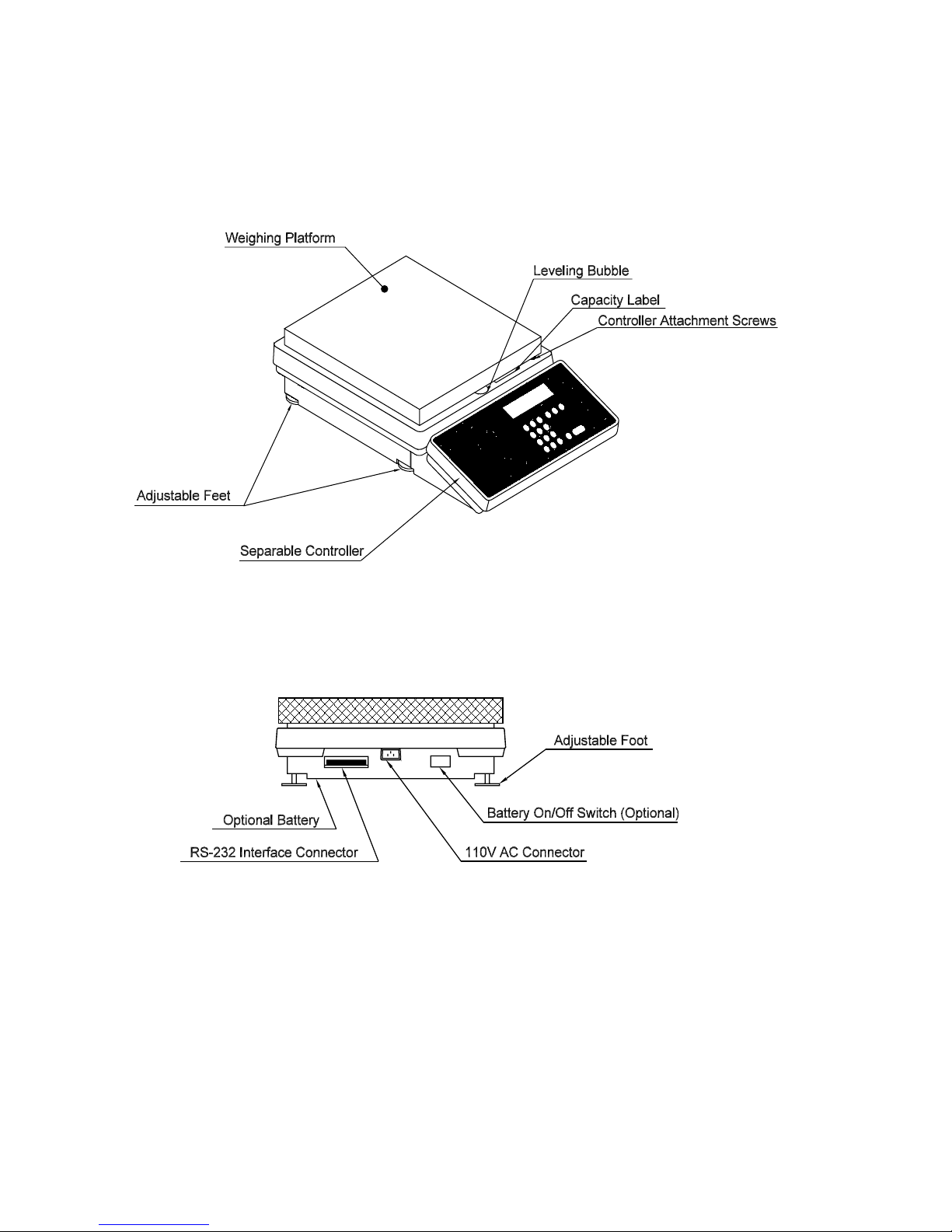
Figure 1. Components and features of the Setra platform scale.

5

Section One
Installing Y our Scale
SETUP
1. Locating your scale
The rugged design of your Setra scale ensures that it will withstand most of the
environmental conditions it might encounter. Nonetheless, you should treat your
scale as you would any piece of precision equipment, locating it on a clean, dry
surface; protected where possible from extremes of draft and vibration. The
controller (keyboard and display unit) may be separated from the weighing
platform. This allows the platform to be located on the floor with the keyboard
and display on a table or wall.
2. Leveling your scale
1. Retract the left rear foot completely into the scale.
2. Adjust the two front feet until the leveling bubble is centered in the circle.
3. Extend the left rear foot until it contacts the mounting surface. Make certain that
all four feet are contacting the mounting surface.
Replace the weighing pan by visually centering the pan on the scale and
pressing in place until well seated. The pan will be seated correctly if it is level on
all sides.
3. Connecting your scale to an AC outlet
To connect your scale to an AC outlet, insert the appropriate end of the power
cord into an electrical outlet. Now connect the other end into the back of the
scale (see Figure 1). Once you have plugged your scale into a live outlet, it is
automatically on. The scale draws very little current from an outlet, and should
be left connected. This keeps your scale ready to use with no “warm-up” time.
4. Using the optional internal battery
The internal battery option on Setra CP Model Scales includes one nickel -
cadmium battery pack, an internal battery charger, and a battery on/off switch.
The switch is located on the rear of the platform. (Refer to Figure 1.)
The battery does not come fully charged from the factory. Before using
your scale for the first time, it is necessary to charge the battery. To charge
the battery, simply plug the scale into an electrical outlet. Fourteen hours is
necessary for a full charge. The battery will charge faster if the battery on/off
switch is in the off position.

6
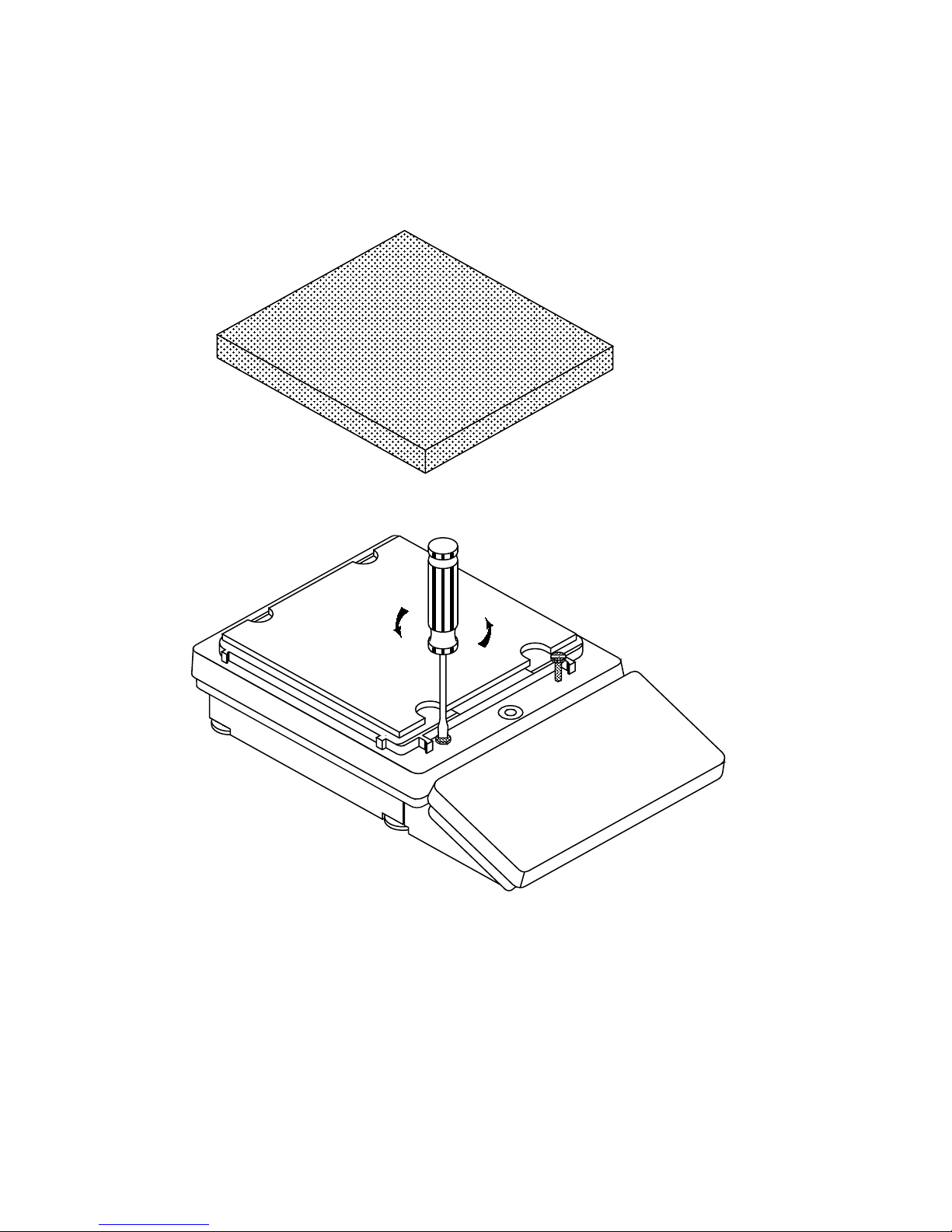
Figure 2. Detaching the controller.

7
Discharge the battery pack completely each time before recharging to maxi-
mize the life of the battery. A fully charged battery should provide about six
hours of operation.
The battery on/off switch is used only during battery operation to conserve the
charge. Be certain to turn the scale off when not in use during battery operation.
When operating on AC, it is recommended that the scale always be left on. This
reduces warm-up time and keeps a full charge in the battery at all times.
5. Detaching the controller and weighing platform
Since Setra platform scales have a high weighing capacity, it may be easier to
place the weighing platform on the floor. This will reduce the height to which
heavy weights must be lifted. To allow this type of operation, the CP models
come standard with a detachable controller (keyboard and display). This con-
troller may be placed on a table or wall, while the platform is used on the floor.
To detach the controller, follow the procedure below: (refer to Figure 2)
1. Remove the pan by grasping it with two hands on the sides and lifting.
2. Loosen the controller attaching screws. The controller will drop down
until it rests on its own feet.
3. Lift up the front of the weighing platform and slide the controller out
from underneath.
Replace the pan by visually centering it on the scale and pressing it in place
until well seated. The pan will be seated correctly if it is level on all sides.
To replace the controller, follow this procedure:
1. Remove the pan by grasping it with two hands on the sides and lifting.
2. Pull the cable out of the weighing platform in order to obtain some
tension.
3. Pack as much cable as possible into the retainer on the rear of the
controller. The cable must be double folded in order to store it
completely.
4. Lift up on the front of the weighing platform and slide the controller
under the front lip.
5. Align the controller with the attaching screws and engage them by
hand for several turns.
CAUTION: TO PREVENT CROSS-THREADING, DO NOT USE A SCREWDRIVER TO
ENGAGE THE ATTACHING SCREWS.

8
6. Tighten attaching screws until the controller is firmly seated. Tightness
may be checked by rocking the controller.
Replace the pan by visually centering it on the scale and pressing it
in place until well seated. The pan will be seated correctly if it is level
on all sides.
Note: When the controller and platform are attached, the scale may be carried by
grasping the right or left side of the platform, using the flange as a handle.
EXPERIMENTATION
1. Display test
When your scale is first powered on (connected to an AC outlet), it automatically
runs through a “display test,” showing all possible segments which might be
displayed. This test lasts approximately six seconds. The scale next says “HELLO”
and performs self-diagnostics to ensure proper operation. The scale then sets
itself to zero, and is ready for use. For best accuracy allow the scale to warm up
for at least 45 minutes.
2. Trying your scale
Experimenting with your scale and its keyboard prior to reading this guide in its
entirety will not harm your scale, and may actually give you a better understand-
ing of the instructions in this guide. If you instruct the scale to do something it is
not capable of doing, the scale will simply respond by displaying the message
“UnAbLE”. To continue experimenting, press the clear key.

9
Section T wo
Understanding Y our Scale
KEYBOARDFUNCTIONS
zero Clears the display and tare memory. Assigns the pan and whatever is
currently being weighed a value of zero.
count Instructs the scale to begin or continue counting.
setup/cal Instructs the scale to accept or to enter the advanced function
programming mode.
apw Instructs the scale to accept an average-piece-weight entry ordisplay
average piece weight.
clear Clears the display and the last number entered or function requested,
and displays weight.
Note:— clear acts asaresetfunction,setting allcountingandweighing
registers to zero.
tare Assigns weight on the pan as the “tare” or container weight, subtracts
the weight from the display and saves it in the tare register, leaving the
display to read “net” or contents weight.
gross Adds weight saved in tare register to net weight to display gross
weight.
print Sends to a printer (or other peripheral device) information displayed,
along with all stored and programmed fields of information.
conv Convertsweighingunits (forexample,changes fromgrams toounces).
accum Stores and sums results of weighing or counting functions.
i.d. Instructs scale to accept an identification number of up to 25 digits for
use as desired; (e.g., a part number or account number.)
./ rcl Instructs scale to recall the value stored in any of the various registers
(tare, accumulate, etc.). Also instructs scale to enter a decimal point
during numeric entry.
—Instructs scale to change the sign of a number. Also acts as a second
function key for commands.

10
0-9 Instructs the scale to enter numerical values given, such as the
number of pieces or average piece weight.
remote Switches display from the Setra CP scale to the remote base. When
repressed, display returns to the Setra CP scale. Used with Setra
Remote Scale Option (p/n 402520).
DISPLAY SYMBOLS
ok Reading shown is stable. Further operations may be performed.
gross Reading shown is gross weight, and includes both net weight and tare
weight.
apw Reading shown is the average piece weight.
accum Reading shown is the amount, in pieces or in weight, stored in the
accumulator register.
tare Reading shown is the weight stored in the tare register.
pc Reading shown is given in number of pieces.
lb Reading shown is given in pounds.
oz Reading shown is given in ounces.
g Reading shown is given in grams.
“x” Reading shown is given in user-definable units.
Note: “x” units are preset at the factory in kilograms.
t Reading shown is given in user-definable, tamperproof units.
Note: T units are preset at the factory in grains (15.4326 grains = 1
gram).
c Reading shown is given in carats.
dwt Reading shown is given in pennyweights.
t oz Reading shown is given in troy ounces.
Questo manuale è adatto per i seguenti modelli
2
Indice
Altri manuali Setra Systems Scala

Setra Systems
Setra Systems EL-200S Manuale utente

Setra Systems
Setra Systems Super II Manuale utente

Setra Systems
Setra Systems Super Count Manuale utente

Setra Systems
Setra Systems Super Count Manuale utente

Setra Systems
Setra Systems EZ2-500 Manuale utente

Setra Systems
Setra Systems L Series Manuale utente

Setra Systems
Setra Systems Super Count Manuale utente

Setra Systems
Setra Systems Super II Manuale utente

Setra Systems
Setra Systems 500C Manuale utente

Setra Systems
Setra Systems Super II Manuale utente