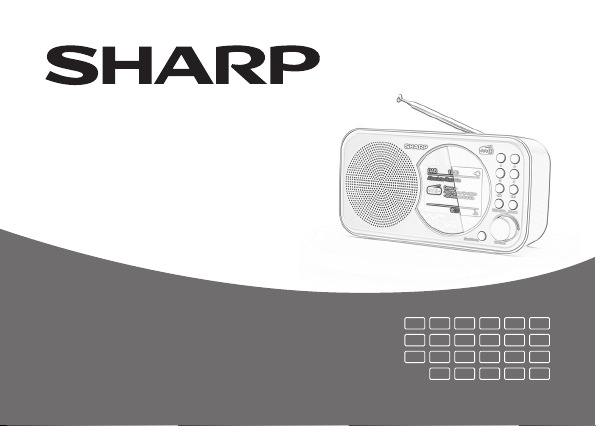
Sharp DR-P320 Manuale utente

Quick start guide
Product images are for illustration purposes only. Actual product may vary.
NL
BG
LV
TR
NO
HR
ET
UA
EN
HU
SU
EL
SV
SR
CZ
HE
PT
RO
LT
RU
DK
SL
SK
DR-P320 | Portable Digital Radio

1 2
5
6
7
8
3 4

1
10 11 129

2
EN
Before using your product, read all safety
instructions. For full instructions please refer to
the user guide available to download from the
website sharpconsumer.eu
Panels/Controls
See pictures on the rst page.
Picture 1 - FRONT PANEL:
1. Display screen
2. Source/Standby – Press to switch on
the unit.
Press and hold to switch o the unit.
Press to switch between DAB and FM
mode when the radio is on.
3. Stations/Save – short press takes you
to“preset recall” i.e. saved stations.
Long press takes to you“preset store”to
choose location number where you save
a station.
4. Select/Scan, Volume (Scroll) – Press
and hold the Select/Scan button to auto
scan for available radio stations, press
it again to stop the auto scan and enter
the Menu.
Volume +/- knob – Turn to adjust the
volume level or to scroll the cursor within
Menu.
5. Info/Menu – Press the button to change
display options.
Press and hold the button to enter or exit
the menu.
6. – In FM mode pressing will manually
change the frequency by +0.05MHz,
press and hold to scan forward to the
next available radio station on the fre-
quency. In DAB mode pressing takes you
to the list of available stations.
7. – In FM mode a pressing will manu-
ally change the frequency by -0.05MHz,
press and hold to scan back to the next

3
available radio station on the frequency.
In DAB mode pressing takes you to the
list of available stations.
8. Pre-set buttons (1/2/3/4) – Press the
corresponding button to select saved/
preset radio station 1-4.
Long press the coresponding number to
store current radio station in to preset
number.
Picture 2 - REAR PANEL:
9. Battery compartment cover
10. Switch - DC power on / Battery power on
11. DC IN (micro USB)
12. Telescopic antenna/aerial
Battery installation
1. Remove the battery compartment cover
on the rear panel of the unit.
2. Install 4 x AA/R6 (1,5V) batteries (not
included) into the battery compartment
making sure that the battery have been
inserted with the correct polarities
matching the symbols +/- as indicated
inside the battery compartment.
3. Replace the cover.
FM tuner Operation
1. Short press Source/Standby to power
on. Short press Source/Standby again to
enter FM tuner mode.
2. To automatically search for the next/
previous available radio station, press
and hold for 2 seconds the or
button.
3. Press and hold Select/Scan button when
in FM mode and it will automatically scan
the frequency range and save presets
for radio stations discovered. To access
“preset recall” press the Stations/Save
button.

4
FM Menu
Press and hold the Info/Menu button while
in FM mode to enter the FM menu. Inside the
menu you can scroll between the following
menu items and functions using the volume
dial . (Press the Select/Scan button
to conrm a selection. To exit menu items and
the menu press the Info/Menu button once
or twice until the menus close.):
[Scan setting]: Select the scan sensitivity
(strong stations only or all stations)
[System]:The system menu included sleep,
Alarm, Time, Backlight (brightness), Language,
Factory Reset and SW version options.
Sleep: The sleep function enables you to set
a timer after which the unit will turn itself
into standby mode automatically. The sleep
times included are: Sleep o/15/30/45/60/90
minutes. To cancel the sleep function, select
the Sleep o option.
Alarm: The Alarm timer allows you to
congure 2 dierent alarms.
The alarm setup is done through an assis-
ted process (wizard). To begin choose Alarm
setup 1 or 2, set the: on time, duration,
source, cycle (days), volume and on/o -
once the cycle is complete you will return
to the System menu.
Time: The Time setting includes set Time/
Date, Auto update, Set 12/24 hour and Set
date format options.
Backlight: The Backlight (brightness) setting
has three options: Timeout, On level and Dim
level, these options can be used to set the
desired Backlight level.
Language: choose your preferred system
language from: English, Dutch, Italian or
French.
Factory Reset: reset the unit (No/Yes).
SW version: View software version.

5
Manually Store Radio Stations
This unit enables you to store up to 20 radio
stations:
1. Tune to a radio station which you would
like to store.
2. Press and hold for 2 seconds the Sta-
tions/Save button. The display will show
“Preset Store”.
3. Select a desired preset (1 - 20) on which
you want to store the current frequency
using the volume dial to scroll.
4. Press the Select/Scan button to conrm
your setting. “Preset xx stored” will be
shown on the display.
5. To recall a stored station/frequency, press
the Station/Save button and use the
volume dial to scroll the desired
station/frequency, press Select/Scan
button to conrm.
DAB Operation
DAB (Digital Audio Broadcasting) provides
a larger choice of radio programmes with
improved sound quality and allows more
data/information to be transmitted.
Press the Source/Standby button to select
the DAB source, when in DAB mode, press
and hold the Select/Scan button to complete
an auto-scan of available stations. Select
the desired radio station by pressing the
or button to enter the Station List,
scroll using the volume dial and then press
the Select/Scan button to play the selected
station.
DAB Menu
Press and hold Info/Menu to enter the
DAB Menu. Inside the menu you can select
between the following menu items and
functions via the volume dial .

6
• [Full scan]: scan and store all the available
DAB radio stations.
• [Manual tune]: tune to a DAB station
manually.
• [DRC]: select (dynamic range control)
DRC /o.
• [Prune]: remove all the invalid stations from
the station list.
• [TA]: select on/o for local trac announce-
ments.
• [System]: adjust system settings,for details
please refer to the FM system.
Manually storing DAB Stations
This unit enables you to store up to 20 radio
stations:
1. Tune to a radio station which you would
like to store.
2. Press and hold for 2 seconds the Sta-
tions/Save button, this will take you to
the “Preset Store”.
3. Select a desired preset location (1 - 20)
in which you want to store the current
station by using the volume dial
to scroll.
4. Press the Select/Scan button to conrm
your setting. “Preset xx stored” will be
shown in the display.
To recall a stored frequency, press the
Station/Save button to access the
“Preset Recall”.
Info Display
To toggle the information shown on the
display (which is broadcast by the radio
station), repeatedly press the Info/Menu
buton on the unit.

7
PT
Antes de usar o seu produto, leia todas as
instruções de segurança. Para instruções
completas, veja o guia do utilizador disponível
para download na página web sharpconsumer.
eu
Painéis/controlos
Ver imagens na primeira página
Imagem 1 - PAINEL DIANTEIRO:
1. Visor do ecrã
2. Fonte/Standby – Carregue para ligar a
unidade.
Carregue e mantenha para desligar a
unidade.
Carregue para alternar entre o modo DAB
e FM quando o rádio estiver ligado.
3. Estações/Guardar – um toque leve faz
“abrir as predenidas”, isto é, as estações
guardadas. Um toque longo leva-o até às
“predenidas guardadas”para escolher
o número da posição onde quer guardar
uma estação.
4. Selecionar/Pesquisar, Volume (Des-
lizar) – Carregue e mantenha o botão
Selecionar/Pesquisar para pesquisar
automaticamente estações de rádio
disponíveis, carregue novamente para
parar a pesquisa automática e entrar
no Menu.
Manípulo Volume +/- – Gire para ajustar
o nível do volume ou para deslizar o
cursor dentro do Menu.
5. Info/Menu – Carregue no botão para
alterar as opções do mostrador.
Carregue e mantenha o botão para entrar
ou sair do menu.
6. – No modo FM, carregar irá alterar
manualmente a frequência +0.05MHz.
Carregue e mantenha para pesquisar
para a frente, até à próxima estação de

8
rádio disponível na frequência. No modo
DAB, ao carregar irá entrar na lista de
estações disponíveis.
7. – No modo FM, carregar irá alterar
manualmente a frequência -0,05MHz.
Carregue e mantenha para pesquisar
para trás, até à próxima estação de rádio
disponível na frequência. No modo DAB,
ao carregar irá entrar na lista de estações
disponíveis.
8. Botões predenidos (1/2/3/4) – Carre-
gue no botão correspondente para sele-
cionar as estações de rádio guardadas/
predenidas 1-4.
Carregue prolongadamente no número
correspondente para armazenar a
estação de rádio atual no número
predenido.
Imagem 2 - PAINEL TRASEIRO:
9. Cobertura do compartimento da
bateria
10. Interruptor - Alimentação CC ligada /
Alimentação por pilhas ligada
11. Entrada CC (micro USB)
12. Antena telescópica
Instalação da pilha
1. Retire a cobertura do compartimento da
pilha do painel traseiro da unidade.
2. Insira 4 pilhas AA/R6 (1,5V) (não
incluídas) no compartimento das pilhas,
certicando-se de que estas foram
inseridas com as polaridades corretas a
combinar com os símbolos + - , tal como
indicado no interior do compartimento
das pilhas.
3. Volte a colocar a cobertura.
Altri manuali per DR-P320
2
Indice
Lingue:
Altri manuali Sharp Radio

Sharp
Sharp DR-430 Manuale utente

Sharp
Sharp GF-5454H Manuale utente

Sharp
Sharp DR-450(GR) Manuale utente

Sharp
Sharp DR-450 Manuale utente

Sharp
Sharp GF-9191H Manuale utente

Sharp
Sharp FV-1800 Manuale utente

Sharp
Sharp FV-1710 Manuale utente

Sharp
Sharp DR-I470 Pro Manuale utente

Sharp
Sharp DR-450 Manuale utente

Sharp
Sharp DR-430 Manuale utente