
SICK GRSE18 Manuale utente

GRSE18
Operating Instruction
DE/EN/FR/PT/IT/ES/ZH/JA/RU
8016954.16B5
OPERATING INSTRUCTION

Described product
GR18
GRSE18
Manufacturer
SICK AG
Erwin-Sick-Str. 1
79183 Waldkirch
Germany
Production location
Legal information
This work is protected by copyright. Any rights derived from the copyright shall be
reserved for SICK AG. Reproduction of this document or parts of this document is only
permissible within the limits of the legal determination of Copyright Law. Any modifica‐
tion, abridgment or translation of this document is prohibited without the express writ‐
ten permission of SICK AG.
The trademarks stated in this document are the property of their respective owner.
© SICK AG. All rights reserved.
Original document
This document is an original document of SICK AG.
2006/42/EC
NO
SAFETY
8016953.16B5 | SICK
Subject to change without notice 1

Through-beam photoelectric sensor
Operating instructions
2 Safety notes
■Read the operating instructions before commissioning.
■Connection, mounting, and setting may only be performed by trained specialists.
■Not a safety component in accordance with the EU Machinery Directive. Only for use in appli‐
cations in accordance with NFPA 79. UL-listed adapters with connecting cables are available.
Enclosure type 1
■When commissioning, protect the device from moisture and contamination.
■These operating instructions contain information required during the life cycle of the sensor.
3 Correct use
The GRSE18 is an opto-electronic through-beam photoelectric sensor (referred to as "sensor" in
the following) for the optical, non-contact detection of objects, animals, and persons. A sender
(WS) and a receiver (WE) are required for operation. If the product is used for any other purpose
or modified in any way, any warranty claim against SICK AG shall become void.
Image 1: GRSE18-xxxx2
Image 2: GRSE18-xxxx7
Irrtuemer | SICK 1
8016954.16B5

4 Commissioning
1 Observe the application conditions: Adjust the distance between the sender and the receiver
according to the corresponding diagram (x = sensing range, y = operating reserve).
If several through-beam photoelectric sensors which are installed next to one another are to
be used, we recommend swapping the sender/receiver arrangement at every second
through-beam photoelectric sensor and ensuring that there is sufficient distance between
the through-beam photoelectric sensors. By doing this, mutual interference can be preven‐
ted.
Image 3: H
2 Mount sensors (sender and receiver) using suitable mounting brackets (see the SICK range
of accessories). Align the sender and receiver with each other [K].
Observe the maximum permissible tightening torque of the sensor of 2.0 Nm for metal/0.9
Nm for plastic [K].
Image: K: GRSE18-x24x7
Commissioning
2| SICK Irrtuemer
8016954.16B5
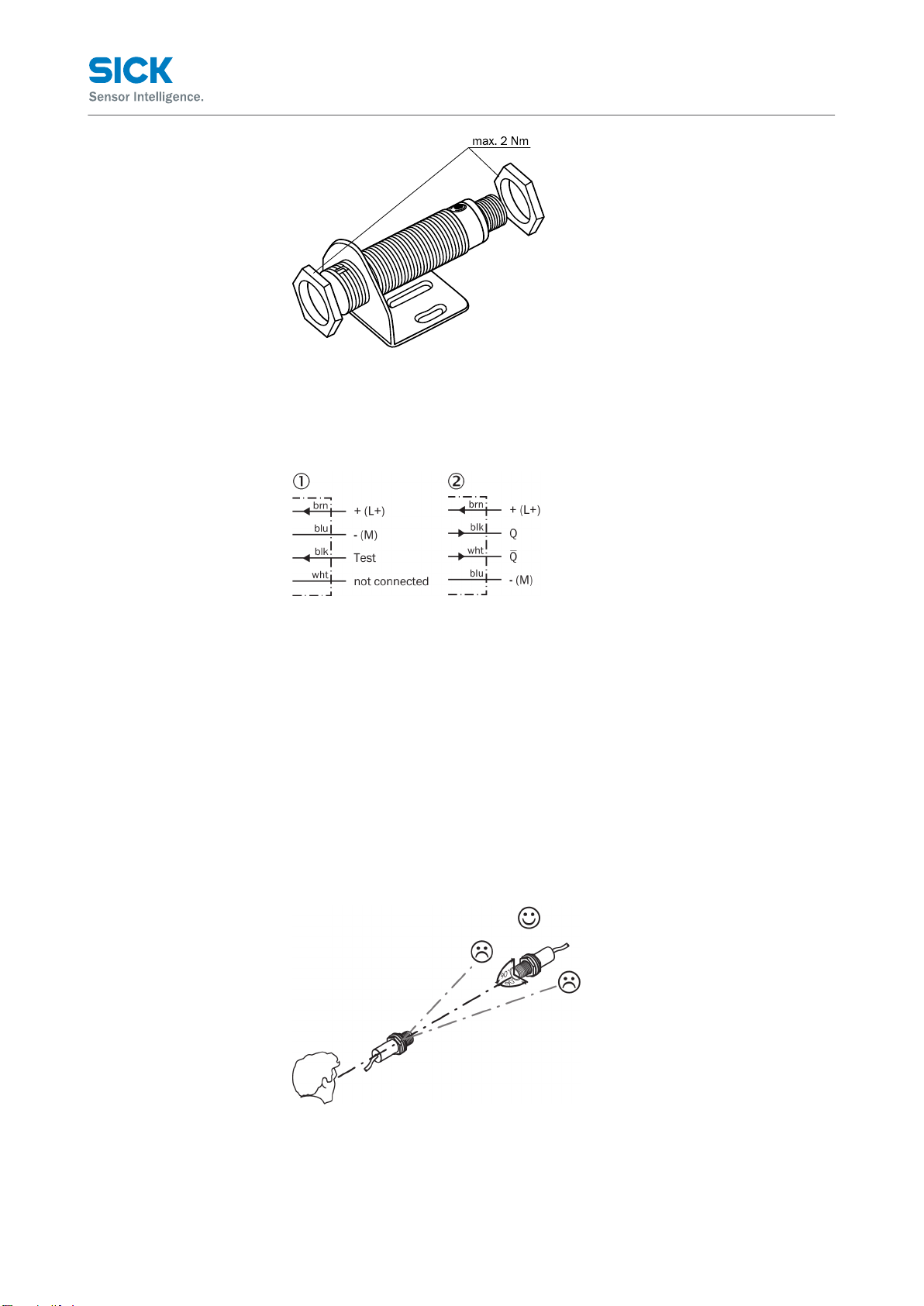
Image: K: GRSE18-x24x2
3 The sensors must be connected in a voltage-free state (VS = 0 V). The information in the gra‐
phics [B] must be observed, depending on the type of connection:
– Male connector connection: pin assignment
– Cable: core color
Image: B: GRSE18-x11xx
Only apply voltage/switch on the power supply (VS > 0 V) once all electrical connections have
been completed. The green LED indicator lights up on the sensor.
Explanations of the connection diagram (Graphic B):
Switching outputs Q and /Q (according to Graphic B):
GRSE18-P (PNP: load -> M)
GRSE18-N (NPN: load -> L+)
TI = test input (see Additional functions)
4 Align the sender with the receiver. Select the position so that the red emitted light beam hits
the receiver. Tip: Use white paper or a reflector as an alignment aid. No light spot is visible
with infrared devices. The correct alignment can only be detected via the LED indicators.
Please refer to Graphics C and E in relation to this. The sender must have a clear view of the
receiver, and no object may be in the optical path. You must ensure that the optical open‐
ings (front screen) of the sensors are completely clear.
Image 4: E
Commissioning
Irrtuemer | SICK 3
8016954.16B5

5
Sensor with potentiometer:
The sensitivity is adjusted with the potentiometer (type: 270°). Clockwise rotation: operating
reserve increased; counterclockwise rotation: operating reserve reduced. We recommend
setting the potentiometer to "Maximum."
The sensor is adjusted and ready for operation. Refer to Graphics C and G to check the func‐
tion. If the switching output fails to behave in accordance with Graphic C, check application
conditions. See section Fault diagnosis.
Image 5: C
Image 6: G
4| SICK Irrtuemer
8016954.16B5

6 Additional functions
The GRSE18 sensor features a test input ("TI" on the connection diagram [B]), which can be used
to check that the sensor is functioning correctly: If cable sockets with LED indicators are used,
you must ensure that the TI is assigned accordingly.
There must be no object between the sender and receiver; activate the test input (see the con‐
nection diagram [B], TI at 0 V). The send LED is shut down or the detection of an object is simula‐
ted. Refer to Graphics C and G to check the function. If the switching output fails to behave in
accordance with Graphic C, check application conditions. See section Fault diagnosis.
7 Fault diagnosis
Table 8 indicates which measures are to be taken if the sensor stops working.
8 Tab_Fault diagnosis
LED indicator/fault pattern /
LED indicator/fault pattern
Cause /
Cause
Measures /
Measures
Green LED does not light up /
Green LED does not light up
No voltage or voltage below the
limit values /
No voltage or voltage below the
limit values
Check the power supply, check all
electrical connections (cables and
plug connections) /
Check the power supply, check all
electrical connections (cables and
plug connections)
Green LED does not light up /
Green LED does not light up
Voltage interruptions /
Voltage interruptions
Ensure there is a stable power
supply without interruptions /
Ensure there is a stable power
supply without interruptions
Green LED does not light up /
Green LED does not light up
Sensor is faulty /
Sensor is faulty
If the power supply is OK, replace
the sensor /
If the power supply is OK, replace
the sensor
Green LED lights up, no output sig‐
nal when object is detected /
Green LED lights up, no output sig‐
nal when object is detected
Test input (TI) is not connected
properly /
Test input (TI) is not connected
properly
See the note on connecting the
TI /
See the note on connecting the TI
Yellow LED flashes /
Yellow LED flashes
Sensor is still ready for operation,
but the operating conditions are
not ideal /
Sensor is still ready for operation,
but the operating conditions are
not ideal
Check the operating conditions:
Fully align the beam of light (light
spot) with the receiver. / Clean the
optical surfaces / Readjust the
sensitivity (potentiometer) / If the
potentiometer is set to the max.
sensing range: Reduce the dis‐
tance between the sender and the
receiver, and check against Gra‐
phic E / Check sensing range and
adjust if necessary, see Graphic
E /
Check the operating conditions:
Fully align the beam of light (light
spot) with the receiver. / Clean
the optical surfaces / Readjust
the sensitivity (potentiometer) / If
the potentiometer is set to the
max. sensing range: Reduce the
distance between the sender and
the receiver, and check against
Graphic E / Check sensing range
and adjust if necessary, see Gra‐
phic E
Additional functions
Irrtuemer | SICK 5
8016954.16B5

LED indicator/fault pattern /
LED indicator/fault pattern
Cause /
Cause
Measures /
Measures
Yellow LED lights up, no object in
the path of the beam /
Yellow LED lights up, no object in
the path of the beam
The beam of light of a photoelect‐
ric through-beam sensor hits the
receiver of another (neighbo‐
ring) photoelectric through-beam
sensor /
The beam of light of a photoelect‐
ric through-beam sensor hits the
receiver of another (neighbo‐
ring) photoelectric through-beam
sensor
Swap the sender and receiver
arrangement at every second pho‐
toelectric through-beam sensor
and ensure that there is sufficient
distance between the through-
beam photoelectric sensors /
Swap the sender and receiver
arrangement at every
second photoelectric through-
beam sensor and ensure that
there is sufficient distance bet‐
ween the through-beam photo‐
electric sensors
9 Disassembly and disposal
The sensor must be disposed of according to the applicable country-specific regulations. Efforts
should be made during the disposal process to recycle the constituent materials (particularly pre‐
cious metals).
10 Maintenance
SICK sensors are maintenance-free.
We recommend doing the following regularly:
1. Clean the external lens surfaces
2. Check the screw connections and plug-in connections
No modifications may be made to devices.
Subject to change without notice. Specified product properties and technical data are not written
guarantees.
Einweg-Lichtschranke
Betriebsanleitung
13 Sicherheitshinweise
■Vor der Inbetriebnahme die Betriebsanleitung lesen.
■Anschluss, Montage und Einstellung nur durch Fachpersonal.
■Kein Sicherheitsbauteil gemäß EU-Maschinenrichtlinie. Nur zur Verwendung in Anwendungen
gemäß NFPA 79. Von UL gelistete Adapter mit Anschlusskabeln sind verfügbar. Enclosure
type 1
■Gerät bei Inbetriebnahme vor Feuchte und Verunreinigung schützen.
■Diese Betriebsanleitung enthält Informationen, die während des Lebenszyklus des Sensors
notwendig sind.
14 Bestimmungsgemäße Verwendung
Disassembly and disposal
6| SICK Irrtuemer
8016954.16B5

Die GRSE18 ist eine optoelektronische Einweg-Lichtschranke (im Folgenden Sensor genannt) und
wird zum optischen, berührungslosen Erfassen von Sachen, Tieren und Personen eingesetzt.
Zum Betrieb ist ein Sender (WS) und ein Empfänger (WE) erforderlich. Bei jeder anderen Verwen‐
dung und bei Veränderungen am Produkt verfällt jeglicher Gewährleistungsanspruch gegenüber
der SICK AG.
Abb. 7: GRSE18-xxxx2
Abb. 8: GRSE18-xxxx7
15 Inbetriebnahme
1 Einsatzbedingungen beachten: Distanz zwischen Sender und Empfänger mit dem zugehöri‐
gen Diagramm [vgl. H] abgleichen (x = Schaltabstand, y = Funktionsreserve).
Beim Einsatz von mehreren Einweg-Lichtschranken, die nebeneinander installiert werden,
empfehlen wir, bei jeder zweiten Einweg-Lichtschranke die Anordnung von Sender und Emp‐
fänger zu tauschen, bzw. genügend Abstand zwischen den Einweg-Lichtschranken einzuhal‐
ten. Damit können gegenseitige Beeinflussungen vermieden werden [vgl. I].
Bestimmungsgemäße Verwendung
Irrtuemer | SICK 7
8016954.16B5

Abb. 9: H
2 Sensoren (Sender und Empfänger) an geeignete Befestigungswinkel montieren (siehe SICK-
Zubehör-Programm). Sender und Empfänger zueinander ausrichten [vgl. K].
Maximal zulässiges Anzugsdrehmoment des Sensors von 2,0 Nm für Metall / 0,9 Nm für
Kunststoff beachten [vgl. K].
Abb.: K: GRSE18-x24x7
Abb.: K: GRSE18-x24x2
3 Anschluss der Sensoren muss spannungsfrei (VS = 0 V) erfolgen. Je nach Anschlussart sind
die Informationen in den Grafiken [vgl. B] zu beachten:
– Steckeranschluss: Pinbelegung
– Leitung: Adernfarbe
Inbetriebnahme
8| SICK Irrtuemer
8016954.16B5
Indice
Lingue:
Altri manuali SICK Accessori

SICK
SICK GTB6L-P1 Series Manuale utente

SICK
SICK KTS Manuale utente

SICK
SICK VICOTEC320 Series Manuale utente

SICK
SICK DT1000 Manuale utente

SICK
SICK LMS5 Series Manuale utente

SICK
SICK GRL18V Manuale utente

SICK
SICK GTE20 Manuale utente

SICK
SICK AS30 Prime Edge Manuale utente

SICK
SICK WSE4F Manuale utente

SICK
SICK W26 Manuale utente

SICK
SICK NAV350 Manuale utente

SICK
SICK NAV245 Manuale utente

SICK
SICK SIM2000 Manuale utente

SICK
SICK GR18 Series Manuale utente

SICK
SICK GRTB18 Manuale utente

SICK
SICK TiM7 S Series Manuale utente

SICK
SICK GRL18 Series Manuale utente

SICK
SICK UFS Manuale utente

SICK
SICK G6 Inox Manuale utente

SICK
SICK W16 Manuale utente


