SICK SIG200 Manuale utente

OPERATING INSTRUCTION
Sensor Integration Gateway - SIG200
PROFINET
Integration Products

Described product
SIG - Sensor integration gateway
SIG200 PROFINET
Manufacturer
SICK AG
Erwin-Sick-Str. 1
79183 Waldkirch
Germany
Production location
SICK PCA
55438 Minneapolis, MN
USA
Legal information
This work is protected by copyright. Any rights derived from the copyright shall be
reserved for SICK AG. Reproduction of this document or parts of this document is only
permissible within the limits of the legal determination of Copyright Law. Any modifica‐
tion, abridgment or translation of this document is prohibited without the express writ‐
ten permission of SICK AG.
The trademarks stated in this document are the property of their respective owner.
© SICK AG. All rights reserved.
Original document
This document is an original document of SICK AG.
E497722
2O P E R A T I N G I N S T R U C T I O N | Sensor Integration Gateway - SIG200 8017853/2019-06-06 | SICK
Subject to change without notice

Contents
1 Safety information............................................................................ 4
1.1 General safety notes................................................................................ 4
1.2 Notes on UL approval............................................................................... 4
2 Correct use......................................................................................... 5
3 Product description........................................................................... 6
3.1 Product description.................................................................................. 6
3.2 Operating and status indicators.............................................................. 6
4 Transport and storage....................................................................... 8
4.1 Transport................................................................................................... 8
4.2 Transport inspection................................................................................. 8
4.3 Storage...................................................................................................... 8
5 Mounting............................................................................................. 9
6 Electrical installation........................................................................ 10
6.1 Pin alignment............................................................................................ 10
7 SIG200 configuration....................................................................... 12
7.1 SIG200 PROFINET interface.................................................................... 12
7.2 Operation via Webserver.......................................................................... 39
7.3 Operation via SOPAS ET (USB/Ethernet)................................................. 40
7.4 Configuration via REST API....................................................................... 54
8 Device Functions............................................................................... 73
8.1 Device Functions Overview...................................................................... 73
8.2 Data Storage............................................................................................. 75
8.3 Logic Editor................................................................................................ 76
8.4 Firmware.................................................................................................... 94
9 Troubleshooting................................................................................. 95
10 Disassembly and disposal............................................................... 96
11 Maintenance...................................................................................... 97
12 Technical data.................................................................................... 98
12.1 General technical data............................................................................. 98
CONTENTS
8017853/2019-06-06 | SICK O P E R A T I N G I N S T R U C T I O N | Sensor Integration Gateway - SIG200 3
Subject to change without notice

1 Safety information
1.1 General safety notes
1.1.1 Safety notes
■Read the operating instructions before commissioning.
■Connection, mounting, and setting may only be performed by trained specialists.
■Not a safety component in accordance with the EU Machinery Directive.
■When commissioning, protect the device from moisture and contamination.
■These operating instructions contain information required during the life cycle of
the gateway.
CAUTION
This equipment is not intended for use in residential environments and may not provide
adequate protection to radio reception in such environments.
1.2 Notes on UL approval
UL Environmental Rating: Enclosure type 1
1 SAFETY INFORMATION
4O P E R A T I N G I N S T R U C T I O N | Sensor Integration Gateway - SIG200 8017853/2019-06-06 | SICK
Subject to change without notice

2 Correct use
The SIG200 (referred to as "module" in the following) is an IO-Link Master for connect‐
ing IO-Link devices, standard input signals or standard output signals.
Correct use requires that the device is used industrially indoors without any specific cli‐
matic and atmospheric requirements. Operation of the device in accordance with its
designated use and the degree of protection IP67 are only guaranteed if open male and
female connectors are closed using screw plugs.
If the product is used for any other purpose or modified in any way, any warranty claim
against SICK AG shall become void.
CORRECT USE 2
8017853/2019-06-06 | SICK O P E R A T I N G I N S T R U C T I O N | Sensor Integration Gateway - SIG200 5
Subject to change without notice

3 Product description
3.1 Product description
The IO-Link-Master SIG200 is an intelligent gateway to connect IO-Link devices, input
and/or output signals for signal integration via Profinet to a PLC or via REST API to a
network. It was designed for use in industrial environments that require up to an IP67
enclosure rating. There are four IO-Link channels, each on a dedicated Port Type A M12
socket.
In addition, the SIG200 has a powerful user interface that can be accessed either via
USB using SICK's SOPAS ET software or via Ethernet and a web browser of choice. For
Ethernet access the default IP Address is 192.168.0.1. An embedded IODD interpreter
allows the user to easily configure both the SIG200 and connected IO-Link devices by
simply using the IODD file(s). The user interface also has a logic editor to create sensor/
actuator systems based on the information they provide.
3.2 Operating and status indicators
POWER
SF
BF
C/DI/DO1
DI
C/DI/DO1
DI
C/DI/DO1
DI
C/DI/DO
DI
LINK
ACT2
LINK
ACT1
SF
POWER
BF
/DO
DI
/DO
DI
/DO
DI
/DO
DI
LINK
ACT2
LINK
ACT1
SIG200
POWER CONFIG
S1
S2
S3
S4
P2
P1
1
2
á
8
9
ßà
3
4
5
6
7
Figure 1: Dimensional drawing
1POWER IN
2IO-Link Port S1
3IO-Link Port S2
4IO-Link Port S3
5IO-Link Port S4
6Ethernet Port P2
7Ethernet Port P1
8DI: LED for pin 2
3 PRODUCT DESCRIPTION
6O P E R A T I N G I N S T R U C T I O N | Sensor Integration Gateway - SIG200 8017853/2019-06-06 | SICK
Subject to change without notice

9C/DI/DO LED for pin 4
ßMounting hole for front mounting
àMounting hole for side mounting
áRemovable user defined port labels
âUSB Port (M8) for configuration with SOPAS ET
LEDs on the fieldbus module
SF
BF
SIG200
POWER CONFIG
1
2
3
LINK
ACT2
LINK
ACT1
P2
P1
Table 1: LED status indicators
LED Indication Meaning
Power green Power on
Power off
BF (Bus fault) dark PROFINET connection ok
red Device offline from PROFINET
red blinking PROFINET communication start up or
invalid configuration
SF (System fault) dark Device ok
green blinking Find Me
red blinking System fault of the device
LINK ACT 1 (Link / Activity 1) dark No network connection on port 1
green Network connection on port 1
LINK ACT 2 (Link / Activity 2) dark No network connection on port 2
green Network connection on port 2
IO-Link Port LEDs (Port S1-S4)
/DO
DI
SIG200
S1
8
9
Legend LED Indication Meaning
8DI: LED for pin 2 amber Additional DI on pin 2
off No additional DI on
pin 2
9C/DI/DO LED for pin 4 green Pin 4 - IO-Link commu‐
nication active
green blinking Pin 4 - no IO-Link com‐
munication active
PRODUCT DESCRIPTION 3
8017853/2019-06-06 | SICK O P E R A T I N G I N S T R U C T I O N | Sensor Integration Gateway - SIG200 7
Subject to change without notice

4 Transport and storage
4.1 Transport
For your own safety, please read and observe the following notes:
NOTE
Damage to the device due to improper transport.
■The device must be packaged for transport with protection against shock and
moisture.
■Recommendation: Use the original packaging as it provides the best protection.
■Transport should be performed by specialist staff only.
■The utmost care and attention is required at all times during unloading and trans‐
portation on company premises.
■Note the symbols on the packaging.
■Do not remove packaging until immediately before you start mounting.
4.2 Transport inspection
Immediately upon receipt at the receiving work station, check the delivery for complete‐
ness and for any damage that may have occurred in transit. In the case of transit dam‐
age that is visible externally, proceed as follows:
■Do not accept the delivery or only do so conditionally.
■Note the scope of damage on the transport documents or on the transport com‐
pany’s delivery note.
■File a complaint.
NOTE
Complaints regarding defects should be filed as soon as these are detected. Damage
claims are only valid before the applicable complaint deadlines.
4.3 Storage
Store the device under the following conditions:
■Recommendation: Use the original packaging.
■Do not store outdoors.
■Store in a dry area that is protected from dust.
■So that any residual damp can evaporate, do not package in airtight containers.
■Do not expose to any aggressive substances.
■Protect from sunlight.
■Avoid mechanical shocks.
■Storage temperature: see "Technical data", page 98.
■Relative humidity: see "Technical data", page 98.
■For storage periods of longer than 3 months, check the general condition of all
components and packaging on a regular basis.
4 TRANSPORT AND STORAGE
8O P E R A T I N G I N S T R U C T I O N | Sensor Integration Gateway - SIG200 8017853/2019-06-06 | SICK
Subject to change without notice

5 Mounting
The SIG200 is mounted with two screws, maximum M6, and two flat washers.
Note the maximum permissible tightening torque of 0.8 Nm.
2 x M6
< 0.8 Nm
Figure 2: Mounting
Scope of delivery:
•SIG200
•5 blind plugs (on Port CONFIG, S2, S3, S4, P1)
•Quickstart instruction
•20 labels for the label pocket
To ensure an adequate ground connection to the housing make sure the coating on the
housing is removed around the mounting screws.
NOTE
There can be several SIG200 mounted side by side without observing a minimum dis‐
tance between each IO-Link Master.
NOTE
On port P1, S1 and Power there is no protection cap.
NOTE
There are no screws inlcuded in the scope of delivery.
MOUNTING 5
8017853/2019-06-06 | SICK O P E R A T I N G I N S T R U C T I O N | Sensor Integration Gateway - SIG200 9
Subject to change without notice

6 Electrical installation
The SIG200 power and IO-Link cables must be connected in a voltage-free state (UV =
0 V). The following information must be observed, depending on the connection type:
Even if the wiring is looped through, the total current of the module must not exceed
4A.
NOTICE DAMAGE OF EQUIPMENT
Equipment damage due to incorrect supply voltage! Please note the instructions for
electrical installation.
An incorrect supply voltage may result in damage to the equipment. Operation in short-
circuit protected network max. 8 A is allowed.
Only apply voltage/switch on the voltage supply (UV > 0 V) once all electrical connec‐
tions have been established.
Male and female connectors that are not used must be sealed with blind caps so that
the enclosure rating of IP 67 is assured.
Explanation of the connection diagrams:
DI = Digital input
DO = Digital output
FE = functional ground
IO-Link = IO-Link communication (C)
n. c. = not connected
Rx+ = Receiver +
Rx- = Receiver -
Tx+ = Transmitter +
Tx- = Transmitter +
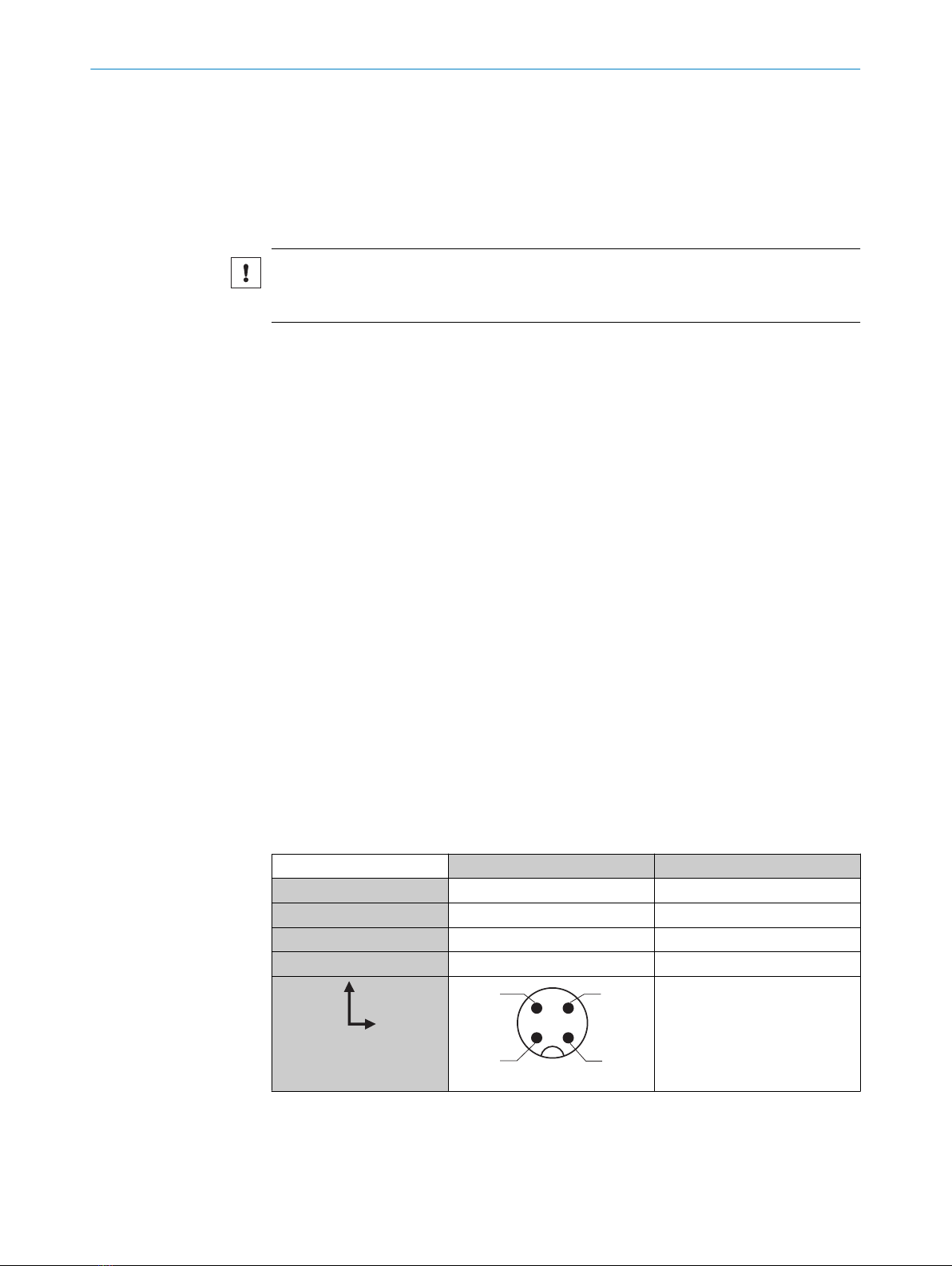
6.1 Pin alignment
UB: 10 ... 30 V DC
Table 2: Power Port, M12 A-coded
Pin Signal Description
1+ (L+) + 24 V DC nominal
2n.c. not connected
3M 0 V
4n.c. not connected
12
4 3
IN = 4 A
6 ELECTRICAL INSTALLATION
10 O P E R A T I N G I N S T R U C T I O N | Sensor Integration Gateway - SIG200 8017853/2019-06-06 | SICK
Subject to change without notice
Altri manuali per SIG200
3
Indice
Altri manuali SICK Portale

SICK
SICK SIG200 Manuale utente

SICK
SICK Flexi Soft Manuale utente

SICK
SICK SIG200 Manuale utente

SICK
SICK Flexi Classic Manuale utente

SICK
SICK UE4740 Manuale utente

SICK
SICK TDC-E Manuale utente

SICK
SICK UE4740 Manuale utente

SICK
SICK SIG200 Manuale utente

SICK
SICK EFI Manuale

SICK
SICK WI180C-IOA00 Manuale utente
Manuali Portale popolari di altre marche

LST
LST M500RFE-AS Manuale utente

Kinnex
Kinnex Media Gateway Manuale utente

2N Telekomunikace

2N Telekomunikace 2N StarGate Manuale utente

Mitsubishi Heavy Industries
Mitsubishi Heavy Industries Superlink SC-WBGW256 Manuale utente

ZyXEL Communications
ZyXEL Communications ZYWALL2 ET 2WE Manuale utente

Telsey
Telsey CPVA 500 - SIP Manuale utente