SICK IO-Link Master IOLG2EI-03208R01 EtherNet/IP Manuale utente

EN
IOLG2EI-03208R01 – EtherNet/IP™
IO-Link Master
OPERATING INSTRUCTIONS

Operating instructions IO-Link Master IOLG2EI-03208R01 – EtherNet/IP™
2 ©SICKAG•PresenceDetection•Subjecttochangewithoutnotice•8018483
Copyright protection!
This work is protected by copyright. The associated rights
are reserved by
SICK AG. Reproduction of this document is only per-
missible within the limits of the legal determination of
copyright law. Alteration or abridgment of the document
is not permitted without the explicit written approval of
SICK AG.

©SICKAG•PresenceDetection•Subjecttochangewithoutnotice•8018483 3
Operating instructions IO-Link Master IOLG2EI-03208R01 – EtherNet/IP™
Contents
Contents
1 General information........................................................................... 5
1.1 Information on the operating instructions ...............................5
1.2 Explanationofsymbols .............................................................5
1.3 Abbreviations .............................................................................5
1.4 Limitationofliability ..................................................................6
1.5 Scopeofdelivery .......................................................................6
1.6 Customerservice.......................................................................6
1.7 EU declaration of conformity.....................................................7
2 Safety .................................................................................................. 8
2.1 Intended use .............................................................................8
2.2 Incorrect use ..............................................................................8
2.3 Requirementsforqualiedpersonnel......................................9
3 Setup and function .......................................................................... 10
3.1 Setup ....................................................................................... 10
3.2 Function................................................................................... 11
3.3 Status indicators and operating elements ........................... 11
4 Mounting .......................................................................................... 14
4.1 MountingtheIO-LinkMaster ................................................. 14
5 Electrical connection....................................................................... 14
5.1 Safety....................................................................................... 14
5.2 IO-Link Master electrical connection..................................... 15
5.3 Connection diagrams ............................................................. 16
5.3.1 Connection diagram for “POWER IN” and
“POWEROUT”supplyvoltage................................. 16
5.3.2 “EtherNet/IP™” connection diagram..................... 17
5.3.3 “IO-Link port” connection diagram ........................ 17
6 Systemintegrationandconguration............................................ 18
6.1 Integrating the IO-Link Master into the system..................... 18
6.2 ConguringtheIO-LinkMaster .............................................. 22
6.2.1 Dataconguration .................................................. 22
6.2.2 Congurationdata .................................................. 22
6.2.3 Moduleconguration.............................................. 23
6.2.4 IO-Linkportconguration....................................... 23

Operating instructions IO-Link Master IOLG2EI-03208R01 – EtherNet/IP™
Contents
4 ©SICKAG•PresenceDetection•Subjecttochangewithoutnotice•8018483
6.2.5 Input data................................................................ 24
6.2.6 Process data output ............................................... 26
6.3 IO-Linkobjectclasscode:0x96(CIPgeneric) ...................... 27
7 Operation on the IO-Link Master .................................................... 30
7.1 Statusindicatorsandoperatingbuttons .............................. 30
7.1.1 Operatingbuttons................................................... 30
7.1.2 ConguringdisplayLEDs ........................................ 31
7.2 Modes and displays................................................................ 31
7.2.1 Operating mode ...................................................... 31
7.2.2 Edit mode and fast-scroll mode............................. 31
7.2.3 Ping mode ............................................................... 31
7.3 Locking and unlocking edit mode for display ....................... 32
7.4 Commissioning ....................................................................... 32
7.5 Main menu .............................................................................. 33
7.6 “IP CONFIG” menu and changing address............................ 33
7.7 “IP SETUP” menu.................................................................... 35
7.8 “MODULEINFO”menu–
informationabouttheIO-LinkMaster ................................... 35
8 Operation via the web server .......................................................... 36
8.1 General information ............................................................... 36
8.2 Views........................................................................................ 36
9 Cleaning and maintenance ............................................................. 44
10 Disposal ............................................................................................ 44
11 Technical data.................................................................................. 45
11.1 Dimensions ............................................................................. 45
11.2 Supply...................................................................................... 46
11.3 EtherNet .................................................................................. 46
11.4 Operatingconditions .............................................................. 46
11.5 Constructional design............................................................. 46
Index .......................................................................................................... 47

©SICKAG•PresenceDetection•Subjecttochangewithoutnotice•8018483 5
Operating instructions IO-Link Master IOLG2EI-03208R01 – EtherNet/IP™
General information
1 General information
1.1 Information on the operating instructions
These operating instructions supplement the supplied QuickStart guide
andincludeadditionalinformationandmoredetaileddescriptionsofwork-
ingwiththeIOLG2EI-03208R01EtherNet/IP™IO-LinkMaster.
Theseoperatinginstructionsareintendedforqualiedpersonnelandelec-
tricalspecialistsandmustbereadbeforestartinganywork.
1.2 Explanation of symbols
Physical damage Warningsintheseoperatinginstructionsarelabeledwithsymbols.
Thesewarningsmustbeobservedatalltimesandcaremustbetakento
avoidphysicaldamage.
WARNING!
…indicatesapossiblehazardoussituationwhichmay
leadtophysicaldamageifitisnotavoided.
Tips and recommendations
NOTE!
… highlights useful tips and recommendations as well as
information for efcient and trouble-free operation.
1.3 Abbreviations
Abbreviation Description
DID DeviceID
EIP EtherNet/IP™
EMC Electromagneticcompatibility
FE Functional grounding
I Standard input port
ISDU IndexServiceDataUnit(IO-Linkservicedataparameters)
O Standard output port
VID VendorID
Table 1: Abbreviations

Operating instructions IO-Link Master IOLG2EI-03208R01 – EtherNet/IP™
General information
6 ©SICKAG•PresenceDetection•Subjecttochangewithoutnotice•8018483
1.4 Limitation of liability
Applicablestandardsandregulations,thelateststateoftechnological
development,andmanyyearsofknowledgeandexperiencehaveallbeen
takenintoaccountwhenassemblingthedataandinformationcontainedin
these operating instructions.
Themanufactureracceptsnoliabilityfordamagecausedby:
• Failingtoobservetheoperatinginstructions
• Incorrect use
• Usebyuntrainedpersonnel
• Opening the housing
• Unauthorizedconversions
• Technicalmodications
• Useofdefectivedevices
• Useofunauthorizedspareparts/consumableparts.
Withspecialvariants,whereoptionalextrashavebeenordered,orowingto
thelatesttechnicalchanges,theactualscopeofdeliverymayvaryfromthe
featuresandillustrationsshownhere.
1.5 Scope of delivery
Includedwithdelivery:
• IOLG2EI-03208R01 EtherNet/IP™ IO-Link Master
• 4M12blindplugsforsealingunusedIO-Linkports
• M4groundstrapwithM4x6screw
• 20labels
Supplieddocumentation:
• QuickStart
1.6 Customer service
Ifyourequireanytechnicalinformation,ourcustomerservicedepartment
willbehappytohelp.
Seethebackpageforyourrepresentativeofce.
NOTE!
In order to allow us to deal with the matter quickly, please
note down the type designation and order number before
calling. This information can be found on the side of the
IO-Link Master.

Operating instructions IO-Link Master IOLG2EI-03208R01 – EtherNet/IP™
Safety
8 ©SICKAG•PresenceDetection•Subjecttochangewithoutnotice•8018483
2 Safety
2.1 Intended use
The IOLG2EI-03208R01 IO-Link Master is a remote IO-Link
inputandoutputmoduleforintegrationintoanEtherNet/IP™network.
TheIOLG2EI-03208R01IO-LinkMastermayonlybeusedinapplicationsin
whichthesafetyofpersonneldoesnotdependonthedevicefunction.
SICKAGassumesnoliabilityforlossesordamagearisingfromtheuseof
theproduct,eitherdirectlyorindirectly.Thisappliesinparticulartouseof
the product that does not conform to its intended purpose and is neither
describednormentionedinthisdocumentation.
2.2 Incorrect use
TheIOLG2EI-03208R01IO-LinkMastermustnotbeusedinexplosive
environments.
Anyotherusethatisnotdescribedasacorrectuseisprohibited.
Noaccessoriesmaybeconnectedwhichhavenotbeenexplicitlystipulat-
ed,intermsofquantityandproperties,andapprovedbySICKAG.

©SICKAG•PresenceDetection•Subjecttochangewithoutnotice•8018483 9
Operating instructions IO-Link Master IOLG2EI-03208R01 – EtherNet/IP™
Safety
2.3 Requirements for qualiedpersonnel
WARNING!
Damage to the device in the event of improper han-
dling!
Improper handling may lead to physical damage.
Forthisreason:
• Allworkmustonlyeverbecarriedoutbythestipulated
persons.
Theoperatinginstructionsstatethefollowingqualicationrequirementsfor
thevariousareasofwork:
• Qualied personnel
areabletocarryouttheworkassignedtothemandindependently
recognizepotentialrisksduetotheirspecialisttraining,knowledge,and
experience,aswellasknowledgeoftherelevantregulations.
• Electrical specialists
areabletocarryoutworkonelectricalsystemsandindependently
recognizepotentialrisksduetotheirspecialisttraining,knowledge,and
experience,aswellasknowledgeoftherelevantstandardsandregula-
tions.
InGermany,electricalspecialistsmustmeetthespecicationsofthe
BGVA3WorkSafetyRegulations(e.g.,MasterElectrician).Otherrelevant
regulationsapplicableinothercountriesmustbeobserved.

Operating instructions IO-Link Master IOLG2EI-03208R01 – EtherNet/IP™
Setup and function
10 ©SICKAG•PresenceDetection•Subjecttochangewithoutnotice•8018483
3 Setup and function
3.1 Setup
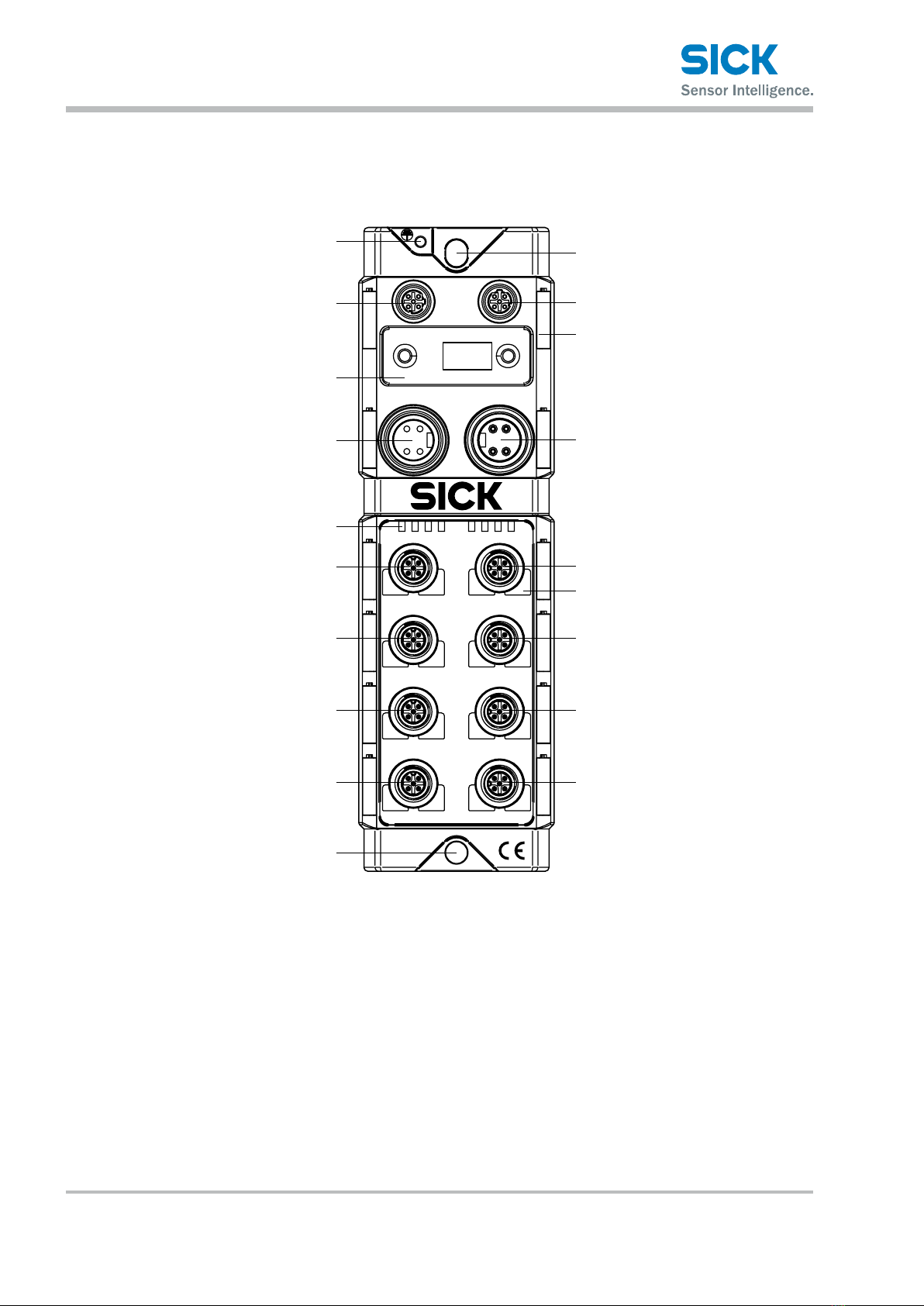
US UA Mod Net100 LK1 100 LK2
EIP1 EIP2
POWER
IN
POWER
OUT
00 01 08 09
02 03 10 11
04 05 12 13
06 07 14 15
255
Fig. 1: IOLG2EI-03208R01 EtherNet/IP™ IO-Link Master setup
1 Functional grounding connection
2 EtherNet/IP port 1
3 Display with operating buttons and
two display LEDs
4 Output supply voltage
5 Status LED: IO-Link Master/
EtherNet communication
6 Port 00 / 01
7 Port 02 / 03
8 Port 04 / 05
9 Port 06 / 07
ß Mounting hole
à EtherNet/IP port 2
áLabel
â Input supply voltage
ã Port 08 / 09
ä Pin/port LEDs: Signal status
å Port 10 / 11
æ Port 12 / 13
ç Port 14 / 15
Indice
Altri manuali SICK Hardware di rete
Manuali Hardware di rete popolari di altre marche

Matrix Switch Corporation
Matrix Switch Corporation MSC-HD161DEL Manuale utente

B&B Electronics
B&B Electronics ZXT9-IO-222R2 Manuale utente

Yudor
Yudor YDS-16 Manuale utente

D-Link
D-Link ShareCenter DNS-320L Manuale utente

Samsung
Samsung ES1642dc Istruzioni per l’uso

Honeywell Home
Honeywell Home LTEM-PV Istruzioni per il montaggio