SINOCOLOR UF-300C Manuale utente

第1 页/共38 页
非常感谢您购买此产品。
- 为确保正确和安全使用,并充分了解本产品的性能,请务必仔细阅读
本手册完全存放在安全的地方。
- 禁止未经授权复制或转让本手册的全部或部分内容。
- 本手册的内容和本产品的规格如有变更,恕不另行通知。
- 本手册和产品已尽可能准备和测试。如果您发现任何印刷错误或错误,请
通知我们。
- Sino Color Corp.对因使用此产品而可能发生的任何直接或间接损失或损害不承担任何责任
产品,无论本产品是否有任何失败。

第2 页/共38 页
- Sino Color Corp.对任何可能发生的任何直接或间接损失或损害不承担任何责任
使用此产品制作的文章。
Thanks for your support to Sinocolor Printer.
- Be sure to read carefully to ensure proper and safe use and to fully understand the performance of this product.
This manual is completely stored in a safe place.
- Unauthorized reproduction or transfer of all or part of this manual is prohibited.
- The contents of this manual and the specifications of this product are subject to change without notice.
- This manual and product have been prepared and tested as much as possible. If you find any typographical
errors, please inform us.
- Sinocolor Group. assumes no responsibility for any direct or indirect loss or damage which may occur with
respect to any article made using this product.

Important Notes on Handling and Use
This machine is a precision device. To ensure the full performance of this machine, be sure to
observe the following important points. Failure to observe them may not only result in loss of
performance, but may also cause malfunction or breakdown.
Machine
您可以从以下网站下载获取机器信息
You can know more about printer from below website。
https://www.SinoColorDG.com/
Installation Requirement(Please read carefully)
Install in a quiet, stable location offering good operating conditions. An unsuitable location can cause
accident, fire, faulty operation, or breakdown.
Install the machine in a location that is level, stable, and able to bear the weight of the
machine.
The total weight of the machine may reach 80kg. Installation in an unsuitable location may cause a
major accident, including tip over, fall, or collapse.
Install in a clean, brightly lit location.
Conduct operations in a clean, brightly lit location. Working in a location that is dark or cluttered may
lead to an accident, such as becoming caught in the machine as the result of an inadvertent stumble.
Position so that the power plug is within immediate reach at all times.
This is to enable quick disconnection of the power plug in the event of an emergency. Install the
machine next to an electrical outlet. Also, provide enough empty space to allow immediate access to
the electrical outlet.
Ensure adequate ventilation for the work area.
Failing to perform ventilation may result in a health hazard or danger of combustion due to ink fumes.
Temperature and Humidity
Keep the room temperature between 20-30C, hundity 40-60%. Air conditioner and humidifier may be
required. Keep a distance from strong radiation field. The floor/working table must be level.
Maintain the specified temperature and humidity even when the machine is not in use. If
temperatures are too high or too low, it may cause malfunction.
Electrical requirement
Electrical requirement writes on a metal tag on the back of the printer. Find it to confirm if your printer
supports 220V or 110V. A transformer is needed if your country standard is different. The printer
must be well grounded.
UPS and voltage stabilizer is highly recommended.(Not included in printer price. Need to buy
separately)
Computer
Computer requirement
Basic requirement: CPU: 2.5 GHz
or higher Memory: 2GB or higher
Hard Disk: 200GB or higher
Operating system: Microsoft Windows XP / Windows 7 Ultimate Edition / Windows 10
Recommendatory requirement:
CPU: 3.5 GHz or higher
Memory: 4GB or higher

Hard Disk: 500GB or higher (NTFS format)
Operating system: Microsoft Windows 7 Ultimate Edition
NOTICE: Suggest user format your hard disk into 2 partitions (NTFS). The first partition is used for installing
OS and other software, the second partition is used to save pictures and work files.
Ink
Suggest to use original ink from Sinocolor. Had tested carefully before supplying to customer. High
quality. And most friendly for printhead. Other ink is not tested, may cause problem of printhead clogging,
color difference, strong smell.
Storage: Store unopened in a well-ventilated location at a temperature of 0 to 40°C (32 to 104°F)

一 机器部件说明 Description of printer structure
1.1 板卡说明 Board Instruction
主板 Main Board
如主板外观图所示 The Main Board is as shown in the above photo
1:主板电源,需接 12V、24V、42V(顺序按照板卡显示连接),电流要求 5A 以上;
Mainboard power supply, needs to connect 12V, 24V, 42V ( should be connected as indicated on the board),
current is required to be 5A or more
2:吸墨泵、UV 灯接口,输出为 24V;
Ink pump, UV lamp interface, the output is 24V;
3:Moto 0: 墨栈升降电机接口 capping station lifting motor interface
4:Moto 1 刮片电机接口;Wiper Motor interface
5:X 小车电机信号接口(DIR+、DIR-、PUL+、PUL-);X motor signal connector(DIR+、DIR-、PUL+、PUL-)
6:Y 走料电机信号接口(DIR+、DIR-、PUL+、PUL-);Y motor signal connector =(DIR+、DIR-、PUL+、PUL-)
7:USB 接口(建议使用2.0);USD connector (suggest use 2.0)
8:按键控制板或者触摸屏接口;Touch Screen interface
9:光栅解码器接口;Encoder reader interface
10:刮片电机限位感应器接口;wiper motor limit sensor interface
11:墨栈升降电机限位感应器接口;capping station lifting motor limit sensor interface
12: Z轴上限位 ;Z axis upper limit
13:Z轴下限位 ;Z axis lower limit
14:左限位接口 ;Left limit connector
15:右限位接口 ;right limit connector
16:通过31P扁平线与喷车板连接,一定注意对应关系(P2-P2、P3-P3、P4-P4)。Connected to the printhead

board with the 31P flat data cable, pay attention to the corresponding relationship (P2-P2, P3-P3, P4-P4).
喷头板 Printhead Board
如图上示:
1:通过 31P 扁平线与主板连接,(单头只需要接 P2、P3、P4); Connected mainboard through 31P flat data
cable (single head only need to connect P2, P3, P4)
2:光栅解码器接口,注意板卡上标注显示(5V、BX、AX、GED); Encoder reader interface. Please note, there
is mark on the board (5V, BX, AX, GED)
3:左限位感应器接口(5V、GED、L); Left limit sensor interface (5V, GED, L)
4:右限位感应器接口(5V、GED、R); Right limit sensor interface (5V, GED, R)
5:防撞端口;anti-collision port
6:喷头小板接口(DX8喷头需要转接)Printhead convert card interface (DX8 head needs to be converted)
转接板Convert card

注:请注意小转接板上面的“UP”,“DOWN”;连接到对应的喷头板还有喷头。
Note: Please note there is mark of “UP” and “DOWN” on the convert card. Connect to the corresponding
printhead board and printhead.
Please pay big attention on this printhead data cable connection. Wrong connection may burn the printhead easily.

Machine Frame
安装完打印机后,我们现在需要进行对打印机的部分部件的了解。
After install the printer, we need to know the structure of the printer.
Front
1: UV灯开关; UV lamp switch
2: 电源开关; Printer Power switch
3:UV灯功率调节旋钮(旋转至30-60);UV lamp strength adjust knob (rotate to 30-60);
4:UV水箱水温显示屏; Display to show the temperature of water in the UV Water box.
5:触控屏; Touch screen
6:平台;Printer Platform
7:小车;Carraige
8:UV灯;UV lamp
9:光栅读条。Encoder reader

Rear
1:USB连接口;USB interface
2:Z上限位感应器;Z upper limit sensor
3:Y原点限位开关;Y base point limit sensor
4:墨盒;Ink bottle
5:总开关; The main power
6;电源连接口(注意电压值110V或者220V)Power interface (note: the voltage should be 110V or 220V)

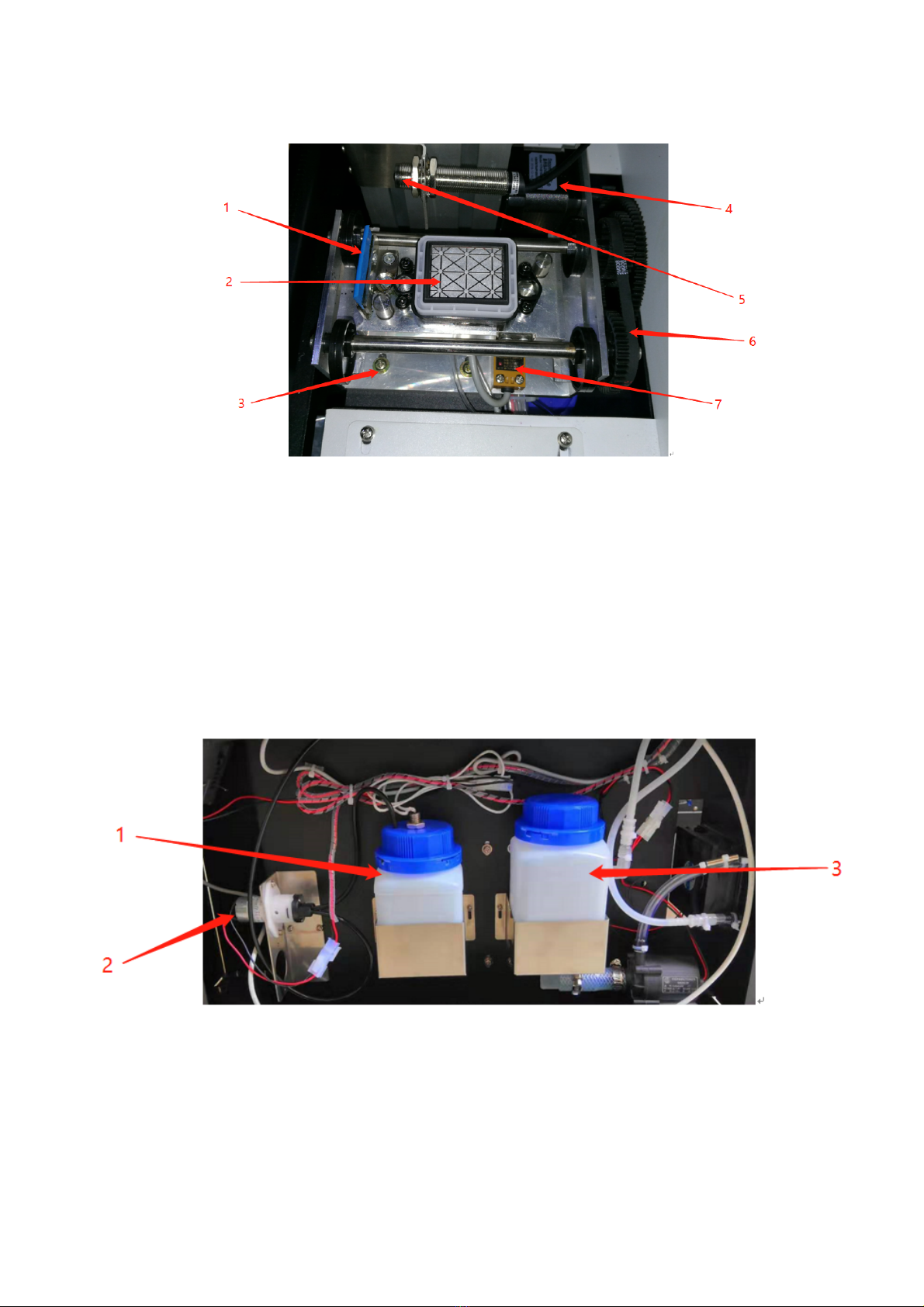
墨栈: Capping Station
1: 刮片;Wiper
2: 墨托;Capping unit
3:墨栈固定螺丝;Fixing screw of Capping station
4:墨栈电机;capping station motor
5:Z上限位感应开关;Z upper limit sensor switch
6: 墨栈皮带及齿轮;capping station belt and gear
7:墨栈限位开关。Capping station limit sensor
1:废墨瓶(注意需要定时清理,防止溢出)Waste ink bottle (Note: need to clean regularly to prevent overflow)
2:吸墨电机 Ink pump motor
3:UV水箱(需要每月更换一次纯净水)UV water tank (need to change pure water once a month)
Altri manuali SINOCOLOR Stampante