
Sling Media Slingbox Manuale utente

SlingPlayer Mobile for
Symbian S60 User Guide
Your guide to setting up and using SlingPlayer Mobile
for Symbian S60

© 2005 Sling Media, Inc. All rights reserved. Patents pending.
Slingbox, SlingPlayer, SlingPlayer Mobile, SlingStream, and SlingBar are the property of Sling Media,
Inc. All other products and services, screen images, logos, trademarks, and movie quotes are the
property of their respective owners.
SlingPlayer uses the SoundTouch Sound Processing Library, which is licensed under the terms of the
GNU Lesser General Public License.
(http://sky.prohosting.com/oparviai/soundtouch/#license)
SoundTouch Library Copyright © Olli Parviainen 2001-2005.
SPM SYS60 1.0 GM UG 1.3 (en-UK)

Table of Contents
SlingPlayer Mobile for Symbian S60 User Guide i
Table of Contents
Introduction ............................................................................................................................ 1
System Requirements .................................................................................................................................2
Slingbox .................................................................................................................................................................................. 2
Mobile Phone Requirements ..............................................................................................................................................2
Network Requirements ........................................................................................................................................................ 2
Installing SlingPlayer Mobile............................................................................................... 3
Installing SlingPlayer Mobile .....................................................................................................................3
Getting to Know SlingPlayer Mobile................................................................................... 5
Starting SlingPlayer Mobile ................................................................................................................................................. 5
SlingPlayer Mobile Interface .....................................................................................................................6
SlingPlayer Mobile Controls ............................................................................................................................................... 6
SlingPlayer Mobile Menus ................................................................................................................................................... 7
Help ........................................................................................................................................................................................ 7
SlingStream ..................................................................................................................................................8
Using SlingPlayer Mobile ..................................................................................................... 9
Slingbox Directory ......................................................................................................................................9
Connecting to a Slingbox .................................................................................................................................................... 9
Adding a Slingbox to the Slingbox Directory .................................................................................................................. 9
Editing Slingbox Settings ..................................................................................................................................................10
Removing a Slingbox ..........................................................................................................................................................10
Navigation ..................................................................................................................................................11
Navigator Keys ...................................................................................................................................................................11
Using the Remote Control ................................................................................................................................................11
Changing Channels in Numeric Mode ............................................................................................................................11
Using Favourites .................................................................................................................................................................11
Volume Control ........................................................................................................................................13
Switching Inputs .......................................................................................................................................14
Viewing Options .......................................................................................................................................15
Normal Player Mode ..........................................................................................................................................................15
Audio Only Player Mode ...................................................................................................................................................15
Closing SlingPlayer Mobile ......................................................................................................................16
Disconnected from Slingbox ..................................................................................................................17
Customizing SlingPlayer Mobile........................................................................................ 19
Favourites ...................................................................................................................................................19
Adding/Editing Remote Function Favourites ...............................................................................................................19
Adding/Editing Channel Favourites ...............................................................................................................................19
Settings .......................................................................................................................................................21
Appendix ............................................................................................................................... 23
Updating SlingPlayer Mobile for Symbian ............................................................................................23
Automatic Update Alert ....................................................................................................................................................23
Upgrading Slingbox Firmware ................................................................................................................24
Updating Slingbox Firmware Automatically ..................................................................................................................24

ii SlingPlayer Mobile for Symbian S60 User Guide
Slingbox Finder ID ...................................................................................................................................25
Locating your Slingbox Finder ID ...................................................................................................................................25
Network Settings ......................................................................................................................................26

SlingPlayer Mobile for Symbian S60 User Guide 1
1: Introduction
Welcome to SlingPlayer MobileTM for Symbian S60. SlingPlayer Mobile gives you the most powerful
option available in mobile television, combining your unique personal home TV experience with your
mobile phone. As long as you have your phone and a 3G Internet connection, you don't have to miss
another big match or your favourite TV programme.
Compatible Devices. SlingPlayer Mobile for Symbian S60 is currently compatible with Nokia N73
with additional device support soon.

Introduction
2SlingPlayer Mobile for Symbian S60 User Guide
System Requirements
For SlingPlayer Mobile to function properly, it needs the following:
Slingbox
• A Slingbox with the latest firmware. For instructions, see “Upgrading Slingbox Firmware” on
page 24.
• Remote viewing must be enabled on the Slingbox. For instructions, see “Network Settings” on
page 26.
Mobile Phone Requirements
• Nokia N73 with 3's X Series service; visit 3's website for more details.
• The latest SlingPlayerMobile software.
Network Requirements
Slingbox needs network an upload speed of about 256 Kbps (or higher).
Installing SlingPlayer Mobile
SlingPlayer Mobile for Symbian S60 User Guide 3
2: Installing SlingPlayer Mobile
Installing SlingPlayer Mobile
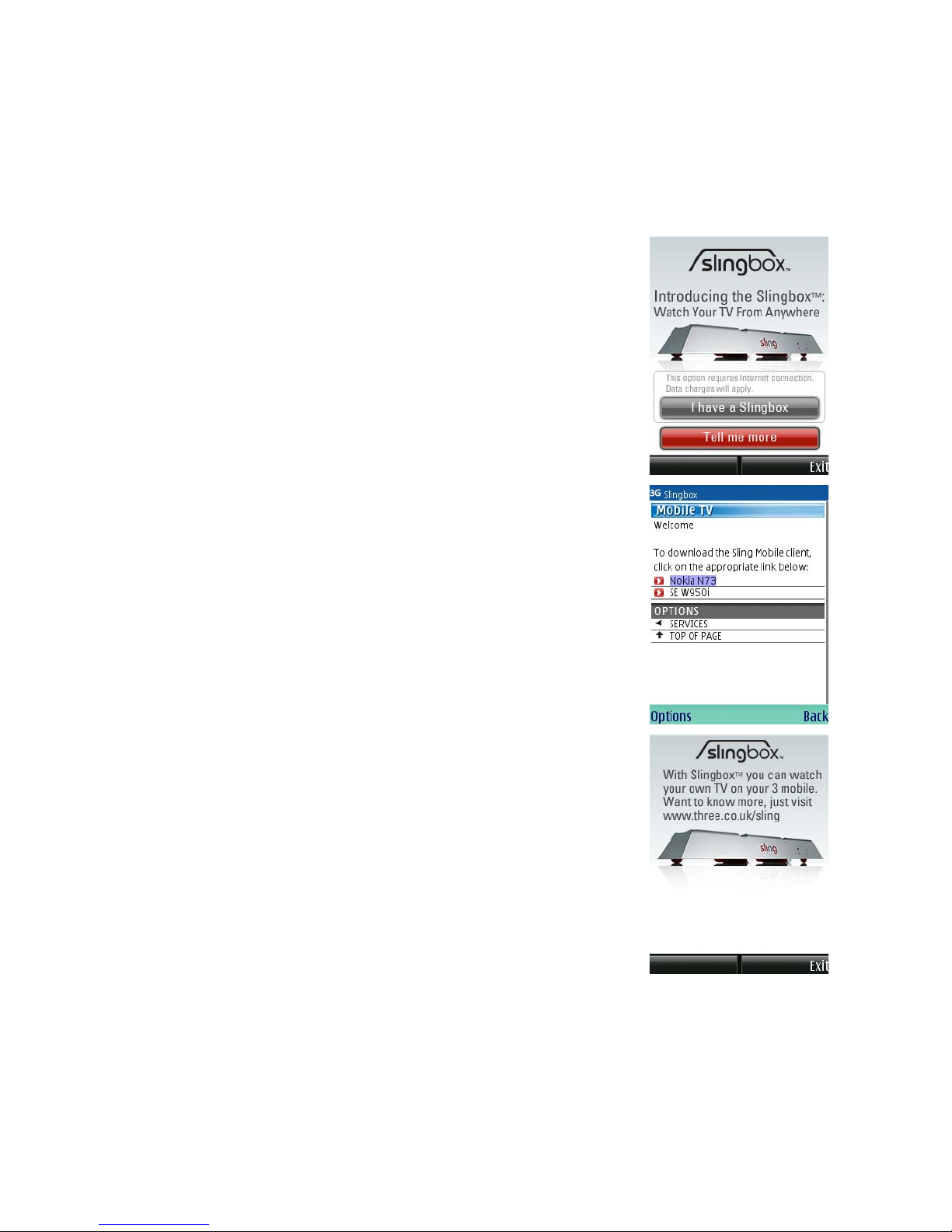
The SlingPlayer applet is pre-installed on your Nokia N73. With this
applet, you can download the full version of SlingPlayer Mobile.
To install SlingPlayer Mobile:
1. From the home screen on your mobile phone, select Menu >
Applications to view installed programs.
2. Using the navigator key(s), browse to and select SlingPlayer
Mobile and press the select button.
The SlingPlayer Mobile applet is launched.
3. Select one of the following options:
•I have a Slingbox. Select this option if you already have a Slingbox
and want to download the full version of SlingPlayer Mobile for
Symbian S60. On the download page, select Nokia N73. Once the
application is downloaded, follow the on-screen instructions to
install the software.
•Tell me more. If you don’t have a Slingbox and want to know more,
select this option to get more information.

Installing SlingPlayer Mobile
4SlingPlayer Mobile for Symbian S60 User Guide
SlingPlayer Mobile for Symbian S60 User Guide 5
3: Getting to Know SlingPlayer
Mobile
This chapter will help you get to know the application and the various user interface components.
Starting SlingPlayer Mobile
1. From the home screen on your mobile phone, select Menu >
Applications to view installed programs.
2. Browse to SlingPlayer Mobile.
3. Using the navigator key(s), select SlingPlayer and press the select
button.
SlingPlayer Mobile is launched.
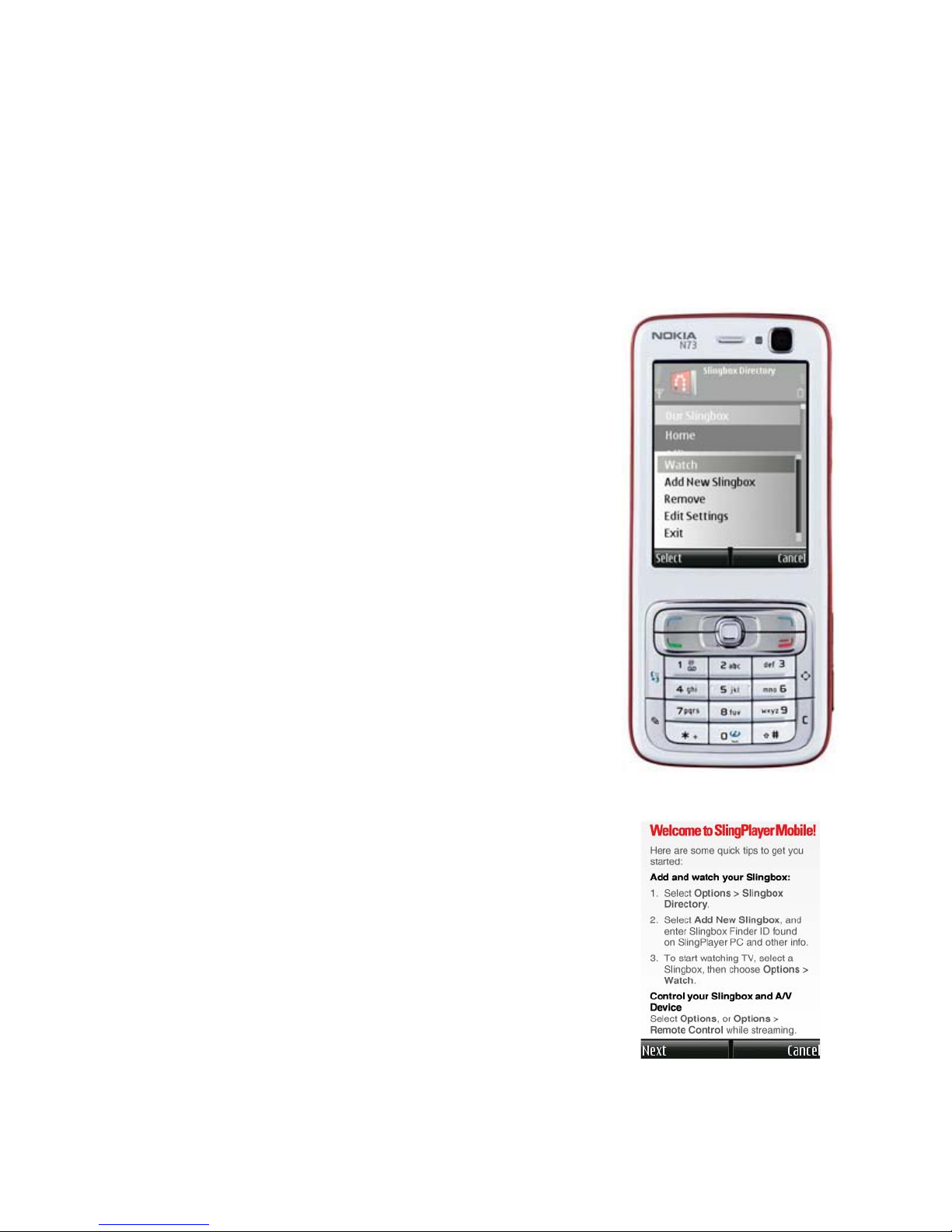
4. If you have added a Slingbox and want to view it, select Options
> Start. Or,
• If it is the first time you are using SlingPlayer Mobile, a few usage
tips for first-time users appear. You can also view a more detailed
version from Options > Help. Additionally, you can download
the SlingPlayer Mobile for Symbian Pocket Guide from
http://uk.slingmedia.com/page/documentation.html
• If you want to add a Slingbox to your directory, see “Slingbox
Directory” on page 9.
• If you want to connect to another Slingbox, see “Connecting to a
Slingbox” on page 9.
• To exit from SlingPlayer Mobile properly, see “Closing
SlingPlayer Mobile” on page 16.
• See “SlingPlayer Mobile Interface” on page 6 for more
information.
Getting to Know SlingPlayer Mobile
6SlingPlayer Mobile for Symbian S60 User Guide
SlingPlayer Mobile Interface
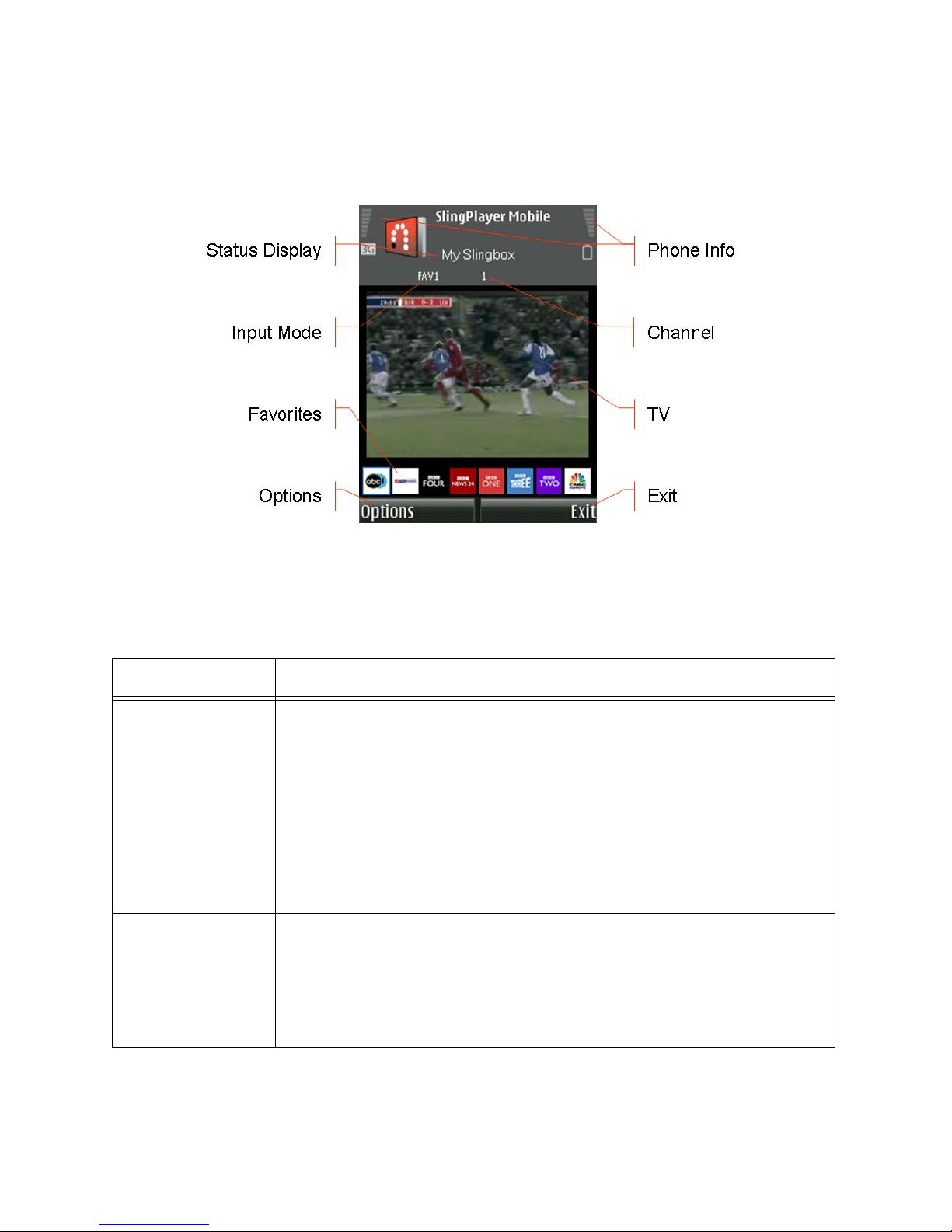
The figure below shows the basic layout of SlingPlayer Mobile (Nokia N73). For information
pertaining to each control, see “SlingPlayer Mobile Controls” on page 6.
SlingPlayer Mobile Controls
The table below describes the various controls and their function.
Table 1: SlingPlayer Mobile Controls
Control Function
Status Display This area provides information on the state of SlingPlayer Mobile.
Slingbox Name indicates the Slingbox SlingPlayer Mobile is or previously
was connected.
Pending appears while SlingPlayer Mobile is sending remote control
commands to Slingbox. The number displayed is the number of commands
that still need to be sent.
Controlling appears when the SlingPlayer Mobile is in Control Mode, and
when your commands are being executed.
Input Mode Displays the current mode of SlingPlayer Mobile.
•123. In this mode, you can use the numeric keypad to jump to a specific
channel. For example, press 5 and 0 to switch to channel 50.
•FAV(1/2). In this mode, you can use your Favourites. See “Favourites”
on page 19.
Altri manuali per Slingbox
6
Questo manuale è adatto per i seguenti modelli
1
Indice
Altri manuali Sling Media Software


Manuali Software popolari di altre marche


PS Audio
PS Audio PowerPlay Manuale del proprietario

Brady
Brady LOCKOUT PRO 3.0 Manuale di servizio

Avaya
Avaya Interaction Center Manuale utente

Texas Instruments
Texas Instruments TI-83 Plus Silver Edition Manuale

Novell
Novell GROUPWISE 8 - INTERNET AGENT Manuale utente

Oracle
Oracle Application 9i Manuale utente

Acer
Acer RDM Manuale utente

Canon
Canon Vixia HF21 Manuale utente

Canon
Canon ZR950 Manuale utente

Samsung
Samsung Auto Backup Manuale utente

Polycom
Polycom Vortex EF2201 Istruzioni per l'installazione e il funzionamento

Brocade Communications Systems
Brocade Communications Systems Brocade 8/12c Manuale utente