Solutions4AV ET-RFD40 Manuale utente

MODEL
ET-PFD365
FRAME-EVO-P10 / P10-US
Mounting frame for projectors
The following projectors can be mounted in this frame:
3 Chip DLP*
1 Chip DLP*
PT-DZ13K
PT-DS12K
PT-DW11K
PT-RZ120
PT-RZ870
PT-RZ660
PT-RCQ10
PT-DZ110XE
PT-DS100XE
PT-DW90XE
PT-RZ970
PT-RW930
PT-RZ770
PT-RCQ80
PT-DZ10K
PT-DZ870
PT-DZ780
PT-RX110
* All compatible projector models can be found on page 15.
These installation instructions must always be provided to the customer

Manual FRAME-EVO-P10 / P10-US
Version 1.6
02.09.2019
Page 1of 39

Manual FRAME-EVO-P10 / P10-US
Version 1.6
02.09.2019
Page 2of 39
Table of content
1. Preamble.................................................................................................... 3
1.1 FRAME-EVO-P10 / P10-US designation......................................................................................... 3
1.2 Optional accessory designation..................................................................................................... 4
1.3 Tools required ............................................................................................................................... 5
2. Safety instructions...................................................................................... 5
3. What’s in the box? ....................................................................................10
4. Optional Accessories .................................................................................11
5. Fitting the projectors in the frame.............................................................13
6. Removing the Upper Ring - Installation Version ........................................17
7. Reinstalling the Upper Ring .......................................................................20
8. Adjustment options...................................................................................22
9. Stacking frames.........................................................................................24
10. Mounting the frame on a truss ................................................................25
11. Maximum stacking information...............................................................27
12. System maintenance and inspection (Re-examination) ...........................33
13. Declaration of Conformity .......................................................................36
14. Dimensions..............................................................................................37
14.1 FRAME-EVO-P10 / P10-US......................................................................................................... 37
14.2 FRAME-EVO-P10 / P10-US Installation Version - without the Upper Ring................................ 38
Imprint..........................................................................................................39

Manual FRAME-EVO-P10 / P10-US
Version 1.6
02.09.2019
Page 3of 39
1. Preamble
Congratulations on your purchase of the FRAME-EVO-P10 / P10-US projector frame from
LANG AG.
Please read very carefully the instructions provided in this manual. In the following pages
you will find all the information needed for a safe and fast installation.
After the installation is done properly, you can enjoy all the features of your new product.
Please consider keeping the original box and packaging materials, in case you ever need to
ship the frame.
Model number: FRAME-EVO-P10 / P10-US
1.1 FRAME-EVO-P10 / P10-US designation
European market
Non-European market
Manufacturer m.no.: FRAME-EVO-P10
Panasonic EU m.no.: ET-RFD40
Manufacturer m.no.: FRAME-EVO-P10-US
Panasonic USA m.no.: ET-PFD365
m.no. = model number
Note: In this manual, when reference is made to the manufacturer model number it is also
automatically a reference to the Panasonic EU / USA model number like described in the
table above

Manual FRAME-EVO-P10 / P10-US
Version 1.6
02.09.2019
Page 4of 39
1.2 Optional accessory designation
European market
Non-European market
Manufacturer m.no.: FRAME-PF-UNI-PORAD
Panasonic EU m.no.: ET-CLP-P
Manufacturer m.no.: FRAME-PF-UNI-PORAD
Panasonic USA m.no.: - (non-USA product)
Manufacturer m.no.: FRAME-PF-UNI-CLP5030
Panasonic EU m.no.: ET-CLP50
Manufacturer m.no.: FRAME-PF-UNI-CLP5030
Panasonic USA m.no.: ET-PFD50CLAMP
Manufacturer m.no.: FRAME-PF-UNI-CLP30PT
Panasonic EU m.no.: ET-CLP30
Manufacturer m.no.: FRAME-PF-UNI-CLP30PT
Panasonic USA m.no.: ET-PFD30CLAMP
Manufacturer m.no.: TH-SHORT-150-8
Panasonic EU m.no.: ET-SHT150
Manufacturer m.no.: TH-SHORT-150-8
Panasonic USA m.no.: ET-PFD550TMS2
Manufacturer m.no.: TH-SHORT-60-6
Panasonic EU m.no.: ET-SHT60
Manufacturer m.no.: TH-SHORT-60-6
Panasonic USA m.no.: - (non-USA product)
m.no. = model number
Note: In this manual, when reference is made to the manufacturer model number it is also
automatically a reference to the Panasonic EU / USA model number like described in the
table above.

Manual FRAME-EVO-P10 / P10-US
Version 1.6
02.09.2019
Page 5of 39
1.3 Tools required
The only tool required is a 4 mm hex key to mount the projector in the FRAME-EVO-P10 /
P10-US.
These installation instructions must always be handed over to the installing person.
1
Read these instructions carefully before installing the system.
Copyright © 2018 LANG AG. All rights reserved.
2. Safety instructions
INTENDED USE
The FRAME-EVO-P10 / P10-US frame is intended for use by fully qualified, trained and
competent persons to provide safe and secure transportation, installation and adjustment
of projectors.
Only use the frame with projector in a closed environment (conference rooms, theatres,
convention halls, etc.) where there is no wind, moisture, excessive heat etc.
Make sure that only the corresponding projectors are installed in this frame! Do not try to
use it with other projectors because serious accidents can occur!
1
Only a qualified person should install this product
4 mm hex key (Allen key)

Manual FRAME-EVO-P10 / P10-US
Version 1.6
02.09.2019
Page 6of 39
WARNINGS
Installation work should only be carried out by a qualified technician.
•If this product is not installed correctly, serious accidents may result.
Do not use the FRAME-EVO-P10 / P10-US frame outdoors.
•This product is made only for indoor usage. If the FRAME-EVO-P10 / P10-US frame is
mounted outdoor, there are many influences like wind or rain that can have an effect
on the stability of the whole system. This can cause serious accidents and property
damage.
Do not place the frame on top of unstable surfaces.
•If the frame is placed on top of a surface which is sloped or unstable, it may fall down
or tip over and injury or damage could result. Make sure that the surface can support
a load of 175 kg (385.81 lbs)
2
plus the weight of all additional equipment as well as
other potential systems.
Do not hang the frame from unstable or inappropriate structures.
•If the frame is hung on an unstable structure, the entire system can fall down and
injuries may occur. Make sure that the construction can support a total weight of 175
kg (385.81 lbs) plus the weight of all additional equipment as well as other potential
systems.
Make sure to not exceed max. weight loads for ceiling mounting.
•For suspended installations, use only designated hanging accessories, like TH-SHORT-
150-8, TH-SHORT-60-6, FRAME-PF-UNI-PORAD Portrait Adapter and FRAME-PF-UNI-
CLP5030, FRAME-PF-UNI-CLP30PT rigging clamps for a max. weight load of 175 kg
(385.81 lbs). Please refer to the corresponding instructions for the accessories used.
Please also refer to chapter “4. Optional Accessories” and “11. Maximum stacking
information”.
2
175 kg (385.81 lbs) = 3 x (weight of heaviest projector + weight of heaviest lens + weight of FRAME-EVO-P10 / P10-US)

Manual FRAME-EVO-P10 / P10-US
Version 1.6
02.09.2019
Page 7of 39
For stacking, make sure that all four locking pins pass completely through the female
stacking bolt.
•Make sure the four male bolts enter into the correspondent female bolts and are
locked.
Do not install the FRAME-EVO-P10 / P10-US or the projector while people are present
under the mounting zone during the installation process.
•When installing the projector, make sure no one is in the area underneath the
installation zone.
Always secure the frame to the rigging truss with a safety steel cable.
•The frame should always be secured with an appropriate safety steel cable so that in
case of a malfunction it doesn’t fall more than 5 cm. Please consult the local laws or
regulations regarding the additional safety of hanging equipment.
CAUTION
Before installing the projector in the FRAME-EVO-P10 / P10-US frame, please read the
projector’s user manual. When the projector has a lens attached, please remove it.
•The FRAME-EVO-P10 / P10-US frame with the projector inside must be installed only
in an environment that is recommended by the projector manufacturer.
Minimum two persons are required to install the FRAME-EVO-P10 / P10-US frame.
•With regard to the overall weight of all necessary installation devices, make sure to
handle those with at least two people.
Make sure that the structure from which you hang up to 3 FRAME-EVO-P10 / P10-US
frames including projectors is capable of carrying the overall weight of approx. 175 kg
(385.81 lbs) plus the weight of all additional equipment as well as other potential systems.
•Prior to any installation, you must do a visual inspection to make sure that the
system is in a good condition. For more information please refer to chapter
“12. System maintenance and inspection (Re-examination)”.

Manual FRAME-EVO-P10 / P10-US
Version 1.6
02.09.2019
Page 8of 39
RISK SITUATIONS
Risk of injury due to the possibility of falling objects during the assembly or disassembly of
the FRAME-EVO-P10 / P10-US frame.
•Protection objective: avoid injury from falling parts.
•Wear appropriate safety shoes, gloves and helmet.
•Make sure the area is clear under the frame during installation.
Risk of hitting the head with the FRAME-EVO-P10 / P10-US frame during the hanging set
up process.
•Protection objective: avoid injury from hitting the head.
•Wear a helmet.
Incorrect installation may lead to certain parts of the FRAME-EVO-P10 / P10-US frame or
the entire FRAME-EVO-P10 / P10-USframe to fall down.
•Protection objective: prevent personal injury and property damage.
•Double check the FRAME-EVO-P10 / P10-US frame and its installation.
Insufficient load capacity of the supporting structure may lead to certain parts of the
FRAME-EVO-P10 / P10-US frame or the entire FRAME-EVO-P10 / P10-US frame to fall
down.
•Protection objective: prevent personal injury and property damage.
•Provide adequate dimensioning of the supporting structure. The supporting structure
must be able to support the combined weight of all the equipment attached to, or
hung from it.
•Ensure correct installation of the supporting structure.

Manual FRAME-EVO-P10 / P10-US
Version 1.6
02.09.2019
Page 9of 39
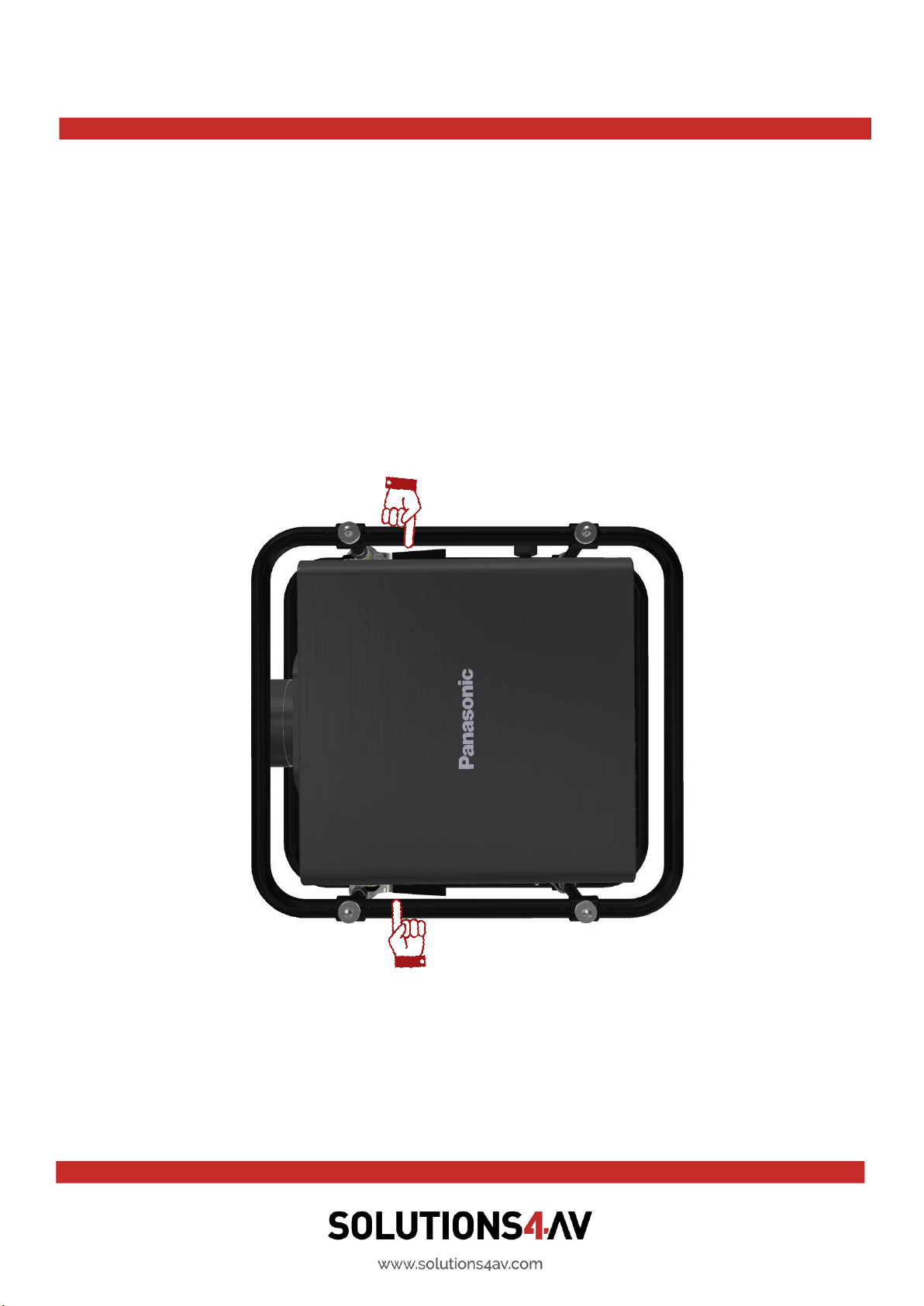
The fingers or the hand of the user can be caught between the outer rings and the plates
or projector.
•Protection objective: Prevent personal injury by using safety gloves.
•When the adjustment of the image is made, the user must always keep his hands on
the hand levers (see picture below).
•Because the spring of the spring clip is strong, please be careful not to clamp your
fingers between the spring and the attachment nut.
Questo manuale è adatto per i seguenti modelli
3
Indice
Altri manuali Solutions4AV Accessori per proiettori