
Sonel MIC-2505 Manuale utente

OPERATING MANUAL
INSULATION RESISTANCE METER
MIC-2505
SONEL SA
ul. Wokulskiego 11
58-100 Świdnica
Version 1.01 17.02.2012

OPERATING MANUAL MIC-2505 version 1.01
2
MIC-2505 meter is a modern, easy in use and safe measuring device. Please acquaint yourself with
the present manual in order to avoid measuring errors and prevent possible problems related to opera-
tion of the meter.

OPERATING MANUAL MIC-2505 version 1.01
3
CONTENTS
1SAFETY ....................................................................................................................4
2METER CONFIGURATION..................................................................................5
3MEASUREMENTS..................................................................................................7
3.1 DOUBLE-LEAD MEASUREMENT OF INSULATION RESISTANCE.....................................7
3.2 THREE-LEAD MEASUREMENT OF INSULATION RESISTANCE......................................10
3.3 VOLTAGE MEASUREMENT .....................................................................................11
4SOFTWARE UPDATES........................................................................................12
5METER POWER SUPPLY...................................................................................13
5.1 MONITORING OF THE POWER SUPPLY VOLTAGE .....................................................13
5.2 REPLACING RECHARGEABLE BATTERIES ................................................................13
5.3 CHARGING RECHARGEABLE BATTERIES .................................................................13
5.4 GENERAL PRINCIPLES REGARDING USING NIMH RECHARGEABLE BATTERIES..........14
6CLEANING AND MAINTENANCE ...................................................................15
7STORAGE ..............................................................................................................15
8DISMANTLING AND DISPOSAL ......................................................................15
9TECHNICAL SPECIFICATIONS .......................................................................16
9.1 BASIC DATA..........................................................................................................16
9.2 ADDITIONAL DATA ACCORDING TO IEC 61557-2 (RISO).........................................17
10 EQUIPMENT .........................................................................................................17
10.1 STANDARD EQUIPMENT ........................................................................................17
10.2 OPTIONAL ACCESSORIES.......................................................................................18
11 MANUFACTURER ...............................................................................................19

OPERATING MANUAL MIC-2505 version 1.01
4
1 Safety
MIC-2505 meter is designed for performing check tests of protection against electric shock
in mains systems. The meter is used for making measurements and providing results to determine
safety of electrical installations. Therefore, in order to provide conditions for correct operation and the
correctness of the obtained results, the following recommendations must be observed:
•Before you proceed to operate the meter, acquaint yourself thoroughly with the present manual
and observe the safety regulations and specifications determined by the producer.
•Any application that differs from those specified in the present manual may result in a damage to
the device and constitute a source of danger for the user.
•MIC-2505 meters must be operated only by appropriately qualified personnel with relevant certifi-
cates authorising the personnel to perform works on electric systems. Operating the meter by un-
authorised personnel may result in damage to the device and constitute a source of danger for the
user.
•During measurements of insulation resistance, dangerous voltage up to 2.5 kV occurs at the ends
of test leads of the meter.
•Before the measurement of insulation resistance you must be sure that tested object is discon-
nected from the power supply.
•During the measurement of insulation resistance do not disconnect test leads from the tested ob-
ject before the measurement is completed (see par. 3.1); otherwise the capacitance of the object
will not be discharged, creating the risk of electric shock.
•The instrument must not be used for the mains and equipment in rooms with special conditions,
such as fire or explosion hazard.
•It is unacceptable to operate the following:
⇒a damaged meter which is completely or partially out of order,
⇒a meter with damaged test leads insulation,
⇒a meter stored for an excessive period of time in disadvantageous conditions (e.g. excessive
humidity). If the meter has been transferred from a cool to a warm environment with a high
level of relative humidity, do not start measurements until the meter is warmed up to the am-
bient temperature (approximately 30 minutes).
•Displayed BATT symbol indicates insufficient voltage of power supply and the need to charge the
accumulator or replace batteries.
•Symbols ErrX, where Xis a number 1…9, indicate incorrect operation of the meter. If after restart-
ing the device this situation is repeated - it indicates that the meter is damaged.
•If after switching ON and displaying software version, message is displayed and the meter
switches OFF - send the meter for servicing. When is displayed every time after the meter is
switched ON, but the meter enters the measurement mode – update its software.
•Before measurement, choose a correct measurement function and make sure that test leads are
connected to respective measuring terminals.
•Do not operate a meter with an open or incorrectly closed battery (accumulator) compartment or
power it from other sources than those specified in the present manual.
•RISO inputs are electronically protected against overloads (caused by e.g. connecting the meter to
a live circuit) up to 600 V for 60 sec.
•Repairs may be carried out only by an authorised service point.
Note:
Due to continuous development of the meter’s software, the actual appearance of the display,
in case of some of the functions, may slightly differ from the display presented in this operat-
ing manual.
OPERATING MANUAL MIC-2505 version 1.01
5
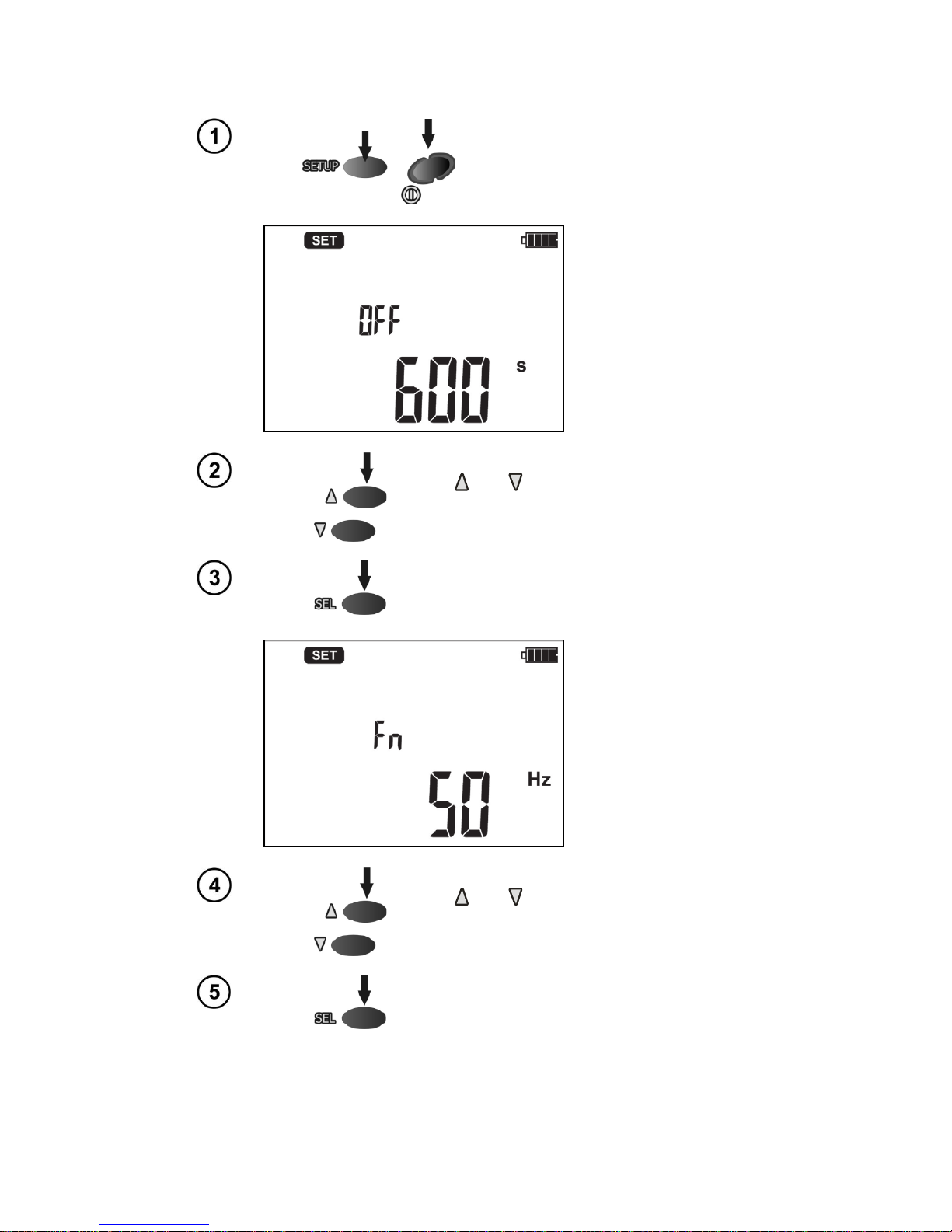
2 Meter Configuration
Turn on the meter keeping SETUP
button pressed.
Use and buttons to set the auto-off time
or cancel auto-off function (horizontal lines).
Press SEL button to enter the setting of no-
minal network frequency.
Use and buttons to set the frequency
value.
Press SEL button to enter the setting the type
of absorption coefficients.
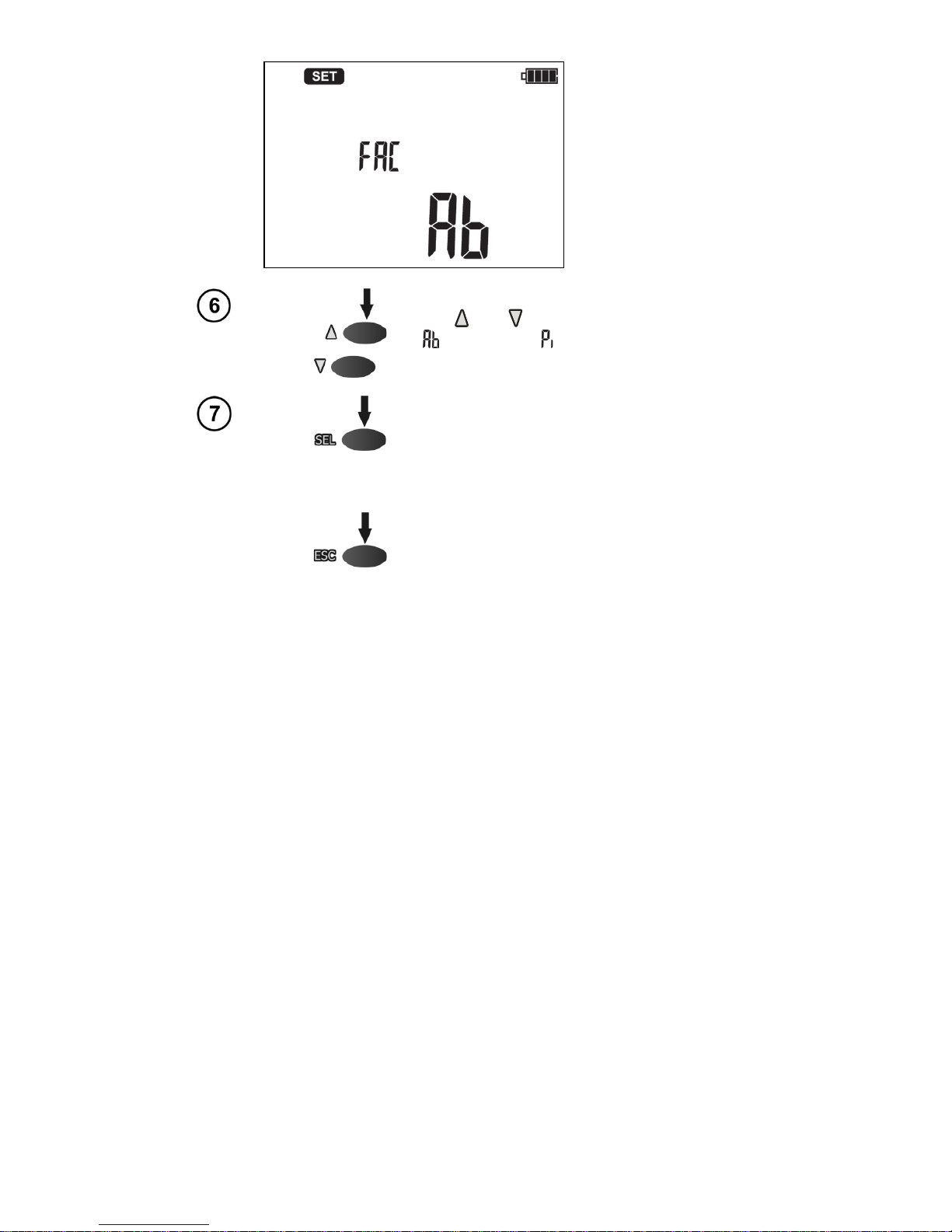
OPERATING MANUAL MIC-2505 version 1.01
6
Use and to set Ab1, Ab2 parameters (
) or PI, DAR ( ).
Press ENTER to display the measurement
screen, approving introduced changes or…
…press ESC to go to the measurement scre-
en without validating the changes.
Indice
Altri manuali Sonel Multimetro


Manuali Multimetro popolari di altre marche


Gossen MetraWatt
Gossen MetraWatt METRAmax 6 Manuale utente

PeakTech
PeakTech 4000 Manuale per l'uso e la cura

YOKOGAWA
YOKOGAWA 90050B Manuale utente

Gossen MetraWatt
Gossen MetraWatt METRALINE DMM16 Manuale utente

Fluke
Fluke 8846A Manuale operativo e di manutenzione

Tempo Communications
Tempo Communications MM200 Manuale utente


