Spectra SP80 Manuale utente

User Guide
SP80 GNSS Receiver

Legal Notices
©2014 Trimble Navigation Limited. All rights
reserved.
All product and brand names mentioned in this
publication are trademarks of their respective hold-
ers.
SP80 User Guide, Rev. A, December 2013.
Limited Warranty Terms and Conditions
Product Limited Warranty. Subject to the terms and
conditions set forth herein, Trimble Navigation Lim-
ited (“Trimble”) warrants that for a period of (1)
year from date of purchase this Spectra Precision
product (the “Product”) will substantially conform
to our publicly available specifications for the Prod-
uct and that the hardware and any storage media
components of the Product will be substantially
free from defects in materials and workmanship.
Product Software. Product software, whether built
into hardware circuitry as firmware, provided as a
standalone computer software product, embedded
in flash memory, or stored on magnetic or other me-
dia, is licensed solely for use with or as an integral
part of the Product and is not sold. The terms of the
end user license agreement govern the use of the
Product Software, including any differing limited
warranty terms, exclusions and limitations, which
shall control over the terms and conditions set forth
in the limited Product warranty.
Warranty Remedies. If the Product fails during the
warranty period for reasons covered by this limited
warranty and you notify us of such failure during
the warranty period, we will repair OR replace the
nonconforming Product with new, equivalent to
new, or reconditioned parts or Product, OR refund
the Product purchase price paid by you, at our op-
tion, upon your return of the Product in accordance
with our product return procedures then in effect.
Notices
Class B Statement - Notice to Users. This equip-
ment has been tested and found to comply with the
limits for a Class B digital device, pursuant to Part
15 of the FCC Rules. These limits are designed to
provide reasonable protection against harmful in-
terference in a residential installation. This equip-
ment generates, uses and can radiate radio
frequency energy and, if not installed and used in
accordance with the instructions, may cause harm-
ful interference to radio communication. However,
there is no guarantee that interference will not oc-
cur in a particular installation. If this equipment
does cause harmful interference to radio or televi-
sion reception, which can be determined by turning
the equipment off and on, the user is encouraged
to try to correct the interference by one or more of
the following measures:
• Reorient or relocate the receiving antenna.
• Increase the separation between the equip-
ment and the receiver.
• Connect the equipment into an outlet on a cir-
cuit different from that to which the receiver is
connected.
• Consult the dealer or an experienced radio/TV
technician for help.
Changes or modifications not expressly approved by
the manufacturer or registrant of this equipment
can void your authority to operate this equipment
under Federal Communications Commission rules.
Canada
The digital apparatus does not exceed the Class B
limits for radio noise emissions from digital appara-
tus as set out in the radio interference regulations
of the Canadian Department of Communications.
Le présent appareil numérique n’émet pas de
bruits radioélectriques dépassant les limites
applicables aux appareils numériques de Classe B
prescrites dans le règlement sur le brouillage
radioélectrique édicté par le Ministère des
Communications du Canada.
Europe
This product has been tested and found to comply
with the requirements for a Class B device pursuant
to European Council Directive 89/336/EEC on
EMC, thereby satisfying the requirements for CE
Marking and sales within the European Economic
Area (EEA). These requirements are designed to
provide reasonable protection against harmful in-
terference when the equipment is operated in a res-
idential or commercial environment.
Notice to Our European Union Customers
For product recycling instructions and more infor-
mation, please go to http://www.spectrapreci-
sion.com/footer/weee-and-rohs/.
Recycling in Europe: To recycle Spectra Precision
WEEE (Waste Electrical and Electronic Equipment
products that run on electric power), call +31 497
53 24 30 and ask for the “WEEE Associate”. Or,
mail a request for recycling instructions to:
Trimbl e E u rope BV
c/o Menlo Worldwide Logistics
Meerheide 45
5521 DZ Eersel, NL
Declaration of Conformity
We, Spectra Precision,
declare under sole responsibility that the product:
SP80 GNSS receiver
complies with Part 15 of FCC Rules.
Operation is subject to the following two condi-
tions:
(1) this device may not cause harmful interference,
(2) and this device must accept any interference
received, including interference that may cause
undesired operation.

Rechargeable Lithium-ion Batteries
This receiver uses one or two rechargeable Lithium-
ion batteries.
WARNING - Do not damage the rechargeable Lithi-
um-ion batteries. A damaged battery can cause an
explosion or fire, and can result in personal injury
and/or property damage. To prevent injury or dam-
age:
• Do not use or charge the batteries if they ap-
pear to be damaged. Signs of damage include,
but are not limited to, discoloration, warping,
and leaking battery fluid.
• Do not expose the batteries to fire, high tem-
perature, or direct sunlight.
• Do not immerse the batteries in water.
• Do not use or store the batteries inside a vehi-
cle during hot weather.
• Do not drop or puncture the batteries.
• Do not open the batteries or short-circuit their
contacts.
WARNING - Avoid contact with a rechargeable Lith-
ium-ion battery if it appears to be leaking. Battery
fluid is corrosive, and contact with it can result in
personal injury and/or property damage. To prevent
injury or damage:
• If a battery leaks, avoid contact with the bat-
tery fluid.
• If battery fluid gets into your eyes, immediate-
ly rinse your eyes with clean water and seek
medical attention. Do not rub your eyes!
• If battery fluid gets onto your skin or clothing,
immediately use clean water to wash off the
battery fluid.
WARNING - Charge and use the rechargeable Lith-
ium-ion batteries only in strict accordance with the
instructions. Charging or using the batteries in un-
authorized equipment can cause an explosion or
fire, and can result in personal injury or/and equip-
ment damage. To prevent injury or damage:
• Do not charge a battery if it appears to be dam-
aged or leaking.
• USE EXCLUSIVELY the dual-battery charger
(P/N 61116-10) or the AC/DC power block
(model ADP-65JH AB, P/N 78650-SPN) to
charge the SP80 Lithium-ion batteries. See
instructions in this guide. These two devices
are part of the SP80 standard accessories list.
CHARGE THE BATTERIES ONLY IN THE
TEMPERATURE RANGE 0° to +40°C (32° to
104°F), at a maximum altitude of 2,000 me-
ters (6,562 feet).
• Discontinue charging a battery that gives off
extreme heat or a burning odor.
• Use the batteries only in Spectra Precision
equipment that is specified to use them.
• Use the batteries only for their intended use
and according to the instructions in the prod-
uct documentation.
Disposing of Rechargeable Lithium-ion Batteries
Discharge Lithium-ion batteries before disposing of
them. When disposing of batteries, be sure to do so
in an environmentally sensitive manner. Adhere to
any local and national regulations concerning bat-
tery disposal or recycling.
Receiver Use and Care
The receiver can withstand the rough treatment
that typically occurs in the field. However, the re-
ceiver is a high-precision electronic instrument and
should be treated with reasonable care.
CAUTION - Operating or storing the receiver out-
side the specified temperature range can damage
it. For more information, see Physical Specifica-
tions in this guide.
High-power signals from a nearby radio or radar
transmitter can overwhelm the receiver circuits.
This does not harm the instrument, but it can pre-
vent the receiver from functioning correctly. Do not
use the receiver within 400 meters (1312 feet) of
powerful radar, television or other transmitters.
Low-power transmitters such as those used in cell
phones and two-way radios do not normally inter-
fere with receiver operations.
For more information, contact your Spectra Preci-
sion distributor.
Bluetooth & Wifi Radios
The radiated output power of the wireless radios is
far below the FCC radio-frequency exposure limits.
Nevertheless, the wireless radios shall be used in
such a manner that the Spectra Precision receiver
is 20 cm or further from the human body.
The internal wireless radios operate within guide-
lines found in radio-frequency safety standards and
recommendations, which reflect the consensus of
the scientific community. Spectra precision there-
fore believes the internal wireless radios are safe for
use by consumers.
The level of energy emitted is far less than the elec-
tromagnetic energy emitted by wireless devices
such as mobile phones. However, the use of wire-
less radios may be restricted in some situations or
environments, such as on aircraft. If you are unsure
of restrictions, you are encouraged to ask for autho-
rization before turning on the wireless radios.
COCOM Limits
The US Department of Commerce requires that all
exportable GNSS products contain performance
limitations so that they cannot be used in a manner
that could threaten the security of the United
States.
The following limitation is implemented on the re-
ceiver: Immediate access to satellite measure-
ments and navigation results is disabled when the
receiver’s velocity is computed to be greater than
1000 knots, or its altitude is computed to be above
17,000 meters (59,055 feet). The receiver contin-
uously resets until the COCOM situation is cleared.
Technical Assistance
If you have a problem and cannot find the informa-
tion you need in the product documentation, con-
tact your local distributor. Alternatively, request
technical support using the Spectra Precision web-
site at www.spectraprecision.com.
Your Comments
Your feedback about the supporting documentation
helps us improve it with each revision. Email your
comments to documentation_feedback@spectra-
precision.com.

UHF Radios
Regulations and Safety. The receiver may be fitted
with an internal radio as an option. It can also be
connected to an external UHF radio.
Regulations regarding the use of Ultra High Frequen-
cy (UHF) radio-modems vary greatly from country to
country. In some countries, the UHF kit may be used
without obtaining an end-user license. Other coun-
tries require end-user licensing. For licensing infor-
mation, consult your local Spectra Precision dealer.
Before operating the receiver with the UHF kit, deter-
mine if authorization or a license to operate the UHF
kit is required in your country. It is the end-user’s re-
sponsibility to obtain an operator’s permit or license
for the location or country of use.
Exposure to RF energy is an important safety consid-
eration. The FCC has adopted a safety standard for
human exposure to radio-frequency electromagnetic
energy.
Proper use of this radio modem results in exposure
below government limits. The following precautions
are recommended:
• DO NOT operate the transmitter when someone
is within 20 cm (7.8 inches) of the antenna.
• DO NOT collocate (place within 20 cm) the ra-
dio antenna with any other transmitting device.
• DO NOT operate the transmitter unless all RF
connectors are secure and any open connectors
are properly terminated.
• DO NOT operate the equipment near electric
blasting caps or in an explosive atmosphere.
• All equipment must be properly grounded ac-
cording to Spectra Precision installation in-
structions for safe operation.
• All equipment should be serviced only by a qual-
ified technician.

Table of Contents
About Spectra Precision SP80 .............................................................1
SP80 Packout.....................................................................................2
Standard Accessories .............................................................2
Optional Accessories ..............................................................3
Other Optional Accessories .....................................................4
Discover Your New Equipment .............................................................5
Front Panel ...........................................................................5
Bottom View..........................................................................6
Right-Side View.....................................................................7
Left-Side View.......................................................................8
Phase Center Location ...........................................................8
Height Mark ..........................................................................9
Special Key Combinations ....................................................10
Screen Illumination & Buzzer................................................10
Using SP80 for the First Time ............................................................11
Charging the Batteries..........................................................11
Inserting the Batteries..........................................................12
Inserting Cards ....................................................................13
Setting up the Receiver........................................................14
Running a Survey ................................................................14
Ending the Survey ...............................................................15
Front Panel Displays..........................................................................16
Welcome Screen..................................................................16
General Status ...................................................................17
Memory/SD Card..................................................................19
Receiver Identification ........................................................19
Position Solution .................................................................19
Devices...............................................................................20
ATL Recording Screen .........................................................21
Memory Management ..........................................................22
Power Off Screen.................................................................22
Raw Data Recording Screen..................................................22
Monitoring Batteries..........................................................................23
Conventions Used ................................................................23
Possible Battery Statuses in the Field....................................24
Possible Battery Statuses With AC/DC Power Block Used.........25
Possible Error Statuses ........................................................26
Remote Battery Monitoring ...................................................27
Lithium-Ion Battery Storage..................................................27
Rover Setup .....................................................................................28
Network Rover.....................................................................28
Rover in CSD Mode..............................................................28
Rover With Radio.................................................................28

Base Setup....................................................................................... 29
Network Base ......................................................................29
Base in CSD Mode ...............................................................29
Base With Radio ..................................................................29
Internal vs. External Power Source.........................................30
Recording/Downloading GNSS Raw Data ............................................ 31
Data Recording Flowchart.....................................................31
Step-by-Step Procedure........................................................31
Downloading Raw Data Files .................................................34
Charging Batteries - Using External Power ......................................... 35
Batteries Vs. External Power Source.......................................35
Charging Batteries, Scenario #1............................................35
Charging Batteries, Scenario #2............................................36
Using Cable P/N 59044-10-SPN from the Office Power Kit..37
Using Cable P/N 95715 from the Field Power Kit................37
Anti-Theft Protection......................................................................... 38
Theory of Operation..............................................................38
Purpose...........................................................................38
Enabling/Disabling the Anti-Theft Protection.......................38
How the Receiver Operates With the Anti-Theft On ..............38
What the Anti-Theft Protection Does Initially.......................38
What Events Will Trigger a Theft Alarm? .............................39
What Will Happen When a Theft is Detected?......................39
What if the Thief Removes the Batteries? ...........................39
Disabling Anti-Theft Before Turning Off the Receiver ...........40
Lost your Anti-Theft Password?..........................................40
The Theft Alarm is Part of the Level-1 Alarms List...............40
Using the Anti-Theft Protection in Survey Pro ........................41
Alerts Tab........................................................................41
Managing Contacts and Notifications .................................42
Enabling/Disabling the Anti-Theft Protection.......................43
Using the Anti-Theft Protection in FAST Survey .....................44
Using the UHF Kit Option ................................................................... 46
Installing the UHF Module into the Receiver ..........................47
Configuring the UHF Module.................................................48
Completing Rover Radio Setup..............................................49
Completing Base Radio Setup With External UHF Antenna ......50
Completing Base Radio Setup With Internal UHF Antenna.......51
Technical Specifications................................................................... 52
GNSS Characteristics ...........................................................52
Real-Time Accuracy (RMS) ...................................................52
Real-Time Performance ........................................................53
Post-Processing Accuracy (RMS) ...........................................53
Data Logging Characteristics .................................................53
Physical Characteristics........................................................53
Standard & Optional System Components ..............................55
Data Collectors and Software ................................................55
Appendix......................................................................................... 56
USB Connection ..................................................................56
Upgrading Receiver Firmware................................................56
Restoring Factory Settings ....................................................58
Alerts .................................................................................59

English
1
About Spectra Precision SP80
The Spectra Precision SP80 is a new-generation GNSS
receiver that combines decades of GNSS RTK technology
with a revolutionary new GNSS processing. Featuring the new
240-channel “6G” chipset, the SP80 system is optimized for
tracking and processing signals from all GNSS constellations.
In addition, SP80 is the most connected GNSS receiver in
the industry. It is the first to offer a unique combination of
integrated 3.5G cellular, WiFi and UHF communications with
SMS, email and anti-theft features.
These powerful capabilities, packaged in an ultra-rugged and
cable-free housing with unlimited operation time (hot-
swappable batteries) make SP80 an extremely versatile
turnkey solution.
The key features of the SP80 are:
• New 240-channel 6G chipset
• Z-Blade GNSS-centric technology
• 3.5G cellular modem
• Optional integrated TRx UHF radio
• Built-in Bluetooth and WiFi communication
• SMS and e-mail alerts
• Anti-theft technology
• Hot-swappable batteries
• 2-GB internal memory

English
2
SP80 Packout
NOTE: Spectra Precision reserves the right to make changes
to the lists of items provided below without prior notice.
Standard
Accessories
The SP80 GNSS Single Receiver Kit (P/N 94334-00)
consists of the following items.
(1) When applicable, the items part of the standard packout may be ordered
separately as spare parts, using the P/Ns specified in this column.
NOTE: The SP80 User Guide may be downloaded from:
www.spectraprecision.com/products/gnss-surveying/SP80/
Item Picture Spare Part (1)
SP80 GNSS receiver (Not Applicable)
Li-Ion Battery, 2.6 Ah, 7.4 V, 19.2 Wh
(Qty: 2) 92600-10 (one battery)
Dual Li-Ion Battery Charger (does not
include AC/DC power supply and
cable)
61116-10
AC/DC Power Block, 65 W, 19 V,
3.42 A, 100-240 VAC 78650-SPN
Power Cord Kit (four types) for use with
AC/DC Power Block 78651-SPN
Tape Measure, 3.6 m (12 feet) 93374
Pole Extension, 7 cm, for use on tripod 88400-50-SPN
USB-to-Mini Universal Cable 67901-11
Universal Hard Case, including large,
soft bag for field transport 802142-02
Product Software and Documentation
Leaflet, Quick Start Guide and Anti-
Theft Technology Adhesive Sticker.
(Not Applicable)

English
3
Optional
Accessories
Three different kits specific to the SP80 are available as
optional accessories.
(1) When applicable, the items part of these three SP80-specific kits may be
ordered separately as spare parts, using the P/Ns specified in this column.
(2) DOES NOT include the UHF antenna. See other optional accessories
below.
Item Picture Spare Part (1)
SP80 UHF Kit P/N 92673-00 (2):
UHF Module (Not Applicable)
Base Pole Extension, 25 cm (9.5”) long, with
oblong aperture 95672
Rover Range Pole, 2 m (6.5 ft) long, fiber-
glass, two parts, with specific tapping on top
part
89937-10
Soft Bag for Range Pole 95860
T25 Torx Screwdriver, “L” shaped (Not Applicable)
SP80 Field Power Kit P/N 94335:
Power cable, 0.6 m, 7P Lemo to SAE 95715
Power cable, 1.8 m, SAE to battery clips 83223-02-SPN
SP80 Office Power Kit P/N 94336:
Power/Data cable, 1.5 m, DB9-f to OS/7P/M
to SAE 59044-10-SPN
Adapter cable, 0.15 m, SAE to DC socket
(2.1 mm) 88769-SPN
RS232-to-USB adapter cable 90938-SPN

English
4
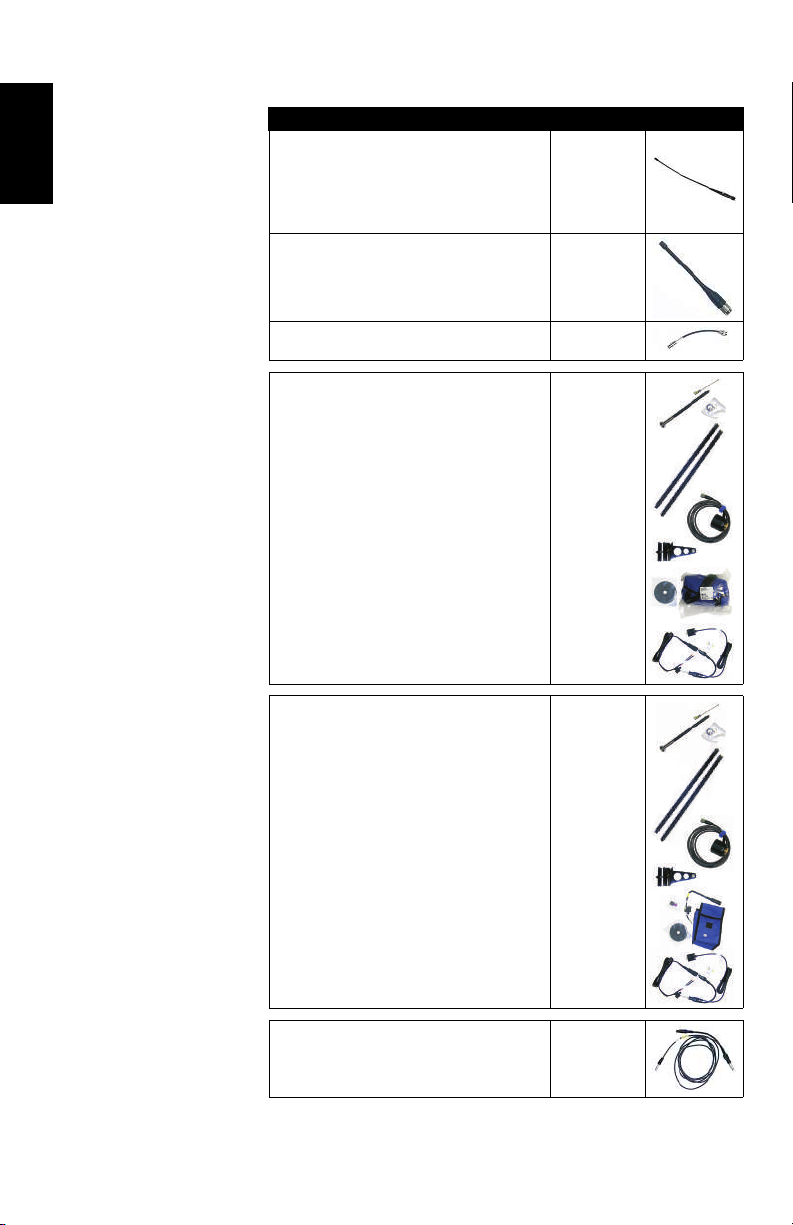
Other Optional
Accessories Item Ordering P/N: Picture
UHF whip antenna, Procom, half-wave, with
TNC adapter:
• 410-430 MHz
• 430-450 MHz
• 450-470 MHz
C3310190
C3310196
C3310188
UHF whip antenna, ¼ wave, with TNC adapter:
• 410-430 MHz
• 430-470 MHz
67410-12
67410-11
Coaxial adapter cable (for use with P/N 95672) 96845
ADL Vantage Pro Accessories Kit. Choose
P/N according to UHF band used:
• 450-470 MHz
• 430-450 MHz
• 410-430 MHz
The kit includes the following items:
• Unity-gain antenna (compatible with chosen
band, see above)
• Range pole mount
• Tripod mount system
• HPB-Battery bag with cables (specific to
ADL Vantage Pro)
• HPB-Programming cable
(ADL Vantage Pro unit NOT included in the kit.)
87400-10
87400-20
87410-10
ADL Vantage Accessories Kit. Choose P/N
according to UHF band used:
• 450-470 MHz
• 430-450 MHz
• 410-430 MHz
The kit includes the following items:
• Unity-gain antenna (compatible with chosen
band, see above)
• Range pole mount
• Tripod mount system
• HPB-Battery bag with cables (specific to
ADL Vantage)
• HPB-Programming cable
(ADL Vantage unit NOT included in the kit.)
87330-10
87330-20
87310-10
Y cable, receiver-to-PacCrest HPB & Battery,
3.0 m (OS7P to 1S5P) PCC-A02507
Indice
Altri manuali Spectra Ricevitore