
Spectrum DX3S Manuale utente

®
DSM Sport System with Integrated Telemetry
www.pitstop-shop.nl

2SPEKTRUM DX3S USER GUIDE
TABLE OF CONTENTS
Introduction.............................................................................................................................................3
Contents..................................................................................................................................................3
ModelMatch/Binding ..............................................................................................................................3
System Features......................................................................................................................................3
Identifying Buttons, Switches and Controls ............................................................................................4
Switching Rubber Grips..........................................................................................................................5
Installing the Batteries.............................................................................................................................5
Charging.................................................................................................................................................5
Steering Rate...........................................................................................................................................6
Receiver Compatibility ............................................................................................................................6
Receiver Connection and Installation......................................................................................................7
Using the Rolling Selector ......................................................................................................................7
Main Screen............................................................................................................................................8
Telemetry Screen.....................................................................................................................................9
List........................................................................................................................................................10
Model Select.........................................................................................................................................10
Model Name .........................................................................................................................................11
Model Reset..........................................................................................................................................11
Travel ....................................................................................................................................................12
Exponential ...........................................................................................................................................13
Reverse .................................................................................................................................................14
Sub Trim ...............................................................................................................................................14
Timer.....................................................................................................................................................15
Bind ......................................................................................................................................................16
ModelMatch..........................................................................................................................................16
Binding a Receiver................................................................................................................................16
Failsafe..................................................................................................................................................17
Throttle Punch ......................................................................................................................................17
AUX Setting ..........................................................................................................................................18
Telemetry Settings.................................................................................................................................19
System..................................................................................................................................................22
Installing the Telemetry Sensors in Your Vehicle ..................................................................................23
General Notes .......................................................................................................................................25
www.pitstop-shop.nl

3SPEKTRUM DX3S USER GUIDE
INTRODUCTION
Spektrum’s DX3S features an integrated telemetry system
providing accurate speed/rpm, temperature and voltage
readings. Featuring DSM 2.4GHz technology, the DX3S
offers sophisticated software combined with an easy-to-
use one-touch Rolling Selector making programming
quick and easy. Spektrum technology offers a bulletproof
radio link that’s immune to internal (noisy motors/ ESCs,
etc.) and external interfering sources. No longer will you
have to wait for a frequency or worry about someone else
being on the same channel. With Spektrum when you’re
ready to race there’s nothing stopping you!
CONTENTS
The DX3S radio system is supplied with the following:
• DX3Stransmitter
• SR3300Treceiver(SPMSR3300T)
• SR300receiver(SPMSR300)
• Bindplug(SPM6802)
• 4AAAlkalinebatteries
• ReceiverAAbatteryholder
• Switchharness
• GripSet(SPM9006)
• HeadTemperatureSensor(SPM1450)
• Battery/MotorTemperatureSensor(SPM1451)
• RPMSensor(SPM1452)
• SensorMountHardware.21-.26(SPM1501)
• SensorMountHardware.12-.15(SPM1502)
• SensorMountHardwareElectrics(SPM1503)
• TelemetryRPMSticker(SPM1512)
MODELMATCH/BINDING
The DX3S features ModelMatch (patent pending).
ModelMatch prevents a model from being operated when
the wrong model memory is selected. If the wrong model
memory is selected the receiver simply won’t respond to
the transmitter.
It’s necessary to program the receiver to a specific
model memory (called binding) so that the receiver
will only recognize and respond to that specific model
memory. See Page 16 for specific details on Binding and
ModelMatch.
SYSTEM FEATURES
• IntegratedTelemetry
• One-toucheasy-to-useprogramming
• InternalandprogrammableUporDowntimers
• 128x64highresolutiondot-matrixscreen
• 10-modelmemory
• Traveladjust
• Exponential
• Throttlepunch
• Steeringmix
• Expertandstandardmodes
Dodge and HEMI are trademarks of
Chrysler LLC. Dodge Ram and its trade
dress are used under license by Horizon
Hobby, Inc. ©Chrysler LLC 2008.
www.pitstop-shop.nl
4SPEKTRUM DX3S USER GUIDE
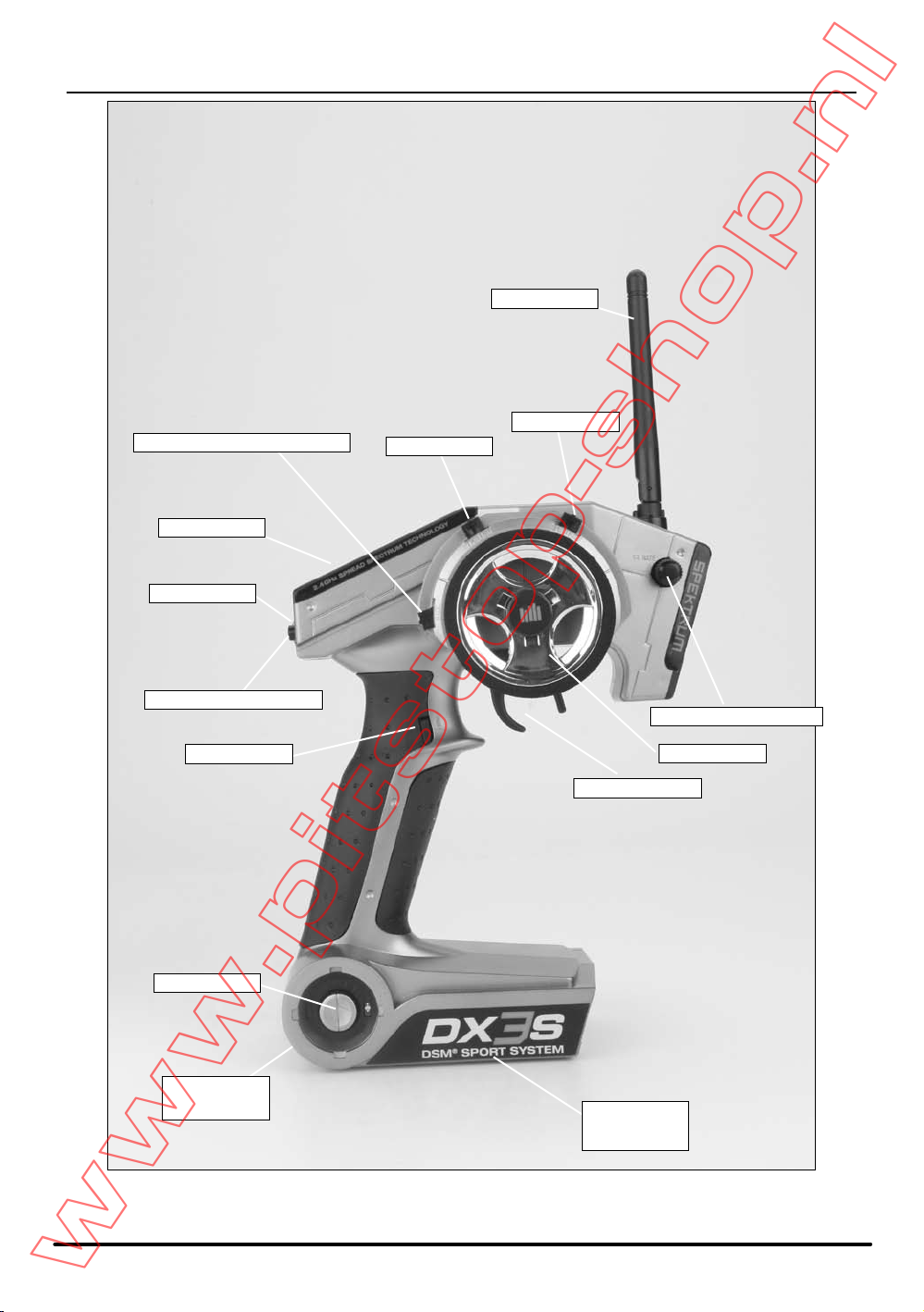
IDENTIFYING BUTTONS, SWITCHES AND CONTROLS
Antenna
LCD Screen
Steering Rate Knob
On/Off Switch
Steering Trim
Remote Start Button
Battery Door
(on bottom)
Switch - Aux. Ch. 2-Position
Timer Button
Charge Jack
(on back)
Throttle Trim
Rolling Selector
Steering Wheel
Throttle Trigger
www.pitstop-shop.nl
5SPEKTRUM DX3S USER GUIDE
SWITCHING RUBBER GRIPS
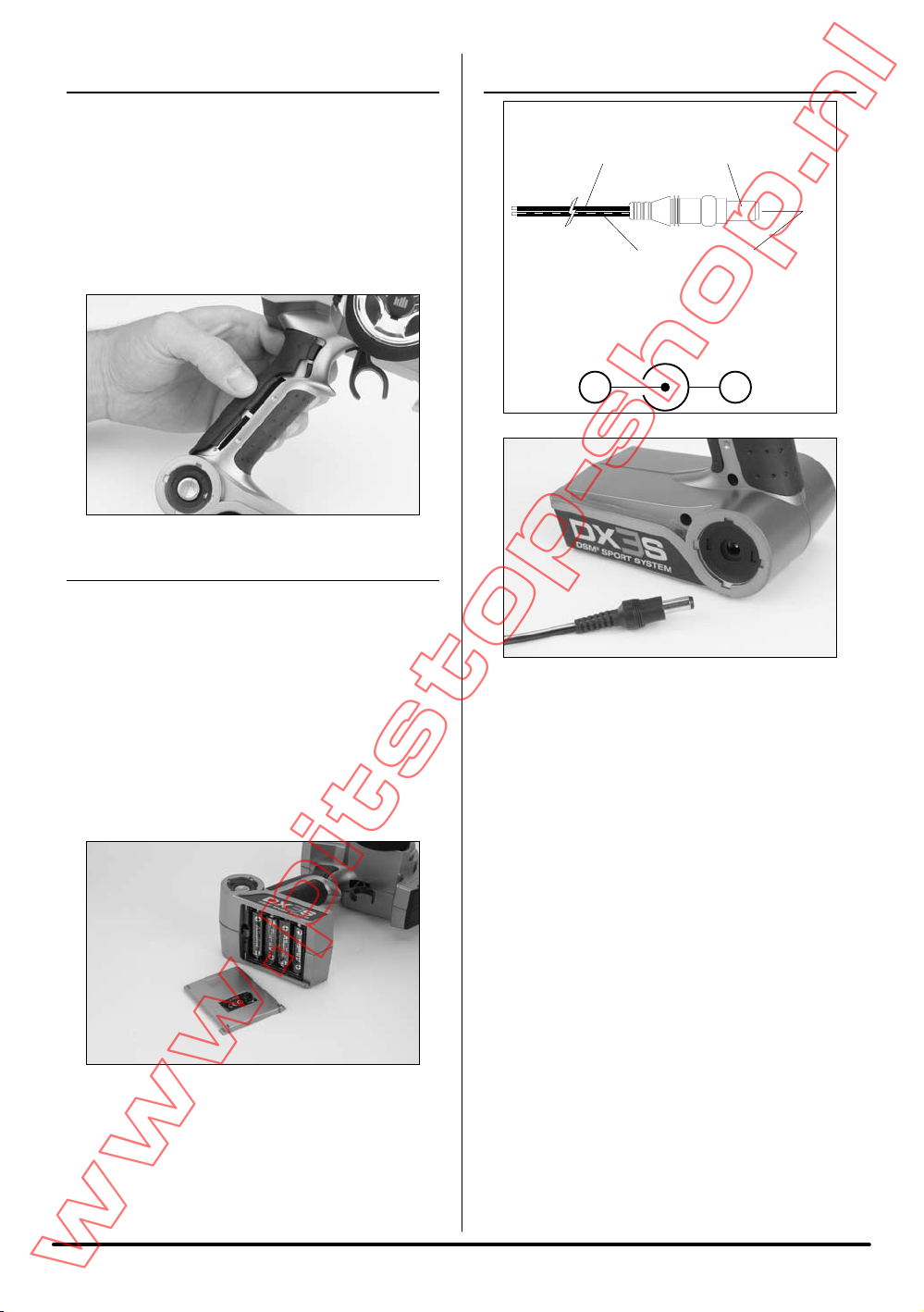
The DX3S is supplied with 3 different sized rubber
grips with the medium size installed on the transmitter.
Each grip’s size is identified with an “S” (small), “M”
(medium), or “L” (large) on the inside of the grip for
easy identification. To remove, simply lift the edge of the
grip and continue around the grip until it is completely
removed. To replace, align the tabs of the grip to the slots
in the handle and press the grip in place.
INSTALLING THE BATTERIES
The DX3S radio system is supplied with 4 AA alkaline
batteries required for operation that provide over 16
hours of run time. Many drivers prefer alkaline batteries
over rechargeable batteries finding it more convenient to
simply replace the batteries when depleted rather than
taking the time to recharge.
OptionalNiMH1.2-voltAArechargeablebatteries
(SPM9525)canalsobeused.Achargejacklocated
opposite of the on/off switch is provided for convenient
recharging.
Remove the battery door and install 4 AA batteries
observing the polarity marked on the battery holder.
Replace the battery door.
CHARGING
Charger Pigtail for Transmitter
Spektrum Transmitter Charge Jack Polarity
BLACK TO POSITIVE
BLACK W/WHITE STRIPE TO NEGATIVE
-+
Achargingjackislocatedontheoppositesideoftheon/
off switch. If rechargeable batteries are used they can be
conveniently charged without removing them from the
transmitterusingthechargejack.
IMPORTANT:AllSpektrumchargejacksare
center-pin negative. This is opposite of many
chargers. Before using a charger, make sure
the connector is center-pin negative. This
can be done using a voltmeter. Also, unlike
conventional radio systems that use 8 cells to
power the transmitter, the DX3S uses 4 cells.
This is due to the electronics being more
efficient. When charging, be sure to use a
charger designed for 4 cells (a 4.8-volt battery
pack) when charging the transmitter. Many
drivers simply make a harness and use the
same charger used to charge their car packs
but turn the current rate down to 1 to 2 amps.
www.pitstop-shop.nl

6SPEKTRUM DX3S USER GUIDE
STEERING RATE
Steering rate, (also known as dual rate) allows on-the-fly
steeringtraveladjustmentstobemadeusingthesteering
rate knob. Steering rate limits the amount of travel of the
steering servo. The steering rate cannot be greater than
100% and will never exceed the amount of steering travel
set in the travel screen.
RECEIVER COMPATIBILITY
The DX3S features DSM technology and is also
compatible with most DSM Spektrum surface receivers.
COMPATIBLE SPEKTRUM RECEIVERS
The DX3S is compatible with the following DSM
receivers. It is not compatible with the SR3100 DSM2
receiver.
SR300 - 3-channel - SPMSR300
SR3000 - 3-channel standard - SPM1200
SR3001 - 3-channel Pro - SPM1205
SR3500 - 3-channel Micro Race - SPM1210
Note: The SR3000HRS (SPM1202) receiver
is designed to be used with Spektrum’s Futaba
HRS compatible module system only and is
not compatible with the DX3S.
Steering
Rate
www.pitstop-shop.nl
7SPEKTRUM DX3S USER GUIDE
Futaba is a registered trademark of Futaba Denshi
Kogyo Kabushiki Kaisha Corporation of Japan
RECEIVER CONNECTION AND
INSTALLATION
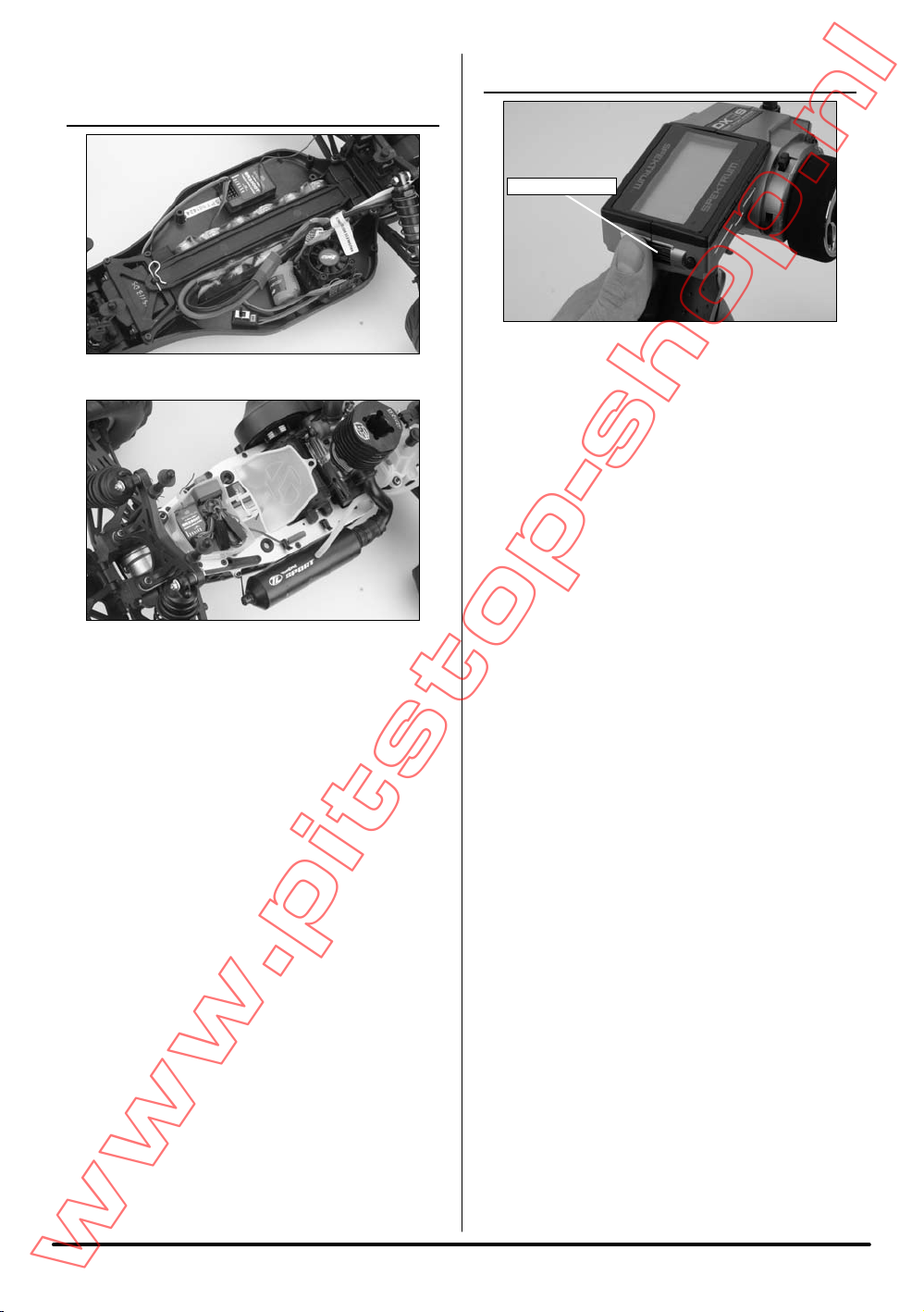
Typical Electric Installation
Typical Gas Installation
USING THE ROLLING SELECTOR
The Rolling Selector is pressed to access functions and
rolled to select specific features or to change settings
or values. Pressing and holding the Rolling Selector
for more than 3 seconds returns the display to the main
screen.
The DX3S features one-touch programming utilizing a
Rolling Selector. The Rolling Selector has three functions:
1. Pressing the Rolling Selector - enters the selected
function.
2. Rolling the Rolling Selector - highlights function or
changes settings and values when selected.
3. Pressing and holding the Rolling Selector for more
than 3 seconds from any screen - returns the display
to the Main Screen.
Programming is very intuitive and always starts with a
press on the selector, then a roll, then a press, then a
roll and so on. Most find that within a few minutes they
are able to easily program their car without reading the
instructions; however, to realize the full benefit of the
programming it is recommend that the manual be read.
Most racers find it is most convenient to use their thumb
when making programming changes as this allows for
one-handed programming, even allowing the car to be
runinonehandwhilemakingprogrammingadjustments
with the other.
Rolling Selector
www.pitstop-shop.nl

8SPEKTRUM DX3S USER GUIDE
MAIN SCREEN
The main screen displays pertinent information about
the selected model like trim and steering rate positions,
timers, the model selected, battery voltage, etc.
TO ACCESS THE MAIN SCREEN
From the List screen, the first function at the top of the
List screen is MAIN. Using the Rolling Selector highlight
the Main function and press the Rolling Selector to
access the Main screen.
From any screen, pressing and holding the Rolling
Selector for more than three seconds will return the
display to the main screen.
Note: When the battery voltage drops below
the preset value in the System function, an
alarm will sound.
Model Number and Name
Transmitter Voltage
Steering Trim
Down Timer
Steering Rate
Throttle Trim
Internal Timer
Brake Trim
Auxiliary Trim
www.pitstop-shop.nl

9SPEKTRUM DX3S USER GUIDE
TELEMETRY SCREEN
The Telemetry screen displays information received from
the on-board telemetry built into the SR3300T receiver.
Note: The signal strength display is for the
Telemetry link only. Typical telemetry range is
100–200 feet and will vary depending on the
operating environment.
TO ACCESS THE TELEMETRY SCREEN
From any screen, pressing and holding the Rolling
Selector for more than three seconds will first return
the display to the Main screen. Three seconds later the
Telemetry screen will be displayed.
Model Number
Maximum Recorded rpm/Speed
Transmitter Voltage
Real-Time rpm/Speed
Down/Up Timer
Receiver Battery Voltage
Signal Strength
Temperature
Maximum Recorded
Temperature
Alert Temperature
www.pitstop-shop.nl

10 SPEKTRUM DX3S USER GUIDE
LIST
The List screen displays all the available functions. The
desired function can be accessed by highlighting the
desired function using the Rolling Selector and, when
highlighted, pressing the Rolling Selector to enter the
function.
TO ACCESS THE LIST SCREEN
From the telemetry or main screen press the Rolling
Selector until the List screen appears.
From any other screen, List is located at the top right
side of the programming screens. Highlighting List
with the Rolling Selector and then pressing the Rolling
Selector will return back to the List screen.
MODEL SELECT
TO ACCESS THE MODEL SELECT FUNCTION
In the List screen rotate the Rolling Selector to highlight
the Model Select function.
Press the Rolling Selector to access the Select function.
Rotate the Rolling Selector to highlight the Select
function by placing the box around it.
Press the Rolling Selector and the box will flash,
indicating the Select function is active.
Use the Rolling Selector to select the desired model
memory. (Models 1 thru 10)
To return to the main screen press and hold the Rolling
Selector for more than three seconds, or to go back to
the list screen roll up and select List.
www.pitstop-shop.nl
Indice
Altri manuali Spectrum Telecomando

Spectrum
Spectrum URC1160 Manuale utente

Spectrum
Spectrum URC1160 Manuale utente

Spectrum
Spectrum DX5C Manuale utente

Spectrum
Spectrum enbrighten UCL/44/3/39/12/120 Manuale utente

Spectrum
Spectrum URC1160 Manuale utente

Spectrum
Spectrum DX6i Manuale utente

Spectrum
Spectrum DX6i Manuale utente

Spectrum
Spectrum AR9000 Manuale utente

Spectrum
Spectrum DX8G2 Manuale utente

Spectrum
Spectrum DX8 Manuale per l'uso e la cura


