SPYCRUSHERS SPY CAMERA PEN
Operation Manual
page 4
w w w . s p y c r u s h e r s . c o m
Tur i g the Spy Camera Pe Off
•With the Spy Camera en in standby mode press and hold the
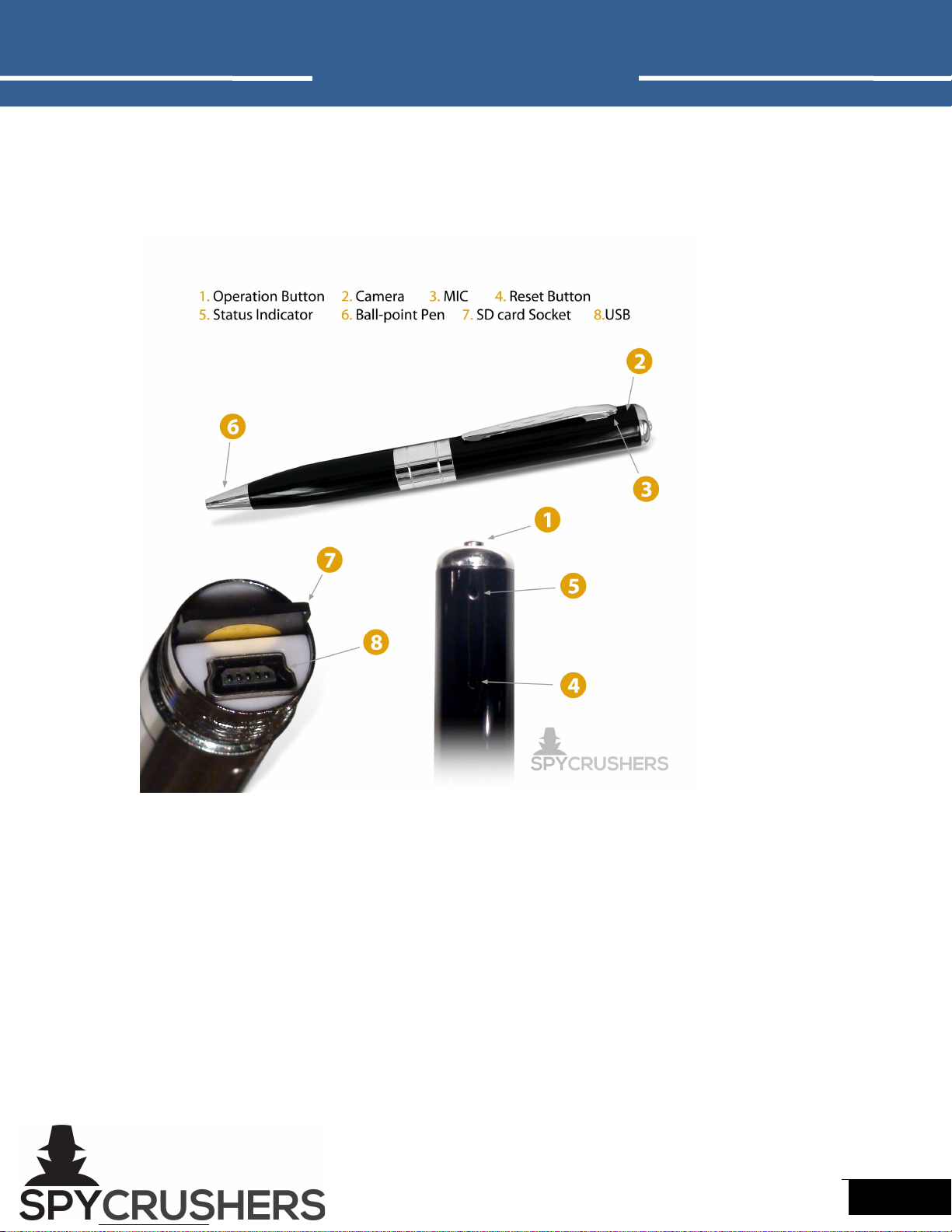
power/record button (#1 in layout diagram) for 3-4 seconds. The
green status indicator light will flash repeatedly 3 or 4 times. The Spy
Camera en will shut down saving all video and photo files
automatically.
•The Spy Camera en will not switch off if you do this while the Spy
Camera en is in video mode and recording.
•If the Spy Camera en is recording you must press the power/record
button (#1 in layout diagram) once to stop recording and return to
standby (static green status indicator light) then press and hold the
button until the green light turns off.
Recordi g Video a d Taki g Photos
•Video: Turn on the Spy Camera en. While in standby mode press
the power/record button (#1 in layout diagram) for 2 seconds, the
green status indicator light will flash 3 times and go out. Video is
now being recorded (#2 in layout diagram).
Note: Make sure there is adequate light a d the camera a d
micropho e (#3 i layout diagram) is ot blocked by other items.
Keep the Spy Camera Pe upright a d stable. Recorded objects
should be more tha 19 i ches from the camera.
ress the power/record button (#1 in layout diagram) again to stop
the video and save the file. In order to ensure the size and safety of
files, the Spy Camera en internal system will save the video files
automatically every 50 minutes and continue the video recording.
•Photo: Turn on the Spy Camera en. While in standby mode press
the power/record button (#1 in layout diagram) once shortly to
takes one picture, the light will flash and go back to a static green
again. Repeat process to take more.
Dow loadi g a d Viewi g Video a d Photos
•When the Spy Camera en is connected to a computer running
Windows X , Windows Vista, Windows 7 or Mac OS X, the operating
system will automatically recognize the device and install the correct
drivers.
•Navigate to the Removable Disk in My Computer to view, copy or