
Stamina inMotion T9000 Manuale utente

CAUTION:
Weight on this product should not exceed 225 lbs.
Owner's
Manual
Product May Vary Slightly From Pictured.
!WARNING !
Exercise can present a
health risk. Consult a
physician before beginning
any exercise program with
this equipment. If you feel
faint or dizzy, immediately
discontinue use of this
equipment. Serious bodily
injury can occur if this
equipment is not assembled
and used correctly. Serious
bodily injury can also occur
if all instructions are not
followed. Keep others and
pets away from equipment
when in use. Always make
sure all bolts and nuts are
securely tightened prior to
each use. Follow all safety
instructions in this manual.
STAMINA PRODUCTS
MADE IN CHINA
©2021 Stamina Products, Inc.
2021, 01
When calling for parts or
service, please specify
the following numbers:
Model#: 45-0900C
S/N: _____________
This Product is Distributed Exclusively by
2040 N Alliance Ave, Springeld, MO 65803
Customer Care
1 (800) 375-7520
www.staminaproducts.com

Quickstart Guide
Go to the App Store on your device or
scan the QR Code for quick access.
Smart Audio Workouts for Your Treadmill
Download the app and get moving!
Assembly video included in app.
IMPORTANT
Apple, the Apple logo, iPhone, and iPod touch are trademarks of Apple Inc., registered in the U.S. and other countries. App Store is a service
mark of Apple Inc., registered in the U.S. and other countries. Google Play and the Google Play logo are trademarks of Google LLC.

TABLE OF CONTENTS
Safety Instructions ...................................... 3
Before You Begin ........................................ 5
Equipment Warning, Caution & Notice Labels
... 6
Hardware Identication Chart .................... 7
Assembly Instructions ................................ 8
Operational Instructions ........................... 11
Maintenance ............................................... 13
Storage ....................................................... 14
Conditioning Guidelines ........................... 15
Warm-Up and Cool-Down ......................... 16
Warranty ..................................................... 17
Product Parts Drawing .............................. 18
Parts List .................................................... 19
Notes ........................................................... 20
Fax/Mail Ordering Form ............................ 22
SAFETY INSTRUCTIONS
3
1. Save these instructions and ensure that other exercisers read this manual prior to using the
inMotion® T900 Treadmill for the rst time.
2. Read all warnings and cautions posted on the inMotion® T900 Treadmill.
3. The inMotion® T900 Treadmill should only be used after a thorough review of the Owner’s
Manual.
4. We recommend that two people be available for assembly of this product.
5. Keep children away from the inMotion® T900 Treadmill. Do not allow children to use or play
on the inMotion® T900 Treadmill. Keep children and pets away from the inMotion® T900
Treadmill when it is in use.
6. It is recommended that you place this exercise equipment on an equipment mat.
7. Set up and operate the inMotion® T900 Treadmill on a solid level surface. Do not position the
inMotion® T900 Treadmill on loose rugs or uneven surfaces.
8. Make sure that adequate space is available for access to and around the inMotion® T900
Treadmill.
9. Keep ngers clear of all pinch points when folding and unfolding the inMotion® T900 Treadmill.
10. Before using, inspect the inMotion® T900 Treadmill for worn or loose components, and securely
tighten or replace any worn or loose components prior to use.
11. Before using, always check the BASE FRAME(1) to be sure it is secure. The LOCKING KNOB(5)
must be inserted through the hole in the LEFT UPRIGHT(2) and tightened by screwing it into the
BASE FRAME(1).
12. Consult a physician prior to commencing an exercise program and follow his/her
recommendations in developing your tness program. If at any time during exercise you feel faint,
dizzy, or experience pain, stop and consult your physician.
13. Follow your physician’s recommendations in developing your own personal tness program.
14. Always choose the workout which best ts your physical strength and exibility level. Know your
limits and train within them. Always use common sense when exercising.
15. Do not wear loose or dangling clothing while using the inMotion® T900 Treadmill.
16. Never exercise in bare feet or socks; always wear proper footwear such as running, walking, or
cross training shoes that t well, provide foot support, and feature non-skid rubber soles.
17. Be careful to maintain your balance while using, mounting, dismounting, or assembling the
inMotion® T900 Treadmill, loss of balance may result in a fall and serious bodily injury.
18. The inMotion® T900 Treadmill should not be used by persons weighing over 225 pounds.
19. The inMotion® T900 Treadmill should be used by only one person at a time.
20. The inMotion® T900 Treadmill is for consumer use only. It is not for use in public or semipublic
facilities.
!WARNING Cancer and Reproductive Harm www.P65Warnings.ca.gov
Consult your physician before starting this or any exercise program. This is
especially important if you are over the age of 35, have never exercised before,
are pregnant, or suer from any health problem. This product is for home use
only. Do not use in institutional or commercial applications. Failure to follow all
warnings and instructions could result in serious injury or death.
To reduce the risk of serious injury, read the following Safety Instructions
before using the inMotion® T900 Treadmill.
!WARNING
!WARNING

NEED HELP?
CONTACT US FIRST
1 (800) 375-7520
customer.care@staminaproducts.com
Hi! From all of us here at Stamina Products, thank you for your purchase. We
know that you have big fitness goals in mind and we are here to help you along.
Call us, email us, or send us a message on Facebook. Be sure to contact us if you
have any questions on your new product. We look forward to hearing from you!
With your body in mind,
Stamina Customer Care
To enact your extended warranty and to help us better
serve you, please go onlineand register your new product.
register.staminaproducts.com
ONLINE
customer.care@staminaproducts.com
www.staminaproducts.com
TELEPHONE
1 (800) 375-7520
FAX
(417) 889-8064
MAIL
Stamina Products, Inc.
ATTN: Customer Care
2040 N Alliance Ave
Springfield, MO 65803
facebook.com/StaminaProducts
facebook.com/AeroPilates
CUSTOMER CARE HOURS:
Monday-Thursday, 7:30 AM-5:00 PM, Central Time
Friday, 8:00 AM-3:00 PM, Central Time
It is quick and easy to register online, but if you’re a little old school or just need a
reason to raise that little flag on your mailbox, fill out the info on the last page of this
manual and mail it in.

Rear Roller
Round Cap
Endcap
THE FOLLOWING TOOLS ARE INCLUDED FOR ASSEMBLY: Wrench
Allen Wrench (5mm)
Maintenance Decal
BEFORE YOU BEGIN
5
Meter
Right Upright
Moving Wheel
Locking Knob Board
Walking Belt
Base Frame
U-Shaped
Handrail
Left Upright
Foam Grip
Bumper Stand
Caution Label
Left Upright
Flywheel
Serial Decal
Thank you for choosing the inMotion® T900
Treadmill. We take great pride in this quality
product and hope it will provide many hours of
quality exercise to make you feel better, look
better, and enjoy life to its fullest.
It's a proven fact that a regular exercise program
can improve your physical and mental health.
Too often, our busy lifestyles limit our time and
opportunity to exercise. The inMotion® T900
Treadmill provides a convenient and simple
method to begin your journey of getting your body
in shape and achieving a happier and healthier
lifestyle.
Before reading further, please review the
drawing below and familiarize yourself with the
parts that are labeled. Locate the serial decal on
the product and write the serial number on the
cover of the manual in the space provided. See the
next page for an image of the serial decal. Model
number and serial number are required when
calling for assistance.
Read this manual carefully before using the
inMotion® T900 Treadmill.
Providing you with a quality product is Stamina's
top priority. However, sometimes there could be a
missing or incorrectly sized part. If you have any
questions or problems with the parts included with
your inMotion® T900 Treadmill, please do not
return the product. Contact us FIRST!
If a part is missing or defective, please contact
Customer Care for assistance. Call us toll free
at 1-800-375-7520 (in the U.S.) or live chat on
staminaproducts.com. Our Customer Care Sta is
available to assist you from 7:30 A.M. to 5:00 P.M.
(Central Time) Monday through Thursday and 8:00
A.M. to 3:00 P.M. (Central Time) on Friday.
Be sure to have the name and model number of
the product available when you contact us.

5
EQUIPMENT WARNING, CAUTION & NOTICE LABELS
6
This chart is provided to help identify the warning, caution, and notice labels on the inMotion® T900
Treadmill. Please take a moment to familiarize yourself with all of the warning, caution, and notice
labels.
CAUTION
!
Consult your physician before
starting this or any exercise
program. This is especially
important if you are over the age
of 35 or have any pre-existing
health condition. Always make
sure all nuts and bolts are
securely tightened before using
this product. This product should
not be used by person weighing
more than 250 lbs. unless
otherwise stated in your Owner’s
Manual.
Keep others including children &
pets away from equipment when
in use.
For consumer use only. Failure to
follow all warnings and
instructions could result in injury
or property damage. Before
assembling or using this product,
read and follow the Owner’s
Manual and all other warnings and
instructions that accompany this
product. Replace this caution label
if damaged, illegible, or removed.
To best serve you, our Customer Care Representatives will
need your serial number. For quick access, write in your
serial number on the cover of the manual.
SERIAL DECAL(53)
CAUTION LABEL(52)
MAINTENANCE DECAL(48)
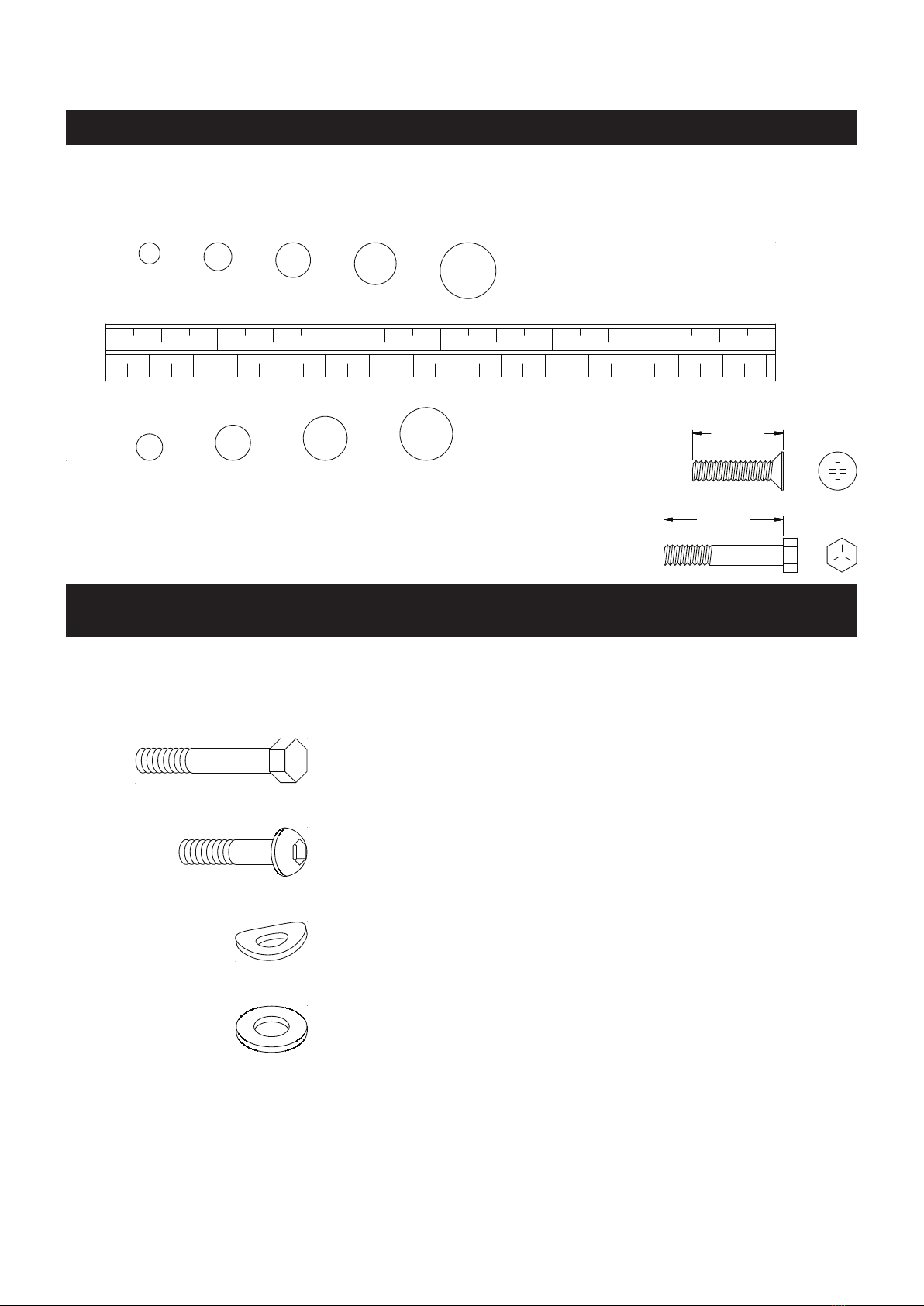
43 Washer (M10) 2
Part Number and Description Qty
33 Bolt, Hex Head (M10 x 1.5 x 50mm) 2
35 Bolt, Button Head (M8 x 1.25 x 35mm) 4
39 Arc Washer (M8) 4
7
length
length
mm.
in.
INCHES
This chart is provided to help identify the hardware used in the assembly process. Place the washers or
the ends of the bolts or screws on the circles to check for the correct diameter. Use the small scale to
check the length of the bolts and screws.
NOTICE: The length of all bolts and screws, except those with flat
heads, is measured from below the head to the end of the bolt
or screw. Flat head bolts and screws are measured from the
top of the head to the end of the bolt or screw.
After unpacking the unit, open the hardware bag and make sure that you have all the following items.
Some hardware may be already attached to the part.
MILLIMETERS
0 10 20 30 40 50 60 70 80 90 100 110 120 130 140 150
0 1/2 1 1/2 2 1/2 3 1/2 4 1/2 5 1/2 6
6 8 10 12
3/16" 1/4" 5/16" 3/8" 1/2"
HARDWARE IDENTIFICATION CHART

ASSEMBLY INSTRUCTIONS
8
STEP 1
Attach the LEFT and RIGHT UPRIGHTS(2, 3) to the BASE FRAME(1) with HEX BOLTS(M10x1.5x50mm)
(33) and WASHERS(M10)(43). DO NOT TIGHTEN COMPLETELY.
STEP 2
Connect the LOWER EXTENSION WIRE(24) located on the LEFT UPRIGHT(2) to the SENSOR WIRE(25).
Place all parts from the box in a cleared area and position them on the oor in front of you. Remove
all packing materials from your area and place them back into the box. Do not dispose of the packing
materials until assembly is completed. Read each step carefully before beginning. If you are missing
a part, please go to staminaproducts.com under the Customer Care section and order the part
(in the U.S.). Our Customer Care Sta is available to assist you from 7:30 A.M. to 5:00 P.M. (Central
Time) Monday through Thursday and 8:00 A.M. to 3:00 P.M. (Central Time) on Friday.
Some product parts are t tested at the factory to ensure proper t and alignment. Marks in
the paint may be noticeable, but are not an indication of damage.

ASSEMBLY INSTRUCTIONS
9
STEP 3
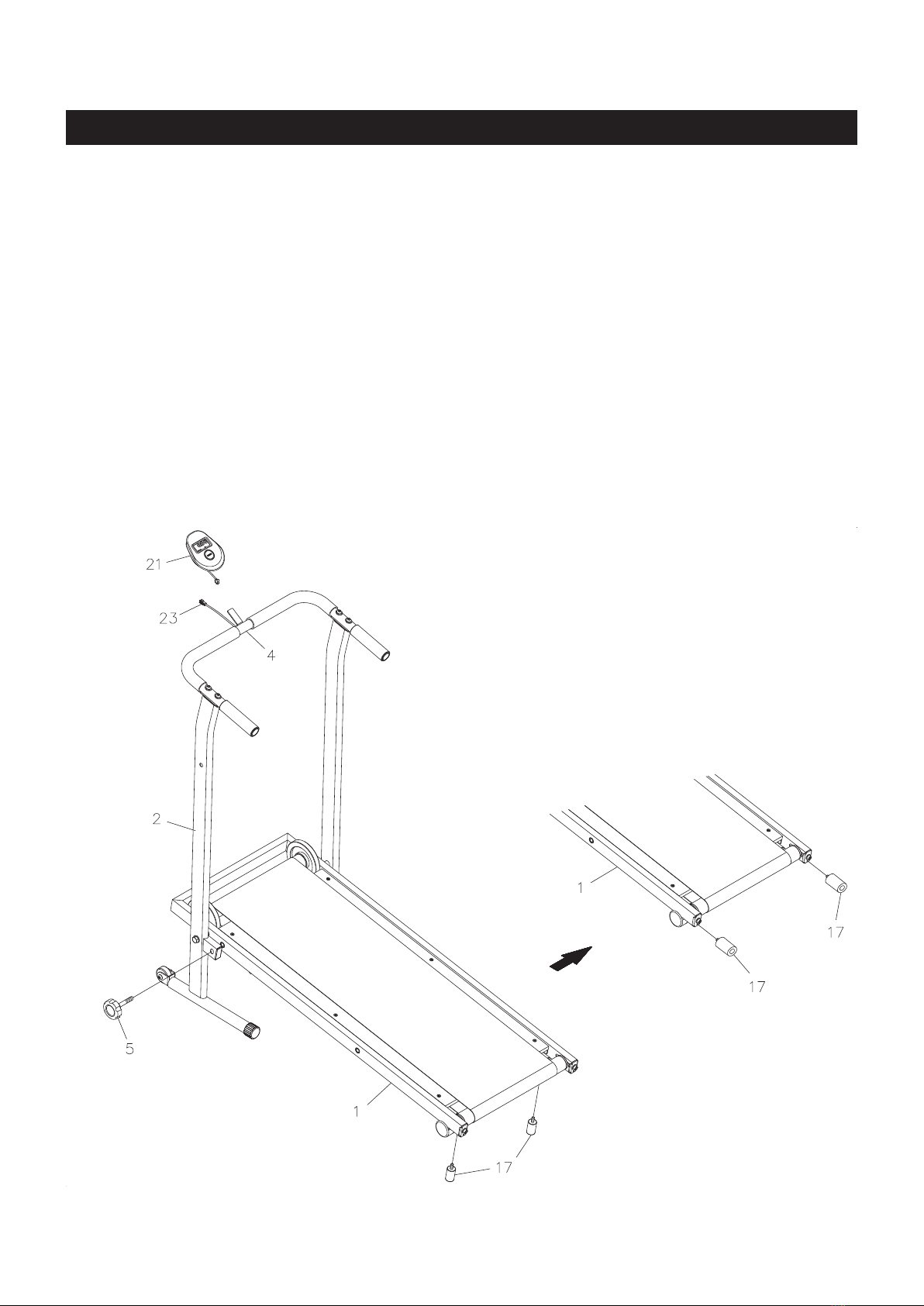
Connect the LOWER EXTENSION WIRE(24) extending from the top of the LEFT UPRIGHT(2) to the
UPPER EXTENSION WIRE(23) extending from the bottom of the U-SHAPED HANDRAIL(4). Push extra
wires back into the LEFT UPRIGHT(2). Secure the U-SHAPED HANDRAIL(4) to the LEFT and RIGHT
UPRIGHTS(2, 3) with BUTTON HEAD BOLTS(M8x1.25x35mm)(35) and ARC WASHERS(M8)(39).
Go back and tighten HEX BOLTS(M10x1.5x50mm)(33) in STEP 1.
ASSEMBLY INSTRUCTIONS
10
STEP 4
Insert the LOCKING KNOB(5) through the LEFT UPRIGHT(2) and screw into the hole in the BASE
FRAME(1) to lock the BASE FRAME(1) in position.
STEP 5
Install two AAA batteries into the METER(21), the batteries are not included. See page 11 for detailed battery
installation instructions. Slide the METER(21) onto the plate on the U-SHAPED HANDRAIL(4). Connect
the UPPER EXTENSION WIRE(23) to the METER(21).
STEP 6
Attach the BUMPER STANDS(17) to the bottom of the BASE FRAME(1).
NOTE: The BUMPER STANDS(17) may be stored on the end of the BASE FRAME(1) to increase the
angle of the treadmill and reduce the walking resistance. See page 13 for details on adjusting the
walking resistance.
Questo manuale è adatto per i seguenti modelli
1
Indice
Altri manuali Stamina Tapis roulant

Stamina
Stamina 45-0900B Manuale utente

Stamina
Stamina InMotion II 45-1002C Manuale utente

Stamina
Stamina T3000 Treadmill 45-1003 Manuale utente

Stamina
Stamina In Motion II Manuale utente

Stamina
Stamina inMotion T900 Manuale utente

Stamina
Stamina Inmotions Manuale utente

Stamina
Stamina Adjustable Height Treadmill Manuale utente

Stamina
Stamina Calm T901 Manuale utente


