Star Lake SCH-406 Manuale utente

User’s Manual
Revision Date: April.29.2021
SCH-406
IEC-61850-3, IEEE-1613 1U Computer

SCH-406 User’s Manual
Revision Date: Apr.29.2021
1
Safety Information
Electrical safety
To prevent electrical shock hazard, disconnect the power cable from the electrical outlet before relocating the
system.
When adding or removing devices to or from the system, ensure that the power cables for the devices are
unplugged before the signal cables are connected. If possible, disconnect all power cables from the existing
system before you add a device.
Before connecting or removing signal cables from the motherboard, ensure that all power cables are unplugged.
Seek professional assistance before using an adapter or extension cord. These devices could interrupt the
grounding circuit.
Make sure that your power supply is set to the correct voltage in your area.
If you are not sure about the voltage of the electrical outlet you are using, contact your local power company.
If the power supply is broken, do not try to fix it by yourself. Contact a qualified service technician or your local
distributor.
Operation safety
Before installing the motherboard and adding devices on it, carefully read all the manuals that came with the
package.
Before using the product, make sure all cables are correctly connected and the power cables are not damaged. If
you detect any damage, contact your dealer immediately.
To avoid short circuits, keep paper clips, screws, and staples away from connectors, slots, sockets and circuitry.
Avoid dust, humidity, and temperature extremes. Do not place the product in any area where it may become
wet.
Place the product on a stable surface.
If you encounter any technical problems with the product, contact your local distributor
Statement
All rights reserved. No part of this publication may be reproduced in any form or by any means, without prior
written permission from the publisher.
All trademarks are the properties of the respective owners.
All product specifications are subject to change without prior notice

SCH-406 User’s Manual
Revision Date: Apr.29.2021
2
Revision History
Revision
Date (yyyy/mm/dd)
Changes
V1.0
2021/04/29
First release
Packing List
Item
Description
Q’ty
1
SCH-406 IEC-61850-3, IEEE-1613 1U Computer
1
2
Driver CD
1
Ordering information
SCH-406
2U 19” Power Automation Fanless Server Computer with Intel. 10th Gen. Core i7 Processor,
2 × RJ45 GbE, 2 x 10GbE, 100V~240V AC-in, 2 x 200W AC/DC Redundant Power Supply, Operating Temperature
-20~+60°C
Optional Ordering Information
INTEL X710 Dual 10GbE SFP+ LAN card

SCH-406 User’s Manual
Revision Date: Apr.29.2021
3
RoHS Compliance
7Starlake RoHS Environmental Policy and Status Update
7Starlake is a global citizen for building the digital infrastructure. We are committed to providing
green products and services, which are compliant with
European Union RoHS (Restriction on Use of Hazardous Substance in Electronic Equipment) directive 2011/65/EU, to be
your trusted green partner and to protect our environment.
In order to meet the RoHS compliant directives, 7Starlake has established an engineering and manufacturing task force
to implement the introduction of green products. The task force will ensure that we follow the standard 7Starlake
development procedure and that all the new RoHS components and new manufacturing processes maintain the highest
industry quality levels for which 7Starlake are renowned.
The model selection criteria will be based on market demand. Vendors and suppliers will ensure that all designed
components will be RoHS compliant

SCH-406 User’s Manual
Revision Date: Apr.29.2021
4
Chapter 1 : Production Introduction.......................................................................................................5
1.1 Specifications ...........................................................................................................................5
1.2 Front Panel I/O Placement.......................................................................................................7
1.3 Rear Panel I/O Placement ........................................................................................................8
1.4 Mechanical Dimensions ...........................................................................................................9
Chapter 2 : Rear I/O Ports.....................................................................................................................10
2.1 LAN/IPMI port ........................................................................................................................10
2.2 VGA/DVI-D port......................................................................................................................10
2.3 USB3.2 port ............................................................................................................................10
Chapter 3 : System Setup .....................................................................................................................11
3.1 Removing the Top Cover from the Chassis ............................................................................11
3.2 Installing PCIe Card.................................................................................................................11
3.3 Install the screws on the upper cover....................................................................................12
Chapter 4: AMI BIOS UTILITY .................................................................................................................12
4.1 Starting...................................................................................................................................12
4.2 Navigation Keys ......................................................................................................................13
4.3 Main Setup .............................................................................................................................13
4.4 Advanced Setup Configuations ..............................................................................................16
4.5 Event Logs ..............................................................................................................................50
4.6 IPMI ........................................................................................................................................52
4.7 Security...................................................................................................................................55
4.8 Boot........................................................................................................................................62
4.9 Save & Exit..............................................................................................................................65

SCH-406 User’s Manual
Revision Date: Apr.29.2021
5
Chapter 1 : Production Introduction
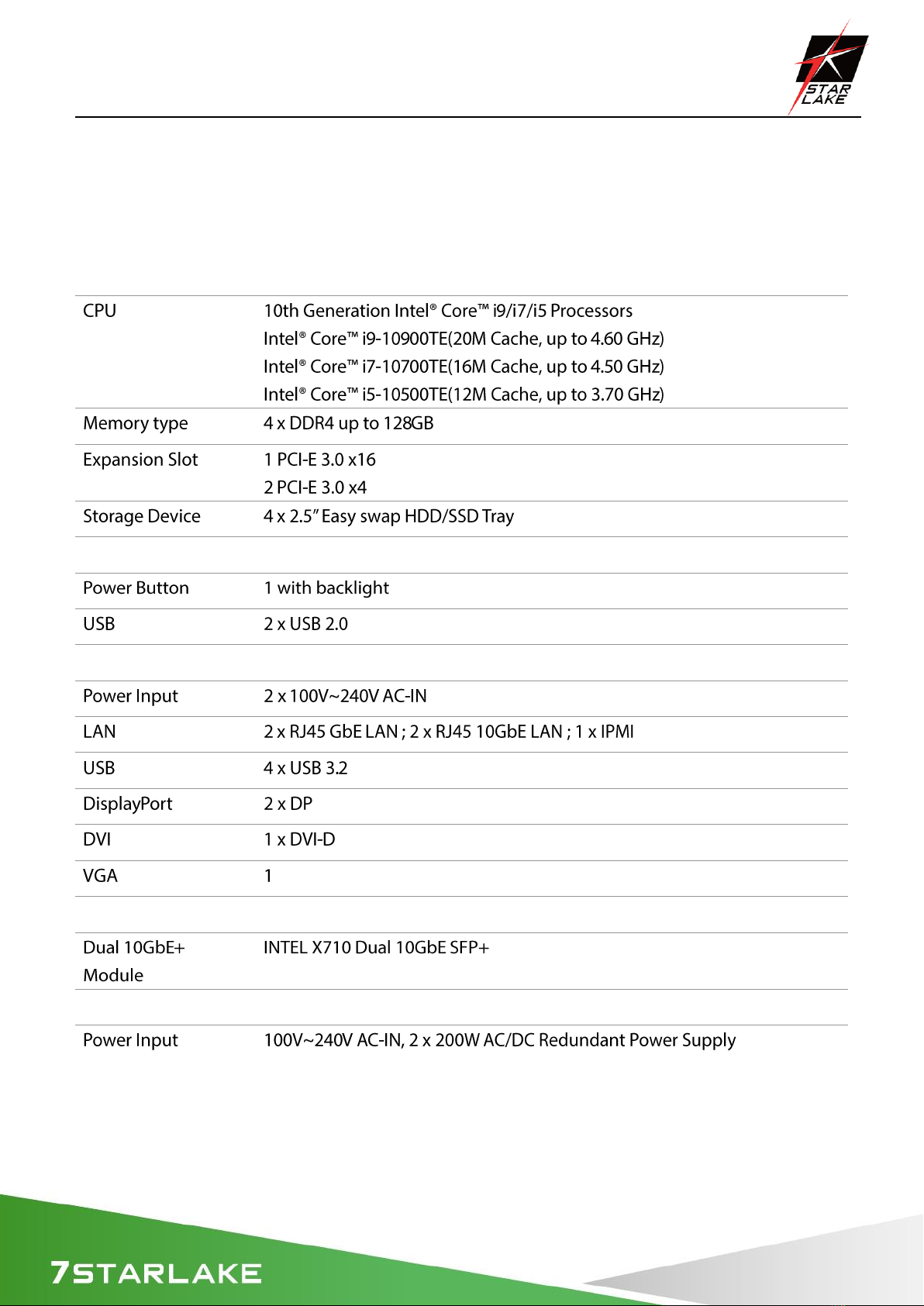
1.1 Specifications
System
Rear I/O
Front I/O
Optional
Power

SCH-406 User’s Manual
Revision Date: Apr.29.2021
6
OS support list
Mechanical and Evvironmental

SCH-406 User’s Manual
Revision Date: Apr.29.2021
7
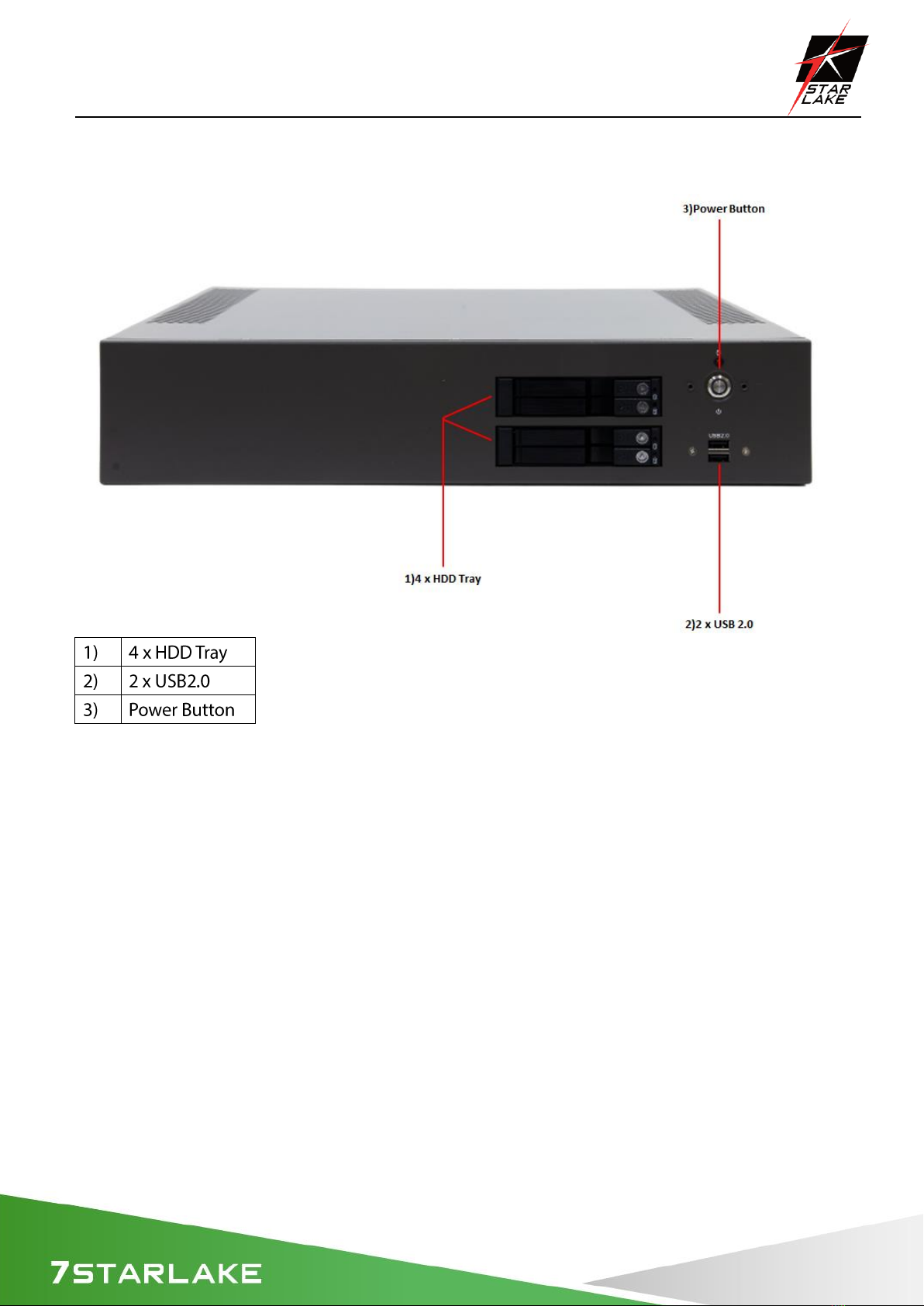
1.2 Front Panel I/O Placement

SCH-406 User’s Manual
Revision Date: Apr.29.2021
8
1.3 Rear Panel I/O Placement

SCH-406 User’s Manual
Revision Date: Apr.29.2021
9
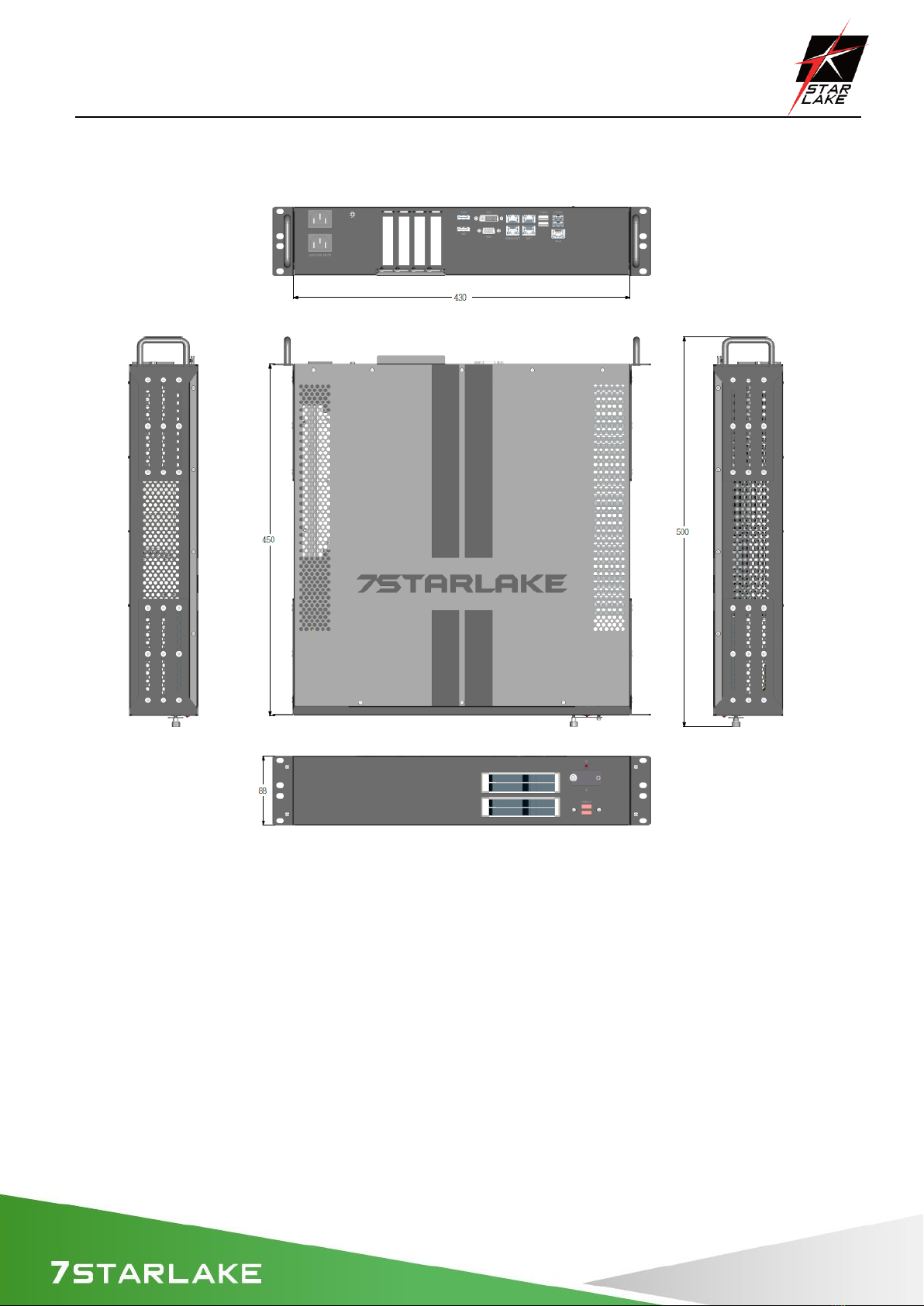
1.4 Mechanical Dimensions
Altri manuali per SCH-406
1
Indice
Altri manuali Star Lake Scrivania

Star Lake
Star Lake THOR200-D15EG Manuale utente

Star Lake
Star Lake SR700 Manuale utente

Star Lake
Star Lake CPT330B Manuale utente

Star Lake
Star Lake AV710 Manuale utente

Star Lake
Star Lake SR10B Manuale utente

Star Lake
Star Lake ROC286BB Manuale utente

Star Lake
Star Lake SR10-SCH Manuale utente

Star Lake
Star Lake SCH-406 Manuale utente