1QUICK REFERENCE
For basic operation please follow the guidelines below. The SL-2001includes eight demonstration presetswhich may be
used afterthe instrument isinstalled into yourMIDI system.
1.Connect voltage adapter into a power outlet (make sure voltage specification on power adapter matches your line volt-
age). Connect adapter cable to SL-2001 power jack.
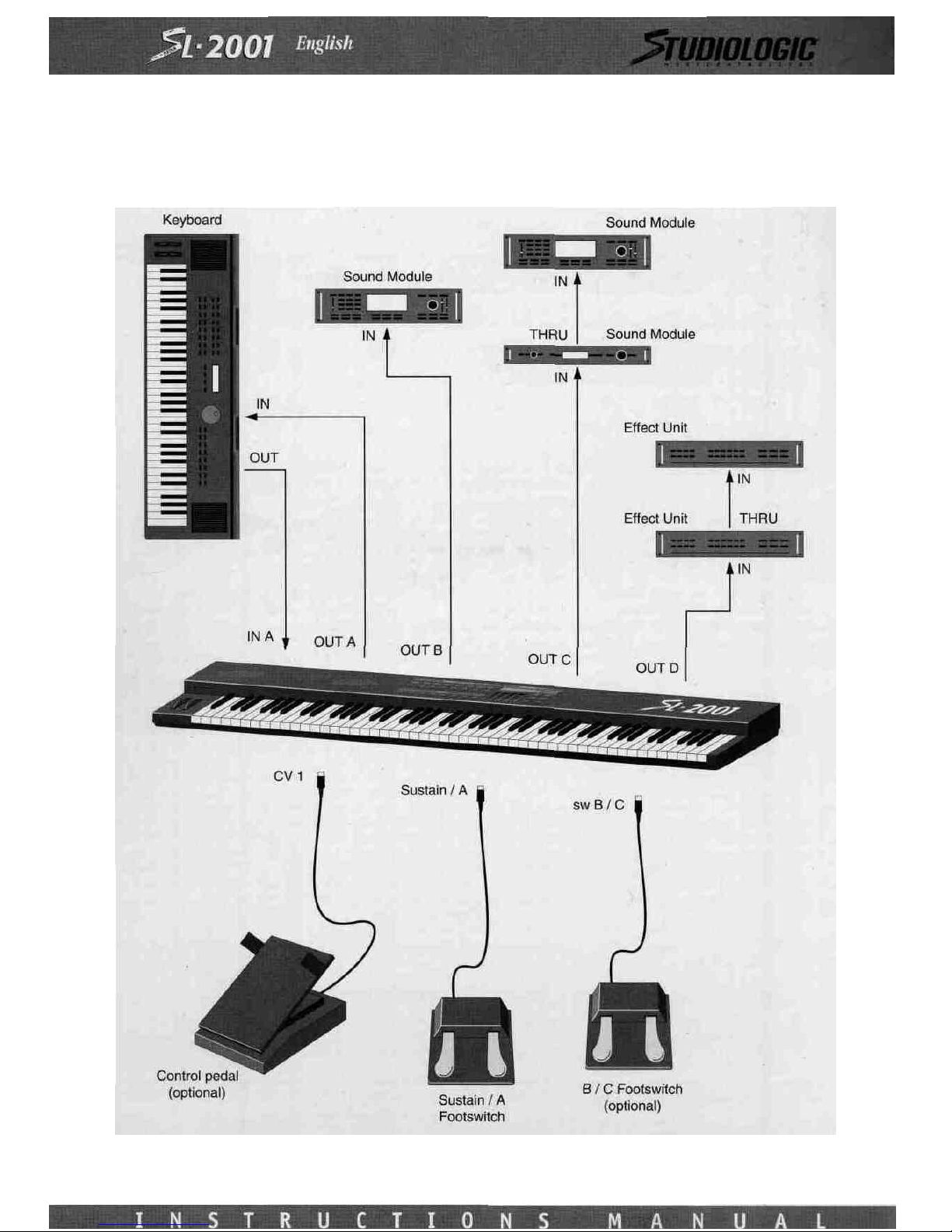
2. Connect MIDI cables before switching on any MIDI devices. Touse the demonstration presets, connect a sound module
to each ofthe fourMIDI outputsA-D. Each sound module should be setto receive on MIDI channel 1.
4.Apply power to all MIDI devicesin the system.
5.Switchon the power tothe SL-2001.
Tochange SL-2001presets, make sure that the unit isin Perform Mode (red light onEDIT switch isoff).Tochange the pre-
set, press any ofthe eight PRESET switches. To change to a differentbank,press the left or right arrow switches
(< > ) untilthe desired banknumber isdisplayed before pressing one of theeight PRESET switches. Presets are arranged
in eight banks ofeight, for a total of64 presets (11through88).An optional memory card isavailable which holds 64 addi-
tional presets.
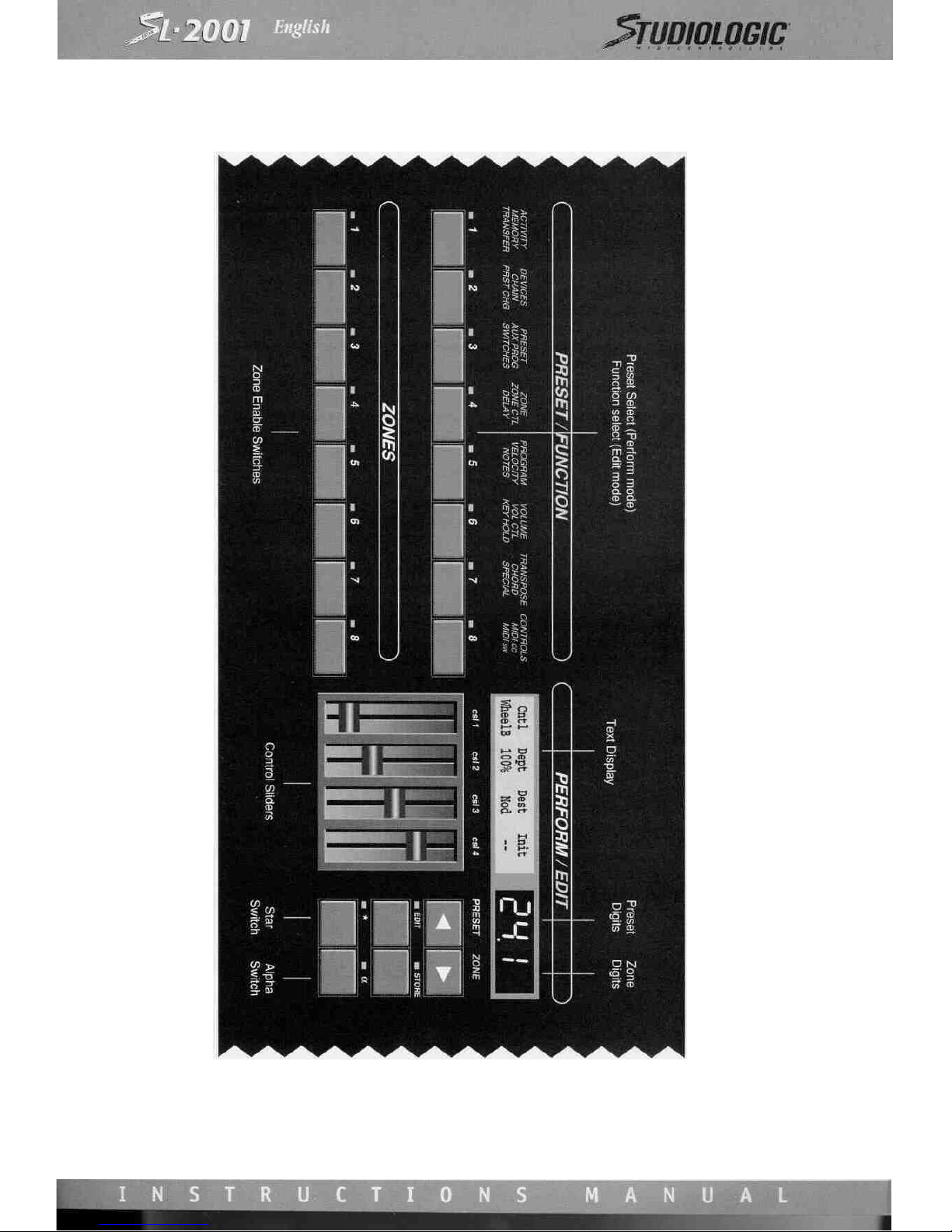
Local controllers (front panel sliders, Star and Alpha switches, footswitches A through C, and control voltage inputs 1 and 2)
will issue MIDI control change commands dependingon the selected preset.
MIDI devices may be switched on and off using the eight ZONE switches.
Toedit a preset, enter EditMode by pressing the EDIT switch. Press the appropriateFUNCTION switch to access the desired
function (press several times if necessary untilthe desired screen appearson thetext display).If a star (*)appears in thedis-
play, an alternate screen may be accessed by pressing theStar switch.Adjusttheparameterwith the appropriatecontrol slid-
er. Tochange parametersfor a specific zone, first select theappropriate zone by using the left and right arrow switches.The
selectedzone isindicated by the zone digit(s) following the preset number.
IMPORTANT:Before the SL-2001 can be effectively programmed for your MIDI system, all MIDI devices must be properly
"installed" into the SL-2001 operating system. Refer to the DEVICES function in section 4 for information on this procedure.
DEMONSTRATION PRESETS
The SL-2001comes from the factory with 8 demonstration presets in locations 11through 18.The demonstration presets are
intended for use with fourMIDI sound modules.Each sound module should be setfor MIDI channel1,and each should
each be on a separate MIDI output.The demonstration presets illustrateseveral ofthe most usefulSL-2001 functions,and
are summarizedbelow. When thedemonstration presets are selected with the PRESET switches, the sound modules should
change programs automatically. The actualprogram number on each sound module may not match the number ofthe pre-
setselected on theSL-2001. These program numbers may be easilychanged; seethe operation guide sectionsonEdit Mode
and the Program function.
DEMONSTRATION PRESET 11:All foursound modules are active and receiving note information from the keyboard. The
ZONE switches may be used to turnoff selected sound modules to hear differentcombinations ofthe modules. The four
control sliders on the front panel are used to adjustthe volume level for each sound module (refer to the CONTROLS func-
tion in section8 for information on programming slidersand control pedals).
DEMONSTRATION PRESET 12:Allfour sound modules are active, but the keyboard isdivided into four zones,with a dif-
ferent sound module active in each zone (refer tothe ZONE function in section8 for more information).
DEMONSTRATION PRESET 13:All four sound modules are active,but each key that isplayed onthe keyboard isassigned
to a different sound module, (refer to the NOTES function in section8 for more information).