
TCL Sweeva 6000 Manuale utente


Contents
Deutsch
Eestlane
English
Español
Ελληνικά
Français
Italiano
Latvietis
Lietuvis
Luxembourgeois
1
3
5
7
9
11
13
15
17
19

Contents
Nederlands
Norsk
Polskie
Português
Română
Suomi
Svenska
Український
български
21
23
25
27
29
31
33
35
37

- 1 -
Weitere Informationen und das Benutzerhandbuch finden Sie unter: www.tcl.com
Entfernen Sie das Schutzmaterial
• Entfernen Sie vor dem Gebrauch den Schutzstreifen.
• Installieren Sie die Seitenbürste ein und entfernen Sie die Schutzfolie.
Benutzung der Maschine
Stellen Sie die Ladestation/den selbstentleerenden
Staubbehälter auf.
• Stellen Sie sicher, dass sich im Umkreis von 1.5m vor und 0.5m links
und rechts keine Hindernisse benden.
• Beim Sweeva 6000 ist das untere Ende der Vorderseite der Ladestation
zugewandt, beim Sweeva6500 ist das hintere Ende dem
Staubauffangturm zugewandt.
Reinigungs-/Schalttaste
• Halten Sie die Taste 3 Sekunden lang gedrückt, um das
Gerät ein-/auszuschalten.
• Drücken Sie einmal, um die Reinigung zu starten.
Auflade-Taste
• Drücken Sie einmal, um zum Aufladen zurückzukehren.
• Drücken und halten Sie 15 Sekunden lang, um die
Werkseinstellungen wiederherzustellen.
Aufladetaste +Reinigungs-/Schalttaste
• Halten Sie die beiden Tasten gleichzeitig für 3
Sekunden gedrückt, um in den
Netzwerkkonfigurationsmodus zu gelangen.
Lichtstatus
• Blaues Dauerlicht: Standby/Betrieb (normaler Batteriestand).
• Orangefarbenes Dauerlicht: Standby (schwache Batterie).
• Blaues Atmungslicht: Rückkehr zum Laden.
• Orangenfarbenes Atmungslicht: Laden/Starten bei niedrigem Batteriestand.
• Blaues Licht blinkt: mit Wi-Fi verbunden.
• Rotes Licht blinkt: Fehler oder Störung mode.
Sweeva 6000/6500
Schnellstart-Anleitung
DE
• Halten Sie die Taste „ 3 s“ lang gedrückt, um das Gerät einzuschalten.
• Bitte laden Sie die Batterie vor der ersten Verwendung vollständig auf. Die Ladezeit
beträgt 4 Stunden.

- 2 -
Laden Sie die App herunter
• Suchen Sie im Mobile Application Store nach „TCL HOME“.
• oder scannen Sie den untenstehenden QR-Code, um die APP herunterzuladen.
Reinigung starten
• Wenn das Gerät mit normalem Batteriestand eingeschaltet ist, drücken Sie die
„ “, um die Reinigung zu starten.
• Oder klicken Sie nach erfolgreicher Netzwerkkonfiguration auf der APP-Schnitt
stelle auf die Schaltfläche „Reinigen“, um die Reinigung zu starten.
• Klicken Sie auf „beitreten“, um Ihr
Telefon mit dem Netzwerk des Saugro
boters zu verbinden.
• Benennen Sie Ihren Saugroboter
um und erstellen Sie seinen
Arbeitsbereich.
• Halten Sie die Tasten „ “ und “ “gleichzeitig 3s lang gedrückt, das Gerät
geht in die Netzwerkkonfiguration und die Kontrollleuchte blinkt blau.
Anzeigelampe:
• Das blaue Licht blinkt langsam: Warten auf die Verbindung.
• Das blaue Licht blinkt schnell: die Wi-Fi-Verbindung wird
hergestellt.
• Das blaues Licht leuchtet normal: Verbindung zum Wi-Fi
hergestellt.
* Hinweis: Derzeit unterstützt das Gerät kein 5G-Hz-Wi-Fi.
• Drücken Sie auf „Geräte hinzufügen“. • Wählen Sie „Sweeva 6000/6500“ aus.
Connect to the APP
• Wenn das Gerät blau blinkt, klicken
Sie in der App auf „Weiter“.
• Geben Sie das Wi-Fi-Passwort in
der APP ein.
DE
Sweeva 6000/6500
Schnellstart-Anleitung

Rohkema informatsiooni ja kasutusjuhendi jaoks, palun külasta: www.tcl.com
- 3 -
Eemaldage kaitsematerjal
• Enne kasutamist eemaldage kaitseriba.
• Installige küljehari ja rebige küljest kaitsekile.
Masina kasutamine
Paigaldage laadimisdokk/isetühjenev prügikast
• Veenduge, et ees 1.5m ning vasakul ja paremal 0.5m ulatuses ei oleks takistusi.
• Mudelil Sweeva 6000 on esipoole alumine osa laadimisdoki suunas, mudelil
Sweeva 6500 on tagakülg tolmukogumistorni suunas.
Puhastusnupp/lüliti
• Masina sisse-väljalülitamiseks vajutage ja hoidke 3
sekundit all.
• Puhastamise alustamiseks vajutage üks kord.
Laadimisnupp
• Uuesti laadimiseks vajutage üks kord.
• Tehaseseadete lähtestamiseks vajutage ja hoidke 15
sekundit all.
Laadimisnupp + puhastusnupp/lüliti
• Võrgukonfiguratsiooni sisenemiseks vajuta kahte
nuppu samal ajal ja hoia neid all.
Tulede olek
• Ühtlane sinine tuli: Ootel/töötab (normaalne akutase).
• Ühtlane oranž tuli: Ootel (madal akutase).
• N-ö hingav sinine tuli: Uuesti laadimise märguanne.
• N-ö hingav oranž tuli: Laadimine/käivitumine madala akutasemega.
• Vilkuv sinine tuli: Loo Wi-Fi ühendus.
• Vilkuv punane tuli: Vea- või tõrke-režiim.
Sweeva 6000/6500
Kiirjuhend
ET
• Masina sisselülitamiseks vajutage nuppu „ “ ja hoidke seda 3 sekundit all.
• Enne esimest kasutuskorda laadige aku täielikult. Laadimisaeg on 4 tundi.

- 4 -
Laadige rakendus alla
• Sisestage mobiilirakenduste poes otsing „TCL HOME“.
• Või skannige rakenduse allalaadimiseks allolev QR-kood.
Alustage puhastamist.
• Kui masin töötab normaalse akutasemega, vajutage puhastamise alustamiseks
nuppu „ “.
• Või kui võrguga konfigureerimine õnnestus, vajutage puhastamise alustamiseks
nuppu „Puhasta“ rakenduse liidesel.
• Vajutage nuppu „Ühenda“, et telefon
robottolmuimeja võrguga ühendada.
• Andke oma robottolmuimejale uus
nimi ja määrake selle tööruum.
• Vajutage samal ajal nuppe „ “ ja „ “ ning hoidke neid 3 sekundit all; seejärel
siseneb masin võrgukonfiguratsiooni ja näidikus hakkab vilkuma sinine tuli.
Näidiku tuli
• Aeglaselt vilkuv sinine tuli: Oodake ühendust.
• Kiirelt vilkuv sinine tuli: Wi-Fi ühendus loomisel.
• Sinine tuli tavaolekus: Wi-Fi ühendus loodud.
* Märkus: Praegu ei toeta masin 5G Hz Wi-Fid.
• Vajutage nuppu „Lisa seadmeid“. • Valige „Sweeva 6000/6500“.
Looge rakendusega ühendus.
• Kui masinas süttib sinine tuli,
vajutage rakenduses nuppu „Edasi“.
• Valige oma Wi-Fi konto ja sisestage
parool.
ET
Sweeva 6000/6500
Kiirjuhend
For more information and user manual, please visit: www.tcl.com
- 5 -
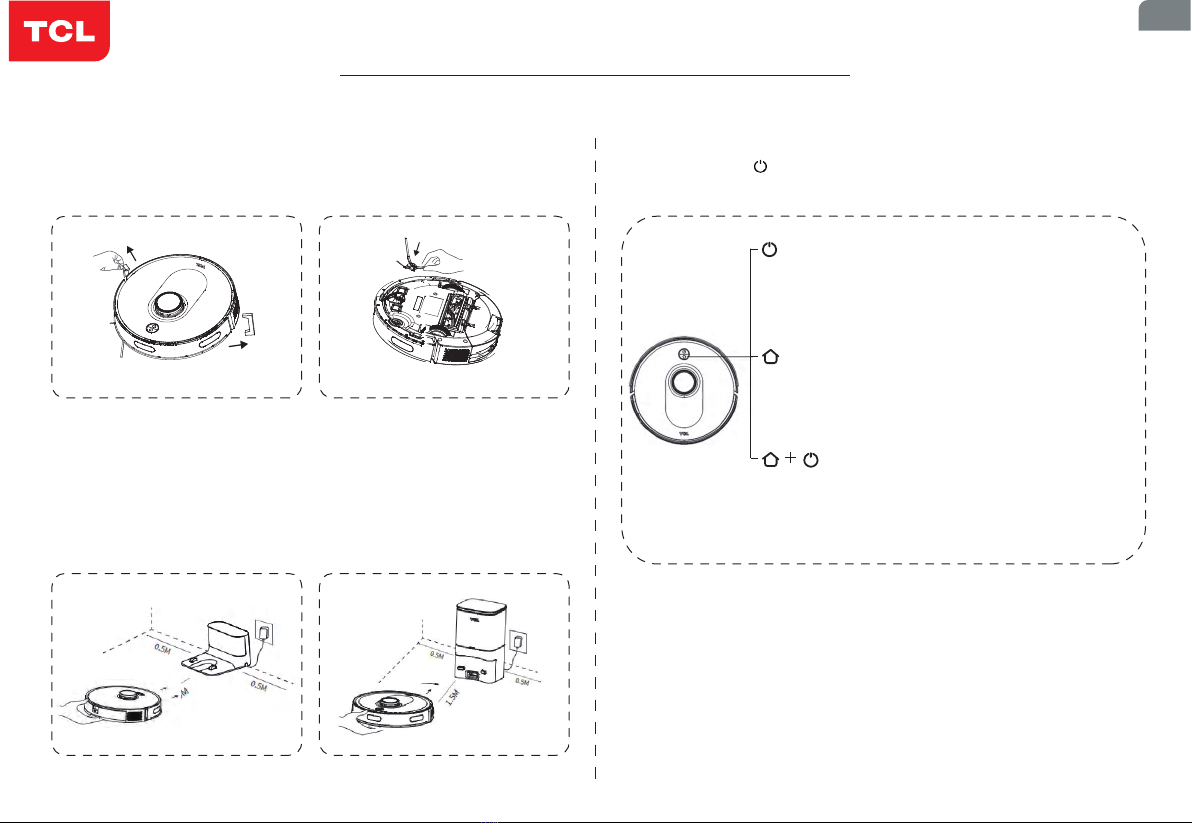
Remove the protective material
• Before use, remove the protective strip.
• Install the side brush, and tear off the protective film.
Use of the machine
Place the charging dock/self-emptying dustbin
• Ensure that there are no obstacles within 1.5m in front and 0.5m on the left
and right.
• For Sweeva 6000, the bottom of its front faces the charging dock; for
Sweeva 6500, its rear end faces the dust collecting tower.
Cleaning/Switch button
• Press and hold for 3 seconds to turn on/off the
machine.
• Press once to start cleaning.
Recharging button
• Press once to return for recharging.
• Press and hold for 15 seconds to restore factory
settings.
Recharging button + Cleaning/Switch button
• Press and hold the two buttons simultaneously
for 3 seconds to enter the network
configuration.
Light Status
• Solid blue light: standby/running (normal battery level).
• Solid orange light: standby (low battery).
• Blue light breathing: return for charging.
• Orange light breathing: charging/startup at low battery.
• Blue light flashing: connect to Wi-Fi.
• Red light flashing: error or fault mode.
Sweeva 6000/6500
Quick Start Guide
EN
• Press and hold the “ ” button for 3s to turn on the machine.
• Please fully charge the battery for the first use. The charging time is 4 hours.

- 6 -
Download the APP
• Search for “TCL HOME” in the mobile application store.
• Or scan the QR code below to download the APP.
Start cleaning
• When the machine is powered on with normal battery level, press the “ ”button
to start cleaning.
• Or, after the network configuration is successful, click “Clean” button on the APP
interface to start cleaning.
• Click “join” to connect your phone
to the robot vacuum’s network.
• Rename your robot vacuum and
set its working room.
• Press and hold the “ ”and “ ”buttons simultaneously for 3s, then the machine
enters the network configuration, and the indicator light flashes in blue.
Indicator light:
• Blue light flashing slowly: wait for connection
• Blue light flashing quickly: Wi-Fi connection in progress
• Blue light normally on: Wi-Fi connected
* Note: Currently, the machine does not support 5G Hz Wi-Fi.
• Press “Add devices”. • Choose “Sweeva 6000/6500”.
Connect to the APP
• When the machine flashes in blue,
click “next” on the App.
• Choose your Wi-Fi account and
enter password.
EN
Sweeva 6000/6500
Quick Start Guide
Altri manuali per Sweeva 6000
3
Questo manuale è adatto per i seguenti modelli
1
Indice
Lingue:
Altri manuali TCL Aspirapolvere


