Teac SR-L30DAB Manuale utente

Z9A09899200
DAB/FM Stereo Radio
OWNER’S MANUAL
SR-L30DAB

2
Contents
Thank you for choosing TEAC. Read this
manual carefully to get the best
performance from this unit.
Contents. . . . . . . . . . . . . . . . . . . . . . . . . . . 2
Before Use . . . . . . . . . . . . . . . . . . . . . . . . . 3
Connection. . . . . . . . . . . . . . . . . . . . . . . . . 4
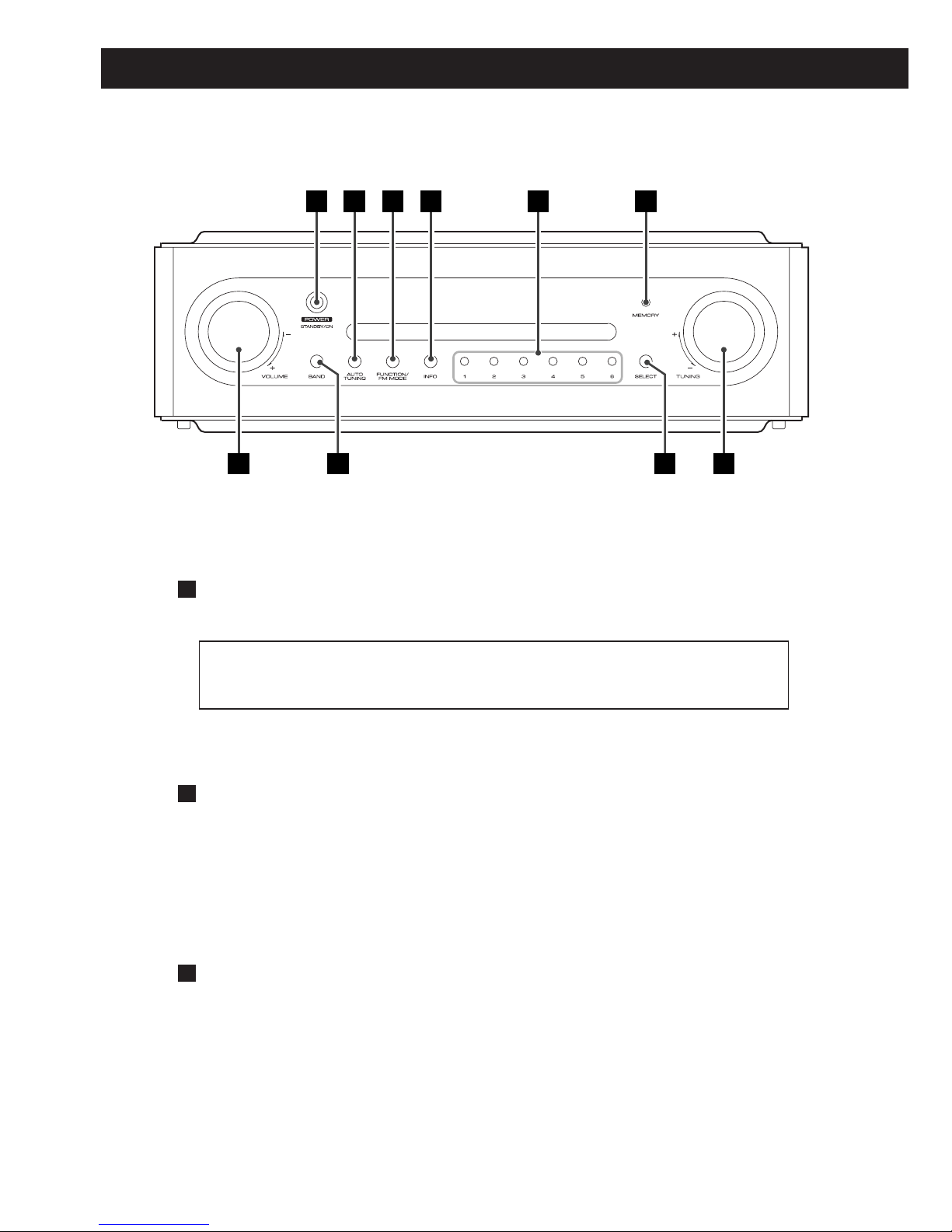
Names of Each Control . . . . . . . . . . . . . . . . 6
Setting up your DAB Tuner . . . . . . . . . . . . . 8
Auto Tuning . . . . . . . . . . . . . . . . . . . . . . . . 8
Using the Channel List . . . . . . . . . . . . . . . . 9
Using Function Control . . . . . . . . . . . . . . . 10
Station order . . . . . . . . . . . . . . . . . . . . 10
Signal error rate . . . . . . . . . . . . . . . . . . 11
Preset tune . . . . . . . . . . . . . . . . . . . . . . 12
DRC value . . . . . . . . . . . . . . . . . . . . . . 13
Manual tune. . . . . . . . . . . . . . . . . . . . . 14
Software version. . . . . . . . . . . . . . . . . . 15
Changing Display Settings. . . . . . . . . . . . . 16
Listening to FM Stations . . . . . . . . . . . . . . 17
Preset Tuning . . . . . . . . . . . . . . . . . . . . . . 18
About DAB . . . . . . . . . . . . . . . . . . . . . . . . 20
Specifications . . . . . . . . . . . . . . . . . . . . . . 21
Factory Reset. . . . . . . . . . . . . . . . . . . . . . . 21
Troubleshooting . . . . . . . . . . . . . . . . . . . . 22
IMPORTANT (for U.K.Customers)
DO NOT cut off the mains plug from this
equipment. If the plug fitted is not suitable for
the power points in your home or the cable is
too short to reach a power point, then obtain
an appropriate safety approved extension lead
or consult your dealer.
If nonetheless the mains plug is cut off,
remove the fuse and dispose of the plug
immediately, to avoid a possible shock hazard
by inadvertent connection to the mains
supply.
If this product is not provided with a mains
plug, or one has to be fitted, then follow the
instructions given below:
IMPORTANT. DO NOT make any connection
to the larger terminal which is marked with
the letter E or by the safety earth symbol| or
coloured GREEN or GREEN-and-YELLOW.
The wires in the mains lead on this product
are coloured in accordance with the following
code:
BLUE : NEUTRAL
BROWN : LIVE
As these colours may not correspond with the
coloured markings identifying the terminals in
your plug proceed as follows:
The wire which is coloured BLUE must be
connected to the terminal which is marked
with the letter N or coloured BLACK.
The wire which is coloured BROWN must be
connected to the terminal which is marked
with the letter L or coloured RED.
When replacing the fuse only a correctly rated
approved type should be used and be sure to
re-fit the fuse cover.
IF IN DOUBT — CONSULT A COMPETENT
ELECTRICIAN.

3
Before Use
Read this before operation
<As the unit may become warm during
operation, always leave sufficient space
around the unit for ventilation.
<Do not use any AC adaptors other than
the one included with this unit to avoid
fire, electric shock, etc. Be sure to connect
the AC adaptor to an AC outlet which
supplies correct voltage.
<Choose the installation location of your
unit carefully. Avoid placing it in direct
sunlight or close to a source of heat. Also
avoid locations subject to vibrations and
excessive dust, heat, cold or moisture.
<Do not place the unit on the amplifier or
the receiver.
<Do not open the cabinet as this might
result in damage to the circuitry or
electrical shock. If a foreign object should
get into the unit, contact your dealer or
service company.
<When removing the AC adaptor from the
wall outlet, never yank the cord.
<Do not attempt to clean the unit with
chemical solvents as this might damage
the finish. Use a clean, dry cloth.
<Keep this manual in a safe place for
future reference.
CAUTION
The product shall not be exposed to
dripping or splashing and that no object
filled with liquids, such as vases, shall be
placed on the product.
Do not install this equipment in a confined
space such as a book case or similar unit.
Beware of condensation
When the unit is moved from a cold to a
warm place, or used after a sudden
temperature change, there is a danger of
condensation; vapor in the air could
condense on the internal mechanism,
making correct operation impossible. To
prevent this, or if this occurs, leave the unit
for one or two hours with the power turned
on. Then the unit will stabilize at the
temperature of its surroundings.
Maintenance
If the surface of the unit gets dirty, wipe
with a soft cloth or use diluted neutral
cleaning liquid. Be sure to remove any fluid
completely. Do not use thinner, benzine or
alcohol as they may damage the surface of
the unit.

4
Connection
DIGITAL IN
CD-R, MD, etc.
AC outlet
AUDIO IN
cassette tape deck,
amplifier, etc.
B
C
E
A
D
optical digital cable
RCA cable
CAUTION
<Turn off the power of all the equipment before making connections.
<Read instructions of each component you intend to use with this unit.
<Be sure to insert each plug securely. To prevent hum and noise, do not bundle the
connection cords.

5
AUDIO OUT jack
Analogue 2-channel audio signal is output from this jack.
Connect the component with RCA pin cable.
AUDIO OUT (SR-L30DAB) wAUDIO IN (cassette tape deck, amplifier, etc.)
Make sure to connect :
white plug wwhite jack (L: left)
red plug wred jack (R: right)
DIGITAL OUT terminal
DAB’s digital audio signal is output from this terminal. If you want to record
digitally, or decode the signal using an external digital decoder, connect the
component with an optical cable.
DIGITAL OUT (SR-L30DAB) wDIGITAL IN (decoder, CD-R, MD, etc.)
<When inserting the plug of the optical cable, the protective shutter of the
terminal will open and you should hear it click into position when fully
inserted. Be careful that you do not force the plug, because this could result
in damage to the protective shutter, the cable, or the unit itself.
DC IN
Connect the provided AC adaptor to this jack. After all other connections are
complete, connect the AC adaptor’s plug to the AC wall socket.
<Do not use any AC adaptors other than the one included with this unit to
avoid fire, electric shock, etc. Be sure to connect the adaptor to an AC outlet
which supplies correct voltage.
PHONES
For private listening, insert the headphones plug into this jack, and adjust the
volume using the VOLUME buttons.
DAB/FM Indoor Antenna
Strech the telescopic antenna and point it towards the direction which gives
the best reception.
<You can check the DAB signal strength. Tune in a DAB station and press the
SELECT button once to display the signal strength.
E
D
C
B
A

6
Names of Each Control
The equipment draws nominal non-operating power from the AC
outlet with its POWER switch in the OFF position.
A FB C D E
H GJ I
POWER switch
Press this switch to turn the unit on or off (standby).
AUTO TUNING button
Press this button to activate auto location of all available DAB services.
Press once for UK services or, hold for longer than 2 seconds to activate
international search.
FUNCTION/FM MODE button
In DAB mode, activates features such as station order, manual tune, DRC
value, SW version indication, signal error rate. It is also possible to ‘tidy’
the station list to remove stations which are in the memory but have no
service provided.
In FM mode, pressing this button alternates between stereo mode and
mono mode.
C
B
A

7
INFO button
In DAB mode, this button is used to change the text content on the
second line of the display, to show DLS (Dynamic Label Segment, info text
supplied by each radio station), Programme type (classification given by
the radio sation ie: Pop music or Rock), Multiplex name (name of
multiplex broadcaster), Time & date, Bitrate, or Channel and frequency.
Numeric buttons
Use these buttons (1-6) to select the desired preset channel.
MEMORY button
Press this button to store the station. Up to 40 stations (DAB:10, FM:30)
can be stored in preset memories.
TUNING knob
Turn this knob to tune in a station.
SELECT button
Use this button to enter your selection.
Press once to show signal stength, press again to remove signal strength
display.
BAND button
Press this button to select the band (FM or DAB).
VOLUME knob
Turn this knob to adjust the volume.
J
I
H
G
F
E
D

8
Setting up your DAB Tuner
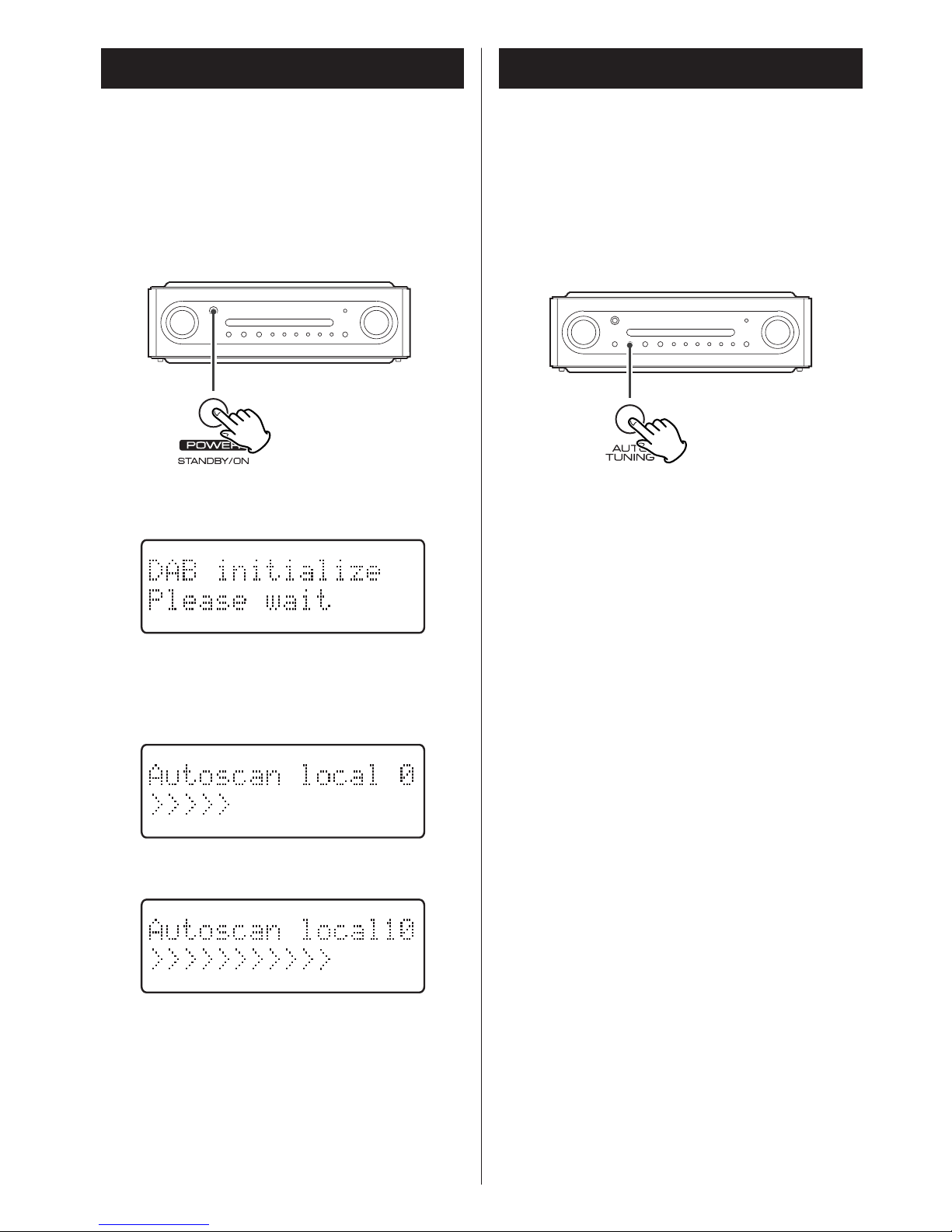
The following screen will display for 2
seconds.
The unit will scan for broadcast services in
the local area and add them to the channel
list as they are found. The scan should take
about 10 seconds.
As channels are added to the channel list the
number of channels found is displayed.
After broadcast services have been found the
channels are listed in alphanumeric order.
>If no broadcast services are found, please
reorient the antenna.
The first time you turn on the unit, it will
scan for DAB channels and build a channel
list.
Press the POWER switch to turn the unit
on.
Auto Tuning
If you move the unit to a new area or you
want to check to see if there are new
channels available in your area, you can scan
to find new channels automatically.
Press the AUTO TUNING button.
The unit will scan for any new channels and
add the channels found to the channel list.
>Press and hold the AUTO TUNING button
for longer than 2 seconds to activate
international search.

9
Using the Channel List
<To display the signal strength of a
channel, press the SELECT button again.
Press the SELECT button once again to
cancel the signal strength display.
<Channels are displayed in alphanumeric
order in the channel list, with numbers
coming first. So, stations such as 6 Music
from the BBC will be listed early in the
list.
<If a channel is no longer broadcasting or
the unit is moved out of the area of a
broadcast channel, the unit will no longer
be able to tune in the channel. If the
channel cannot be tuned in a question
mark (?) is displayed in front of the
channel name. If you select this channel
to tune in by pressing the SELECT button,
‘No stations Available’ is displayed.
<You can remove a channel that is no
longer available from the channel list. See
Tidy station, page 11.
v
1 3 2
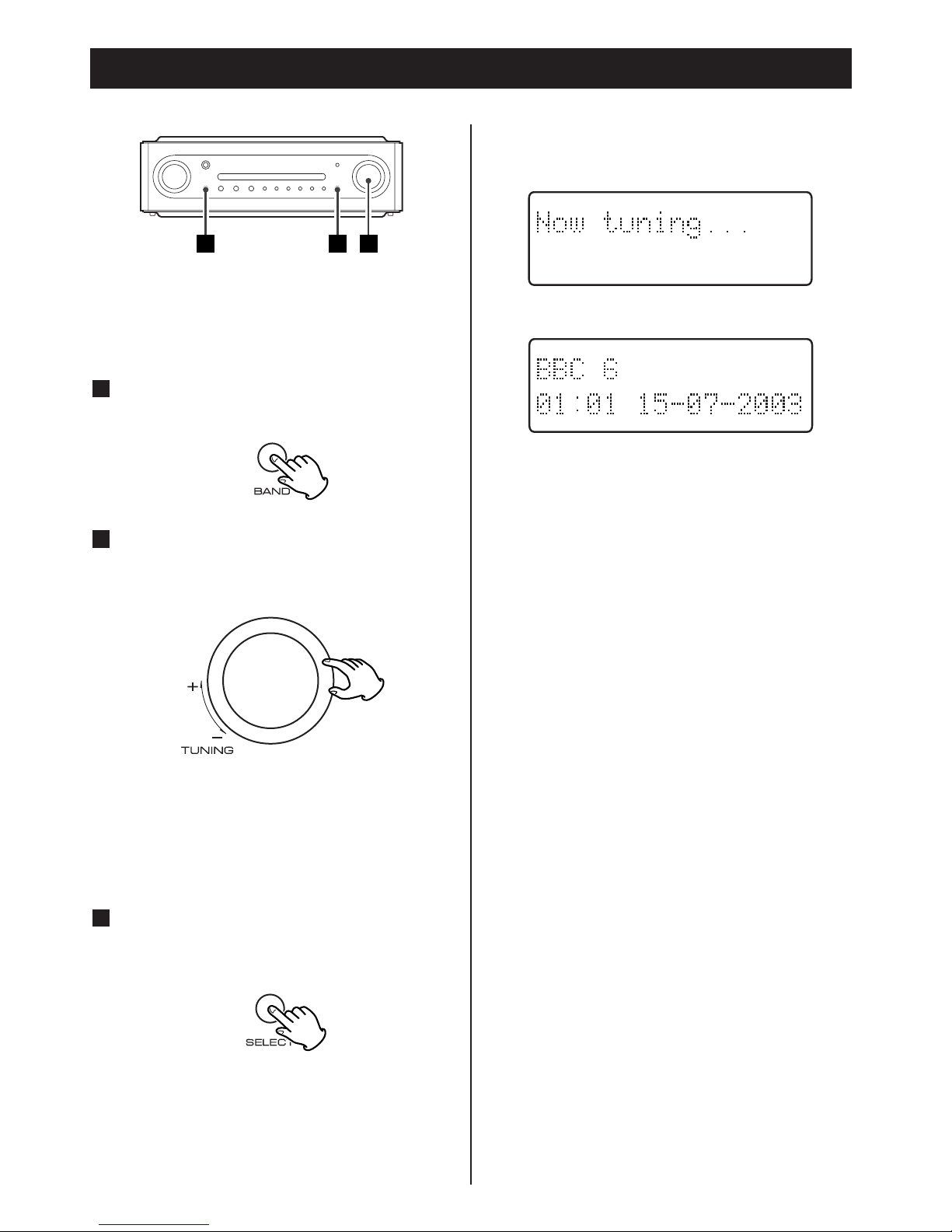
Follow the steps below to tune in and listen
to the channels found by the unit.
Select DAB by pressing the BAND
button.
1
Turn the TUNING knob to the left or
right to scroll through the channels in
the channel list.
2
The present channel is displayed on the
first line and the changing list is displayed
on the second line.
When you have found a channel that
you want to listen to, press the
SELECT button once.
3
The channel is tuned in and channel
information is displayed.

10
TUNING
FUNCTION/
FM MODE SELECT
In DAB mode, use function control to set
system options. There are 6 options in the
function control.
Station order
Use station order to set the order in which
stations are listed. There are four orders:
Favourite, Alphanumeric, Active and Tidy.
While listening to a DAB broadcast
press the FUNCTION/FM MODE
button.
1
Turn the TUNING knob until ‘Station
order’ is displayed in the second line
of the display.
2
Press the SELECT button.
3
Turn the TUNING knob until the
desired option is displayed in the
second line of the display.
4
The current option is displayed in the first
line of the display.
Using Function Control 1
Indice
Altri manuali Teac Radio

Teac
Teac SR-L70i Manuale utente

Teac
Teac CRX45iP Manuale utente

Teac
Teac SR-L200i Manuale utente

Teac
Teac DAB400 Manuale utente

Teac
Teac SR-LX5i Manuale utente

Teac
Teac TASCAM AK-A9010 Manuale utente

Teac
Teac SL-D900 Manuale utente

Teac
Teac SR-80i Manuale utente

Teac
Teac R-1 Manuale utente

Teac
Teac SL-D920 Manuale utente

Teac
Teac R-4iNT Manuale utente

Teac
Teac SR-LXI Manuale utente

Teac
Teac SL-D96 Manuale utente

Teac
Teac SR80iDABp Manuale utente

Teac
Teac SR-L200i Manuale utente

Teac
Teac SL-D900BT Manuale utente

Teac
Teac SR-L230I-B Manuale utente

Teac
Teac SR-L250i Manuale utente

Teac
Teac GR-7i Manuale utente

Teac
Teac PR200DAB Manuale utente