TeamMate UX60 Manuale utente

SMART Board VariHite
Doc. Ref 33-051-E
MSB
29-9-2010
SMART Board VariHite
Conguration and User Manual for UX60 Projector and Screen
Mounting to Mobile Stand
Part No. 140001
Doc. Ref 33-051-E
MSB
29-9-2010

SMART Board VariHite
Doc. Ref 33-051-E
MSB
29-9-2010
Physical dimensions of the TeamMate VariHite stand with
different congurations

SMART Board VariHite
Doc. Ref 33-051-E
MSB
29-9-2010
Before you install and use the SMART Board interactive
whiteboard system to the TeamMate VariHite Mobile Stand, please
read, understand and observe the Safety Warnings, Cautions,
Important Information and Assembly Instructions in this User
Manual. The manual describes the safe and correct operation of
the TeamMate VariHite Stand, helping you to prevent injuries and
equipment damage. You should always ensure that the TeamMate
VariHite Mobile Stand is being used correctly.
If you own a TeamMate product other than a TeamMate VariHite for
SMART Board Mobile Stand system, please refer to the Installation
Guide or User Manual that came with your product for relevant
warnings and maintenance instructions.
The TeamMate VariHite Stand is designed to work with certain
SMART Board interactive models only. The TeamMate VariHite
Stand for SMART Board has been designed and tested for the
products listed in this document.
For more information, or if you are not sure if your TeamMate
product is compatible please refer to an approved TeamMate
reseller or distributor.
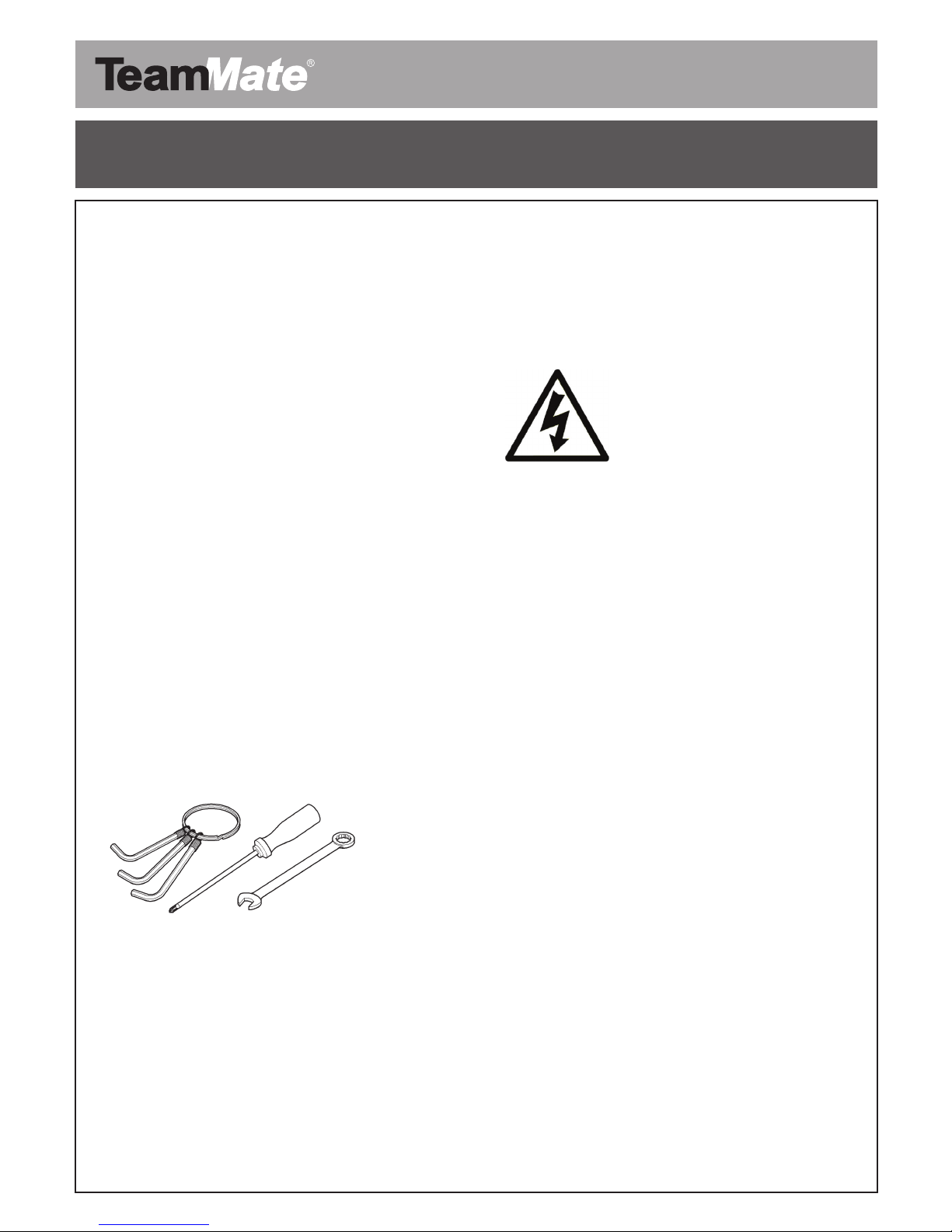
Required Tools
2.5mm Hex Wrench Allen Key•
3mm Hex Wrench Allen Key•
5mm Hex Wrench Allen Key•
Medium cross head screw driver•
8mm Combination Wrench•
19mm Socket Wrench•
Safety warnings
Electrical
Observe all electrical and warning stickers
Toreducetheriskofreorelectricshock,donotexposeany•
component of your TeamMate VariHite Mobile Stand to rain or
moisture.
Make sure that an electrical socket is near your TeamMate•
VariHite Mobile Stand for SMART Board product and remains
easily accessible during use.
All power must be disconnected before removing any covers on•
the TeamMate VariHite Mobile Stand.
Exterior metal work is earth bonded.•
Avoid damaging power cords or modifying power cord, power•
strip or any other internal wiring that has been supplied by
Performance Enclosures.
Do not attempt to service the TeamMate VariHite Mobile Stand•
other than performing routine safety checks; there are no user-
serviceable parts inside the unit. Do not open or disassemble
the TeamMate VariHite Mobile Stand as this may cause electric
shock.
If any component appears to be loose or becomes detached•
from the TeamMate VariHite Stand, Call an authorised
TeamMate reseller for instructions. Do not attempt to repair the
stand.
Do not open the TeamMate VariHite Mobile Stand rack or•
screen support enclosure without disconnecting the unit from
the mains supply.
Before moving the TeamMate VariHite Mobile Stand always•
disconnect from the mains supply and any other connections.
Always check the power cable and socket attached to the•
TeamMate VariHite Mobile Stand for signs of damage or wear.
OncetheTeamMateVariHiteMobileStandhasbeencongured•
for use it is advised that the appliance as a whole is PAT tested
with all third party equipment installed to ensure that the system
as a whole is electrically safe for use.
Ensure that none of the earth straps supplied with the•
TeamMate VariHite Mobile Stand are disconnected, as this will
compromise the route to earth during any potential shorting and
may result in electrical shock. It is also advised that the earth
strap to the selected projector mount is connected before use
(Please refer to User Guide).
At no time should the power bar inside the rack unit be•
tampered with or opened as this may result in electrical shock
when connected to the mains supply.
Regularly check that no mains cables are caught or snagged,•
as this may result in electric shock.
Safety warnings, cautions and important information

SMART Board VariHite
Doc. Ref 33-051-E
MSB
29-9-2010
Observe all Caution stickers
Two people are required to safely mount your SMART Board•
on a TeamMate VariHite Mobile Stand; it might be too heavy
for one person to safely manoeuvre alone. When you lift your
SMART Board, you and your assistant should stand on either
side of the screen, supporting its weight at the bottom corners
while stabilising the top with your other hands. The wheels
should be in the locked position to prevent the stand from
moving.
Donotleavecablesontheoorwheretheycanbeatripping•
hazard.Ifyoumustrunacableovertheoor,layitinaat,
straightlineandsecureittotheoorwithtapeoracable
management strip of a contrasting colour. Handle cables
carefully and avoid excessive bending.
Only mount products that are listed in this document. The•
TeamMateVariHiteMobileStandiscertiedforusewiththe
speciedmodels.
When the TeamMate is in position, lock down all castors. Failure•
to comply with this warning may result in instability leading to
equipment damage or personal injury.
Do not move the TeamMate VariHite Mobile Stand unless it’s•
in the transport position. The TeamMate VariHite Stand must
be lowered to the lowest position. The projector boom/mount
must be in the transport position (please observe User Guide for
correct position). Make sure clamping handle is tightened.
Do not attempt to lift the TeamMate VariHite Mobile Stand unit•
when fully assembled.
When moving the TeamMate VariHite Mobile Stand, please•
ensurethatyouhavesufcientmanpower(pleaserefertoyour
own health and safety policy).
Ensure body parts, loose garments and any other items are•
kept away from all moving parts.
The up and down control should only be activated using the•
supplied control switch, unless authorised by Performance
Enclosures.
Do not climb (or allow children to climb) on any part of your•
TeamMate VariHite Mobile Stand. Climbing on the whiteboard
or projector boom could result in personal injury or product
damage. Do not climb on, hang from, or suspend objects from
any part of the projector system.
Failure to follow the instructions shipped with your TeamMate•
VariHite Mobile Stand product could result in personal injury and
damage to the product.
When installing your SMART product to the TeamMate VariHite•
Mobile Stand for SMART Board, please refer to the relevant
installation safety information provided with your SMART
product.
When mounting the projector on the TeamMate VariHite Stand,•
you must attach both the mounting bracket and safety tether to
the provided stud to safely support the projector’s weight. If the
projector plate bolts come loose the projector may fall, resulting
in product damage and possible personal injury.
Ensurethatanycablesextendingacrosstheoortoyour•
TeamMate VariHite Mobile Stand are properly bundled and
marked to prevent a trip hazard.
When lowering the screen support structure, ensure there are•
no objects overhanging the front face of the rack enclosure, as
these may become entangled or crushed by the white board
lower mounting plate. As a matter of precaution and to remind
the user of this potential hazard, the screen will stop at 10cm
from the potential crush point. The user will then have to release
the down button on the control panel then re-apply pressure to
the down button.
When moving the TeamMate VariHite Mobile Stand, please•
ensure that the projector is moved in to its “Parked” position
and locked off. Drop the height of the TeamMate VariHite Mobile
Stand to its lowest position. It is recommended that, if using the
swing projector option, that you move the projector head to the
opposite side to the elevation control panel. At all times during
elevation and lowering operations, check that the projector
does not hit or clash with any surrounding object or person. It is
advised that the use of the variable height operation is carried
out by an adult who has been instructed in its use and has read
this document.
When moving the TeamMate VariHite Mobile Stand, ensure•
thisoperationiscarriedoutbytwoadultseachholdingrmly
the handles provided, always move the TeamMate VariHite
Stand in the longitudinal direction ( this means to the left or right
when looking at the front surface of the stand with the board
attached).
Do not move the TeamMate VariHite Mobile Stand at any speed•
higher than a slow walk; failure to do so may result in the stand
tipping, possibly causing injury, if it were to suddenly stop.
Never move the TeamMate VariHite Mobile Stand with the•
projector in its fully extended vertical position, as this will
damage or cause a tipping action that may result in injury or
damage to the equipment.
When moving up or down an incline ensure two adults are•
holding the TeamMate VariHite Mobile Stand handles to reduce
the likelihood of toppling. Do not exceed the maximum incline
angle of 5 degrees.
It is recommended that the TeamMate VariHite Mobile Stand•
is moved over smooth surfaces, users need to be aware that
rough surfaces, door thresholds and obstructions may induce a
tipping action that may result in damage or injury.
Cautions

SMART Board VariHite
Doc. Ref 33-051-E
MSB
29-9-2010
Regular checks of the third party attachments such as the•
SMART Boards and peripherals need to be made to ensure
that they are still attached in accordance to the installation
guidelines. Failure to do so may result in third party equipment
falling from the TeamMate VariHite Mobile Stand, causing
damage or injury. This is highly recommended if the stand is
moved on a regular basis.
Donotallowliquidsorcommercialsolventsofanykindtoow•
into or on the TeamMate VariHite Mobile Stand.
Cycling power to the TeamMate VariHite Mobile Stand•
repeatedly can lock or damage the variable height system. After
you turn off the system, wait at least 1 minute before turning on
the system.
Do not add extra weight or apply pressure to the projector•
boom, the stand-mounted SMART Board or its pen tray.
Performance Enclosures designed the brackets to support only
the weight of the components during normal use. Do not push
or pull the TeamMate VariHite Mobile Stand by the SMART
Board or any accessories; always use the handles provided.
The TeamMate VariHite Mobile Stand is made from steel and•
stainless steel components. Some of these components may
be sharp and blunt and care must be taken in handling these
components to avoid cuts and bruising during normal use. Take
care to avoid catching limbs and bumping body parts when
using or moving.
At no time should the power bar inside the rack unit be•
tampered with or opened as this may result in electrical shock
when connected to the mains supply.
Regularly check that no mains cables are caught or snagged as•
this may result in electrical shock.
Turn off the TeamMate product before cleaning it.•
The screws that secure the interactive whiteboard to the•
TeamMate VariHite Stand are located directly behind the pen
tray.
The pen tray must be removed before you can remove or install•
the SMART Board.
Disconnect the product from its power source when it is not•
used for a long period.
Take care when cleaning or maintaining the TeamMate VariHite•
Mobile Stand. If necessary, use a soft cloth moistened with
a mild detergent; do not use abrasive cleaners, or solvents.
Cleaning of stainless steel parts may be achieved with a light oil
based liquid applied to a cloth.
Important information

SMART Board VariHite
Doc. Ref 33-051-E
MSB
29-9-2010
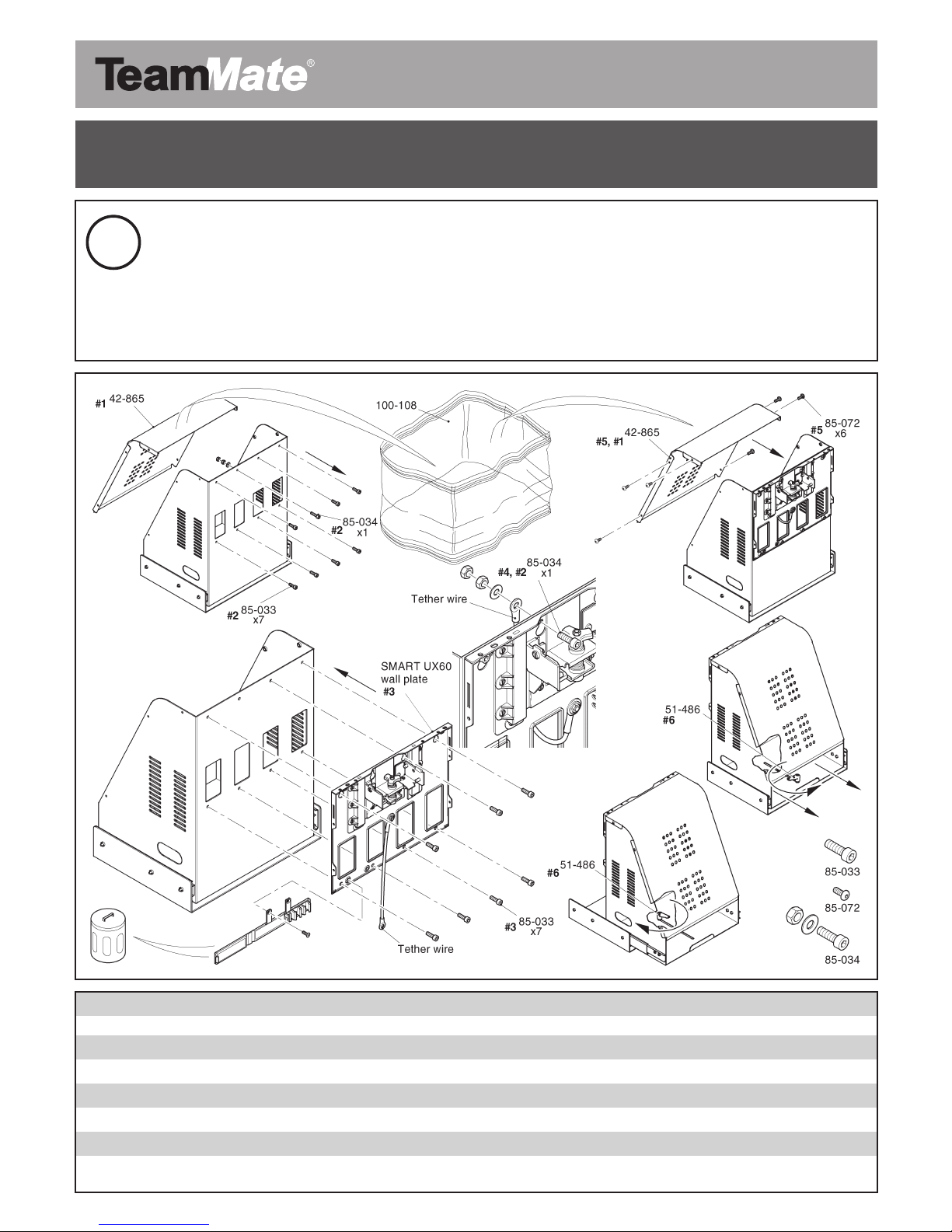
Remove the UX60 projector mount kit from the
packing box
100-205 UX60 Packaging box
85-072 M4 x 12mm stainless steel hex button head
42-865 Projector slide mounting frame cover
100-413 Packaging label
85-103 Nylon 6.6 cheesehead screw M6 x 20mm
85-104 Nylon 6.6 M6 full nut
85-105 Nylon 6.6 insulating washer
1

SMART Board VariHite
Doc. Ref 33-051-E
MSB
29-9-2010
Prepare the TeamMate projector mount partcode 140001
for attachment of the SMART UX60 wall plate and attach
SMART security tether wire
42-865 Projector slide mounting cover
85-034 M6 x 25 zinc steel hex button head screws
85-033 M6 x 20 zinc steel hex cap head screws
85-013 M6 zinc steel plain washer
51-485 254mm slider drawer
51-486 Clamping handle
85-072 M4 x 16 stainless steel hex button head screws
2

SMART Board VariHite
Doc. Ref 33-051-E
MSB
29-9-2010
Install the combined smart wall mount and TeamMate
projector mount onto the display frame
3
42-863 Lower slide mounting plate
85-032 M6 x 16 zinc steel hex cap head
85-013 M6 zinc steel 1 plain washer
51-486 Clamping handle M6 x 10
42-863 Slide mounting plate
42-857 Display frame
51-301 Linak activators

SMART Board VariHite
Doc. Ref 33-051-E
MSB
29-9-2010
Fit SMART Board interactive screens and attach
UX60 projector to Mobile Stand
85-012 M5 zinc steel plain steel washer
85-092 M5 x 25 zinc steel hex cap head
4

SMART Board VariHite
Doc. Ref 33-051-E
MSB
29-9-2010
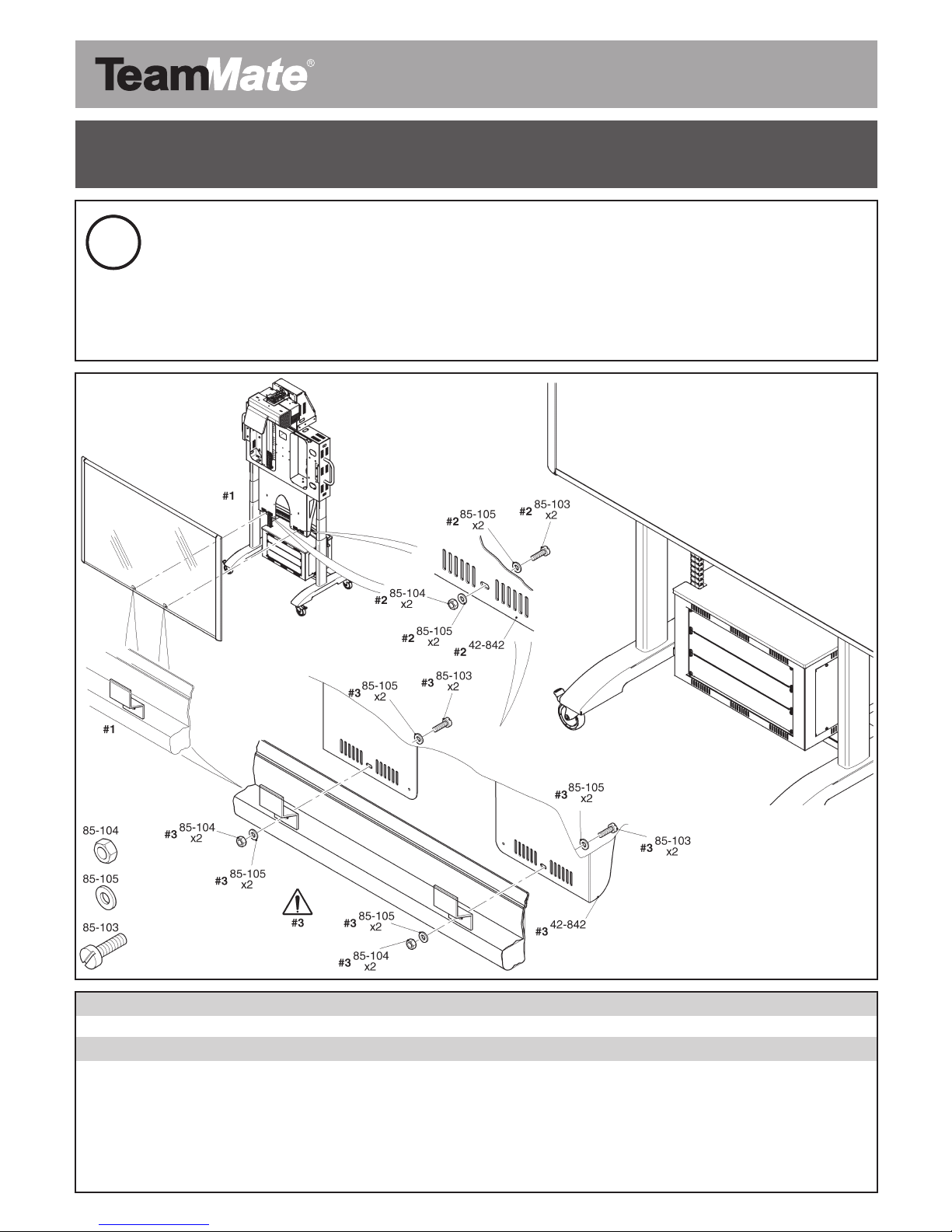
5Fitting SMART Board interactive screens (continued)
42-842 Lower support bracket
85-103 Nylon 6.6 cheesehead screw M6 x 20mm
85-104 Nylon 6.6 M6 full nut
85-105 Nylon 6.6 insulating washer
Questo manuale è adatto per i seguenti modelli
1
Indice