
Teknion SWERV Istruzioni operative e di manutenzione

SWERV USB HUB (YMSUS)
Section:
Description: Page No:
Date:
Rev. No: 1
SWERV USB HUB, SINGLE
ELECTRICAL
Sep 2023 1 of 8
COM_502
complements
Installation Guides

Part and Product Identification
A1 - YMSU USB HUB 30W
(YMSUA__-RAW) x1
Section:
Description: Page No:
Date:
Rev. No: 1
SWERV USB HUB, SINGLE
ELECTRICAL
Sep 2023 2 of 8
COM_502
complements
Installation Guides
B1 - YMSU USB HUB 77W
(YMSUHOA__-RAW) x1
B2 - YMSUSH
(HIGH CAPACITY)
EDGE CLAMP KIT
(MPN10-E012) x1
A2 - YMSUSS(SWERV USB)
EDGE CLAMP KIT
(MPN10-E011) x1
C - TRANSFORMER BRKT,
UNDERMOUNT USB
(MPA16-E196) x1
D - YEUSB 2.5M LINKING
JUMPER
(WC-YEUSB-8FT) x1
B3 - YMSUSH POWER ADAPTER
(WC-PS-YMSUHO-80W) x1
E - P-CLIP 3/8" CORD,
0.203" HOLE
(PCORDMGMT-3326) x2
F - P-CLIP 1/8" CORD,
0.170" HOLE
(PCORDMGMT-3362) x2
G - #8-5/8 Board Screw
(FS8-5/8PB) x varies
(2, 4, 8, or 10)
A3 - YMSUSS 36W POWER
SUPPLY
(WC-PS-YMSU-36W) x1
WHAT'S INCLUDED
YMSUSSM1 YMSUSHM1
A1
H - USB Holder For
Magnet Mount
(N01-9848) x1
YMSUSSM2 YMSUSSM3 YMSUSHM2 YMSUSHM3
A2
A3
B1
B2
B3
C
D
E
F
G
H
1 1 1 0 0 0
010 0 0 0
1 1 1 0 0 0
0 0 0 1 1 1
0 0 0 0 10
0 0 0 1 1 1
0 0 0 1 1 1
1 1 1 1 1 1
0 0 0 1 1 1
1 1 1 1 1 1
1 1 11 1 1
0 0 10 0 1
I0 0 10 0 1
I - J-Clip Clear Adhesive 1.25"
(PCORDMGMT-MKKJ-2-RT) x2
NOTE: DC option only available for
standard capacity, when DC option is
selected, A3 will be excluded.

STEP 1a: Plug in the power supply cable end in the USB hub. Line up the bracket with drilled
holes and secure with screws provided.
NOTE: For YMSUSHM1A_ instead of Power Supply cable, the linking Jumper Cable is
attached..
STEP 1: Pre-drilled 7/64" diam. hole. Location on the Worksurface as specified in the
drawings. The location of holes can be marked before drilling.
NOTE: Keep min. distance of 2.5" from back edge of the Worksurface to the center of the
cut-out.
Section:
Description: Page No:
Date:
ASSEMBLY FOR YMSUSSM1A_ & YMSUSHM1A_ ASSEMBLY FOR YMSUSSM1A_ & YMSUSHM1A_
COM_502
3 of 8
Sep 2023
SWERV USB HUB, SINGLE
ELECTRICAL
complements
Installation Guides
2.5"
4.9"

STEP 1a: Plug the end of the power supply cable in the USB hub as shown. Then, place the
edge clamp with USB hub on worksurface and secure the edge clamp by turning the thumb
screw clockwise.
NOTE: For YMSUSHM2A_ instead of Power Supply, the linking Jumper Cable is attached.
STEP 1: Slide plate into edge clamp as shown, then slide the edge clamp into the slot on the
back of Swerv USB hub.
NOTE: This installation step is same for YMSUSHM2A_.
Section:
Description: Page No:
Date:
ASSEMBLY FOR YMSUSSM2A_ ASSEMBLY FOR YMSUSSM2A_
COM_502
4 of 8
Sep 2023
SWERV USB HUB, SINGLE
ELECTRICAL
complements
Installation Guides

Section:
Description: Page No:
Date:
ASSEMBLY FOR MAGNET MOUNT
Sep 2023 5 of 8
COM_502
SWERV USB HUB< SINGLE
ELECTRICAL
complements
Installation Guides
STEP 1: Attach Magnet Mount to bottom of worksurface using the Open Cell Sponge Rubber on the opposite side of the Magnet Mount. Plug the end of the power supply cable in the USB Hub.
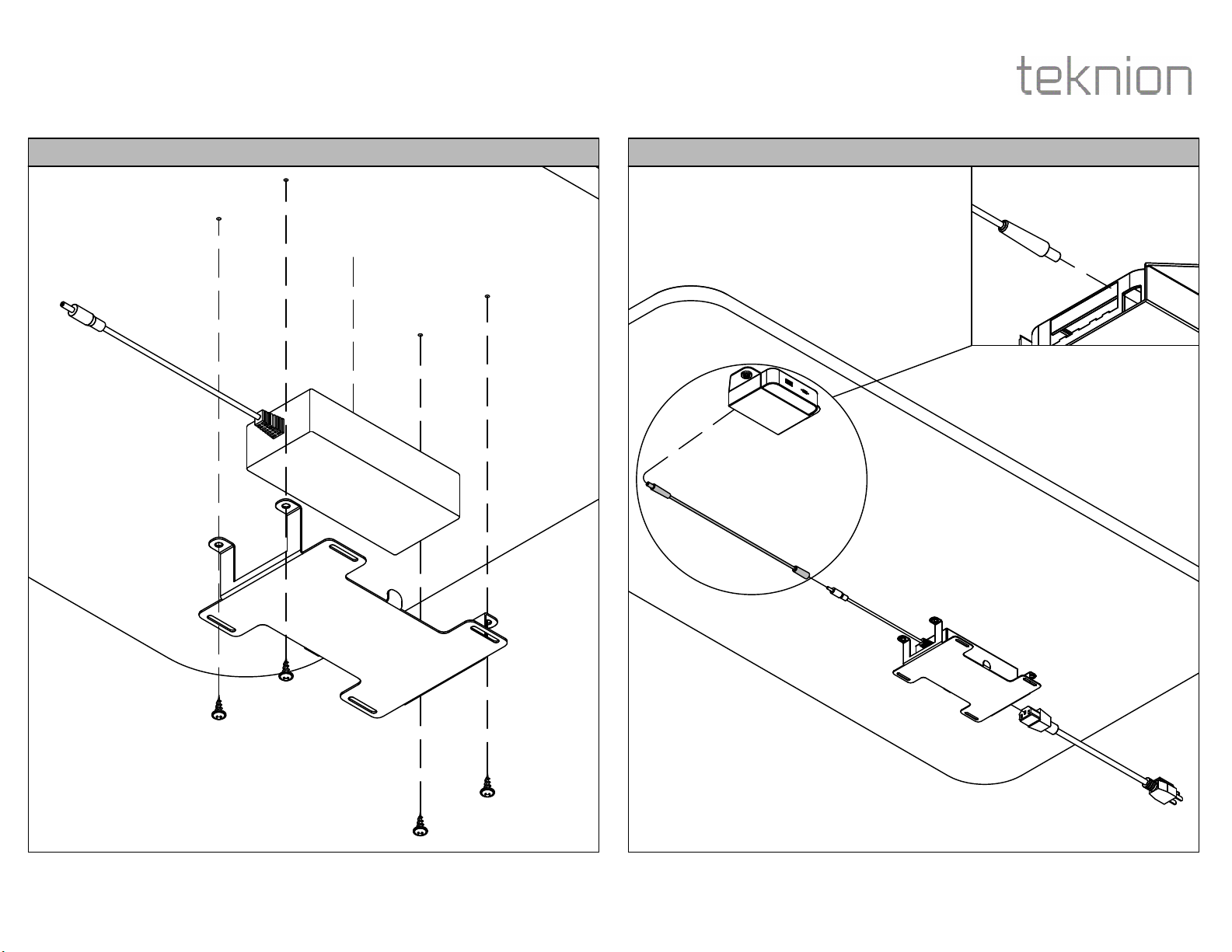
STEP 3: Plug in one end of the linking jumper in the USB module and the other end in the
power supply. Then, connect the power cord with the power source.
NOTE: This installation step is only for YMSUSHM1A_ & YMSUSHM2A_.
STEP 2: Position the bracket onto the worksurface with the Power Supply (D) beneath it as
shown above.
NOTE: This installation step is only for YMSUSHM1A_ & YMSUSHM2A_.
Section:
Description: Page No:
Date:
ATTACHING POWER ADAPTER CONNECTING POWER ADAPTER
COM_502
6 of 8
Sep 2023
SWERV USB HUB, SINGLE
ELECTRICAL
complements
Installation Guides

STEP 5: Place the P-clip on the wire and secure it with the worksurface using the provided
screw.
STEP 4: Drill a 7/64" diam. hole next to the wire. Ensure to keep a distance of more than 4"
from the edge of the work surface.
Section:
Description: Page No:
Date:
Attaching P-Clip Attaching P-Clip
COM_502
7 of 8
Sep 2023
SWERV USB HUB, SINGLE
ELECTRICAL
complements
Installation Guides
Section:
Description: Page No:
Date:
ATTACH ADHESIVE CLIP FOR WIRE
Sep 2023 8 of 8
COM_502
SWERV USB HUB, SINGLE
ELECTRICAL
complements
Installation Guides
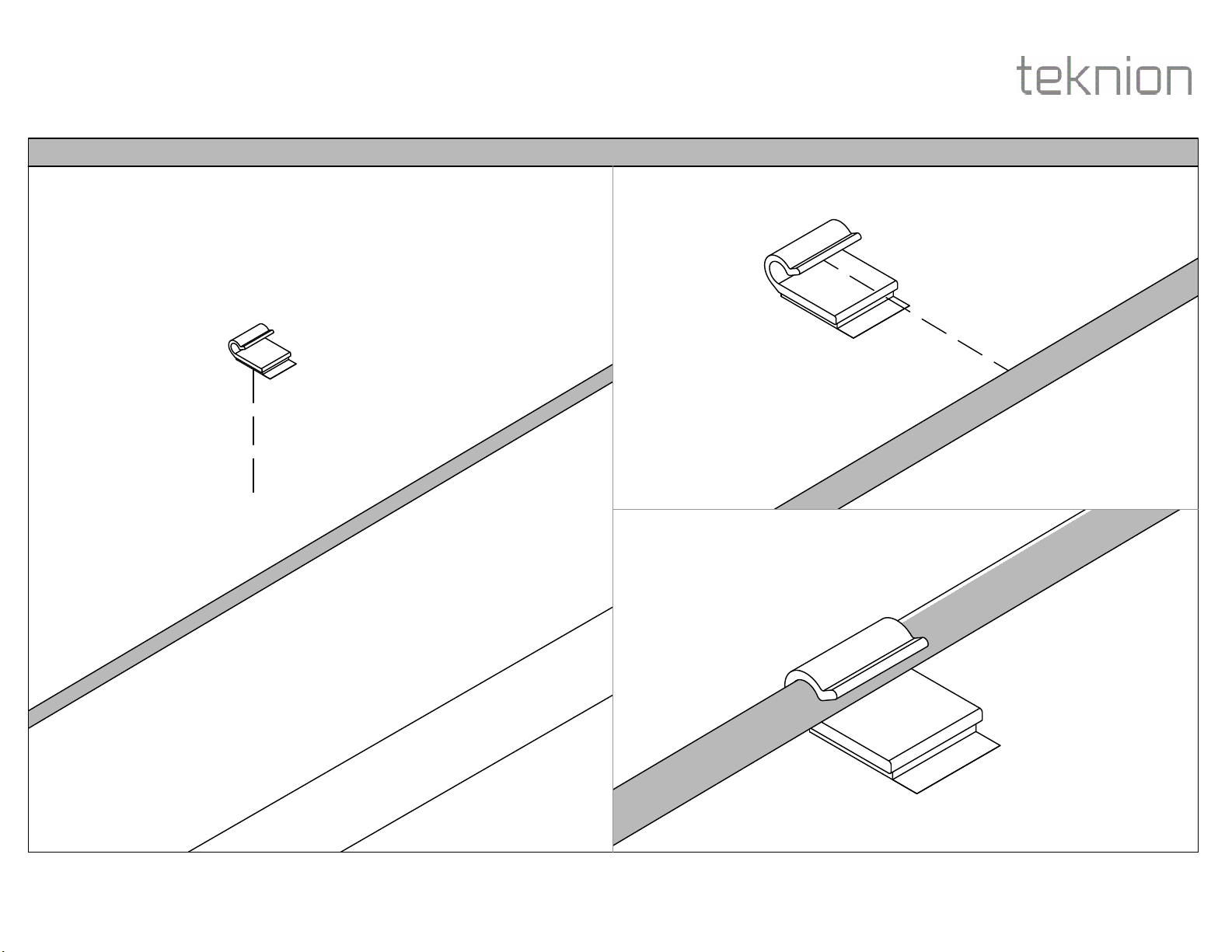
STEP 4: Attach Adhesive Clip to bottom of worksurface using adhesive tape on bottom of clip. Insert wire into Clip.
Questo manuale è adatto per i seguenti modelli
7
Indice
Altri manuali Teknion Interruttore


