teko Astra-45A Manuale utente

Astra-45A
Addressable hardwired
fire manual call point
User guide
Manufacturer:
ZAO NTC TEKO
420108, Russia, Kazan,
Gafuri str., 71
Tel.:+7(843) 528-03-69
www.teko.biz
Made in Russia
Rev. 45А-v2_0_instr_en
1 FUNCTION
The addressable hardwired fire manual call point
(further “Call Point” or “Astra-45A”, “device”) is de-
signed to manually trigger a fire alarm by pressing the
drive element (button), to generate a “Fire”notification
and to transmit the “Fire” notification via Signaling
Line Circuit (SLC) through Astra-A RPA to Control
Panels: Astra –812 Pro or Astra –8945 Pro (version
5_5 or version higher).
Astra-45A provides isolation of the SLC section in
which a short circuit has occurred (Control Panel
version 5_5 and version higher).
Astra –45A is powered by Astra-A RPA.
2 SPECIFICATION
Power supply voltage, V................................ 7,5 - 27,6
Dimensions, mm.…………………………… 110×94×48
Operating Conditions
Temperature range, °С.......................from - 30 to + 55
Relative air humidity, %......................up to 93 at +40°С
without moisture condensation
3 DELIVERY SET
Delivery set includes: unlock key (large) –1 pc, push
key (small) –1 pc, labels –2 pcs, fastening parts (dow-
els –2 pcs, screws –2 pcs), user guide –1 pc.
4 INDICATION
Status
LED
Standby mode
x1 green flash with a period of 8-9
sec.
Fire alarm
x1 red flash with a period of 2 sec.
Fire test
x1 red flashes with a period of 2
sec. during 20 sec.
Power failure
x3 red flashes with a period of 25
sec. at a supply voltage below 8 V
Power failure
SLC1 or SLC2
x1 yellow flashes with a period of 3
sec. at a short circuit or voltage
below 8 V on the supply line L1 or
L2
Data lines
SLC1 or SLC2
failure
x2 yellow flashes with a period of 3
sec. at Data lines SLC1 or SLC2
short circuit
Circuit break
Any possible variant from the table
Command
receiving from
Laser pointer
(LP)
x1 red switching on for 2-5 sec
5 ADDING TO THE SYSTEM
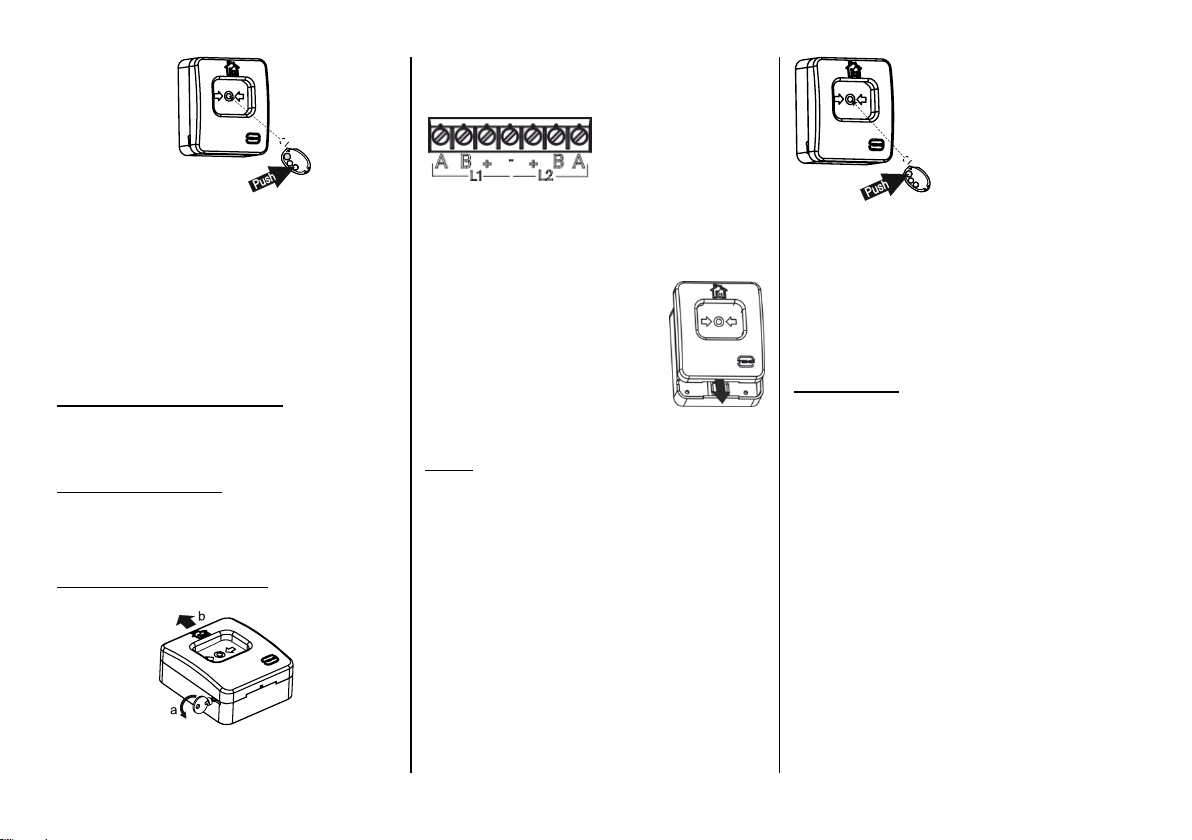
1) Connect the RPA to the Control Panel using RS-
485 interface.
2) Add the Astra-RPA to the Control Panel according to
the user guide of the Control Panel Astra-812 Pro or the
PKM Astra Pro or Pconf-Pro PC built-in. Install the device
at the selected location (see point 8, actions 1)-5)).
Note:
It is recommended to install all Call Points before
registration, because their registration is carried out
using the Astra-942 (L P) and supplied separately.
3)Run the Control Panel mode of Device Adding in the
RPA through Astra Pro PKM or the Control Panel
“Astra-812 Pro” menu in accordance with the Control
Panel manual.
It takes 60 sec to register a device.
4)Run the registration Astra –45A mode:
- press the lower button on the LP
and hold it until the beam appears

-irradiate the Astra –45A indicator at least
1 sec. (the indicator should turn on red for 2 sec.)
WARNNING!
Running registration for several devices at one and
the same time is forbidden.
5) Registration running check:
In case of successful registration, you will see
“Detector”or “Detector is added”on the screen.
In case of unsuccessful registration repeat ac-
tions from 4) to 6
6 REMOVING FROM THE SYSTEM
Removing any device form RPA’s memory can be
performed using installation program modules PKM
Astra Pro or Astra –812 Pro menu.
7 INSTALLATION PLACE
It is recommended to install the device in an accessi-
ble place along escape routes, in corridors, on stair-
cases, at exits.
8 INSTALLATION PROCEDURE
1)Open the device with akey with a beard
2) Mount the base
3) Connect the SLC power cables (terminals "+")
and "-") and the SLC data cables (terminals "A" and "B")
coming from the RPA through the holes for cable enter-
ing in the device base. Recommended cable type –
FRLS 2×2×0.5
The group of terminal blocks L1 or L2 for connecting the
incoming or outgoing ALS can be selected randomly.
ATTENTION!
Connect cables with de-energized lines only!
4)Assemble the device:
- press the device cover against
the base to align the grooves
- slide the cover down until the
latch locks
5)Register the device in the RPA (see section 5)
6)Perform the devicetesting (see section 9)
9 TEST
1)Press the button. A white (or yellow) curtain will ap-
pear at the top of the cover, indicating that the device is
in alarm. The red indicator of the device will blink with
short flashes with a period of 2 sec.
2) Check the "Fire" notification on the screen or
indicator of the Control Panel and/or in the PKM Astra
Pro or in Pconf Pro program.
3) Return the device to Standby mode:
- insert the push key into the hole on the lower end of
the device until it stops (until the button is unlocked);
- remove the key
- disable fire alarm with a registered identifier
- check the device and the Control Panel returning to
Standby mode
4) Activate the "Test" mode:
5) press the red button on Laser Pointer
- direct the laser beam at the indicator
- irradiate the indicator for 1 sec. The device indi-
cator should turn on red for 5 sec. Check the "Fire
Test" notification in the device indicator. In the
event log of PKM Astra Pro or Control Panel As-
tra-812 Pro, an entry “Fire Test” will be made, and
the message “Fire Test” will be displayed in the
Pconf-Pro.
10 WARRANTY
The operation warranty period is 5 years from the date
of operation start-up, but no longer than 5 years 6
months from the date of manufacturing, in condition of
compliance with the requirements of the current tech-
nical manuals and user guide.
Altri manuali teko Allarme antincendio


