Tele
Eye III+ VX Installation Guide Page 4
Installation of
Tele
Eye III+ VX for Local Monitoring
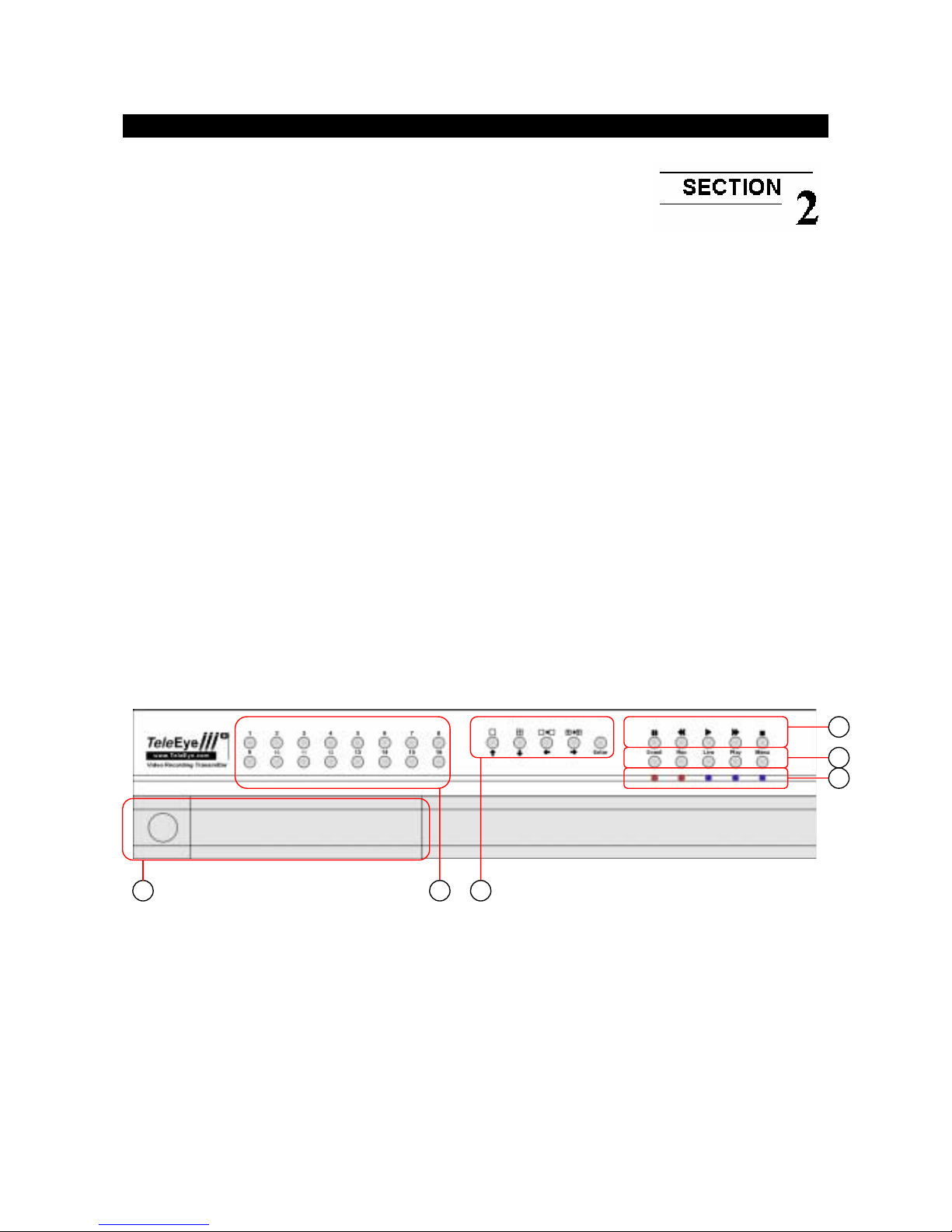
2. Live camera control buttons
-VX–4001 / VX–4002: 1 – 4
-VX–8002 / VX–8004: 1 – 8
-VX–16004 / VX–16008: 1 – 16
-Camera control buttons allow user to fast switch to a specific camera for local monitoring
-The buttons are also used for password input
3. Screen mode control / Menu control buttons
Enter
-There are 2 modes for these buttons, either in live mode or menu control mode
-In live mode, the buttons are used to change video display mode in full screen, quad screen,
full screen page mode and quad screen page mode
-In menu control mode, the buttons are used as “up”, “down”, “left”, “right” and “Enter”
control
4. Local Playback control buttons
-These 5 buttons are used for recording playback control only
-The functions are pause, fast backward, play, fast forward, and stop