1110
Using your TELUS Satellite TV service
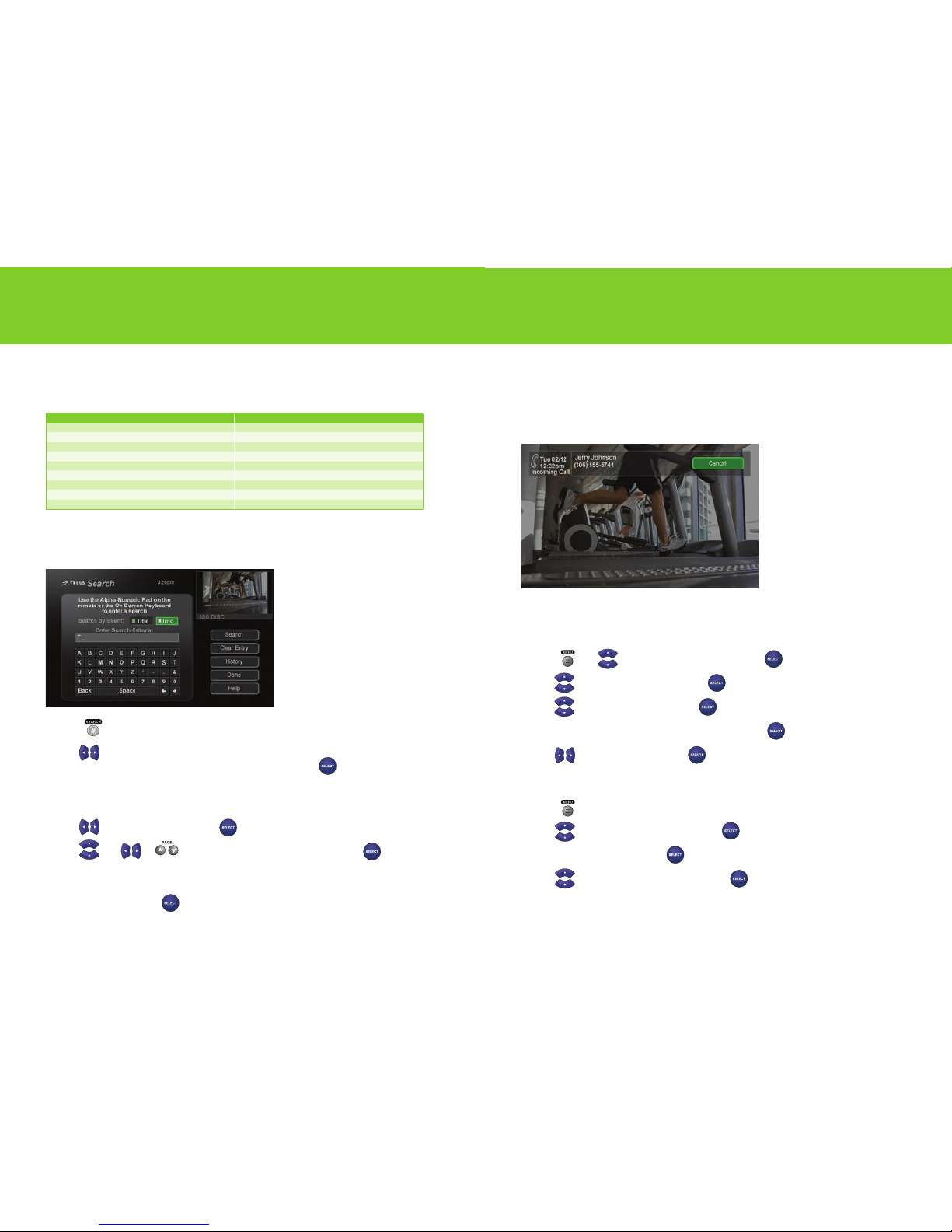
Using search
Use search to easily find your favourite programs and Pay Per View events.
1 Press to open the search screen.
2 Use to highlight Title to search for words that appear in the title of the program or Info to
search for words that appear in the program description and press .
3 Using the onscreen keypad or the number buttons on your remote, enter the word or program
title you would like to search for in the search criteria field.
4 Use to highlight Search and press .
5 Use and or to scroll through your search results and press to tune in
to a program.
If you highlight a program that is on now, the receiver tunes to that program. If you
highlight a program that is in the future, you will be able to schedule an Auto Tune or a Reminder.
6 Highlight Done and press to close the search results screen.
Call Display on your TV
With Call Display, an onscreen pop-up window shows you the name and number of who’s calling.
You can then choose to take the call or wait until the show is over.In order to receive onscreen
Call Display, you must subscribe to Call Display on your TELUS home phone and ensure that your
phone line is connected to your receiver.
Turning Call Display on and off
Call Display is automatically enabled by default on your receiver.
1 Press .
Use to highlight System Setup and press .
2 Use to highlight Installation and press .
3 Use to highlight Caller ID and press .
4 Navigate to Enable Caller ID or Disable Caller ID and press .
5 Use to highlight Done and press .
Viewing your Call Display history
1 Press .
2 Use to highlight System Setup and press .
3 Navigate to Installation and press .
4 Use to highlight Caller ID History and press .
From here, you also have access to actions such as deleting individual events and clearing the list.
Surf zones
TELUS Satellite TV channels are organized by surf zones. That way, categories like sports, news or
lifestyle are all grouped together so you can easily surf through your favourite channels.
Channels Surf zone Channels Surf zone
10 – 91 Descriptive video 901–988 Radio
10 0 – 187 French language programming including PPV 1000
English On Demand Movies
19 6 – 2 9 8 Digital standard and U.S. Superstations 1030–1283 High Definition: Networks and U.S. Superstations
299–382 Movies, including PPV 1251–1283 High Definition: Movies
388 –479 Sports 1400 –1534 High Definition: Sports
500–599 News, learning, family and music 1564–1726 High Definition: News, learning, family
600–660 Lifestyle and variety 1800 French On Demand Movies
697–730 International programming 1802–1891 High Definition: French programming
747–782 Mature programming, including PPV 1933 High Definition programming