Test-Um Validator-NT NT955 Manuale utente

Validator-NT TM
NETWORK/CABLING CERTIFIER
OPERATING INSTRUCTIONS
Validator NT955

6MNO
JKL
5
4
GHI
*
7
PRS
0#
9
TUV
8
QZ
WXY
MENU
1
ACCPT
TEST
3
ABC
2DEF
SEL
QUIT
Test Results
Untitled1.job
50%
Test-Um Inc.
validator
2004 Oct11
10:53:01
Expected Results
1 1
2 2
3 3
6 6
4 4
5 5
7 7
8 8
Cable001 Pass
1 1
2 2
3 3
6 6
4 4
5 5
7 7
8 8
Test Time: 10/11/2004 10:53 A.M
Test Results
PASS
VALIDATOR-NTTM
POWER
MENU TEST
QUIT
ALPHANUMERIC
KEYPAD
NAVIGATION KEYS
ACCEPT
SELECT
CONTEXT
SENSITIVE
KEYPAD

Congratulations!
You have just purchased the world’s most advanced Speed and
Performance Certier. Your Validator-NT is designed to give you years of
reliable service with reasonable care. Remember these important Care
Points.
• Re-charge the lithium-ion batteries nightly. Lithium-ion batteries
like to be charged overnight. They do not have “memory”
problems like older battery technology and are smart enough
to know when they are full. Make sure you start your job with
enough battery power to nish it.
• Keep your Validator-NT clean with a damp soft cloth. Using
cleaning agents can damage the poly carbonate lens over the
LCD screen
• Clean spills and moisture from the Validator-NT immediately. Do
not allow the Validator-NT to be submerged. Battery and display
damage will result.
• Use the RJ45 Sacricial Cable Modules (TP74) provided with
the NT955 kit to prolong the life of your RJ45 data jack on your
Validator-NT main and remote unit. Replace these as necessary.
• Remember to register your Validator-NT online immediately. You
must register your product at www.test-um.comto download
rmware and software updates and obtain access to other
valuable support tools available on our web site. If you prefer,
you may ll out the enclosed warranty registration card and mail
it in.
Above all, enjoy your new Validator-NT. It will make your testing life
easier.

TABLE OF CONTENTS
Introduction ........................................................................ 5
Ethernet Cable Certication .............................................................. 6
Active Network Features ................................................................... 7
Plan-UmTM Software .......................................................................... 7
Test Ports and Cable Adapters ......................................................... 8
Registration ..................................................................................... 12
Support Information ......................................................................... 13
Tests Performed .............................................................................. 14
About Your Validator-NT ................................................. 15
Main Unit Features .......................................................................... 15
Remote Unit Features ..................................................................... 18
Standard Accessories ..................................................................... 20
Optional Accessories ....................................................................... 21
Menu Options & Navigation ............................................................ 22
Battery and Power Management .................................... 23
Battery Lock Feature ....................................................................... 26
Operations ........................................................................ 27
1. Setting Up the Test Tool .............................................. 29
1.1. Display Contrast ....................................................................... 30
1.2. Printer Settings ......................................................................... 31
1.3. Shutdown Timeouts .................................................................. 32
1.4. Set the Clock using the Real Time Clock Screen..................... 33
1.5. Localization . ............................................................................ 34
1.6. Calibrate .................................................................................. 35
2. Validator-NT Properties ............................................... 36
2.1. Battery Info ............................................................................... 37
2.2. Product Version ........................................................................ 39
2.3. Compact Flash Card Usage ..................................................... 40
2.4. Support Info ............................................................................. 41
3. Managing Job Files ..................................................... 43
3.1. Creating A New Job .................................................................. 46
3.2. Creating Job Information .......................................................... 47
3.3. Creating Template Information ................................................. 48
3.4. Using Template Files ................................................................ 49
3.5. Step By Step Instructions for Creating a New Job ................... 50

TABLE OF CONTENTS
4. How Auto Test Works .................................................. 52
4.1. Cable Test Schedule ................................................................ 54
4.2. Site Info .................................................................................... 58
4.3. Contractor Info ......................................................................... 58
4.4. Custom Cable Denitions......................................................... 59
4.5. Job Utilities .............................................................................. 62
4.6. Step by Step Instructions for Performing Auto Tests ............... 63
5. Running Manual Tests ................................................. 65
5.1. Data Cables ............................................................................. 65
5.2. Phone Cables ........................................................................... 67
5.3. 2-Wire Cables .......................................................................... 68
5.4. Step by Step Instructions for Performing Manual Tests ........... 69
6. Performing Active Network Tests ............................... 74
6.1. Port Discovery ........................................................................ 75
6.2. Ping Test .................................................................................. 79
6.3. Cisco Discovery Protocol ......................................................... 84
6.4. Hub Flash ................................................................................ 87
6.4. Step by Step Instructions for Performing Network Tests .......... 88
7. Uploading/Downloading Jobs .................................... 91
7.1. Uploading the Cable Test Schedule to the Validator-NT .......... 91
7.2. Downloading Test Results from Validator-NT to Plan-Um ........ 92
8. Archiving/Saving Test Results ................................... 93
9. Printing Test Results ................................................... 94
10. Application Notes for Typical Field Use ....................95
10.1. New Job, New Cable Installations .......................................... 95
10.2. New Job, Previously Installed Cables .................................... 95
10.3. Existing Job, Adds, Moves and Changes .............................. 96

5
Test-Um NT955 Series
Introduction
The Validator-NT (NT955) Certier uses Speed and Performance
criteria to test and certify Ethernet network cables against IEEE802.3
specications up to 1 Gigabit. It also tests critical noise and delay
(Skew) measurements to assure that the respective cable runs will
perform to their maximum capability. Breakthrough technology has made
Speed and Performance Certication possible. It is the most up to
date way of seeing the physical condition of the wiring and how a specic
cable run will handle data ow on Ethernet speeds, 10 Megabit, 100
Megabit and Gigabit.
In addition to its state of the art 21st Century cable certication
technology, Validator-NT boasts a full selection of active network features
designed to report cable performance and verify connectivity to network
devices. These features include the ability to negotiate with network
components and discover both the speed and conguration of connected
equipment.
ValidatorTM IntroductionValidatorTM Introduction

6
Test-Um NT955 Series
Ethernet Cable Certication
Speed and Performance Certication uses digital technology centered on
the latest advances in Gigabit Ethernet Transceivers. These new highly
integrated chips are capable of testing for noise in the network, faults in
the cabling wiring and even generating live data packets that stress the
cables to make sure they are able to support the equipment connected to
them. This is the heart of the Validator-NT Certier.
To do Speed and Performance Certication Validator-NT measures
three specic levels of cable and connector conditions. Unless all three
of these levels are tested it is impossible to accurately determine a cable
run’s capability.
1. Measure TIA 568 Interconnect Specications such as Opens,
Shorts, Miswires, Split Pairs and Reversals. The distance to
faults and length of cable runs are accurately pinpointed with
the use of both TDR and capacitance length measurement
techniques. The Validator-NT measures length up to a maximum
of 1500 feet or 457 meters.
2. Measure Pertinent Parameters of Noise and propagation delay.
NEXT, Return Loss, Attenuation, Amplitude and other noise
factors are tested using Signal to Noise Ratio measurements.
SKEW is measured using TDR (Time Domain Reectometry) to
insure acceptable signal time delay differences between pairs for
Gigabit use.
3. Conduct a Bit Error Rate Test. BERT sends actual data
packets down specied cable runs at dened data rates and
quantities. Random code data is generated and checked for
errors at the maximum throughput of the link, full duplex.
ValidatorTM IntroductionValidatorTM Introduction

7
Test-Um NT955 Series
Active Network Features
Validator-NT includes three functional test areas that are designed to
report cable performance and verify connectivity to network devices.
They are Port Discovery, Ping, and Hub Flash.
Port Discovery identies telephone or network devices connected to the
other end of the jack or cable.
APing Test veries connectivity to resources on or off the network
and IP addresses. The Ping Test will simultaneously Ping up to seven
different IP addresses and can be run in DHCP or manual addressing
modes.
Cisco Delivery Protocol detects messages broadcast by Cisco bridges
and routers over the network to inform each other of their existence.
Hub Flash sends an intermittent link signal to ash the link status light
on Ethernet equipment.
Plan-UmTM Software
If the heart of Validator-NT is a Gigabit Ethernet Transceiver then the
soul of the Validator-NT is the powerful planning and reporting software
included in your test kit, Plan-Um. Plan-Um software ties the superior
testing capability of the Validator-NT with a simple to use software tool
that helps organize the cable information and test results associated with
your jobs.
Plan-Um will help set up each job, dene the scope of the job, aid in
testing the individual cable runs accurately and produce an End of Job
report that will tie in all the expectations of the installer and the customer.
The Network Tools feature in Plan-Um allows you to quickly and easily
create a topological representation of your physical network, annotate
each piece of equipment, and characterize the connection methods.
This feature is completely separate from the layout of the cable runs and
the Cable Test Schedule. It provides a quick way to see the architecture
of your network and a way to document moves, adds, and changes in an
organized and effective manner.
Validator-NT and the Plan-Um software combine to close the loop on
cable/network installations so that both the network user and the network
installer can be condent of the physical properties of specic cable runs
and the overall capability of the network in general.
ValidatorTM IntroductionValidatorTM Introduction

8
Test-Um NT955 Series
Test Ports and Cable Adapters
Validator-NT is equipped with four dedicated ports for testing data,
telephone, coax, and 2-wire cable types.
Data Jack RJ45 8-wire data interface
Telephone Jack RJ11, 6-wire Telco interface
USOC pairing
Coaxial Connector “F” connector coax interface
Banana Jacks 2-wire testing
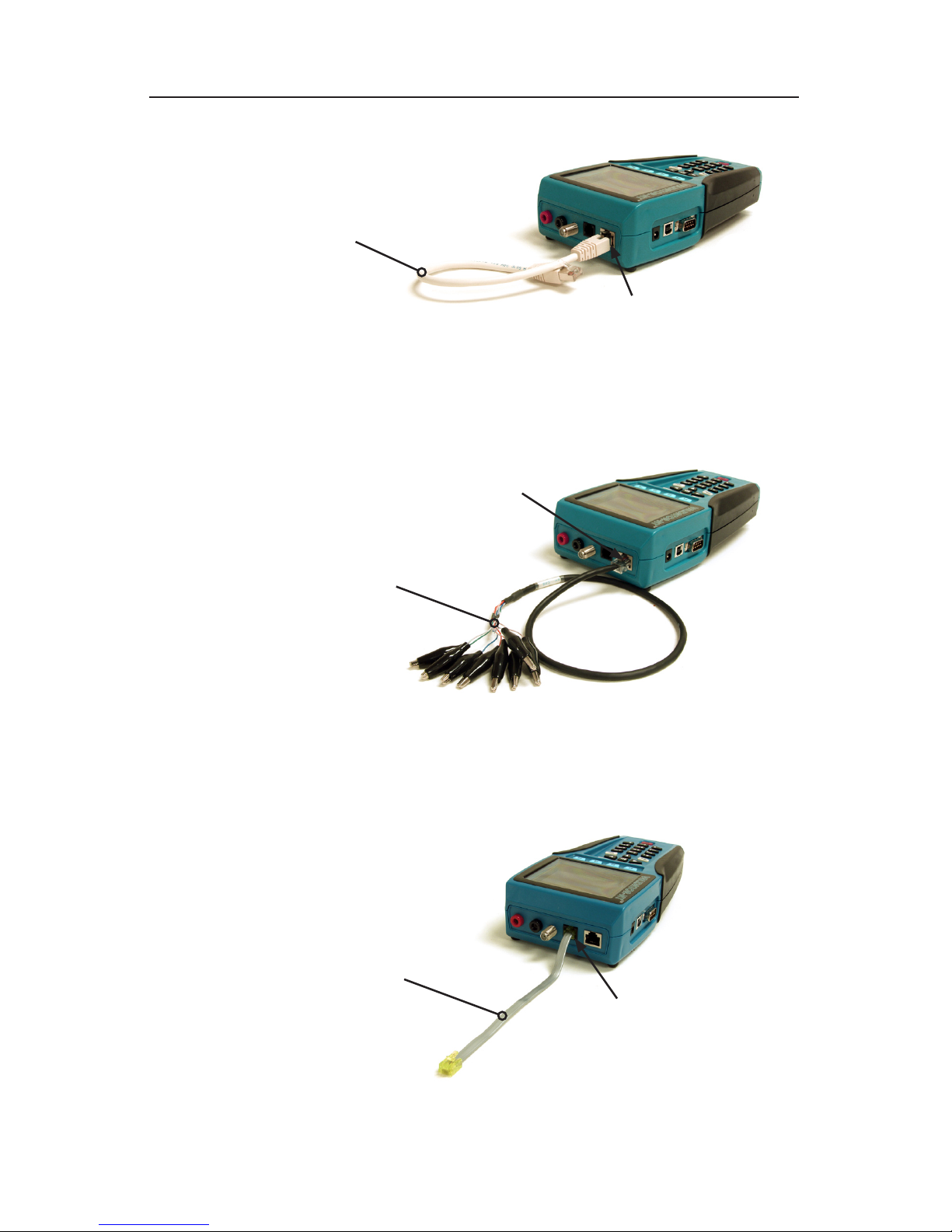
The Validator-NT test kit is supplied with ve cable assemblies designed
to connect to the data, telephone, coax, and 2-wire ports of the main or
remote Validator-NT units. A set of 8 wiremap remotes (TP610) are also
included in this test kit.
TP74 4” sacricial cable with RJ45 connectors
TP20 7.5” no fault cable assembly with RJ11
connectors for the RJ11 or RJ45 port
TP55 12” shielded cable assembly with RJ45 connectors
TP68 24” cable assembly with an RJ45 connector and 8
alligator clips
TP62 Adapter, BNC plug to F jack
Note: It is recommended that you leave the TP74 Sacricial Cables
connected to prolong the life of the RJ45 network cable port of your
Validator-NT main and remote unit.
ValidatorTM IntroductionValidatorTM Introduction

9
Test-Um NT955 Series
Data Cables and Connection
Figure 1. TP55 Connected to Validator-NT
Figure 2. TP68 Connected to Validator-NT
Telephone Cable and Connection
Figure 3. TP20 Connected to Validator-NT
ValidatorTM IntroductionValidatorTM Introduction
RJ11, 6-wires
Telco interface
USOC pairing
(TP20)
7.5” no fault cable
assembly with RJ12
connectors for the RJ11
or RJ45 port
(TP20)
RJ45 8-wire data
interface
24” cable assembly with
an RJ45 connector and
8 alligator clips
(TP68)
12” shielded cable
assembly with RJ45
connectors
(TP55) RJ45 8-wire data
interface
Questo manuale è adatto per i seguenti modelli
1
Indice
Altri manuali Test-Um Tester per cavi