3
Table of contents
1 Purpose .............................................................................................................................4
2 Features............................................................................................................................5
3 Description ......................................................................................................................7
3.1 Appearance...................................................................................................................7
3.2 Cabinet..........................................................................................................................8
3.3 Optical distribution frame...............................................................................................8
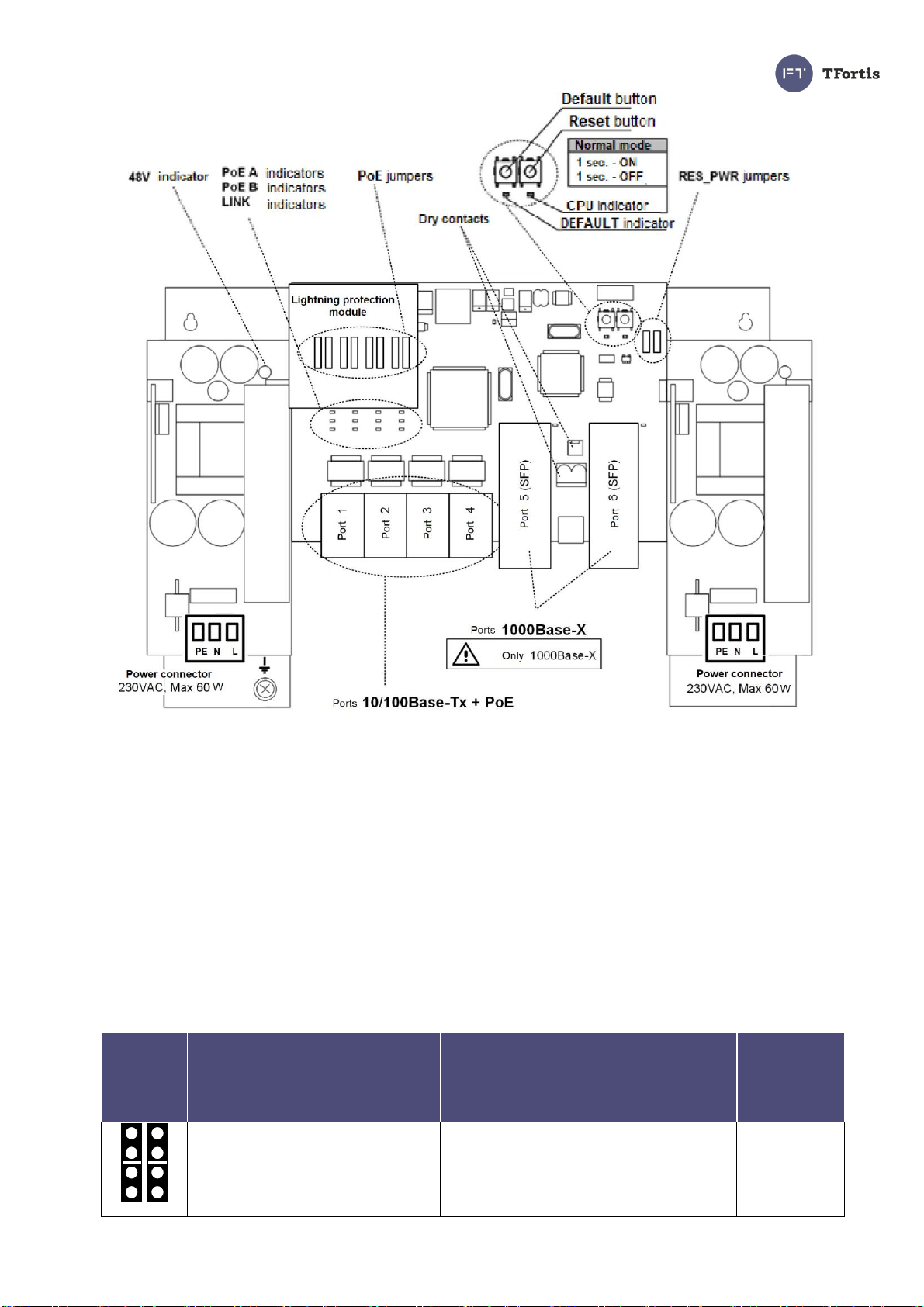
3.4 Switch board and power supply units............................................................................9
3.4.1 PoE jumpers.........................................................................................................10
3.4.2 230VAC power supply backup jumpers................................................................13
3.4.3 CPU button...........................................................................................................13
3.4.4 DEFAULT button..................................................................................................13
3.4.5 CPU indicator.......................................................................................................13
3.4.6 DEFAULT indicator ..............................................................................................13
3.4.7 PoE indicators......................................................................................................14
3.4.8 LINK indicators.....................................................................................................14
3.4.9 Power indicators...................................................................................................14
3.5 Dry contact..................................................................................................................14
3.6 Tamper sensor ............................................................................................................14
3.7 Integrated lightning protection .....................................................................................16
3.8 DIN rail and automatic circuit breaker..........................................................................16
3.9 Automatic circuit breaker.............................................................................................17
3.10 Additional functions ...................................................................................................17
3.10.1 Cold start............................................................................................................17
3.10.2 Restarting cameras in case of hanging ..............................................................17
3.10.3 Cable tester........................................................................................................18
3.10.4 Remote camera polling ......................................................................................19
4 Technical specifications ...........................................................................................19
5 Operating conditions ..................................................................................................20
6 Preliminary setting......................................................................................................21
6.1 Resetting the switch to factory settings .......................................................................21
6.2 IP address setting........................................................................................................21
6.3 User name and password setting................................................................................21
6.4 Setting PoE on ports....................................................................................................22
6.5 Switching on camera housing preheating....................................................................22
6.6 Activation of redundancy protocols..............................................................................23
7 Installation of the switch ..........................................................................................23
7.1 Installation of the cabinet on the wall...........................................................................23
7.1 Installation of the cabinet on lamp posts......................................................................24
7.3 Optical connections.....................................................................................................25
7.4 Power supply connection.............................................................................................26
7.5 Camera connection .....................................................................................................27
8 Manufacturer's warranty ...........................................................................................28
9 Technical support........................................................................................................28
Schedule................................................................................................................................28