
Tinta Facil TFMX60 Manuale utente
User’s Guide
Automatic black inkjet cartridge refilling machine


3
User’s Guide
Congratulations!
You have just acquired the new TF MX60 machine, a high quality and affordable product
that allows you to refill black ink jet cartridges.
For adequate operation of the machine, please read the instructions contained in this
operation manual.
We strongly recommend you to always use original empty cartridges
and ‘Ready2Fill’ inks, this way you extend cartridge lifetime and
improve printing quality even after many recharges.
Remanufactured cartridges can contain traces of bad quality ink,
clogging the printhead and causing troubles on the refilling process.
WARNING!!!
This device has a cartridge refilling system that pushes ink directly
through the print head. Some inks available on the market have
viscosity that hinders the ink from penetrating through the printhead,
thus straining the pump, connections and internal hoses, lessening
the machine lifetime and affecting it’s warranty.
For adequate operation we strongly reccomend using our pigmented
ink that was specially formulated and exhaustively tested.
DYE BASED INKS ABSOLUTELY CANNOT BE USED! WARRANTY WILL
SIMPLY BE VOIDED!
Important!
P.S.: This Manual guide is frequently updated. The updated version can be downloaded at the
following link: www.tintafacil.com.br/manual_TFMX60_English.pdf
4User’s Guide
1. Instructions
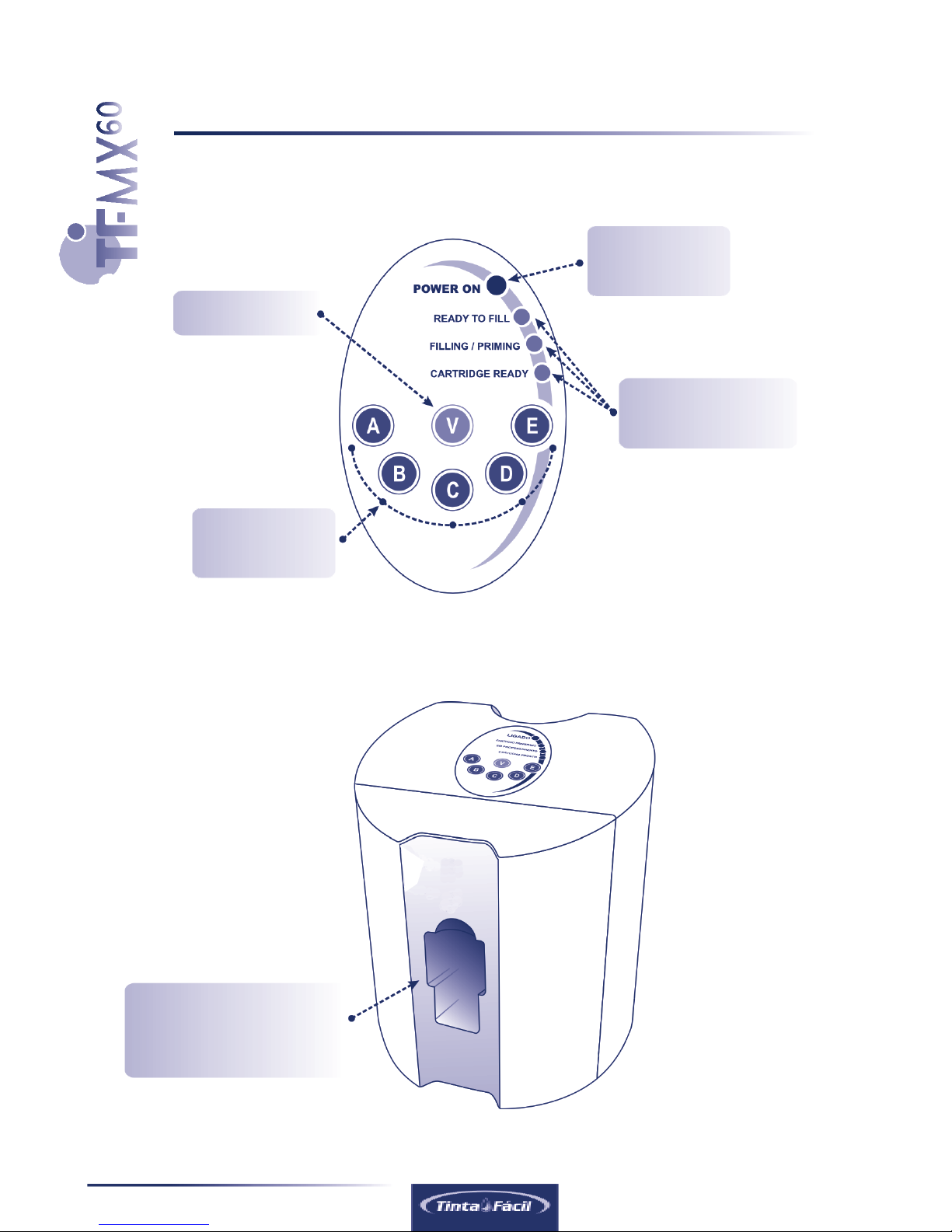
lControl Panel
lFront Connections
Slot for inserting
cartridges before
refilling process
Refilling
Start buttons
Vacuum button
Power ON
LED indicator
Refill process
LED indicators

5
User’s Guide
This machine was developed exclusively for professional use. If
you are not an ink cartridge remanufacturer or you are using this
machine to refill your own cartridges, you must know that the pro-
vided ink is high density pigmented. In case of leaks or ink spilling,
we are not responsible for ink stains on woven materials such as
clothes and carpets, or furniture like tables, chairs, shelfs, etc.,
as it’s removal is extremely difficult, so be careful when handling
the machine, and preferably use it always on appropriate place,
if possible with latex gloves. In case of contact with eyes, wash
abundantly with water and request medical assistance.
lRear Connections
Instructions
Power source
cable 90-240v
Tube and
connector for
black ink refill
Power Switch ON/OFF
Attention!
6User’s Guide
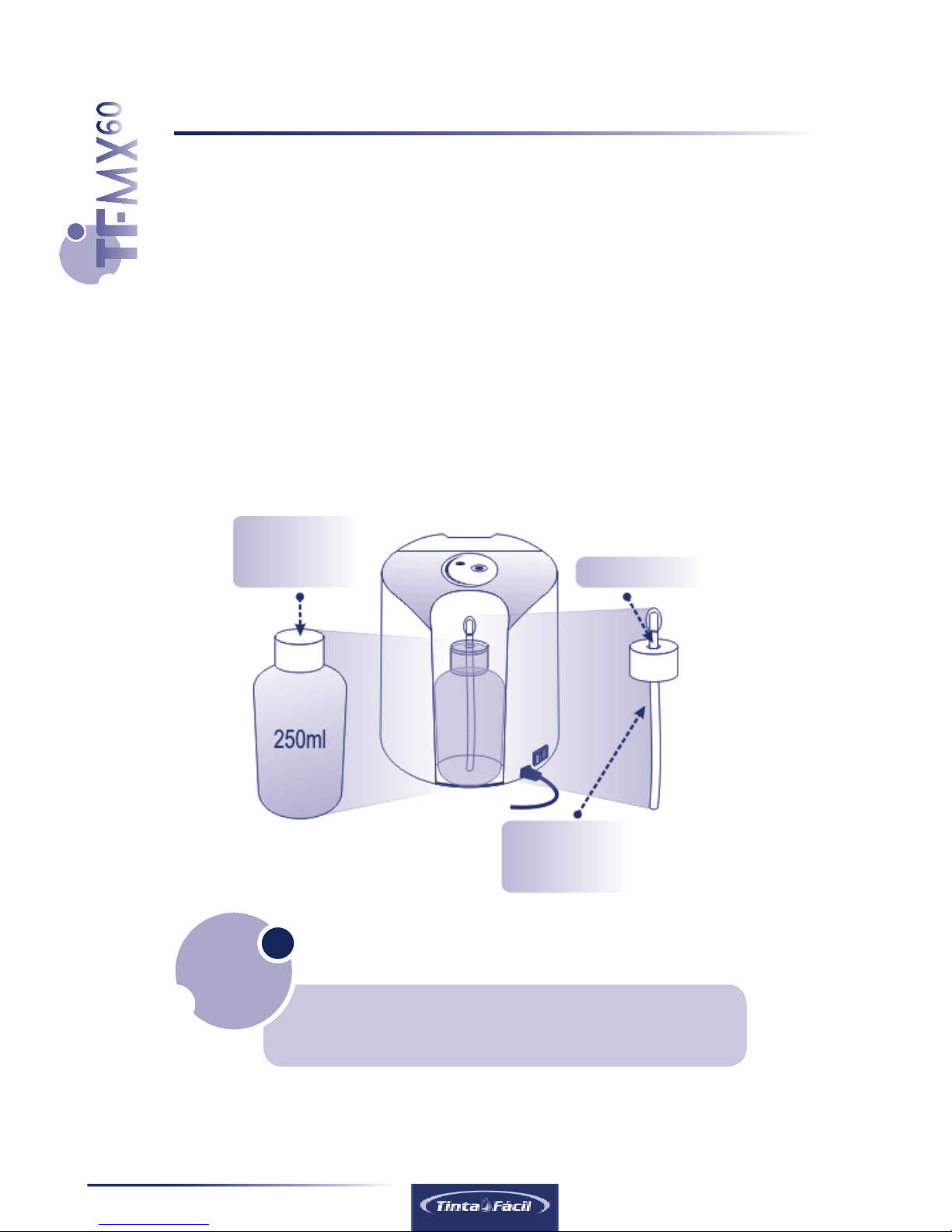
Ink
security cap
Ink feeding
Tube
Connector
lThe Ink Refill Bottle,
The Ink Security Cap
and The Ink Collector Cap
For correct operation you MUST place and install the ink
refill bottle BEFORE your turn on the machine.(next page)
ATTENTION!
The machine contains a 250ml ink bottle sealed with an ink security cap
and an additional cap connected to a flexible “ink feeding” tube (the ink
collector cap).
2. Preparing to use the Machine
7
User’s Guide
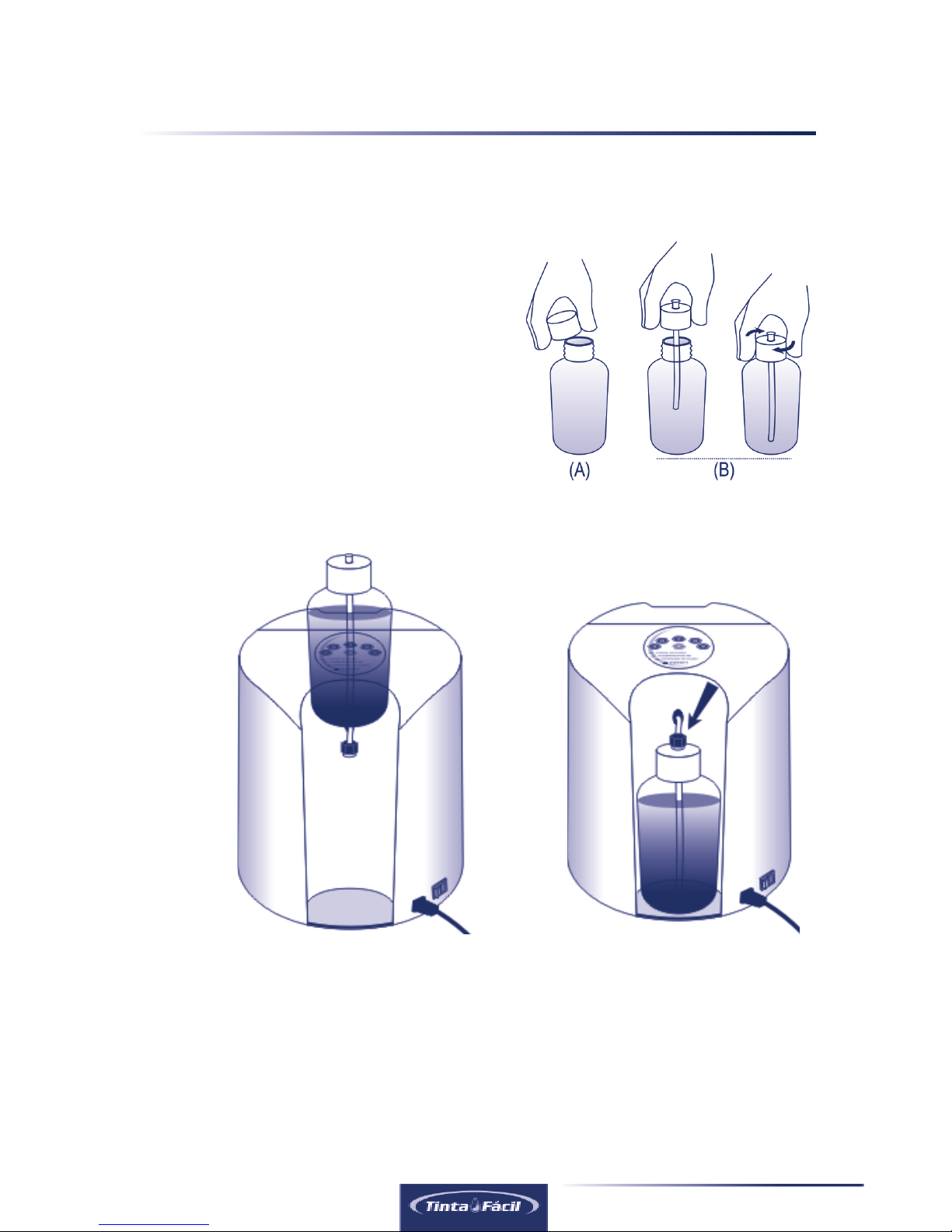
lInk Collector Cap
and refill Installation
A) Remove the ink security cap.
B) Install the ink collector cap.
C) Place the ink bottle
D) Connect to the machine’s tube.
Preparing to use the machine
(C) (D)
After this procedure your machine is ready to be plugged in the power source
supply and switched ON(next page).
8User’s Guide
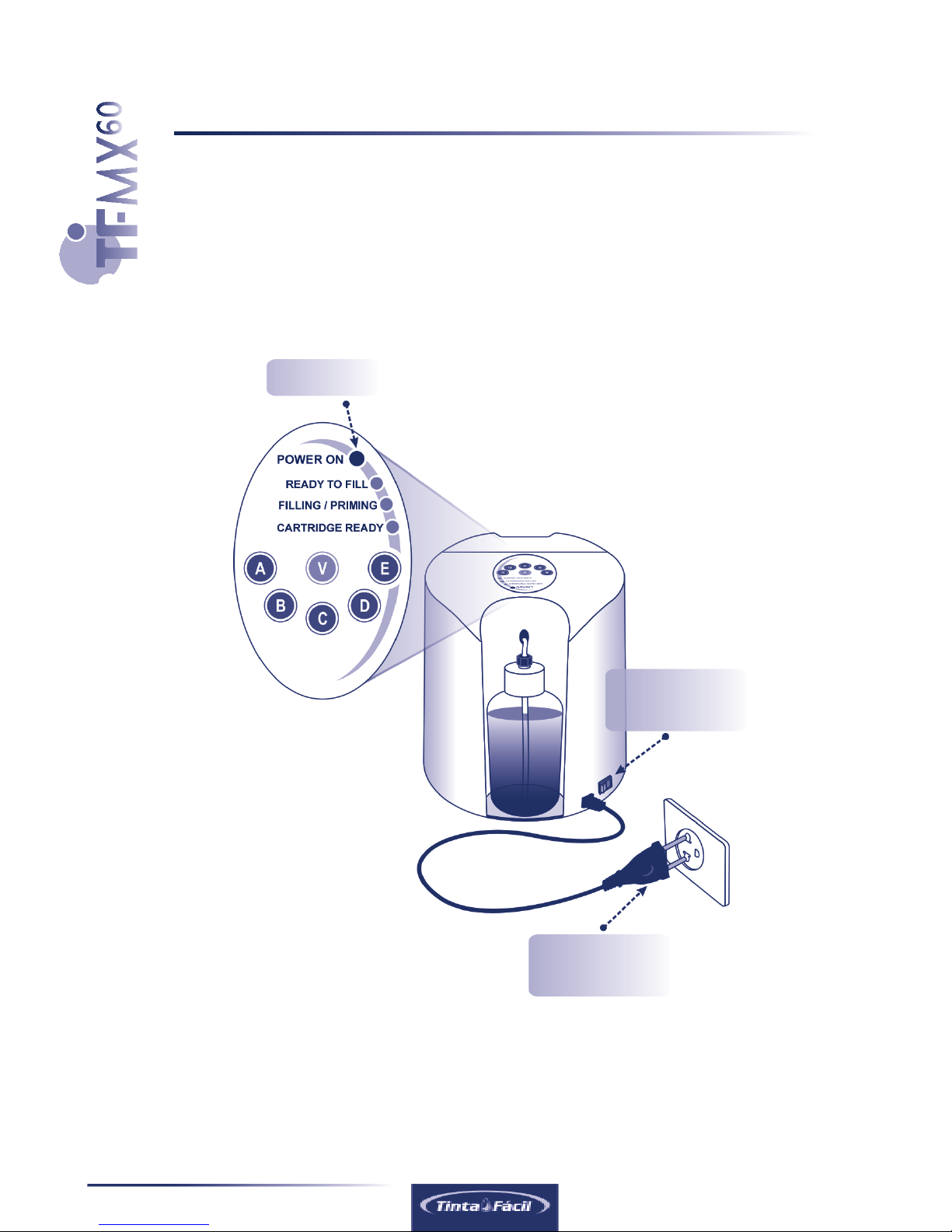
Power LED
Power Switch
(ON/OFF)
Power Cable
to power supply
3. Turning the Machine On
lCongratulations
Your Ready2Fill machine is ready to start refilling cartridges
1. Plug the power cable.
2. Turn on the power switch.
The machine will automatically start a self test and cleaning procedure. Then
the LEDS will blink for a few seconds and the internal hose will be filled with ink
from the ink refill bottle. Wait untill LEDS stop blinking. Check if power LED is ON.
9
User’s Guide
lPlugging the Cartridge in
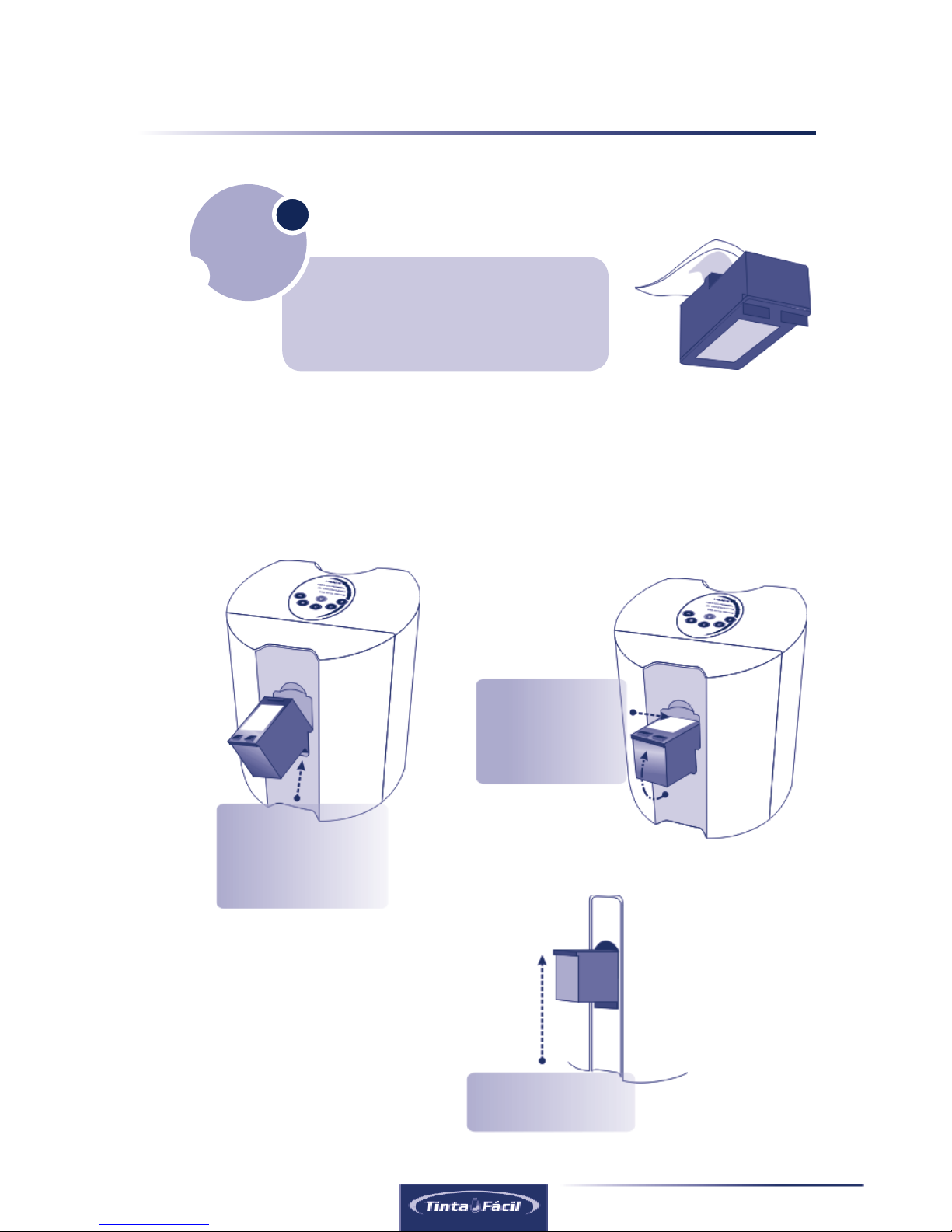
Before refilling the cartridge we
recommend cleaning the printhead
using a damp absorbing paper.
4. Refilling Process
Important!
Correct position
(Vertical).
3
Spin the cartridge
until it gets on
a vertical position
2
Insert COMPLETELY
the cartridge printhead
which must be
downwards
1
10 User’s Guide
Refilling process
This equipment was designed to refill different ink cartridge models wich are
capable of storing different ink volumes ranging from 2 to 12 ml.
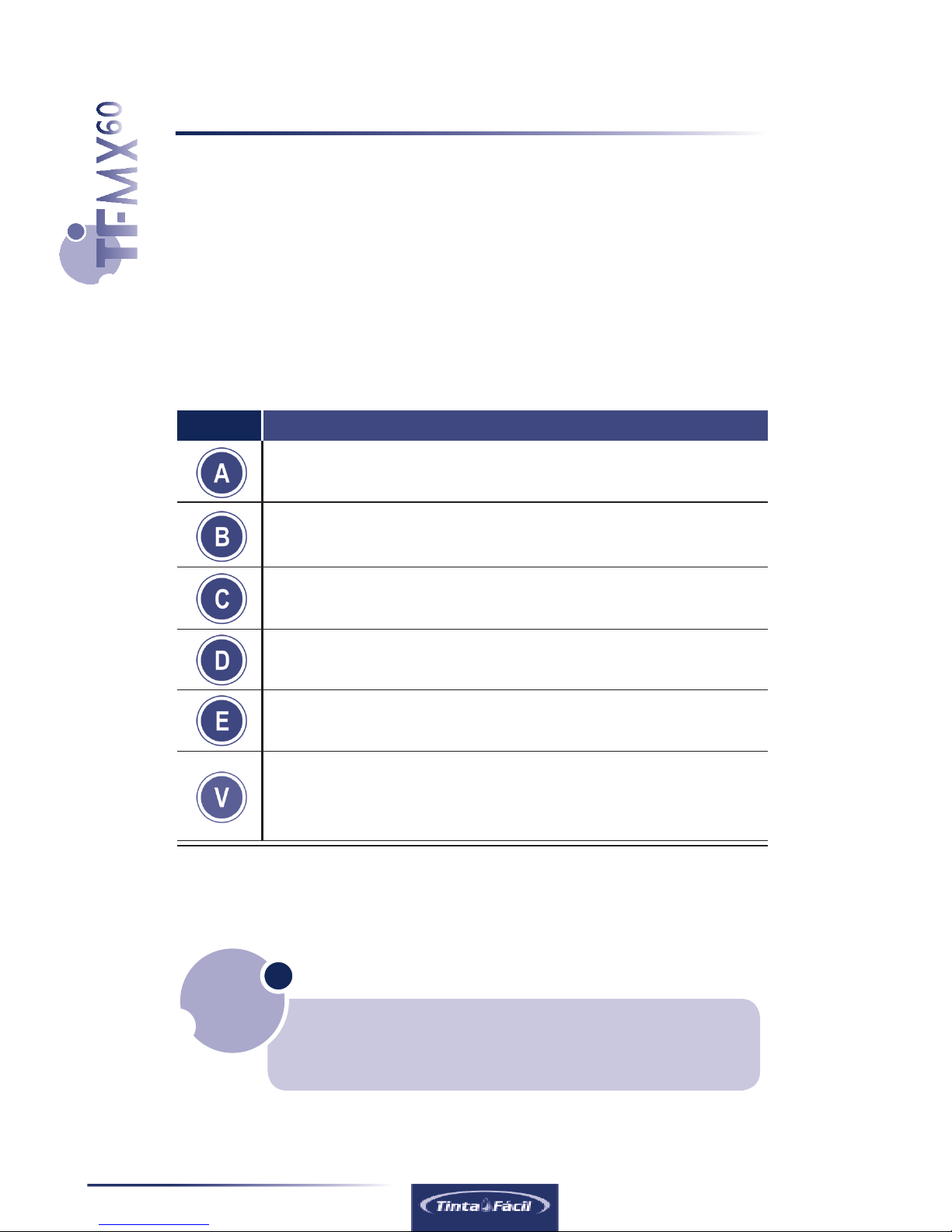
The TF MX60 machine has 5 different programs which can be activated by pres-
sing buttons A, B, C, D and E depending on the cartridge model you need to refill.
Please, check the following cross reference table to help finding the correct button
that must be activated:
Automatic refilling for cartridge models HP 122 and 662 (2ml).
Automatic refilling for cartridge models HP 301 (3ml)
Automatic refilling for cartridge models HP 60 and 901 (5ml)
Automatic refilling for cartridge models HP 122XL, 675 and 301XL (8ml)
Automatic refilling for cartridge models HP 60XL and 901XL (12ml)
Immediate interruption of the refilling process followed by a 1 second vacuum
activation. Can also be used for emptying the cartridge and/or priming
cartridges that exhibits ink leak from printhead when overfilled.
Cross Reference Table
Button Function / Cartridge Types
When pressing the refilling button the refilling process starts automaticaly, during this process
“FILLING/PRIMING” LED will blink. Just wait until “CARTRIDGE READY” Led blinks alone.
Please make sure to press the button according to you
cartridge model. Overfilling cartridges using the wrong
button may cause ink leakage during the process.
Attention!
Indice


