TOPSCCC EX-91171 Manuale utente

EX-91171 User Manual 1
EX-91171 Display Monitor
User Manual
ReleaseDate Revision
Dec. 2005 V0.1
May. 2007 V0.2
®2005 All Rights Reserved. Published in Taiwan

EX-91171 User Manual 2
Warning!___________________________________
This equipment generates, uses and can radiate radio frequency energy and if not installed and
used in accordance with the instructions manual, it may cause interference to radio communications.
It has been tested and found to comply with the limits for a Class A computing device pursuant to
FCC Rules, which are designed to provide reasonable protection against such interference when
operated in a commercial environment. Operation of this equipment in a residential area is likely
to cause interference in which case the user at his own expense will be required to take whatever
measures may be required to correct the interference.
Disclaimer
This information in this document is subject to change without notice.
Electric Shock Hazard – Do not operate the machine with its back cover removed. There are
dangerous high voltages inside.

EX-91171 User Manual 3
Table of Contents______________________
Warning!…………………………………………………………………………….……..….2
Disclaimer………………………………………………………………….…………………2
Chapter1 GettingStarted
1.1 Features………………………………………………………….………….5
1.2 Specifications…………………………………………....……………...….5
1.3 Dimensions…………………………………...………………………….…7
1.4 Brief Description...................................................................................8
1.5 Display Mode……………………………………………………………….10
Chapter2 OSD
2.1 Front Panel OSD Functions….………………………………….…..…...11
2.2 OSD Controls………………………………………………………………12
2.3 Main Menu…..……………………………………………………………..13
Chapter3 ControlBoard
3.1 Introduction to PenMount Control Board………………………………..15
3.2 Features…………………………………………………………………….16
3.3 Electrical Specifications…………………………………………………...16
3.4 Installation of Control Board……………………………………………...17
Chapter4 Installation
4.1 Windows 98/ME Driver Installation………………………………………18
4.2 Uninstall PenMount Windows 98/ME Driver…………………………….32
4.3 Windows 2000/XP Driver Installation…………………………………….33
4.4 Configuring PenMount Windows 2000/XP Driver………………………37
4.5 Uninstall PenMount Windows 2000/XP Driver………………………….47
Chapter5 Software
5.1 Software Functions………………………………………………………..48
5.2 Software Function Descriptions……………………………………….…49

EX-91171 User Manual 4
Appendix A: Board Description & Specifications………………….56
Appendix B: Controller IC Specifications………………………………58
Figures
Figure 1.1: Dimensions of EX-91171….……………………………………..7
Figure 1.2: I/O Functions of EX-91171……………………………………....7
Figure 1.3: Front View of EX-91171………………………………………….8
Figure 1.4: Rear View of EX-91171…..……………………………………...9
Figure 3.1: Bird Eye’s View of Control Board………………………………15
Figure 3.2: Mechanical Drawing of Control Board…………………………15
Figure A: Panelmounting……………………………………………………59
Figure B: VESA 100 mounting………………………………………….….60
Appendix
Panelmounting…..…………………………………………………………….59
VESA 100 mounting…………………………………………………………..60

EX-91171 User Manual 5
Chapter 1_____________________________
1.1 Features
● 17” SXGA color TFT LCD monitor
●Heavy-duty steel chassis
●NEMA 4/IP65-compliant aluminum front panel
●OSD on the front panel
●Long backlight lifetime of 50,000 hours
● Panel or VESA 100 mount
● DVI, composite video and S-video input (optional)
● Power Input: 100~240V AC
● Resistive touch screen (optional)
1.2 Specifications
Display
● Display: 17” SXGA color TFT LCD monitor
● Maximum resolution: 1600 x 1200 with auto phase and auto position
● Maximum colors: 256K
● Dot size (mm): 0.264 x 0.264
● Luminance: 250 cd/m²
● Viewing angle: 150 degrees(H), 140 degrees(V)
● Backlight life: 50,000 hours
● Control: OSD on the front panel
● Touch screen: resistive (optional)
● Power Supply: Internal Universal AC/DC adapter
Mechanical
● Construction: heavy-duty steel chassis
● NEMA 4/IP65-certified front panel
● Mounting type: panel or VESA 100 mount
● Auto recognition of input signal
● Dimensions(WxHxD): 420 x 66.7 x 355mm (16.5” x 14” x 26”)


EX-91171 User Manual 6
Environmental
● Operating temperature: 0 to 45℃ (32 to 113℉)
● Storage temperature: -20 to 60℃(-4 to 140℉)
●Relative humidity: 10 to 95% @40℃, non-condensing
●Vibration: 1G peak, 10~150Hz
●Shock: 10G peak acceleration (11 msec.duration)
●Certification: CE, FCC Class A

EX-91171 User Manual 7
1.3 Dimensions
Figure 1.1: Dimensions of the EX-91171
Figure 1.2: I/O Functions of the EX-91171

EX-91171 User Manual 8
1.4 Brief Description of the EX-91171
The EX-91171 is a 17" SXGA color TFT LCD monitor that comes with a dot size of 0.264 x 0.264mm,
viewing angle of 150 (H) degrees and 140 (V) degrees, and more outstanding features, thus giving
you the best in monitoring and control applications.
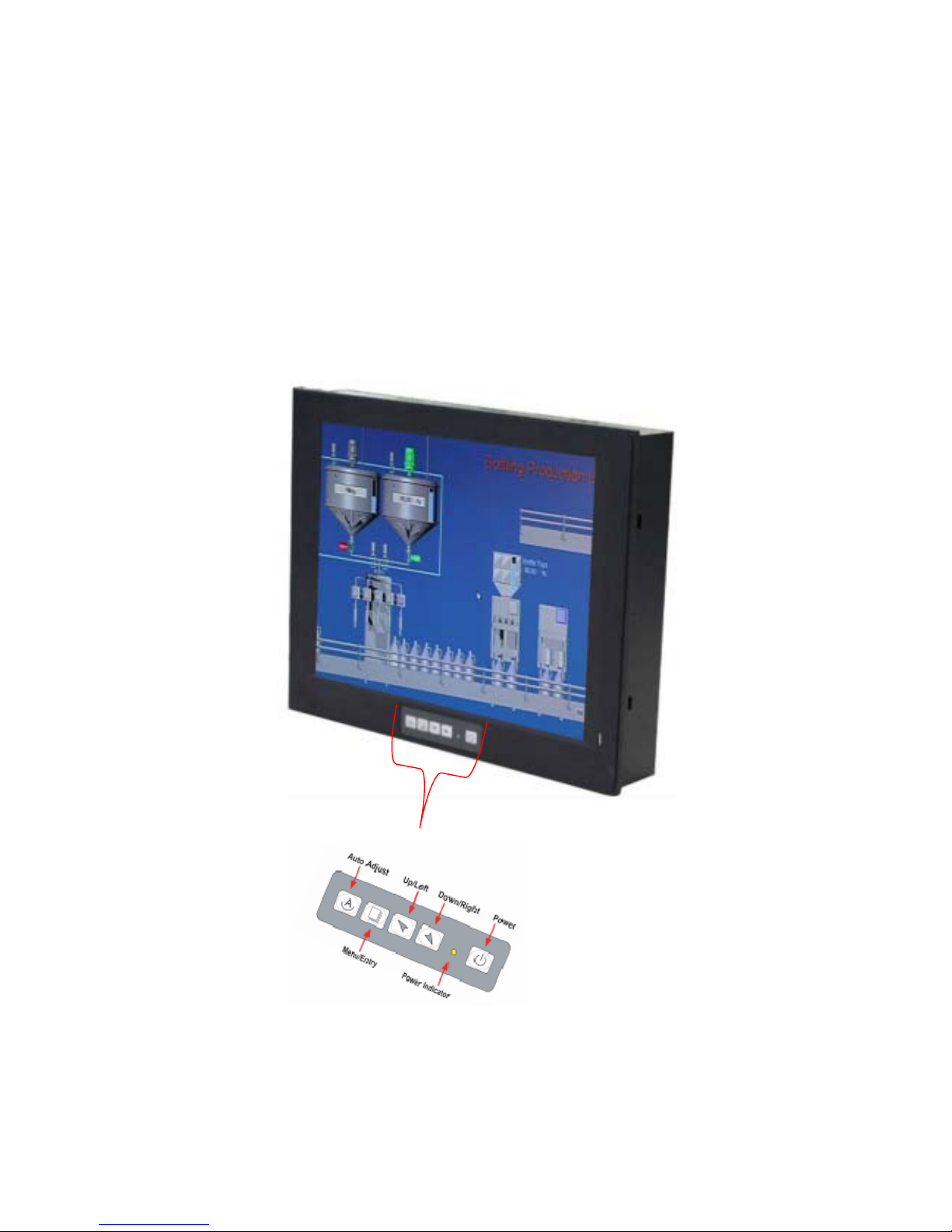
The front panel of the display monitor is sealed with gasket for NEMA 4/IP 65 rating when it is
panel-mounted in a NEMA rated cabinet or enclosure. It can also be VESA 100-mounted. It is optional
to be equipped with a resistive touch screen.
Figure 1.3: Front View of the EX-91171

EX-91171 User Manual 9
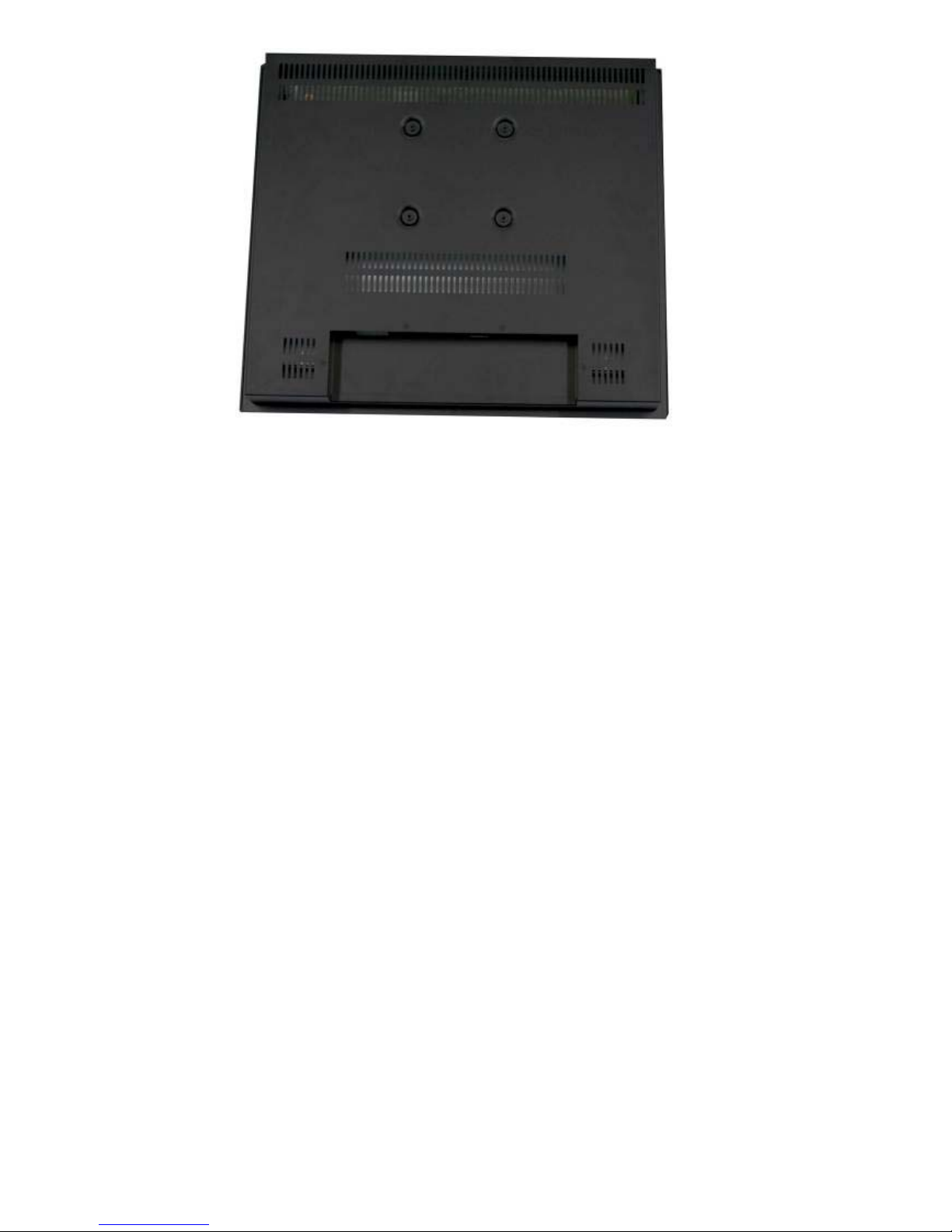
`Figure 1.4: Rear View of EX-91171

EX-91171 User Manual 10
1.5 Display Mode
Display Mode Hori. Sync (KHz) Vert. Sync. (Hz)
31 60
VGA 640 x 480 38 72
38 75
35 56
SVGA 800 x 600 38 60
48 72
47 75
48 60
XGA 1024 x 768 56 70
60 75
1152 x 864 68 75
64 60
SXGA
1280 x 1024 80 75
Indice
Altri manuali TOPSCCC Monitor