
Trifo Emma Manuale utente

2
Table of Contents
English .................................................... 3
Français .................................................. 8
Italiano...................................................13
Deutsch ................................................. 18
Español ................................................. 23
中文 .......................................................28
日本語 ................................................... 33
English...................................................38
Français.................................................40
Italiano .................................................. 42
Deutsch ................................................ 44
Español ................................................ 46
Nederlands ........................................... 48
Svenska.................................................50
Dansk .................................................. 52
Norsk ................................................. 54
中文 ...................................................... 56
日本語 .................................................. 58
User Guide Safety Instructions

3
Meet the New Member of Your Family
Here I am!
Here’s my charging station and power adapter
Upper Lid
Dustbin
USB Charging Port
Reset Button Power
Button
Recharge
Button
Charging Contacts
DC Plug
Signal Indicator
Wi-Fi
Indicator
Dustbin Release
Button
EN

4
Here’s How to Start Me Up
How to Get a Charge Out of Me
Plug in my charger and
give me some space!
Then plug me in to my charger and after
a little while, I’m good to go.
Remove Protective Strip Trifo Home App
1.5ft
1.5ft
4.5ft
EN

5
Indicator Lights
Indicator Light
Wi-Fi: solid blue ...........................................................................
Wi-Fi: blinking blue .....................................................................
Wi-Fi: o .....................................................................................
Power: solid white ........................................................................
Power: solid red ............................................................................
Power: slow ashing white ..........................................................
Power: blinking white ...................................................................
Recharge: solid orange ( + Power: slow ashing red ) .............
Recharge: solid orange ( + Power: o ) ....................................
Recharge: slow ashing orange ..................................................
Recharge: slow ashing orange ( + Power: o ) ......................
What it Means
Robot is connected
Robot is connecting
Robot is not connected
Robot is operating
Robot is not functioning
Robot is booting up
Robot is upgrading or resetting
Battery is low
Battery is fully charged
Robot is returning to the charging base
Robot is charging
Let’s Make a Clean Sweep!
To wake Emma up:
long press
until you hear it start
To start recharging:
short press when
Emma is operating
or paused
To reset: long press
the Reset button
To start/pause:
short press
To connect Emma
to Wi-Fi:
long press
To shut Emma down:
long press
To stop recharging:
short press
EN

6
Mopping
When I Get Full, Tip Me Over and Dump Me
To take out
the dustbin
To open the
dustbin
Empty me
out
Open my
door
Remove my
filters
Wash both
filters
Put my dustbin back
together and put it
back in.
(After the lters are dry)
Open the lid
and add clean
water
Insert the water tank Change the pad and
add clean water every
20 minutes
Start mopping
Attach the
mopping pad
EN

7
Keep Me Running Smoothly
I Need a Clean Brush, Just Like You
Clean out tangled hair, string, etc.
(Sometimes scissors help)
Then turn me over and keep cleaning!
Caster wheel
Cliff sensors x6
Drive wheels x2
Or replace the brush and brushguard with
the interchangeable pet hair extractor
(Emma Pet only)
Remove my
brush guardby
pressing here
Don’t forget my side brush
EN

8
Dites bonjour au nouveau membre de votre famille
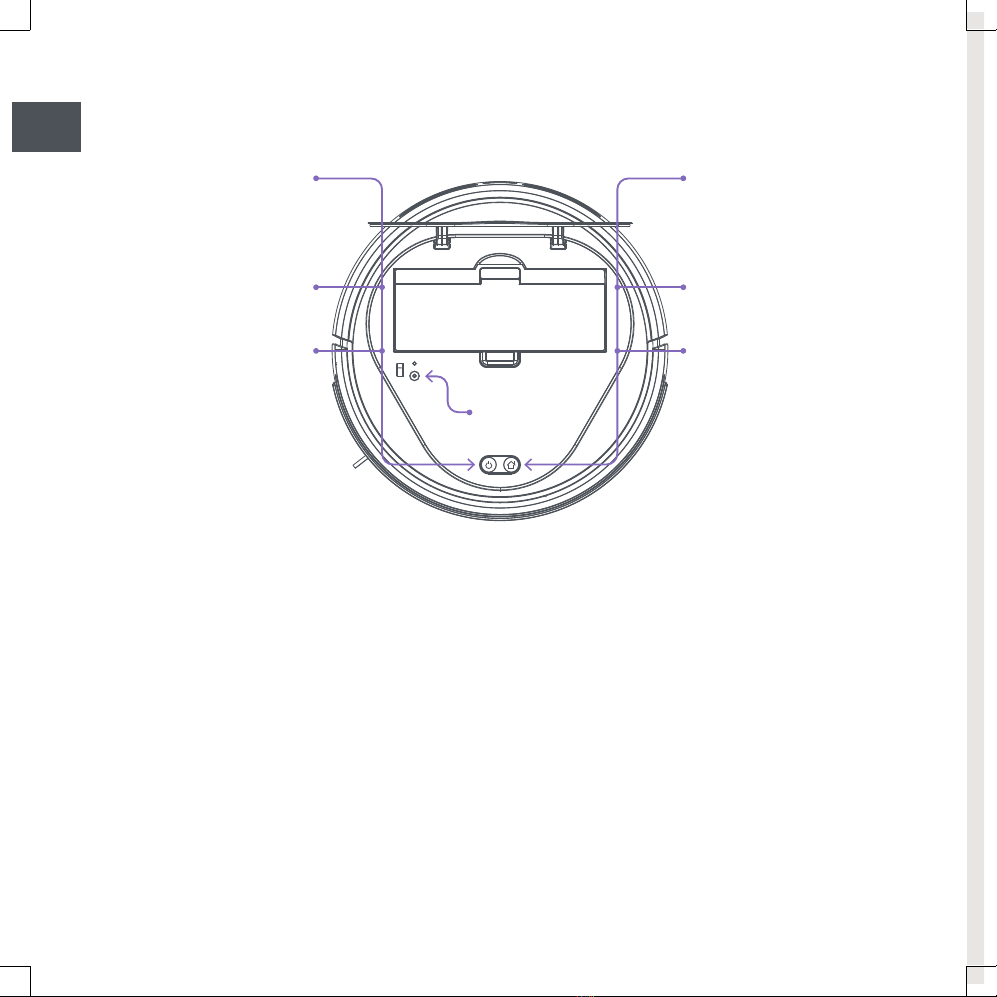
Couvercle supérieur
Bac à poussières
Port de chargement
USB
Bouton de
réinitialisation Bouton de
mise en
marche
Bouton de
recharge
Point de contact pour le
chargement
Prise de
courant
continu (CC)
Indicateur de
signal
Témoin
Wi-Fi
Bouton de dégagement du bac
à poussières
Me voici !
Voici ma base de chargement et mon adaptateur secteur
FR

9
Voici comment me faire démarrer
Comment retirer ma charge
Branchez mon chargeur
et laissez-moi un peu
d’espace !
Ensuite, branchez-moi dans mon
chargeur. Après quelques instants, je suis
prêt à fonctionner.
Retirez la bande protectrice Application TrifoHome
0.5m
0.5m
1.5m
FR
10
Voyants lumineux
Voyant lumineux
Wi-Fi: bleu en permanence ........................................................
Wi-Fi: bleu clignotant lentement ...............................................
Wi-Fi: éteint ................................................................................
Lumière: blanc en continu ...........................................................
Lumière: rouge en continu ...........................................................
Lumière: blanc clignotant lentement ...........................................
Lumière: blanc clignotant ............................................................
Recharge: orange en continu ( + Lumière: rouge clignotant
lentement) ...................................................................................
Recharge: orange en continu ( + Lumière: éteinte) ................
Recharge: orange clignotant lentement .....................................
Recharge: orange clignotant lentement ( + Lumière: éteinte) ........
Signification
Le robot est connecté
Le robot est connecté
Le robot n’est pas connecté
Le robot fonctionne
Le robot ne fonctionne pas
Le robot s’initialise
Le robot se met à jour ou se réinitialise
Faible charge de la batterie
La batterie est complètement rechargée
Le robot retourne à sa base de chargement
La batterie se charge
Nettoyons chez vous !
Pour réveiller Emma :
appuyez plusieurs secondes
sur le bouton jusqu’à ce que
vous entendiez que le robot se
met en route.
Pour commencer à
recharger :
appuyez brièvement sur
le bouton quand Emma
fonctionne ou a été mis en
pause.
Pour réinitialiser:
appuyer
longuement sur le
bouton Reset.
Pour démarrer/mettre
en pause :
appuyez sur le bouton
Pour connecter Emma
au Wi-Fi :
appuyez longtemps sur le
bouton
Pour éteindre Emma :
appuyez longtemps sur le
bouton
Pour arrêter la recharge :
appuyez brièvement sur le
bouton
FR
Indice
Altri manuali Trifo Aspirapolvere


