
Truen NCAM-531BIR Manuale utente

H.26
4 HD VIDEO SERVER
User Manual
ver.1.0
NCAM-531BIR
1.3 Megapixel IP Camera

NCAM-531BIR User Manual
1.3 Megapixel IP Camera Manual
2/44
Safety Precaution
Make sure to turn off the power before installing NCAM-531BIR.
o not install under the direct sunlight or in dusty areas.
Make sure to use the product within the temperature and humidity specified in the specification.
o not operate the product in presence of vibrations or strong magnetic fields.
o not put electrically conducting materials in the ventilation hole.
o not open the top cover of the product. It may cause a failure or electric shock on the
components.
To prevent from overheating, make sure to keep the distance at least 10cm from the ventilation
hole.
Make sure proper voltage (220V/100V) before connecting the power.
We appreciate your purchasing NCAM-531BIR.
Before insta ing the product, p ease read the fo owing with care.

NCAM-531BIR User Manual
1.3 Megapixel IP Camera Manual
3/44
Tab e of Content
Table of Content .............................................................................................................................. 3
1. Introduction ................................................................................................................................. 4
About This Manual .................................................................................................................... 4
Features ................................................................................................................................... 4
Product and Accessories .......................................................................................................... 5
Part Names and Functions ....................................................................................................... 6
3. System Connections ............................................................................................................. 8
2. Installation ................................................................................................................................. 11
Check if it works ..................................................................................................................... 12
3. System Operation .................................................................................................................. 13
Remote Video Monitoring ....................................................................................................... 13
Initialization of IP address ....................................................................................................... 15
4. Remote Configuration ............................................................................................................... 16
Using Web Brower .................................................................................................................. 16
System Configuration ............................................................................................................. 17
Video Configuration ................................................................................................................ 21
Audio Configuration ................................................................................................................ 26
Network Configuration ............................................................................................................ 27
Serial Configuration ................................................................................................................ 32
Event Configuration ................................................................................................................ 34
Preset Configuration ............................................................................................................... 37
Record Configuration .............................................................................................................. 38
User Configuration .................................................................................................................. 39
Camera Configuration ............................................................................................................ 41

NCAM-531BIR User Manual
1.3 Megapixel IP Camera Manual
4/44
1. Introduction
About This Manua
This user manual provides information on operating and managing the premium network camera, NCAM-
531BIR. The manual includes instructions of installation, operation and configuration of NCAM-531BIR as
well as how to make troubleshooting.
Features
NCAM-531BIR is a 1.3 Megapixel network-based camera with remote live monitoring, audio monitoring and
control via an IP network such as LAN, A SL/V SL, and Wireless LAN.
Video
Highly efficient compression algorithm, H.264 & MJPEG support
18 kinds of compression and resolutions: CIF (352x240) - QVGA(1280 x 960)
Wide range of transmission rates: 32kbps ~ 8Mbps
Various transmission modes: CBR, VBR
Motion detection
Audio
Multi-transmission mode: Simplex (NCAM-531BIR Client PC or ecoder, Client PC or ecoder
NCAM-531BIR), Full uplex
Network
Fixed IP & ynamic IP ( HCP) support
1:1, 1:N support
Multicasting
Automatic transmit rate control according to network conditions
Sensor and A arm
Support direct connections of external sensor and alarm devices
Event Alarm
User Interface
iagnose and upgrade through dedicated program called True Manager
System configuration using Internet Explorer

NCAM-531BIR User Manual
1.3 Megapixel IP Camera Manual
5/44
High Re iabi ity
Reliable embedded system
Product and Accessories
NCAM-531BIR Quick Manua SW and User Manua CD

NCAM-531BIR User Manual
1.3 Megapixel IP Camera Manual
6/44
Part Names and Functions
Connector
Connector Function
1. NETWORK Ethernet (RJ45)
2. POWER INPUT C 12V
3. AU IO OUT(RE ) Connect jack from speaker
4. AU IO IN (WHITE) Connect jack from line level audio source
5. ALARM & SENSOR
T/Block – 4pin
A SENSOR IN Normal Open
B GN
C ALARM OUT Normal Open
Relay, Max 30Vdc, 1A
ALARM COMMON
④
④④
④
③
③③
③
⑤
⑤⑤
⑤
①
①①
①
②
②②
②

NCAM-531BIR User Manual
1.3 Megapixel IP Camera Manual
7/44
Rear
Reset Button: Push the reset switch for more than 5seconds to
reset the camera.
Video Output: Composite video output (1 Vpp 75ohm, pitch
2mm connector)
Reset Button Video Output

NCAM-531BIR User Manual
1.3 Megapixel IP Camera Manual
8/44
3. System Connections
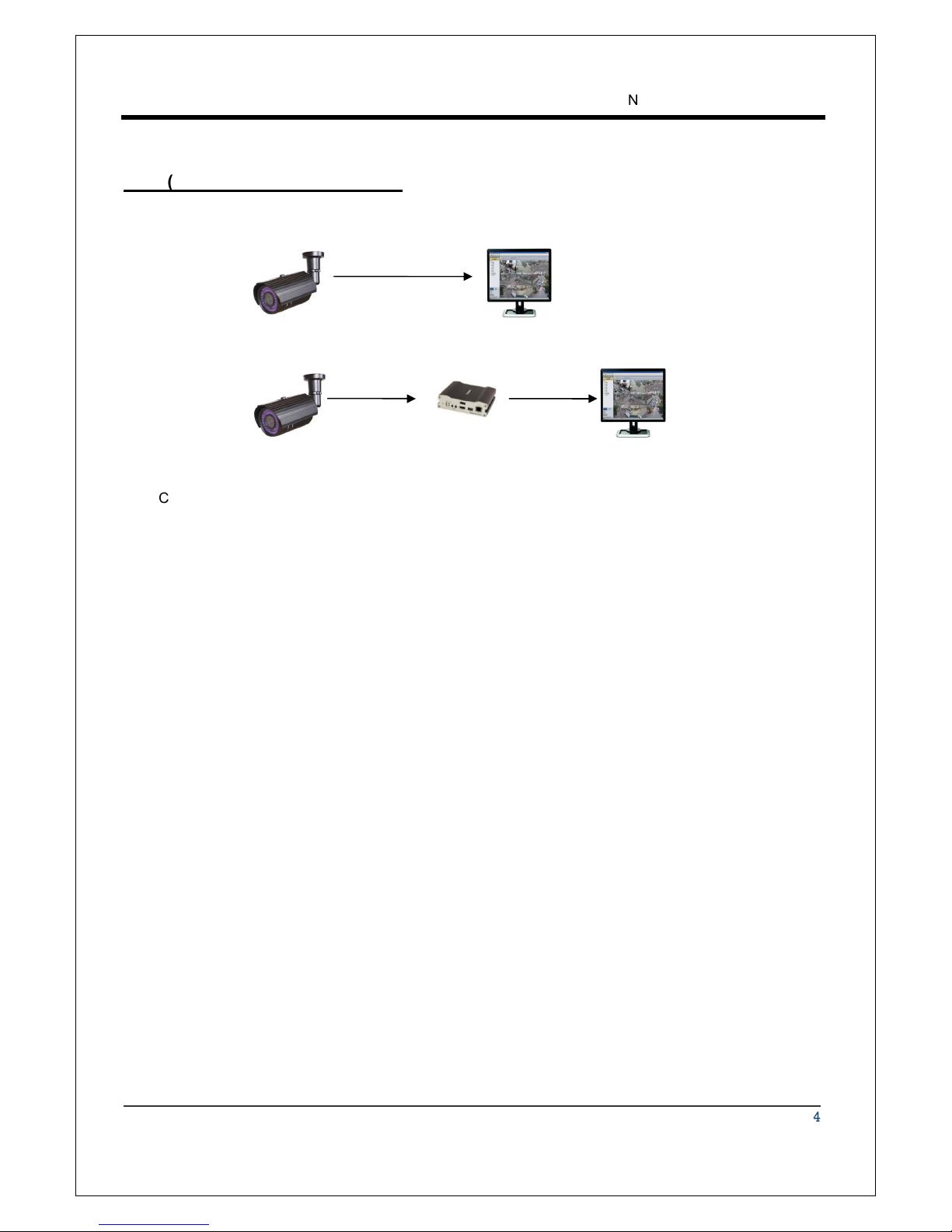
NCAM-531BIR IP Cameras can be connected in either 1 to 1 connection where one NCAM-531BIR is
connected one PC client or a decoder system or 1 to many connections where one NCAM-531BIR can be
connected several PCs and decoder systems.
Topo ogy
Generally, NCAM-531BIR and PC or a decoder is connected in 1-to-1 mode or 1-to many configuration.
1:1 Connection .
One NCAM-531BIR is installed at a site where video images are transmitted. A PC or a decoder is
installed at a central location to receive and view the video images on an analog monitor. Audio and
serial data are transferred in either direction.
Site
Remote Center ( ecoder) Remote Center
Site
Remote Center (PC SW)

NCAM-531BIR User Manual
1.3 Megapixel IP Camera Manual
9/44
or
or
or
1:N Connection .
In this configuration, a site can be monitored from many remote central locations. Although up to 64 PCs
or decoders can be connected to one NCAM-531BIR, in the real network environment, network
bandwidth can limit the maximum connections. Functionally, the central monitoring system (CMS)
software provided can replace the decoder.
Mu ticast Mode
If the network supports multicasting, a large number of decoders can be used to receive video effectively
from a NCAM-531BIR using a single streaming of video and audio. However, multicast mode is possible
only when network environment supports multicast.
Re ay
Video and audio data can be retransmitted from a center to another center. The arrangement is useful
when the network bandwidth to the site is limited while there are more than one center want to monitor
the site.
Site
Remote Center
Site
Center 1( ecoder) Center 2 ( ecoder)
NCAM-531BIR User Manual
1.3 Megapixel IP Camera Manual
10/44
CMS (Centra Monitoring System)
CMS (Central Monitoring System) is a Window-based remote monitoring program in order to monitor or
control video, audio, and events in real time from several IP cameras or video servers. Please refer to
the CMS User Manual for more in detail..
Site
Remote Center
Site
Remote Center ( ecoder)
CMS
Indice


