
TrueNAS R30 Manuale

TrueNAS®R30 Basic Setup Guide
Version 1.0

Contents
1 Introduction ����������������������������������������������������������������������������������������������������� 1
1�1 Safety ������������������������������������������������������������������������������������������������������� 1
1�1�1 Static Discharge ������������������������������������������������������������������������������������������������� 1
1�1�2 Handling the System ������������������������������������������������������������������������������������������� 1
1�2 Requirements ��������������������������������������������������������������������������������������������� 1
2 R30 Components ����������������������������������������������������������������������������������������������� 2
2�1 Front Indicators ������������������������������������������������������������������������������������������� 3
2�2 Rear Components and Ports ���������������������������������������������������������������������������� 3
3 Rack the R30 ����������������������������������������������������������������������������������������������������� 4
3�1 Attach Chassis Rails �������������������������������������������������������������������������������������� 4
3�2 Install Rack Rails ������������������������������������������������������������������������������������������ 6
3�3 Install the R30 in the Rack ������������������������������������������������������������������������������� 8
4 Replace Drives �������������������������������������������������������������������������������������������������� 9
4�1 Remove Drives ������������������������������������������������������������������������������������������ 10
4�1�1 Install Drives ��������������������������������������������������������������������������������������������������� 11
5 Connect Cables ����������������������������������������������������������������������������������������������� 12
6 Connecting to the TrueNAS Web Interface ������������������������������������������������������������ 13
7 Additional Resources ���������������������������������������������������������������������������������������� 14
8 Contacting iXsystems ��������������������������������������������������������������������������������������� 14
Copyright © 2023 iXsystems, Inc. All rights reserved. All trademarks are the property of their respective owners.

Page 1
1 Introduction
The TrueNAS R30 is a 1U, 16-bay, NVMe data storage array� It has redundant power supplies�
Your system comes with the TrueNAS operating system preloaded�
Review the safety considerations and hardware requirements before installing an R30 system into a rack�
1.2 Requirements
We recommend these tools when installing a TrueNAS R30 in a rack:
• #2 Phillips head screw driver
• Flat head screw driver
• Tape measure
• Level
1.1 Safety
1.1.1 Static Discharge
Static electricity can build up in your body and discharge when touching conductive materials� Electrostatic
Discharge (ESD) is harmful to sensitive electronic devices and components� Keep these safety recommendations in
mind before opening the system case or handling non-hot-swappable system components:
• Turn o the system and remove power cables before opening the case or touching internal components.
• Place the system on a clean, hard work surface like a wooden tabletop� Using an ESD dissipative mat can also
help protect the internal components�
• Touch the metal chassis with your bare hand to dissipate static electricity in your body before touching any
internal components, including components not yet installed in the system� Using an anti-static wristband and
grounding cable is another option�
• Store all system components in anti-static bags�
You can nd more preventative tips and details about ESD at https://www�wikihow�com/Ground-Yourself-to-Avoid-
Destroying-a-Computer-with-Electrostatic-Discharge�
1.1.2 Handling the System
We recommend at least two people lift a TrueNAS system�
Hold the system from the sides or bottom whenever possible� Always be mindful of loose cabling or connectors and
avoid pinching or bumping these elements whenever possible�
This document uses “left” and “right” according to your perspective when facing the front of a system or rack�

Page 2
2 R30 Components
R30 Unied Storage Array with up to 16 NVMe
drives installed in trays
Set of rackmount rails with mounting hardware
Accessory kit:
• 2 IEC C13 to NEMA 5-15P power cords
• 2 IEC C13 to C14 cords
• Set of velcro cable ties
• Fasteners:
• 48 #6-32x4mm drive tray screws�
• 4 #6-32x4L chassis rail screws�
• 2 Ear Extenders
TrueNAS units are carefully packed and shipped with trusted carriers to arrive in perfect condition�
If there is any shipping damage or missing parts, please take photos and contact iXsystems support immediately at
support@ixsystems�com, 1-855-GREP4-iX (1-855-473-7449), or 1-408-943-4100�
Please locate and record the hardware serial numbers on the back of each chassis for quick reference�
Carefully unpack the shipping boxes and locate these components:
front

Page 3
2.1 Front Indicators
2.2 Rear Components and Ports
The R30 has front panel indicators for power, locate ID, and fault� The fault indicator is on during the initial power-
on-self-test (POST) and turns o during normal operation. It turns on if the TrueNAS software issues an alert.
The back panel has redundant power supplies and various connection ports�
USB 3.0
Gb Ethernet 2
OOBM
Ethernet
VGA
Port
Location
button
with LED
Power
button
with LED
Power Supply 1 Power Supply 2
PCIe Slot A
PCIe Slot B
PCIe Slot C
OCP 3.0 Slot D
*Half-height cards must be fully PCIe compliant�
Slot A Slot B Slot C Slot D
x16 Gen 4
(Half Height*)
x8 Gen 4
(Half Height*)
x16 Gen 4
(Full Height)
OCP 3�0
(Not Used)
PCIe Expansion
Light Color and Indication
Green: System on and ready
Flash Green: LAN1 & LAN3 connected
Flash Green: LAN2 & LAN4 connected
Blue: Locate ID active
Light Color and Indication
Location Button
Amber: Hardware message event to be viewed
N/A Recessed Reset Button
1
2

Page 4
3 Rack the R30
3.1 Attach Chassis Rails
We recommend double-checking your system’s rack rail placement�
The R30 requires an EIA-310 compliant rack� To properly install the rack rails, the front and rear vertical rack posts
need to be spaced between 23” - 35.75” (584mm - 908mm) apart�
Each rail has two components, the outer rack rail and the inner chassis rail� To protect during shipping, the chassis
rail is inserted into the rack rail and must be removed before attaching a system� Completely expand the rail� Slide
the chassis rail forward until the metal catch stops it� Push in the catch and slide the chassis rail forward until it is
free of the rack rail�
The chassis rail attaches to the side of the R30� Align the chassis rail with the pegs on the side of the R30� Slide rail
back to lock in place� Use the screw hole at the front of the chassis and at the rear of the chassis to secure the rail to
the side of the R30� Attach the chassis rail to the side of the R30 using the 2 chassis rail screws and a #2 screwdriver�
Follow this procedure to slide out and attach the second chassis rail to the other side of the system�
Push
white button
Slide
chassis rail
FRONT
REAR
Position
chassis rail over pegs.
Slide to lock.
FRONT
REAR

Page 5
The following images are enlarged to show detail:
FRONT
FRONT
REAR
REAR
MIDDLE
MIDDLE

Page 6
3.2 Install Rack Rails
Before installing the rack rail, make sure the rack has enough space for the system� The R30 needs 1U of space for
both the system and rack rails�
Take a rack rail and align the end marked “FRONT” with the front of the rack� The “FRONT” text must be pointed
inside the rack so the chassis rails can slide into the rack rails� In this example the left front rack rail is shown�
Align the rail front pegs with the rack attach points and press the rail retention clip to open it� This allows the rail
front pegs to enter the rack attach points� Push the rail front pegs into the rack attach points�
FRONT
Release the spring plate of the rail
retention clip to secure the rail front
pegs in the proper attach points�
The rail kit also includes two retention screw hole extenders
that can be screwed into the middle rail attach point�
The rail rear pegs attach next� Keeping the rail level, slide the
inner rack rail toward the rear of the enclosure�
FRONT

Page 7
With the front of the rail installed, extend the back of the rack rail towards the equivalent attach points on the rear
rack post� Make sure the rail remains level from the front to the back� With the rear attach points in place, secure
the rear of the rail to the rack by depressing the spring clip� Follow this process for the other rack rail�
REAR
Press the spring clip on the rear of the rack rail
to permit the attach points to pass through
the corresponding openings� Release the clip
to secure�
Rear Rack Rail Clip (outside view) Rear Rack Rail Clip (inside view)
Rear Rack Rail Extended (inside view)
Page 8
3.3 Install the R30 in the Rack
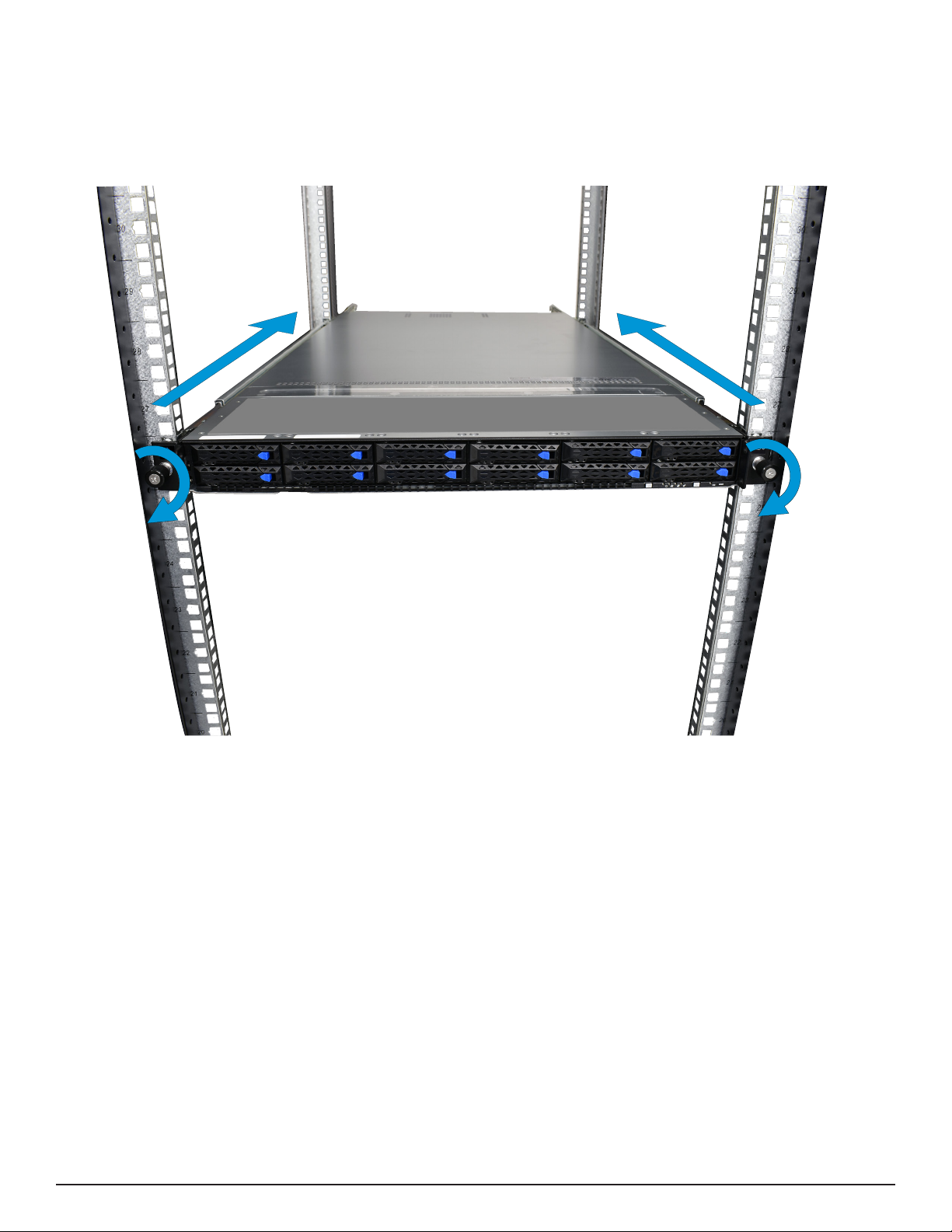
Team-lift the system and align the chassis rails with the rack rails� Slide the ends of the chassis rails into the rack
rails and push the system forward until the metal safety catches click into place� Pull the blue safety catches
towards the front of the system and continue to gently push the system into the rack�
The rail kit includes additional thumb screws that can be used to secure the system to the rack rails
using the screw holes in each chassis ear�
Indice
Altri manuali TrueNAS Magazzinaggio

TrueNAS
TrueNAS X Series Manuale

TrueNAS
TrueNAS M Series Manuale

TrueNAS
TrueNAS M Series Manuale

TrueNAS
TrueNAS ES102 Manuale

TrueNAS
TrueNAS Mini 3.0 Manuale

TrueNAS
TrueNAS Mini X+ Manuale di installazione e funzionamento

TrueNAS
TrueNAS Mini R Manuale

TrueNAS
TrueNAS ES60 Manuale

TrueNAS
TrueNAS M Series Manuale

TrueNAS
TrueNAS ES102 Manuale

TrueNAS
TrueNAS ES24F Manuale

TrueNAS
TrueNAS ES60 Manuale

TrueNAS
TrueNAS R Series Manuale utente

TrueNAS
TrueNAS M Series Manuale utente

TrueNAS
TrueNAS R Series Manuale

TrueNAS
TrueNAS ES24 Manuale

TrueNAS
TrueNAS X-Series Manuale

TrueNAS
TrueNAS ES60 Manuale

TrueNAS
TrueNAS M Series Manuale utente

TrueNAS
TrueNAS R20A Manuale utente


