Uniden U2 DB-CP Manuale utente


Contact Tech Support at 1.800.215.7015 or email at support@unidencellular.com
2
TABLE OF CONTENTS
3
5
6
7
8
10
10
11
11
12
14
16
19
21
22
24
26
28
30
32
34
36
38
40
About The Booster Kits .........................................................................
Booster Kit Components ......................................................................
Tools Required / Optional Equipment ................................................
How It Works ..........................................................................................
Overview ................................................................................................
Getting Started ......................................................................................
Check For Signal Strength ....................................................................
Run Coaxial Cable .................................................................................
Install the Signal (Outdoor) Antennas .................................................
Understand the Different Signal (Outdoor) Antennas .........................
Install & Connect the Distribution (Indoor) Antennas ........................
Understand the Different Distribution (Indoor) Antennas ..................
Power Up Your Cellular Booster ...........................................................
Check the Cellular Booster Status .......................................................
Manual Gain Control, Uplink & Downlink Adjustments,
Dip Switch Control For:
• & DB-CP ..............................................
• DB-CP ......................................................................
• DB-CP ....................................................................
• DB-CP .......................................................................
• DB-CP .....................................................
• TB-CPA .........................................................
• TB-CPA ..........................................................
Troubleshooting ....................................................................................
FAQ ........................................................................................................

Contact Tech Support at 1.800.215.7015 or email at support@unidencellular.com
Notre but est de vous donner une solution prouvée qui nira votre frustration contre
des signaux cellulaire faible et chuté. Celas vous laissez prendre plaisir d’une qualité
d’appelle excellent, plus de convenance, et une productivité plus haute.
3
A PROPOS DE VOTRE AMPLIFICATEUR CELLULAIRE
INSTRUCTIONS POUR INSTALLATION DES
AMPLIFICATEURS SUIVANTS:
• DB-CP
• DB-CP
• DB-CP
• DB-CP
• DB-CP
• DB-CP
• DB-CP
•
• TB-CPA
• TB-CPA
NOTE: This manual contains important safety and operating
information. Please read and follow the instructions in this manual,
failure to do so could be hazardous and result in damage to your
cellular booster.
Important Note Related to Industry Canada
Radio equipment that is installed, activated, modied, repaired, maintained
or allowed to be operated is duly authorized and operated in accordance
with the aforementioned authorization, by checking the operator’s license,
or, failing that, consulting the following website at: http://spectrumdirect.
ic.gc.ca

Contact Tech Support at 1.800.215.7015 or email at support@unidencellular.com
4
SAFETY AND WARNINGS
• Turn AC power OFF atthemainsbeforeworkingonany
electricalconnections.
• AllACpowerwiringandcoaxialcablewiringmust conform
tolocalornationalcodes.
• TheAClinevoltagemustbewithin10%ofthevoltage
speciedforthebooster.
• AsolidcopperconductornolessthanNo.8AWGshouldbe
connectedtoground.
• DO NOT connectagroundwiretoagassupplyline.
• DO NOT openthebooster.Therearenoserviceable
partsinside.
Touchinginternalpartscouldcausedamagefromstaticelectrical
discharge.
OpeningthebaseunitDOES VOID THE WARRANTY.
!

Contact Tech Support at 1.800.215.7015 or email at support@unidencellular.com
5
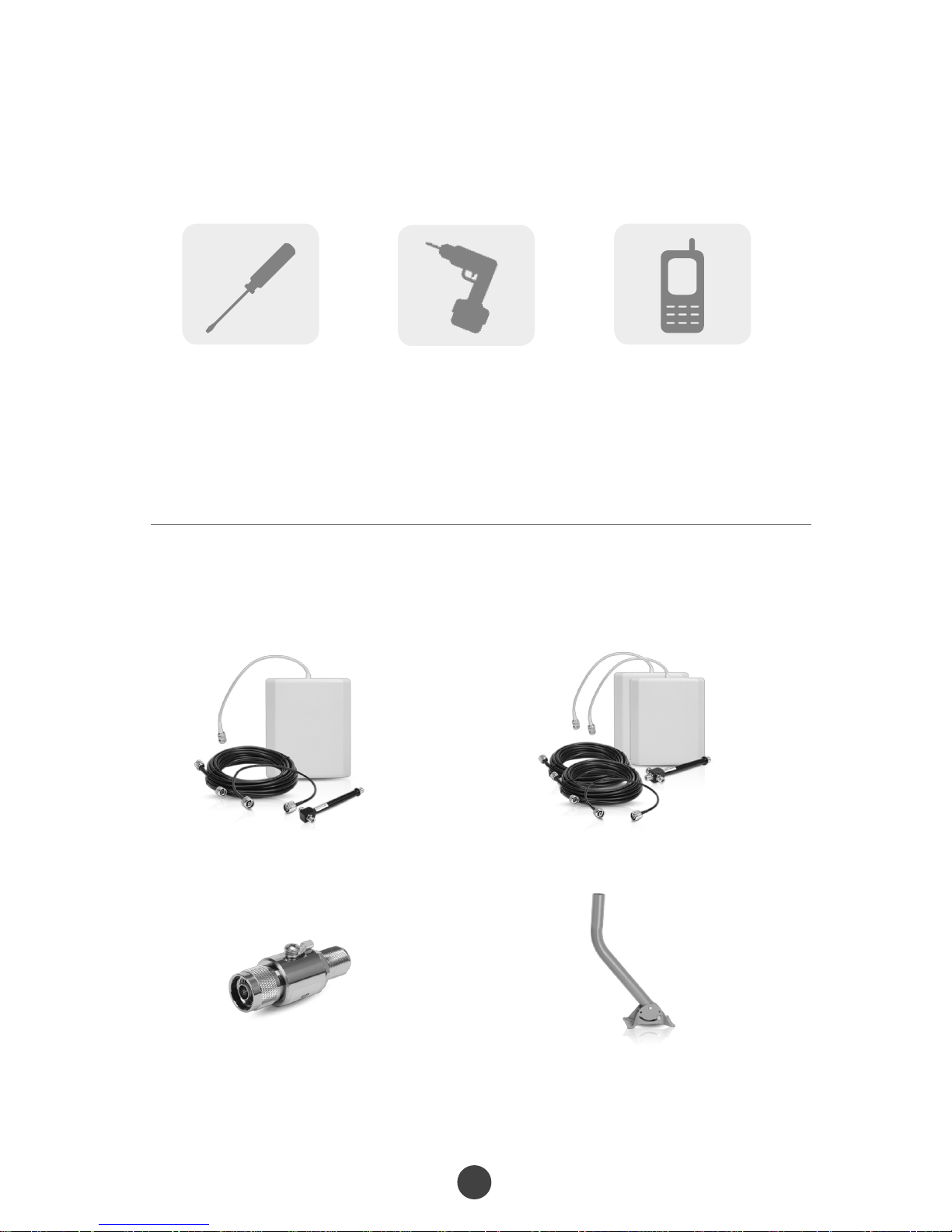
BOOSTER KIT COMPONENTS
BOOSTERS
WHIP
YAGI LDPA
PANEL
SIG 400
PANEL
DOME
POST
SIG 5D
OUTDOOR ANTENNAS (signal)
INDOOR ANTENNAS(distribution)
CABLES (variouslengthsavailable)

Contact Tech Support at 1.800.215.7015 or email at support@unidencellular.com
6
OPTIONAL ACCESSORIES
(soldseparately)
2 Way Expansion Kit
Lightning Surge Protector
3 Way Expansion Kit
Universal Antenna Mounting Pole
Phillips Screwdriver Drill Cellular Phone
(to check signal strength)
TOOLS REQUIRED

Contact Tech Support at 1.800.215.7015 or email at support@unidencellular.com
7
HOW IT WORKS
Thecellularboosterprovidesreliabletwo-waycellularcoveragebyimprovingsignal
strengthinhomes,buildings,ofces,andotherareaswherecellularreceptionisweakor
unreliable.
Thesystemampliesthesignalfromthenearestcellulartowerandretransmitsatahigher
powerlevelwithinalocalarea.
Thismanualprovidessimpleinstallationinstructionsthatwillhaveyourcellularboosterkit
runninginrecordtime.
HOW TO INSTALL YOUR NEW
CELLULAR BOOSTER
1
1
2
2
4
4
3
3
Booster
Indoor Antenna
Outdoor Antenna
Coaxial Cable

Contact Tech Support at 1.800.215.7015 or email at support@unidencellular.com
8
Thisguidewillhelpyouproperlyinstallyourcellularboosterkit.Itisimportant
toreadthroughalloftheinstallationstepsbeforeinstallingyourequipment.
Thoroughlyreadthroughtheinstructions,visualizewherealltheequipmentwill
needtobeinstalledanddoasoftinstallationbeforemountinganyequipment.
Ifyoudonotunderstandtheinstructionsinfull,pleasecontacttechnical
supportat 1-800-215-7015.
OVERVIEW
BOOSTER – select location
Installtheboosterinanareathatisprotectedfromthe
weather,properlyventilatedandisawayfromexcessiveheat
andmoisture.
1
SIGNAL ANTENNA (outdoor) - select location
Mountthesignal(outdoor)antennainanelevatedoutdoor
locationsothatitpointstowardsthecellulartowerandawayfrom
wheretheinsideantennawillbelocated.
2
OUTDOOR COAXIAL CABLE - select location
Theoutdoorcoaxialcableisusedtoconnectthesignal
(outdoor)antennatothebooster.
3
INDOOR COAXIAL CABLE - (if used)
Theindoorcoaxialcableisusedtoconnectthedistribution
(indoor)antennatothebooster.
4
DISTRIBUTION ANTENNA (indoor)
Theideallocationforthedistributionantennawillbetheareaofyour
propertywhereyouneedtoimprovethesignalmost.
NOTE: The signal strength will be strongest closest to the antenna.
5

Contact Tech Support at 1.800.215.7015 or email at support@unidencellular.com
9
LIGHTNING SURGE PROTECTOR - (SOLD SEPARATELY)
Thelightningsurgeprotectorconnectsinbetweenthesignal
antennaandthebooster.
IMPORTANT: Lightning surge protector must be grounded.
6
IMPORTANT: Thesignalantenna(outdoor)shouldalwaysbe
separatedfromthedistributionantenna(indoor)byatleast20
verticalfeetincludingtheseparationofathickbarriersuchas
arooforawall.Dependingonthestrengthofyouroutdoor
signal,theweakerthesignalthelessseparationdistanceis
required.
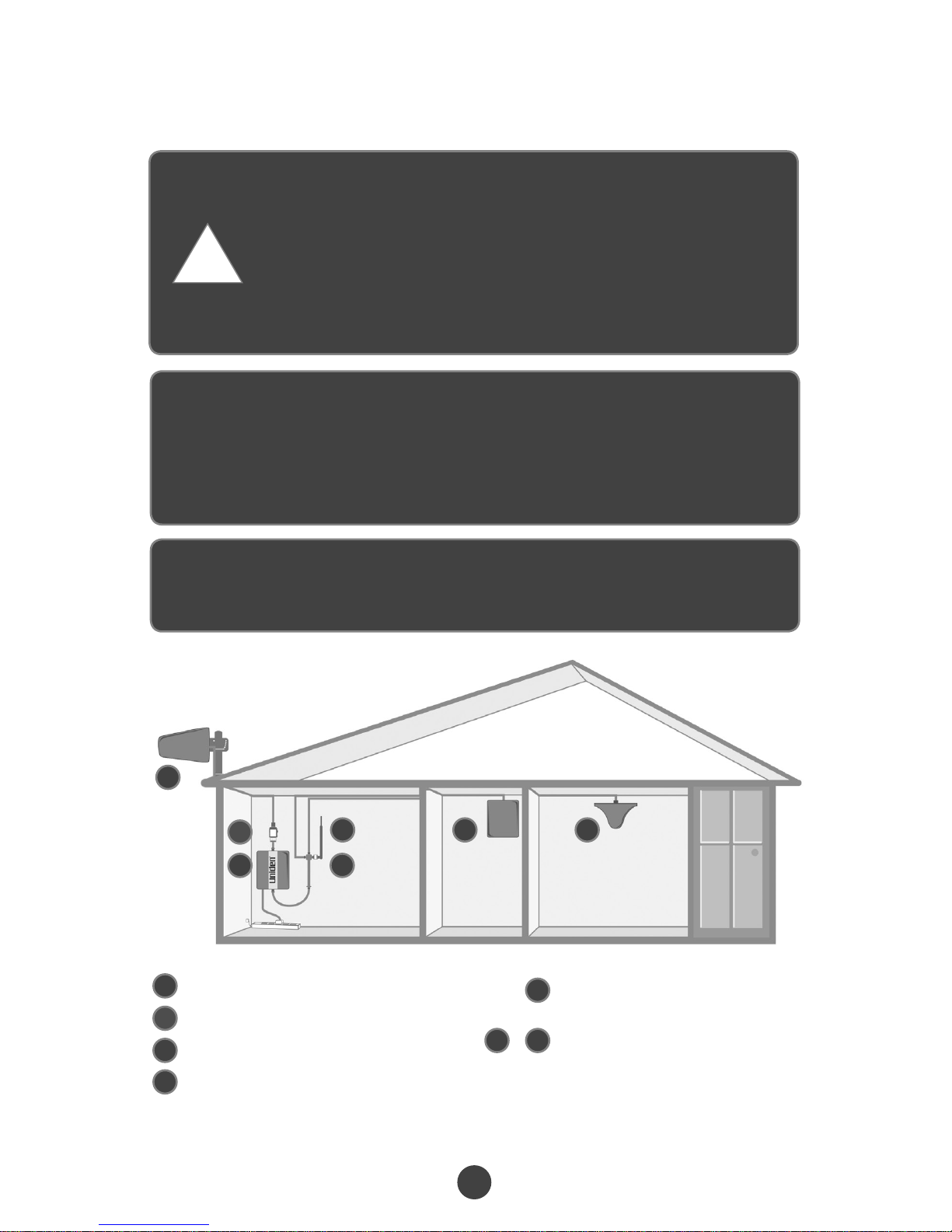
7COMMISSIONING THE SYSTEM
SignalAntenna (outdoor)
SurgeProtector
Booster
DistributionAntenna(indoor)
Splitter
(ifusingmutlipleantenna)
DistributionAntennas
(optionalantennasfor
additionalcoverage)
1
2
4
3
1
2467
3 5
5
6 7
&
!

Contact Tech Support at 1.800.215.7015 or email at support@unidencellular.com
10
Plan the layout of your system
Beforeyougetstartedyouwillneedtoplanthelayoutofyoursystem.Thisinvolves
checkingsignalstrengthforsignalscomingfromthecellulartower,aswellas
antenna,boosterandcableplacement.
IDENTIFY THE BEST LOCATION TO INSTALL THE SIGNAL
(OUTDOOR) ANTENNA.
Check for signal strength
Selectalocationontheroofofthebuildingtoinstallthesignalantenna,
bymonitoringyourcellularphone’ssignalstrength(signalbars)tondthe
strongestsignalfromyourcarrier’scellulartower.
Mark the area
Markthatareaastheinstallationlocationforthesignal(outdoor).
GETTING STARTED
youwanttoensurethatthereisenoughseparationbetweenthe
distributionandsignalantennaorthattheyareshieldedfromeach
othertoensurethedistributionantennadoesnotsendasignalback
intothesignalantenna.Ifyoucannotachievetheseseparations,
eitherchooseanalternatelocationforthesignal(outdoor)antenna
ordetermineiftherearenaturalbarriersinthebuildingconstruction
itselfthatwillattenuatesignalsbetweenthetwoantennassothat
oscillationcanbeprevented.
IMPORTANT: Conrmthatyouhaveatleast
20feetofverticaldistancebetweenthemarked
antennalocationandthelocationwhereyou
willplacethedistribution(indoor)antenna.To
preventthesystemfromoscillation(feedback)
!
Altri manuali per U2 DB-CP
1
Questo manuale è adatto per i seguenti modelli
9
Indice
Altri manuali Uniden Estensione

Uniden
Uniden DRX100 Manuale utente

Uniden
Uniden UP20 Manuale dell'operatore

Uniden
Uniden Um50 Manuale dell'operatore

Uniden
Uniden U60P 4G Manuale utente

Uniden
Uniden Ui15 Manuale utente

Uniden
Uniden U2 DB-CP Manuale utente

Uniden
Uniden Hero Series Manuale utente

Uniden
Uniden Link 4G Manuale utente

Uniden
Uniden U60 4G CELLULAR BOOSTER UNI-2005-CPAL Manuale utente

Uniden
Uniden UM50 4G Istruzioni per l’uso