Uniden U2 DB-CP Manuale utente

INSTRUCTION MANUAL
DB-CP
DB-CP

The Uniden trademark is owned by Uniden America Corporation and its affiliates is used under license by Signifi Mobile.
Instruction Manual
BOOSTER KITS
About The Booster Kits
Booster Kit Components
Tools Required / Optional Equipment
How It Works
Overview
Getting Started
Check For Signal Strength
Run Coaxial Cable
Install The Signal (Outdoor) Antennas
Understand The Different Signal (Outdoor) Antennas
Install & Connect The Distribution (Indoor) Antennas
Understand The Different Distribution (Indoor) Antennas
Power Up Your Cellular Booster
Check The Cellular Booster Status
Manual Gain Control, Uplink & Downlink Adjustments
Dip Switch Control For:
• DB-CP DB-CP
Troubleshooting
Faq
3
5
6
7
8
10
10
10
11
12
13
14
17
18
19
20
22
24
TABLE OF CONTENTS
NOTE: This manual contains important safety and operating information.
please read and follow the instructions in this manual, failure to do so could be hazardous and result
in damage to your cellular booster.
Phone: 1-800-744-9797
Email: info@cellularbooster.com
www.cellularbooster.com
Canadian Head Office
5005 Jean-Talon Street West #10
Montreal, Quebec, Canada H4P1W7
The Uniden trademark is owned by Uniden America Corporation and its affiliates is used under license by Signifi Mobile.

Instruction Manual
BOOSTER KITS
Phone: 1-888-744-9797
Email: info@cellularbooster.com
www.cellularbooster.com
Canadian Head Office
5005 Jean-Talon Street West #10
Montreal, Quebec, Canada H4P1W7
3
The Uniden trademark is owned by Uniden America Corporation and its affiliates is used under license by Signifi Mobile.
•DB-CP model # UNI001 DB-CP
• DB-CP model # UNI002 DB-CP
Our goal is to give you a proven solution that ends your frustration with weak and dropped
cellular signals so you can enjoy excellent call quality, more convenience and greater productivity.
DB-CP and DB-CP cellular boosters are Industry Canada and FCC type accepted.
INSTALLATION INSTRUCTIONS FOR THE
FOLLOWING CELLULAR BOOSTERS:
ABOUT THE BOOSTER KITS

Instruction Manual
BOOSTER KITS
Phone: 1-888-744-9797
Email: info@cellularbooster.com
www.cellularbooster.com
Canadian Head Office
5005 Jean-Talon Street West #10
Montreal, Quebec, Canada H4P1W7
4
The Uniden trademark is owned by Uniden America Corporation and its affiliates is used under license by Signifi Mobile.
•Turn AC power OFF before working on any electrical connections.
• All AC power wiring and coaxial cable wiring must conform to local or national codes.
• The AC line voltage must be within 10% of the voltage specied for the booster.
• A solid copper conductor no less than No. 8 AWG should be connected to ground.
• DO NOT connect a ground wire to a gas supply line.
• DO NOT open the booster. There are no serviceable parts inside.
• Touching internal parts could cause damage from static electrical discharge.
• Opening the base unit DOES VOID THE WARRANTY.
SAFETY AND WARNINGS

Instruction Manual
BOOSTER KITS
Phone: 1-888-744-9797
Email: info@cellularbooster.com
www.cellularbooster.com
Canadian Head Office
5005 Jean-Talon Street West #10
Montreal, Quebec, Canada H4P1W7
5
The Uniden trademark is owned by Uniden America Corporation and its affiliates is used under license by Signifi Mobile.
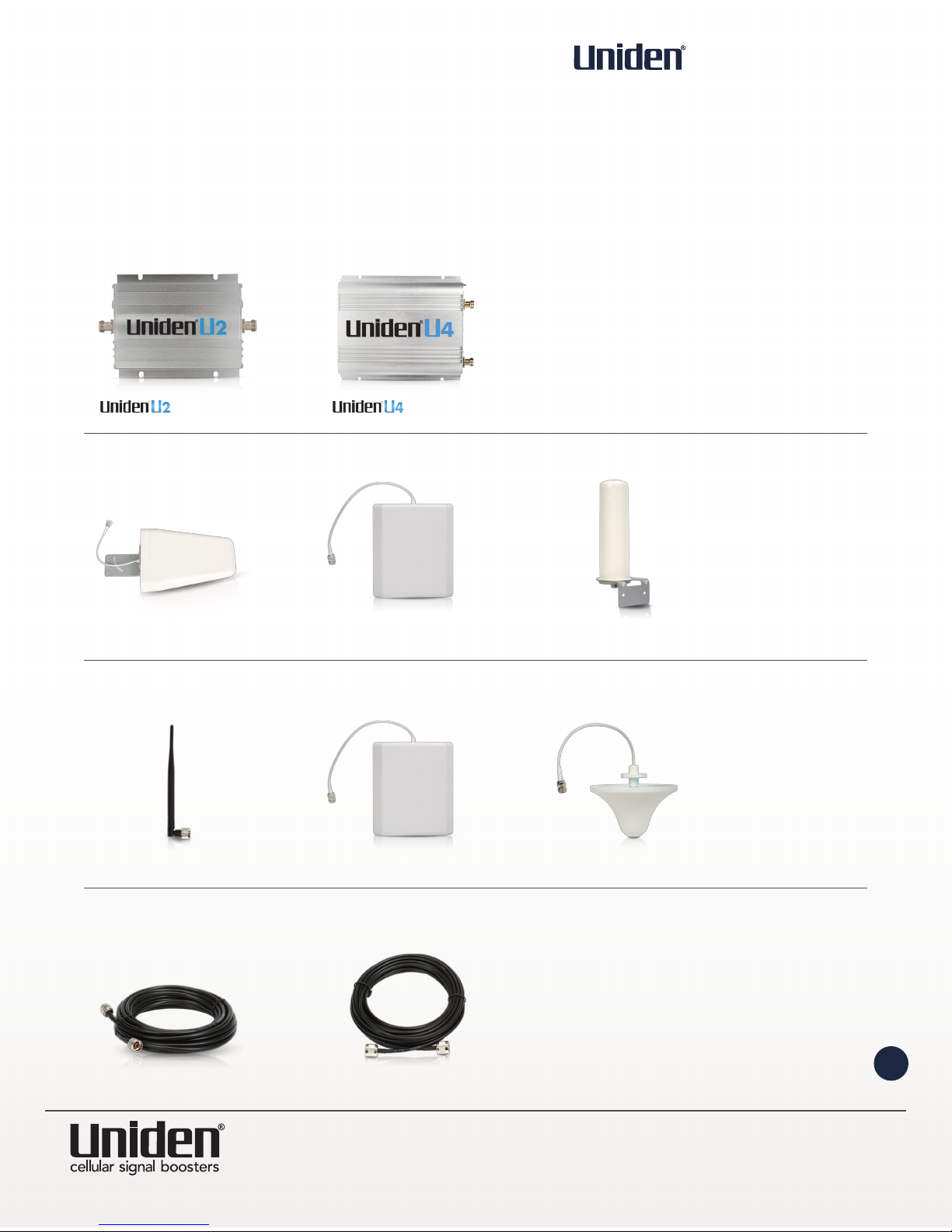
BOOSTER KIT COMPONENTS
BOOSTERS
OUTDOOR ANTENNAS (SIGNAL)
INDOOR ANTENNAS (DISTRIBUTIONAL)
CABLES (VARIOUS LENGTHS AVAILABLE)
YAGI LPDA
WHIP
5D-FB SIG 400
POST
PANEL
PANEL
DOME
DB-CP BOOSTER DB-CP BOOSTER

Instruction Manual
BOOSTER KITS
Phone: 1-888-744-9797
Email: info@cellularbooster.com
www.cellularbooster.com
Canadian Head Office
5005 Jean-Talon Street West #10
Montreal, Quebec, Canada H4P1W7
6
The Uniden trademark is owned by Uniden America Corporation and its affiliates is used under license by Signifi Mobile.
TOOLS REQUIRED
OPTIONAL ACCESSORIES (SOLD SEPARATELY)
Phillips Screwdriver Drill Cellular Phone
(to check signal strength)
2 Way Expansion Kit
Lightning Surge Protector
3 Way Expansion Kit
Universal Antenna Mounting Pole

Instruction Manual
BOOSTER KITS
Phone: 1-888-744-9797
Email: info@cellularbooster.com
www.cellularbooster.com
Canadian Head Office
5005 Jean-Talon Street West #10
Montreal, Quebec, Canada H4P1W7
7
The Uniden trademark is owned by Uniden America Corporation and its affiliates is used under license by Signifi Mobile.
HOW IT WORKS
The cellular booster provides reliable two-way cellular coverage by improving signal strength in homes,
buildings, ofces, and other areas where cellular reception is weak or unreliable.
The system amplies the signal from the nearest cellular tower and re-transmits at a higher power level
within a local area.
This manual provides simple installation instructions that will have your cellular booster kit running in
record time.
HOW TO INSTALL YOUR NEW CELLULAR BOOSTER
Booster
Indoor Antenna
Outdoor Antenna
Coaxial Cable
4
3
4
3
1
1
2
2

Instruction Manual
BOOSTER KITS
Phone: 1-888-744-9797
Email: info@cellularbooster.com
www.cellularbooster.com
Canadian Head Office
5005 Jean-Talon Street West #10
Montreal, Quebec, Canada H4P1W7
8
The Uniden trademark is owned by Uniden America Corporation and its affiliates is used under license by Signifi Mobile.
This guide will help you properly install your cellular booster kit. It is important to read through all of the
installation steps before installing your equipment. Thoroughly read through the instructions, visualize where
all the equipment will need to be installed and do a soft installation before mounting any equipment. If you
do not understand the instructions in full, please contact technical support at: 1-888-744-9797.
OVERVIEW
IMPORTANT: The signal (outdoor) antenna should always be separated from the
distribution (indoor) antenna by at least 20 vertical feet or 50 horizontal feet including
the separation of a thick barrier such as a roof or a wall.
Depending on the strength of your outdoor signal, the weaker the signal the less
separation distance is required.
BOOSTER – SELECT LOCATION
Install the booster in an area that is protected from the weather, properly ventilated and is
away from excessive heat and moisture.
1
SIGNAL (OUTDOOR) ANTENNA - SELECT LOCATION
Mount the signal (outdoor) antenna in an elevated outdoor location so that it points towards
the cellular tower and away from where the inside antenna will be located.
2
INDOOR COAXIAL CABLE - (IF USED)
The indoor coaxial cable is used to connect the distribution (indoor antenna) to the booster.
4
DISTRIBUTION (INDOOR) ANTENNA
The ideal location for the indoor antenna will be the area of your property where you need
to improve the signal most.
NOTE: The signal strength will be strongest closest to the antenna.
5
OUTDOOR COAXIAL CABLE - SELECT LOCATION
The outdoor coaxial cable is used to connect the signal (outdoor antenna) to the booster.
3

Instruction Manual
BOOSTER KITS
Phone: 1-888-744-9797
Email: info@cellularbooster.com
www.cellularbooster.com
Canadian Head Office
5005 Jean-Talon Street West #10
Montreal, Quebec, Canada H4P1W7
9
The Uniden trademark is owned by Uniden America Corporation and its affiliates is used under license by Signifi Mobile.
LIGHTNING SURGE PROTECTOR - (SOLD SEPARATELY)
The lightning surge protector connects in between the signal antenna and the booster
IMPORTANT: Lightning surge protector must be grounded.
6
COMMISSIONING THE SYSTEM
7
Signal (outdoor) Antenna
Surge Protector
Booster
Distribution (indoor) Antenna
Splitter
(if using mutliple antenna)
Distributions Antennas
(optional antennas
for additional coverage)
2
3 5
4
6
&
4 6 72
1
2
1 5
76
53
3
4

Instruction Manual
BOOSTER KITS
Phone: 1-888-744-9797
Email: info@cellularbooster.com
www.cellularbooster.com
Canadian Head Office
5005 Jean-Talon Street West #10
Montreal, Quebec, Canada H4P1W7
10
The Uniden trademark is owned by Uniden America Corporation and its affiliates is used under license by Signifi Mobile.
PLAN THE LAYOUT OF YOUR SYSTEM
Before you get started you will need to plan the layout of your system. This involves checking signal strength
for signals coming from the cell tower, as well as antenna, booster and cable placement.
IDENTIFY THE BEST LOCATION TO INSTALL THE SIGNAL (OUTDOOR) ANTENNA
CHECK FOR SIGNAL STRENGTH
Select a location on the roof of the building to install the signal antenna, by monitoring your cell phone’s
signal strength (signal bars) to nd the strongest signal from your carrier’s cell tower.
MARK THE AREA
Mark that area as the installation location for the signal (outdoor) antenna.
GETTING STARTED
RUN COAXIAL CABLE
Loosely run the coaxial cable from your outdoor antenna to your booster.
(after you have tested the system you can permanently secure the coaxial cable)
AS YOU ROUTE AND PULL CABLING, FOLLOW THESE GENERAL GUIDELINES
• Bend cables and route them smoothly, and protect the outer skin against any damage.
• Keep horizontal cables straight and fasten them with a tie every three to ve feet.
• Bind and fasten vertical cables every six to eight feet.
• Waterproof all outdoor connections with silicone caulking
• Be careful when plugging the connector in so as not to damage the center pins on the connectors.
IMPORTANT: Conrm that you have at least 20 feet of vertical distance between the
marked antenna location and the location where you will place the distribution (indoor)
antenna. To prevent the system from oscillation (feedback) you want to ensure that there is
enough separation between the distribution and signal antenna or that they are shielded
from each other to ensure the distribution antenna does not send a signal back into
the signal antenna. If you cannot achieve these separations, either choose an alternate
location for the signal (outdoor) antenna or determine if there are natural barriers in the
building construction itself that will attenuate signals between the two antennas so that
oscillation can be prevented.
Altri manuali per U2 DB-CP
1
Questo manuale è adatto per i seguenti modelli
1
Indice
Altri manuali Uniden Estensione

Uniden
Uniden Hero Series Manuale utente

Uniden
Uniden UM50 4G Istruzioni per l’uso

Uniden
Uniden Um50 Manuale dell'operatore

Uniden
Uniden DRX100 Manuale utente

Uniden
Uniden U2 DB-CP Manuale utente

Uniden
Uniden U60 4G CELLULAR BOOSTER UNI-2005-CPAL Manuale utente

Uniden
Uniden Ui15 Manuale utente

Uniden
Uniden U60P 4G Manuale utente

Uniden
Uniden Link 4G Manuale utente

Uniden
Uniden UP20 Manuale dell'operatore