
Vectronix USMC VECTOR 21 Manuale

VECTOR™
Operating & Operator Maintenance Instructions
Version 0.3
LEICA VECTOR™
50
403020
USMC VECTOR 21
Shop for Vectronix products online at: 1.877.766.5412
www.SCOUTBASECAMP.com

VECTOR ™- USMC VECTOR 21-V.0.3
2
For safe use of the VECTOR, please note the detailed safety
directions included in this manual.
© 2004 Vectronix AG, ® All rights reserved.
VECTOR™
VECTOR™
As its name implies, the
VECTOR measures the polar
vector from your position to the
target object.
Congratulations on purchasing
your VECTOR.
VECTOR = 4 instruments in 1:
• Binoculars
Superb optics in a robust,
watertight, rubber-armoured
casing.
• Digital Compass
Displays magnetic azimuth or
grid azimuth in degrees or
mils.
• Laser Rangefinder
Measures from 5 m to over
10 km (depending on visibility
and nature of target objects).
• Inclinometer
Displays vertical angles
between -45°and +45°.
r Range (slope distance)
a Azimuth (bearing, horizontal
direction, angle between
north and object)
v Vertical angle (inclination,
elevation)
Shop for Vectronix products online at: 1.877.766.5412
www.SCOUTBASECAMP.com

3
VECTOR ™- USMC VECTOR 21-V.0.3
Contents
Getting started ......................................................................................................................................... 6
Changing the battery .................................................................................................................... 6
Adjusting the neck strap ............................................................................................................... 7
Removing the neck strap .............................................................................................................. 7
Storing the VECTOR .................................................................................................................... 7
Eyepiece viewing distance ........................................................................................................... 8
Eye-base adjustment .................................................................................................................... 8
Dioptric adjustment ....................................................................................................................... 8
Using the VECTOR ....................................................................................................................... 9
Distance measurements ....................................................................................................................... 10
Factors affecting measurement range ....................................................................................... 10
Distance measurement (slope distance).................................................................................... 11
Multiple object measurement .....................................................................................................12
Data transfer for multiple measurements ................................................................................... 13
Combined measurement with data transfer (slope distance, azimuth, inclination) .................. 14
Horizontal dist. and height difference between your position and a remote object .................. 15
Distance between two objects ....................................................................................................16
Horizontal and vertical distance between two objects ............................................................... 17
Azimuth and inclination measurement ............................................................................................... 18
Factors influencing azimuth accuracy ....................................................................................... 18
Azimuth measurement ................................................................................................................ 19
Contents
Shop for Vectronix products online at: 1.877.766.5412
www.SCOUTBASECAMP.com

VECTOR ™- USMC VECTOR 21-V.0.3
4
Combined azimuth and inclination angle measurement ............................................................ 20
Azimuth and horizontal distance between two objects .............................................................. 21
Fall of shot - FOS ....................................................................................................................... 22
Data transfer .......................................................................................................................................... 24
Connecting/disconnecting the interface cable ........................................................................... 24
Cable configuration to PLGR...................................................................................................... 25
Interface parameters .................................................................................................................. 25
Cable configuration to PC .......................................................................................................... 26
Interface parameters .................................................................................................................. 26
Data transfer format for PC ........................................................................................................ 27
Configuration ......................................................................................................................................... 28
Making adjustments .................................................................................................................... 28
Electronic reticle ......................................................................................................................... 29
Night vision device ...................................................................................................................... 29
Using the VECTOR with a night vision device ........................................................................... 30
Settings................................................................................................................................................... 32
Setting the measurement units .................................................................................................. 32
Range gate ................................................................................................................................. 33
Declination compensation .......................................................................................................... 34
Declination display ...................................................................................................................... 34
Declination setting/correction ..................................................................................................... 35
Contents
Contents
Shop for Vectronix products online at: 1.877.766.5412
www.SCOUTBASECAMP.com

5
VECTOR ™- USMC VECTOR 21-V.0.3
Compass calibration ................................................................................................................... 36
General instructions .................................................................................................................... 36
Operator guidance ...................................................................................................................... 37
Calibration procedure (hand held).............................................................................................. 38
Calibration procedure (on tripod) ...............................................................................................39
Setting the mode of the data interface (RS 232) for Rockwell PLGR+96 / PLGR II ................. 41
Setting the PLGR+96.................................................................................................................. 42
Built-in-Test ................................................................................................................................. 43
Setting VECTOR back to factory settings .................................................................................. 44
Troubleshooting .................................................................................................................................... 45
Safety notices ........................................................................................................................................ 51
Care/cleaning ......................................................................................................................................... 53
Technical data ........................................................................................................................................ 54
Equipment .............................................................................................................................................. 57
Shipping inventory ...................................................................................................................... 57
Accessories................................................................................................................................. 58
Reticle ......................................................................................................................................... 59
Reticle with Binocular Enhancer ................................................................................................ 60
Options ........................................................................................................................................ 61
Customer service .................................................................................................................................. 62
Contents
Contents
Shop for Vectronix products online at: 1.877.766.5412
www.SCOUTBASECAMP.com

VECTOR ™- USMC VECTOR 21-V.0.3
6
Getting started Changing the battery
Open the battery compartment
using a suitable tool, or a coin.
Insert a 6V lithium battery, type
2CR5 or equivalent.
Ensure that the drawing ribbon
lies above the securing tape of
the battery cover. Keep the
battery cover seals and the
instrument case clean.
Refit the battery cover and re-
tighten the screw.
The VECTOR monitors the
battery’s condition. If the display
shows 'Lo batt', this indicates
that the battery is used up. You
can still get readings, but the
battery needs to be replaced
soon.
i
The 'Lo batt' display may also
appear under cold conditions,
since low temperature reduces
the battery performance.
Remove the VECTOR
battery before a prolonged
period of non-use.
Use non-magnetic batteries
only!
Getting started
Shop for Vectronix products online at: 1.877.766.5412
www.SCOUTBASECAMP.com
7
VECTOR ™- USMC VECTOR 21-V.0.3
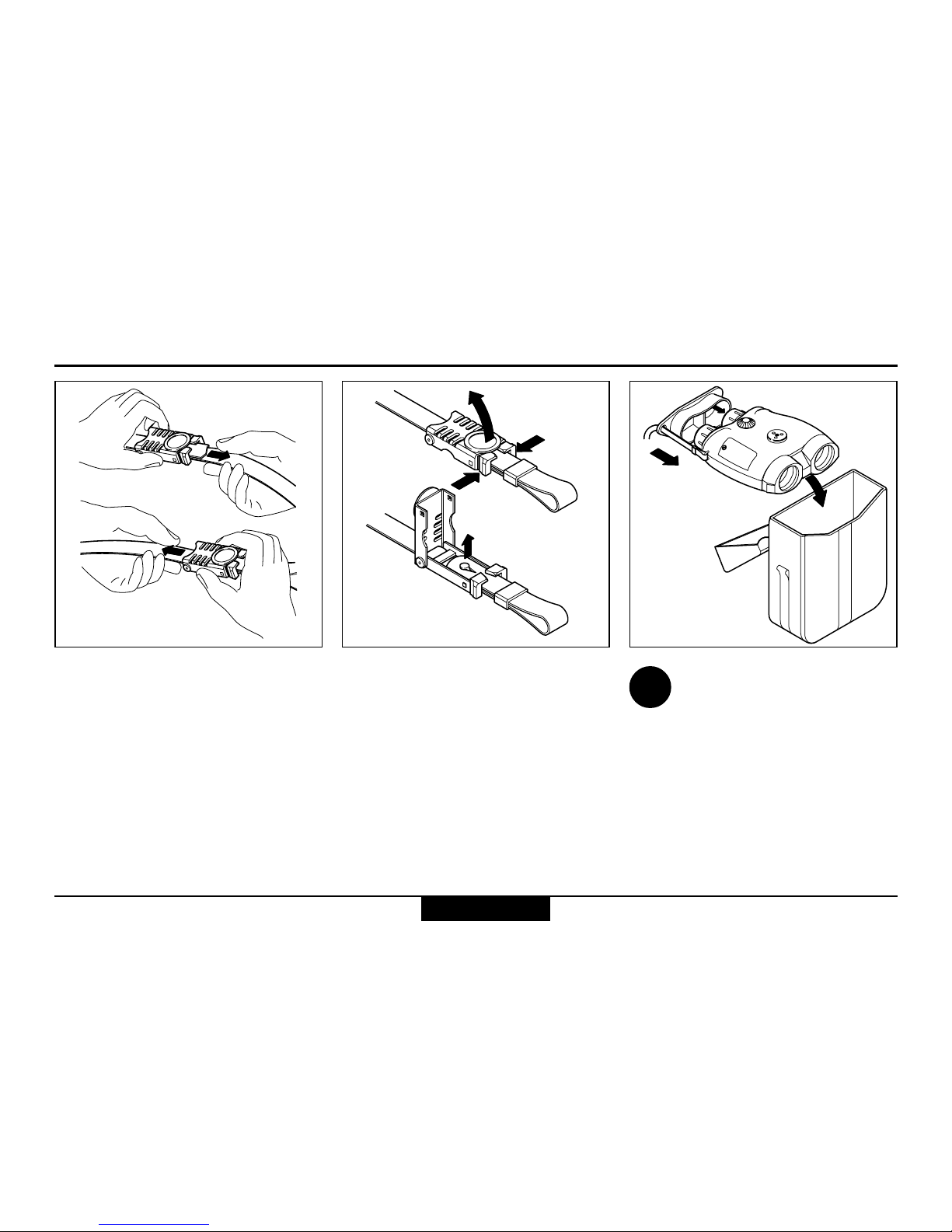
To protect from dirt:
Always fit the eyepiece
cover and keep your VECTOR
in its pouch when not in use.
Adjust the length of the neck
strap by pulling the strap slowly
but firmly around the back of the
catch.
Open both catches:
Squeeze the two clips together
and lift the cover. Remove the
strap ends and pull them
through the lugs on the
VECTOR.
Storing the VECTORRemoving the neck strapAdjusting the neck strap
i
Getting started
Shop for Vectronix products online at: 1.877.766.5412
www.SCOUTBASECAMP.com

VECTOR ™- USMC VECTOR 21-V.0.3
8
Eyepiece viewing distance Dioptric adjustmentEye-base adjustment
Turn the adjusting knob until the
left and right fields of view fuse
to form a circular image.
When using the VECTOR with
glasses, push the eyecups fully
inwards.
When using the VECTOR
without glasses, pull the
eyecups out to the stop.
Sight on an object farther than
100 m away and rotate the
eyepieces to obtain a sharp
image. Standard setting:
0 dioptres.
If the VECTOR is being
used by a number of diffe-
rent people, remember your
personal dioptric setting.
i
Getting started
+
-
+
-
+
-
-
+
Shop for Vectronix products online at: 1.877.766.5412
www.SCOUTBASECAMP.com

9
VECTOR ™- USMC VECTOR 21-V.0.3
Using the VECTOR
The VECTOR is operated
entirely by means of the keys on
the top of the casing.
Key operation is indicated by
the following symbols:
Downward arrow: press and
hold down the key.
Upward arrow: release the key
Double arrow: press and release
the key (click)
Double arrow plus a number:
Press and release the key in ra-
pid succession (e.g. triple click)
Sight the object to be measured
using the pointing circle or
reticle (optional).
Hold the VECTOR steady during
measurement.
The VECTOR displays the
measurement result, then
switches itself off automatically
after a few seconds.
You can prolong the
display period by holding
down the measuring key while
the result is displayed.
Azimuth key
Distance key
i
Getting started
3x
Shop for Vectronix products online at: 1.877.766.5412
www.SCOUTBASECAMP.com

VECTOR ™- USMC VECTOR 21-V.0.3
10
Distance measurements Factors affecting measurement range
Reflective properties Size of the target Oblique surfaces
Atmospheric conditions Vibration Lighting conditions
Distance measurements
Shop for Vectronix products online at: 1.877.766.5412
www.SCOUTBASECAMP.com
Indice


