
ViewSonic WPCI-100 Manuale utente

User Guide
Wireless 802.11g PCI Adpter
ViewSonic®
WPCI-100 Wireless
PCI Adapter

Table of Contents
Chapter 1: Getting Started
Product Registration ............................................................................ 1
Welcome .............................................................................................. 2
Package Contents................................................................................ 2
Features............................................................................................... 2
Chapter 2: Installation
System Requirements .......................................................................... 3
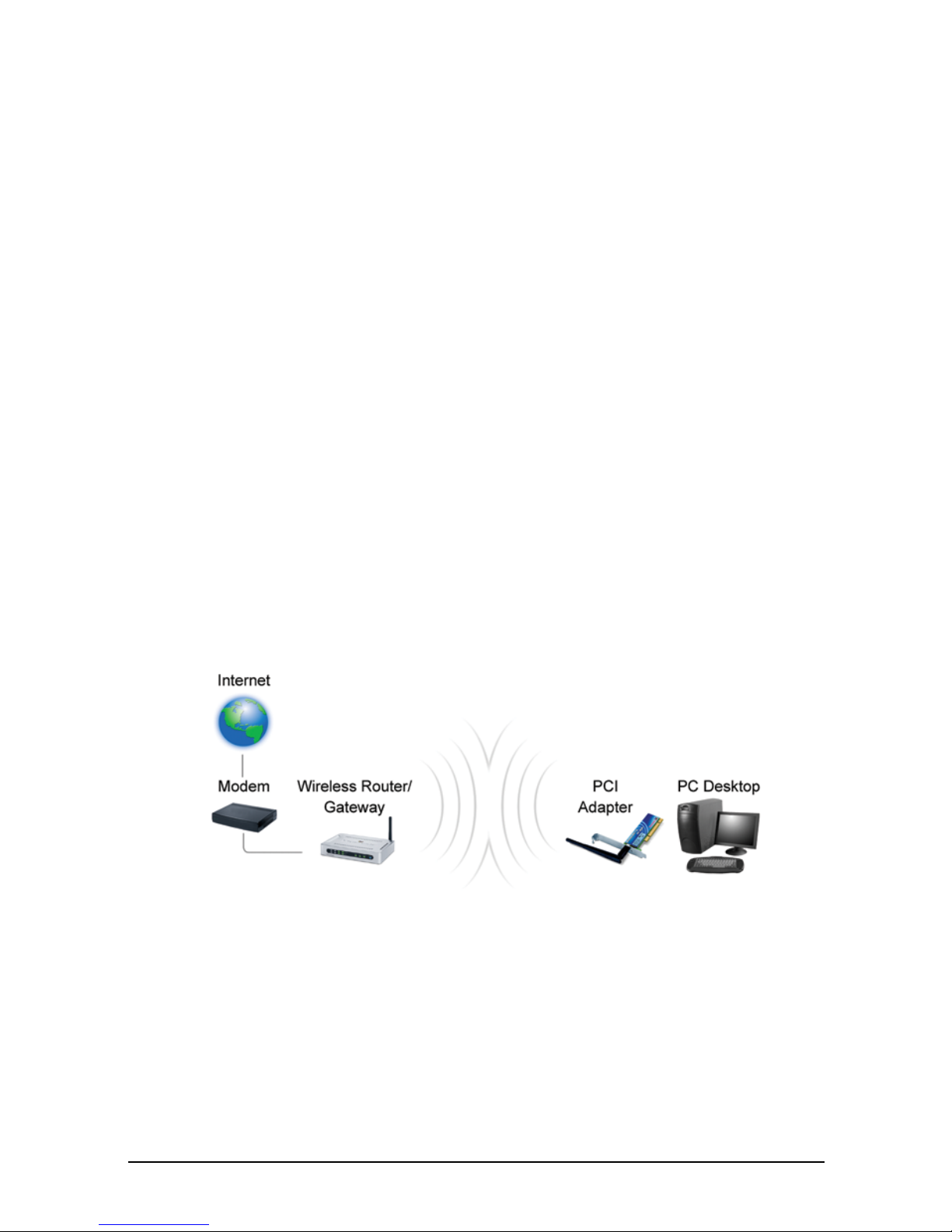
Wireless Network Overview ................................................................. 3
Installation ............................................................................................ 4
NOTE for Windows 98 SE............................................................... 6
Wireless Configuration .................................................................... 7
Verifying a Successful Installation................................................. 10
Uninstalling the Drivers ................................................................. 10
Chapter 3: Appendix
Wireless Configuration for Windows 98SE, ME, and 2000 ................ 11
Troubleshooting ................................................................................. 13
Customer Support .............................................................................. 16
Specifications ..................................................................................... 17
Limited Warranty ................................................................................ 18
Regulatory Information....................................................................... 20

ViewSonic Wireless PCI Adapter 1
Copyright © ViewSonic Corporation, 2004. All rights reserved.
ViewSonic and the three birds logo are registered trademarks of ViewSonic
Corporation.
Microsoft and Windows are either registered trademarks or trademarks of
Microsoft Corporation in the United States and/or other countries.
Corporate names and trademarks are the property of their respective
companies.
Disclaimer: ViewSonic Corporation shall not be liable for technical or
editorial errors or omissions contained herein; nor for incidental or
consequential damages resulting from furnishing this material, or the
performance or use of this product.
In the interest of continuing product improvement, ViewSonic Corporation
reserves the right to change product specifications without notice.
Information in this document may change without notice.
No part of this document may be copied, reproduced, or transmitted by any
means, for any purpose without prior written permission from ViewSonic
Corporation.
Product Registration
To meet your future needs and to receive additional product information as it
becomes available, register your ViewSonic® product at:
www.viewsonic.com
For Your Records
Product Name:
Model Number:
Document Number:
Serial Number:
Purchase Date:
ViewSonic Wireless 802.11g PCI Adapter
WPCI-100
VS10408
A-CD-WPCI-100-1-UG
__________________
__________________

ViewSonic Wireless PCI Adapter 2
Chapter 1: Getting Started
Welcome
Congratulations on your purchase of a ViewSonic WPCI-100 802.11g
Wireless PCI Adapter. This PCI Card supports both 802.11b and 802.11g
wireless networks.
Package Contents
Features
•Up to 54Mbps signal rate at a frequency of 2.4GHz
•Wireless security using WEP or WPA with TKIP encryption and EAP-
type Authentication
•Supports both 802.11b and 802.11g wireless networks
•Plug & Play Installation
Networking Companion CD
(with Setup Wizard and User Guide)
NOTE: Insert this CD first.
Quick Start GuideViewSonic WPCI-100
802.11g Wireless PCI
Adapter
ViewSonic Wireless PCI Adapter 3
Chapter 2: Installation
System Requirements
•Microsoft Windows XP, Windows 2000, Windows ME, or Windows 98
Second Edition (SE)
•Available PCI slot
•300MHz processor or higher
•Minimum 5MB free disk space
•Minimum 32MB RAM
•CD-ROM drive
Wireless Network Overview

ViewSonic Wireless PCI Adapter 4
Installation
NOTE: The installation instructions below apply to Windows XP.
Instructions for Windows 98 SE, ME, and 2000 are noted where
applicable, and configuration instructions for these three operating
systems are located in the Appendix.
To install your ViewSonic WPCI-100 Wireless 802.11g PCI Adapter, do the
following:
1. Insert the supplied Network Companion CD into the CD-ROM drive of
your PC. The software automatically starts the Setup Wizard program.
NOTE: If the CD does not auto-start, right-click Start, select Explore,
double-click the CD-ROM icon, then double-click the Setup icon.
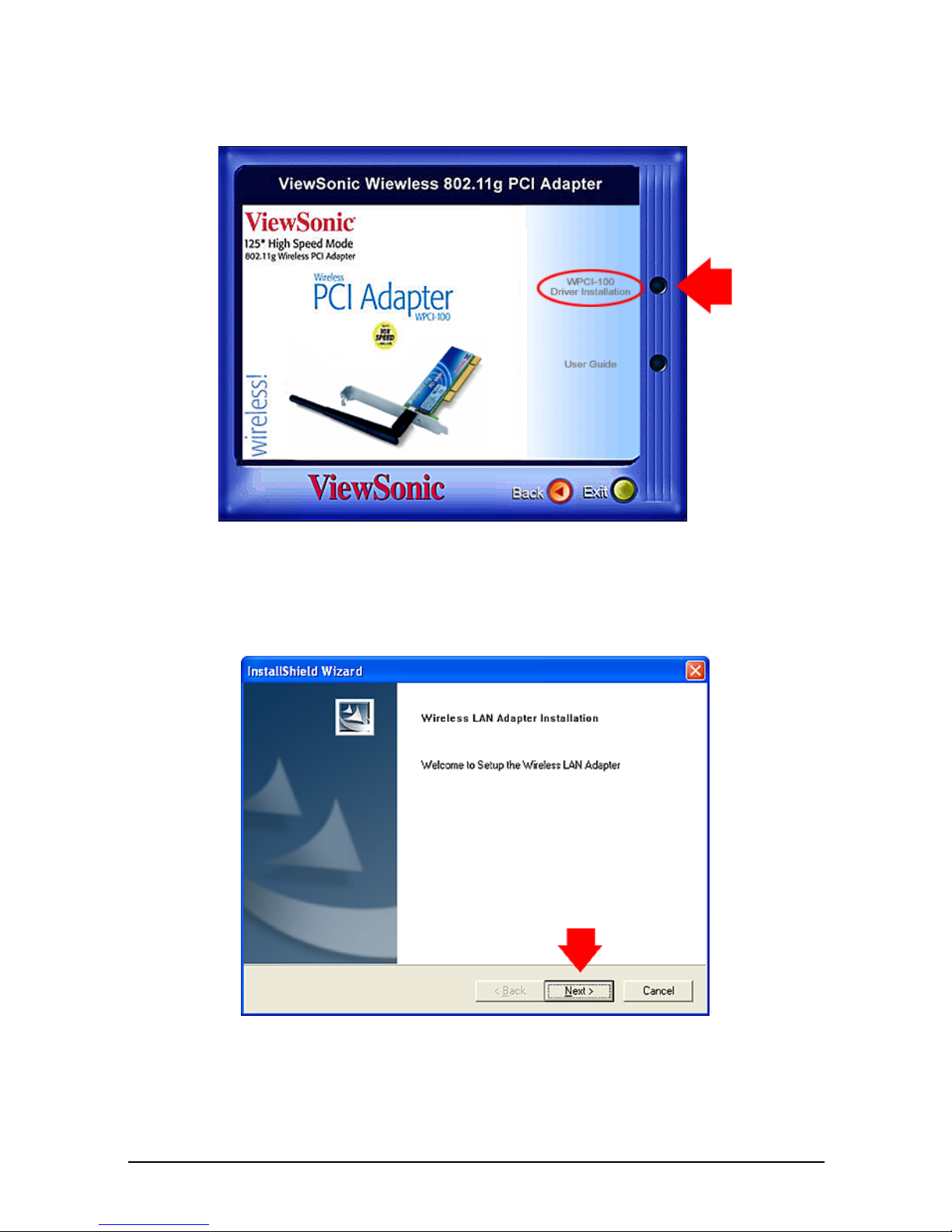
2. From the home page of the ViewSonic Networking Setup Wizard, click
Wireless PCI Adapter.
ViewSonic Wireless PCI Adapter 5
3. From the next screen shown below, click WPCI-100 Driver Installation.
4. Complete the InstallShield Wizard instructions starting with the screen
shown below.
5. After completing the on-screen instructions restart your PC.

ViewSonic Wireless PCI Adapter 6
NOTE for Windows 98 SE:
After restarting your PC, you may be asked to restart your PC again
and/or insert the Windows 98 SE CD. Please follow these instructions.
6. With your PC powered off, plug in WPCI-100 Wireless PCI Adapter into
an available PCI slot.
7. When the Found New Hardware Wizard dialog box appears (shown
below), click Next and complete the remaining steps.

ViewSonic Wireless PCI Adapter 7
8. Complete the Wireless Configuration procedure for your operating
system:
•If you are using Window XP, complete the instructions in the next
section, Wireless Configuration.
•If you are using Windows 98SE, ME, or 2000, see the Appendix for
configuration instructions.
Wireless Configuration
SUGGESTION: To configure your WPCI-100, you will need the
configuration settings (Network Name [SSID], security settings, etc.) of your
wireless router or gateway. For your convenience, write down these settings
for later reference.
To configure your WPCI-100 with Windows XP, do the following:
1. From the Windows XP desktop, right-click the Wireless Monitor utility
icon on the Windows status bar (shown below), then select Enable
Windows Zero Configuration (WZC).
The Wireless Network Connection screen displays.
Wireless Monitor utility icon

ViewSonic Wireless PCI Adapter 8
2. In the Available wireless networks list, click the network name (SSID)
that you want to join.
•If you selected an SSID without a network key (WEP or WPA) associated
with it, click Allow me to connect to the selected wireless network,
even though it is not secure, then click Connect. See the Wireless
Network Connection screen shown on the previous page.
•If you selected an SSID with a network key, enter it in the Network key
field, re-enter it in the Confirm network key field, un-check Enable
IEEE 802.1x authentication for this network, then click Connect. See
the Wireless Network Connection screen shown on the next page.
• IMPORTANT: Be sure to un-check Enable IEEE 802.1x authentication
for this network.
An access point
(SSID) that does
not have a network
key (WEP or WPA)
Indice
Altri manuali ViewSonic Adattatore


