Vivotek IP816A-HP Manuale utente

User’s Manual
IP816A-HP Box
Network Camera
2MP • WDR Pro • Remote back Focus • Snapshot Focus
Rev. 1.1

VIVOTEK
2 - User's Manual
Table of Contents
Overview ....................................................................................................................................................................4
Revision History ..................................................................................................................................................... 4
Read Before Use.................................................................................................................................................... 5
Package Contents .................................................................................................................................................. 5
Symbols and Statements in this Document............................................................................................................ 5
Physical Description ............................................................................................................................................... 6
Mounting the Lens to the Camera .......................................................................................................................... 7
Install the Camera Stand...................................................................................................................................... 10
Network Deployment ............................................................................................................................................ 11
Software Installation ............................................................................................................................................. 14
Ready to Use........................................................................................................................................................ 15
Accessing the Network Camera ...........................................................................................................................18
Using Web Browsers............................................................................................................................................ 18
Using RTSP Players............................................................................................................................................. 21
Using 3GPP-compatible Mobile Devices.............................................................................................................. 22
Using VIVOTEK Recording Software ................................................................................................................... 23
Main Page................................................................................................................................................................24
Client Settings .........................................................................................................................................................30
Conguration...........................................................................................................................................................36
System > General settings ................................................................................................................................... 37
System > Homepage layout ................................................................................................................................ 39
System > Logs ..................................................................................................................................................... 42
System > Parameters .......................................................................................................................................... 44
System > Maintenance......................................................................................................................................... 45
Media > Image ................................................................................................................................................... 49
Media > Video ...................................................................................................................................................... 61
Media > Audio....................................................................................................................................................... 66
Network > General settings.................................................................................................................................. 67
Network > Streaming protocols .......................................................................................................................... 75
Network > SNMP (Simple Network Management Protocol)................................................................................. 84
Security > User accounts ..................................................................................................................................... 85
Security > HTTPS (Hypertext Transfer Protocol over SSL) ....................................................................... 86
Security > Access List ........................................................................................................................................ 93
PTZ > PTZ settings .............................................................................................................................................. 98
PTZ..................................................................................................................................................................... 101
Mechanical PTZ Operation................................................................................................................................. 101
Event > Event settings........................................................................................................................................ 106
Applications > Motion detection.......................................................................................................................... 120
Applications > DI and DO................................................................................................................................... 123
Applications > Tampering detection ................................................................................................................... 123
Applications > Audio detection ......................................................................................................................... 124
Package management (VADP, VIVOTEK Application Development Platform) ................................................. 126
Snapshot Focus ................................................................................................................................................. 128
Recording > Recording settings ........................................................................................................................ 130

VIVOTEK
User's Manual - 3
Local storage > SD card management..................................................................................................... 135
Local storage > Content management ..................................................................................................... 136
Appendix .................................................................................................................................................... 139
URL Commands for the Network Camera................................................................................................ 139
Technical Specications ........................................................................................................................... 232
Technology License Notice....................................................................................................................... 234
Electromagnetic Compatibility (EMC)....................................................................................................... 235

VIVOTEK
4 - User's Manual
Overview
The VIVOTEK IP816A-HP is a professional box network camera offering up to 60 fps @
2-Megapixel resolution with superb image quality, even in the darkest hours of the night.
Featuring the improved Wide Dynamic Range Technology, WDR Pro, the IP816A-HP provides
superior visibility in high-contrast lighting environments with 2-shutter capture method.
When combined with 3D Noise Reduction Technology, users can enjoy an increased level of
image detail in extremely dark environments without consuming or wasting unreasonbly high
bandwidth.
To provide top-notch image quality, IP816A-HP also comes with a P-iris lens, which controls the
iris with extreme precision with its built-in stepper motor. Controlled by advanced software, the
lens maintains the iris opening at an optimal level at all times, resulting in superior sharpness
and depth of eld. VIVOTEK knows that accurately focusing a megapixel network camera can
be difcult due to the level of image detail. In order to help installers properly adjust the focus
of this high resolution camera, the IP816A-HP is also equipped with VIVOTEK’ s RBF (Remote
Back Focus) System, allowing installers to adjust focus even more accurately.
Revision History
■ Rev. 1.0: Initial release
■ Rev. 1.1: Corrected DO pin description

VIVOTEK
User's Manual - 5
Read Before Use
The use of surveillance devices may be prohibited by law in your country. The Network Camera
is not only a high-performance web-ready camera but can also be part of a exible surveillance
system. It is the user’s responsibility to ensure that the operation of such devices is legal before
installing this unit for its intended use.
It is important to first verify that all contents received are complete according to the Package
Contents listed below. Take note of the warnings in the Quick Installation Guide before the Network
Camera is installed; then carefully read and follow the instructions in the Installation chapter to
avoid damage due to faulty assembly and installation. This also ensures the product is used
properly as intended.
The Network Camera is a network device and its use should be straightforward for those who
have basic networking knowledge. It is designed for various applications including video sharing,
general security/surveillance, etc. The Configuration chapter suggests ways to best utilize the
Network Camera and ensure proper operations. For creative and professional developers, the URL
Commands of the Network Camera section serves as a helpful reference to customizing existing
homepages or integrating with the current web server.
Package Contents
■ IP816A-HP
■ C-mount lens
■ C-mount adaptor ring
■ Camera Stand
■ L-type Hex key wrench
■ Software CD
■ Quick Installation Guide
Symbols and Statements in this Document
i
INFORMATION: provides important messages or advices that might help prevent
inconvenient or problem situations.
NOTE: Notices provide guidance or advices that are related to the functional integrity of
the machine.
Tips: Tips are useful information that helps enhance or facilitae an installation, function,
or process.
WARNING: or IMPORTANT:: These statements indicate situations that can be
dangerous or hazardous to the machine or you.
Electrical Hazard: This statement appears when high voltage electrical hazards might
occur to an operator.

VIVOTEK
6 - User's Manual
Physical Description
Front Panel
Rear Panel
Light Sensor
Lens
Ethernet 10/100 RJ45
Socket
Recessed Reset Button
General I/O Terminal Block
Audio Out
Microphone In
Status LED
SD/SDHC/SDXC Card Slot
BNC Video Out
NTSC/PAL Switch
Focus Assist Button

VIVOTEK
User's Manual - 7
Mounting the Lens to the Camera
1. Jot down the camera's MAC address for later reference.
2. Install a C-mount adaptor ring.
3. Mount the lens by turning it clockwise onto the camera mount until it stops.
4. Connect the P-iris control cable to the socket.
Lens
Focus ControllerZoom Controller

VIVOTEK
8 - User's Manual
DI/DO Diagram
DO+
DO-
DI1+
DI2+
DI3+
DI- (common GND)
RS485-
RS485+
AC/DC pw
AC/DC pw
General I/O Terminal Block
This Network Camera provides a general I/O terminal block which is used to connect external
input / output devices. The pin definitions are described below. The “AC/DC pw” pins can be
used to connect both 24V AC and 12V DC power source.
1. The DO+ pin provides a 5V output, and the max. load is 50mA.
2. The max. voltage for DO- pins is 80VDC (External power).
In order to control AC devices, the following diagram can be taken into consideration. This
diagram uses a relay to control the ON/OFF condition of the AC device.
3. An external relay can be triggered by using the DO+ or by an external power source,
depending on the type of relay you use.
4. In case of using an individual relay (instead of using a relay module), for protection against
voltage or current spikes, a transient voltage suppression diode must be connected in parallel
with the inductive load.
DI-
DO+
DI+
DO- External
power source
VDC
Switch
BJT transistor
Relay
AC
Source
NO NC
External
device

VIVOTEK
User's Manual - 9
Hardware Reset
The reset button is used to reset the system or restore the factory default settings. Sometimes
resetting the system can return the camera to normal operation. If the system problems remain
after reset, restore the factory settings and install again.
Reset: Press and release the recessed reset button with a straightened paper clip. Wait for the
Network Camera to reboot.
Restore: Press and hold the recessed reset button until the status LED rapidly blinks. Note that
all settings will be restored to factory default. Upon successful restore, the status LED will blink
green and red during normal operation.
Recessed
Reset Button
DI-
DO+
DI+
DO-
VDC
Switch
BJT transistor
Relay
AC
Source
NO NC
External
device

VIVOTEK
10 - User's Manual
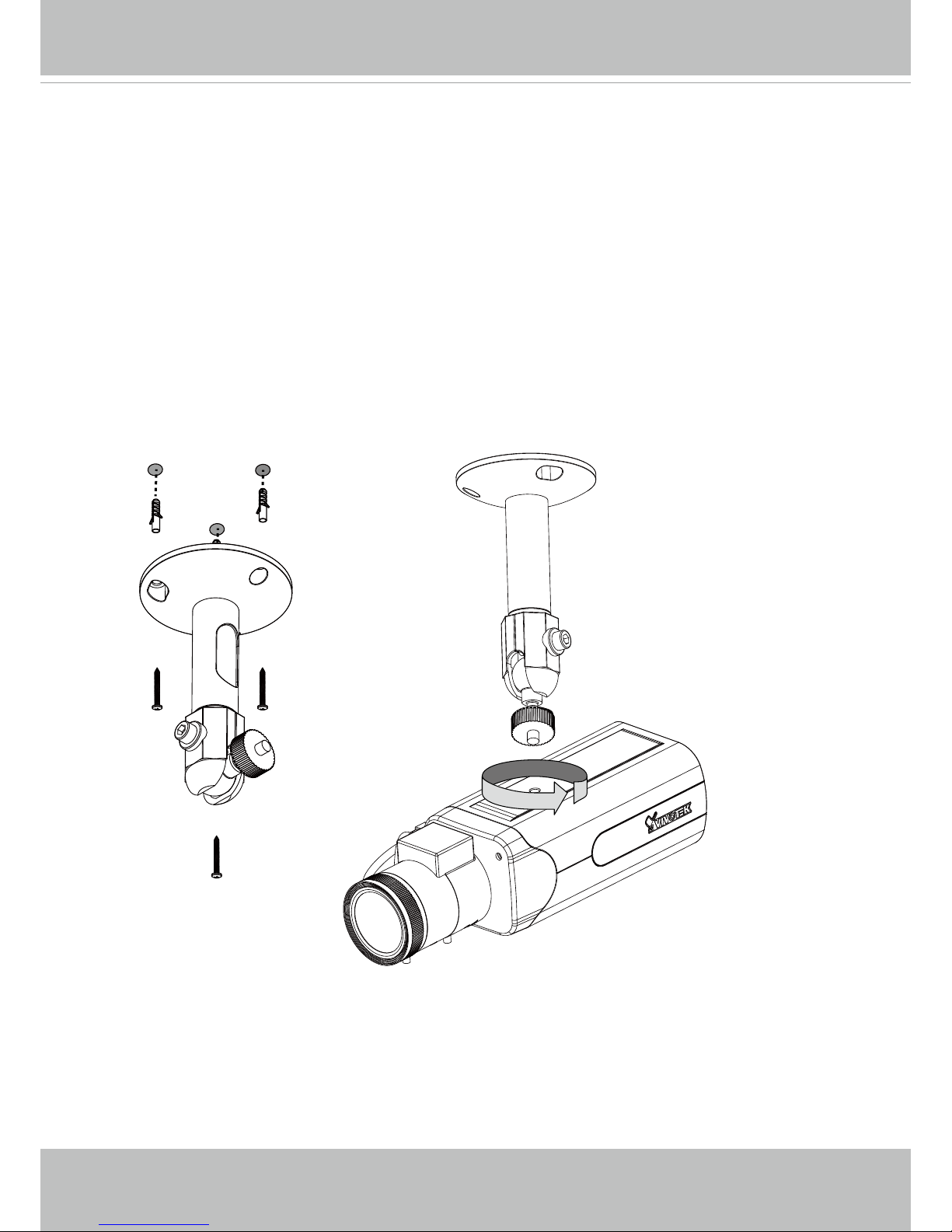
Install the Camera Stand
1. Install the camera stand by drilling holes on the ceiling.
2. Secure the stand to ceiling using the screws and anchors.
3. Secure the camera to stand and tighten the fastening ring.
Micro SD/SDHC/SDXC Card Capacity
This network camera is compliant with Micro SD/SDHC/SDXC 16GB / 8GB / 32GB /
64GB and other preceding standard SD cards.
Indice
Altri manuali Vivotek Telecamera IP