
wowvision proVEOS Manuale utente

User Manual


Contents
Welcome .............................................................................................. 5
How proVEOS Works ...........................................................................................7
Installing the proVEOS Software for Windows ..................................... 9
Configuring Firewall Software.............................................................................10
Installing the Windows proVEOS Software.........................................................14
Signing in to proVEOS........................................................................................24
Installing the proVEOS Software for Mac ........................................... 29
Configuring the Firewall......................................................................................30
Installing the Mac proVEOS Software.................................................................32
Signing in to proVEOS........................................................................................34
Presenting with proVEOS ................................................................... 37
Starting a Presentation .......................................................................................40
Managing Participants ........................................................................................40
Chatting with Participants ...................................................................................45
Playing Music and Movies ................................................................. 47
Managing Media in Your Computer ....................................................................49
Managing Media in proVEOS .............................................................................50
Playing Media Files.............................................................................................51
Collaborating with the White Board ................................................... 55
Drawing and Annotating Tools............................................................................58
Displaying a Participant’s Annotations................................................................59
Capturing and Saving .........................................................................................59
Recording Presentations.................................................................... 61
Audience Response System............................................................... 67
Topic Manager....................................................................................................68
Question Bank ....................................................................................................69
Prepare Exam.....................................................................................................71
Detail Report.......................................................................................................73
Bar Chart ............................................................................................................74
Multimedia Notice Board ................................................................... 75
Uploading Content..............................................................................................78
Creating Playlists................................................................................................79
Scheduling Playlists............................................................................................80

4 proVEOS User Manual
Layout Manager..................................................................................................81
User Manager.....................................................................................................82
Options and Settings.......................................................................... 83
Client Preferences ..............................................................................................84
Controlling the Projector .....................................................................................86
Diagnostic Tools ................................................................................. 91
Network Diagnostics...........................................................................................92
Bandwidth Utility .................................................................................................94
Using the Web Admin ......................................................................... 97
User Management ............................................................................................100
Device Management.........................................................................................103
Alerts.................................................................................................................109
Device Control ..................................................................................................110
Message Scheduler..........................................................................................110
Reports.............................................................................................................112
Session Record.................................................................................................112
Logout...............................................................................................................114

Welcome
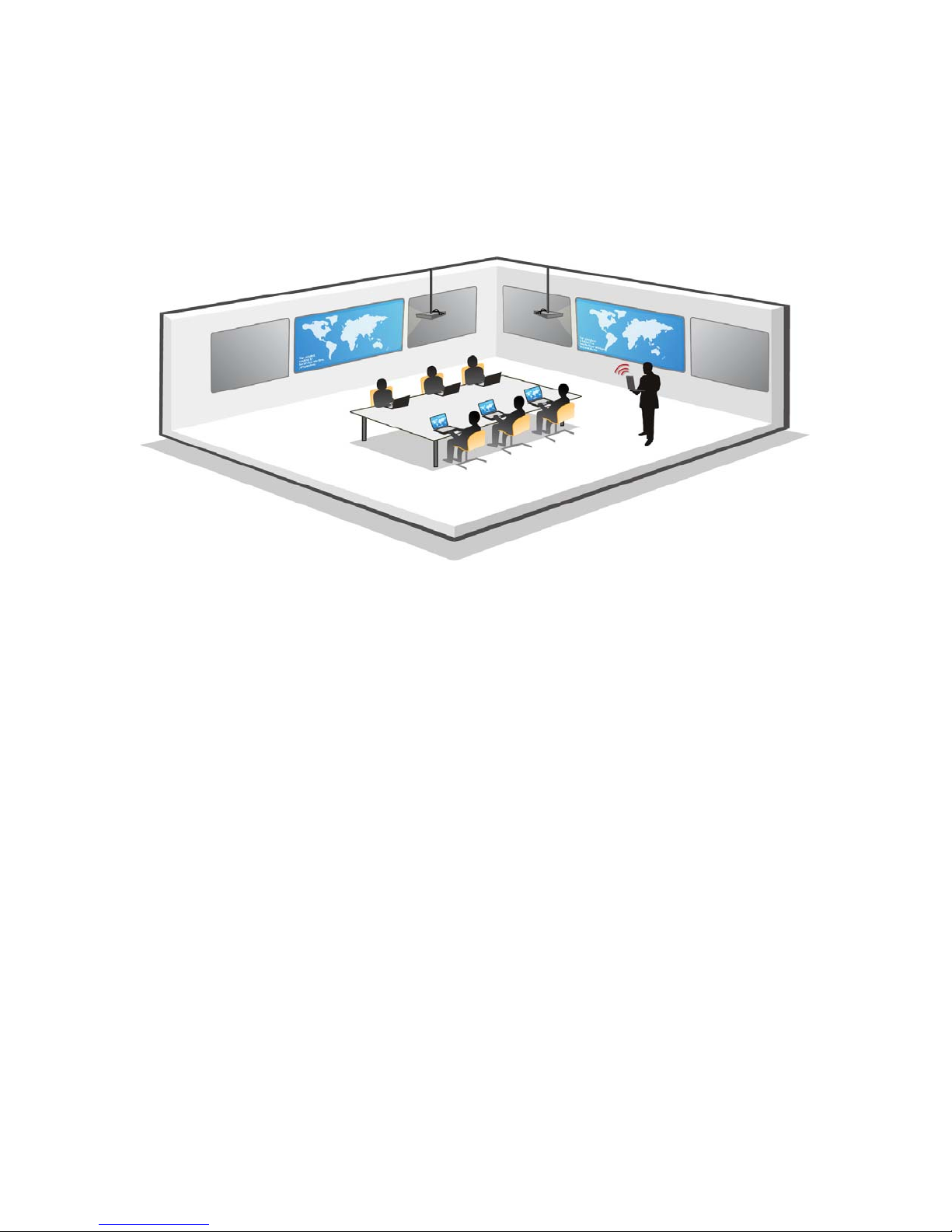
Thank you for choosing the proVEOS Wireless Presentation Gateway. proVEOS
is an advanced network-based and wireless presentation solution that makes it
easy to make presentations and interact with others from the comfort of your
wireless laptop.
Send any laptop’s display to the projector wirelessly without the hassle of
passing around VGA cables and configuring display settings
Interact and collaborate with participants with the chat and white board
features
Play video and audio files on the big screen in HD quality
Staff can easily control access to the projector to ensure a smooth
presentation flow
6 proVEOS User Manual
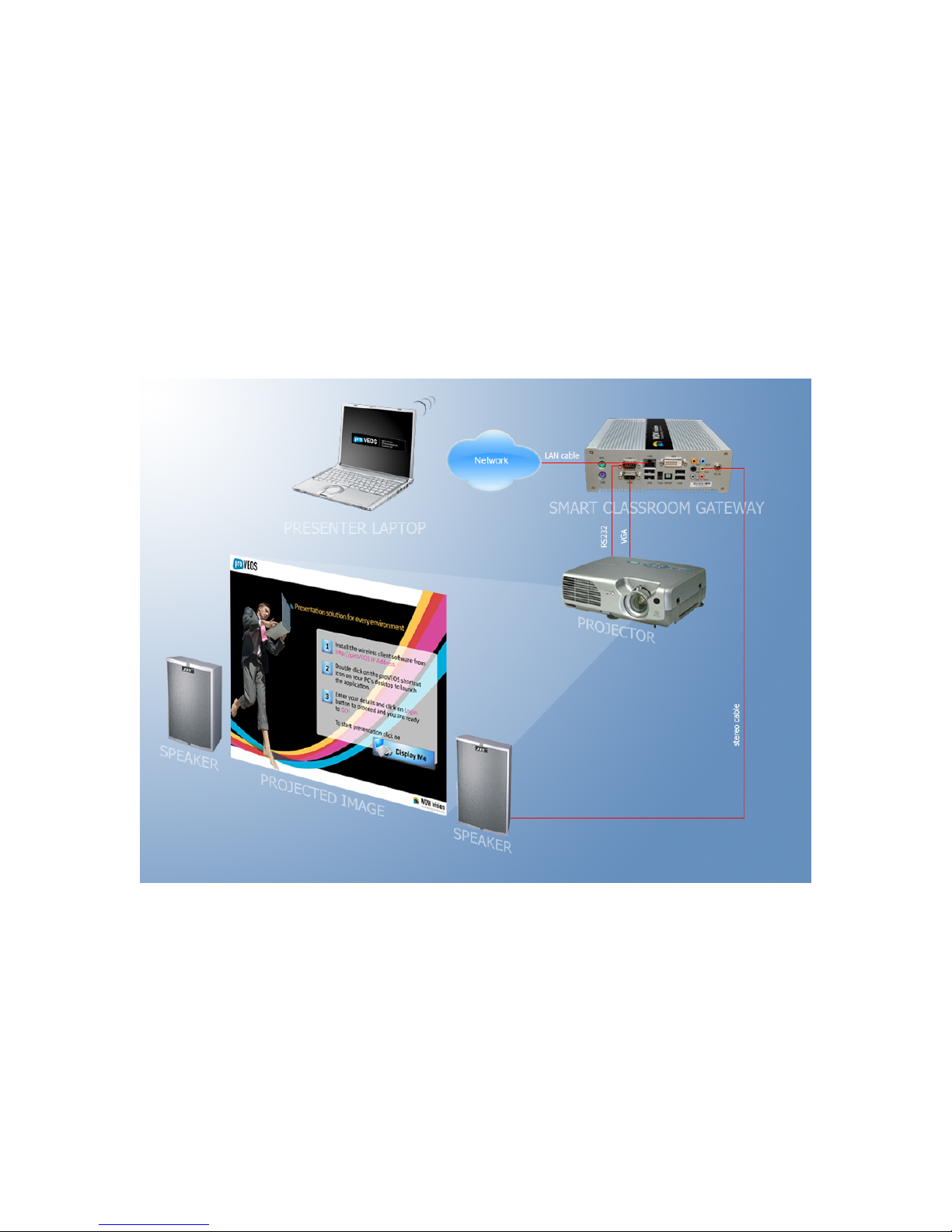
How proVEOS Works
A proVEOS setup is made up of three major components:
1. A Windows or Macintosh computer with the proVEOS software installed
2. proVEOS Wireless Presentation Gateway connected to a projector and
speakers
3. Local area network (LAN)
The computer and proVEOS gateway are connected to the LAN to allow
them to send and receive information
The proVEOS software on the computer signs in to the gateway,
announcing its presence to the other participants
proVEOS User Manual 7

8 proVEOS User Manual
The proVEOS software is switched to presentation mode to start capturing
the laptop’s display continuously and send it to the proVEOS gateway
over the LAN
Multimedia files can also be sent to the proVEOS gateway for playback
The proVEOS gateway receives the display information and multimedia
files from the laptop and sends them to the connected projector and
speakers
The presenter can also show a white board on the projector, and allow
other participants to join in and contribute

Installing the
proVEOS Software
for Windows

The proVEOS software is installed on PCs and laptops, and provides access to a
full range of features available on a proVEOS gateway.
Minimum system requirements:
Windows 2000, XP or Vista
256MB RAM or more
Connect the computer to the network and start Internet Explorer (IE).
Note: ActiveX support is recommended for installation. ActiveX is only available
in Internet Explorer.
Configuring Firewall Software
Before installing the proVEOS software, configure your computer’s firewall
software to prevent problems when the proVEOS software attempts to connect
and communicate with the proVEOS gateway.
The most common connection problems are caused when firewall software are
configured to prevent the proVEOS software from making outgoing connections
to other devices on the network, like the proVEOS gateway.
Note: Check the firewall settings on your computer before you install or run the
software to make presentations.
10 proVEOS User Manual
Altri manuali per proVEOS
5
Indice
Altri manuali wowvision Portale


Manuali Portale popolari di altre marche

LST
LST M500RFE-AS Manuale utente

Kinnex
Kinnex Media Gateway Manuale utente

2N Telekomunikace
2N Telekomunikace 2N StarGate Manuale utente

Mitsubishi Heavy Industries
Mitsubishi Heavy Industries Superlink SC-WBGW256 Manuale utente

ZyXEL Communications
ZyXEL Communications ZYWALL2 ET 2WE Manuale utente

Telsey
Telsey CPVA 500 - SIP Manuale utente


