
Xunison Hub M50 Mesh Cube Manuale utente

Hub M50 Mesh Cube

1. Product Introduction
1
Xunison Hub M50 Mesh Cube
Xunison oers a powerful hub/cube proving the ultimate experience of
Wi-Fi 6 technology including mesh and matter technology.
Wi-Fi 6 (ax)
This device supports Wi-Fi 6 and is compatible with various Wi-Fi stan-
dards, including older ones, for reliable connections with a range of
devices.
Matter
Technology that allows smart devices from dierent companies to com-
municate, simplifying control and creating an integrated smart home.
Parental Control
This feature helps parents monitor and control their child's internet
activity. It includes web content filtering, time limits, and social supervi-
sion, promoting online safety and responsible habits.
2. Product Installation
2
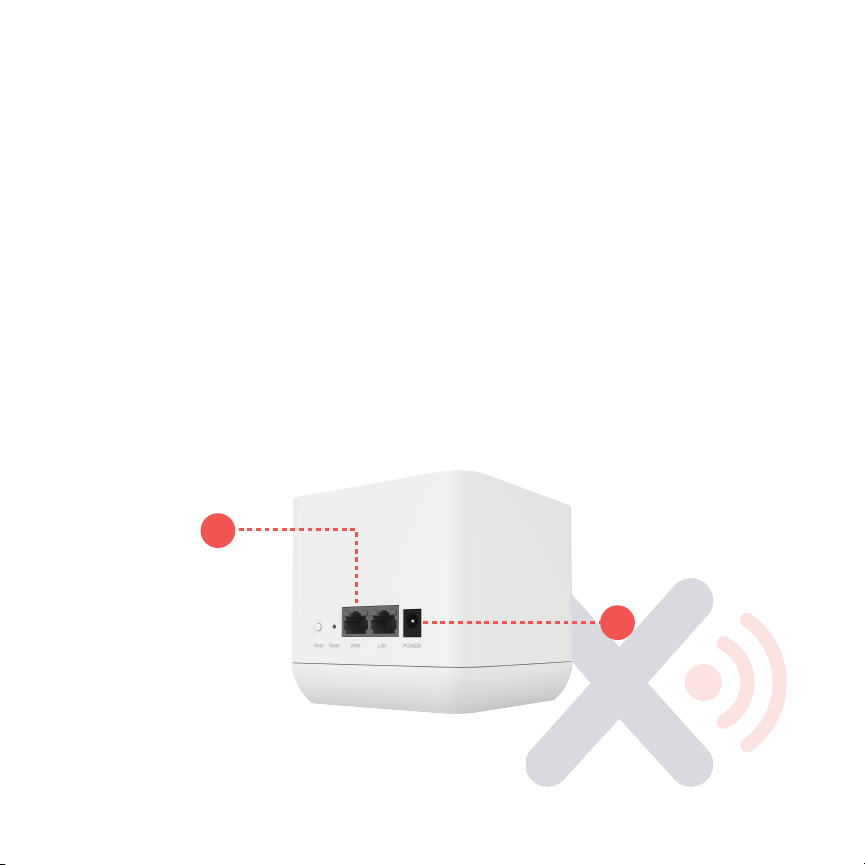
2.1 Ensure the cables are connected.
1. Connect the power cable (labeled “1”) to the device.
2.Connect the Ethernet cable from your home internet to the WAN port
Xunison Hub M50 Mesh Cube
Ethernet cable(2).
on the router (labeled “2”).
Note: If you wish to use the device in satellite mode, disconnect the
1
2

3
2.2 Product Configuration
Step 1:
Connect your mobile device to the Xunison Hub M50 Mesh Cube
network by entering the Wi-Fi details printed on the device sticker.
Step 2:
To install the Xunison app, you can either scan the QR- code on
the welcome card.
OR
Step 2:
Alternatively, you can download the Xunison app from Google
Play store or App store.
After installing the app, log in with your registered account to access the
features of Xunison Hub M50 Mesh Cube
Xunison Hub M50 Mesh Cube

3. LED Indicators
4
Xunison Hub M50 Mesh Cube
LEDs
Color
Symbol
Status
Wi-Fi
Solid Blue
Wi-Fi
Wi-Fi On
Solid Red
Wi-Fi O
Internet
Solid Blue
Internet
Solid Blue
Solid Red
Solid Red
Zigbee
Solid Blue
Zigbee
Zigbee module working
Blinking Blue
Adding Zigbee device
Solid Red
Zigbee not working
LED
Mode
Color
Symbol
Status
Mesh
Gateway Solid Blue
Mesh
Mesh Network
connected
Blinking Blue
Gateway Pairing
Satellite
Quick blinking
yellow
Mesh
Satellite Pairing
Solid green
Mesh Connected
Red blinking
Mesh Failed

4. Ports and Interfaces
Xunison Hub M50 Mesh Cube
Ports
Description
WAN port
Connect Ethernet cable from Xunison Hub M50 Mesh
cube to ISP source.
LAN port
(1Gbps)
To connect PCs, Laptops etc via Ethernet cables.
Power jack
To connect power supply (12V 1.5A).
Button
Description
Mesh button
Press the Mesh button for 5-10 seconds for Mesh
configuration.
Reset button
Press the Reset button for 10 seconds to reset the device
to default settings.
5

6
5. Safety Guidelines
Xunison Hub M50 Mesh Cube
Attention
Use original and certified cables.
Ensure the device does not come into contact with water during storage,
transportation, and operation.
Keep away from heat sources and ensure the device has adequate ventilation.
Do not use any corrosive cleaner/oil to clean the device.
Keep out of the reach of children.
Tips
Please check the cable connections once the device is installed.
Place the Xunison Hub M50 Mesh Cube in an appropriate place for seamless
internet connectivity.
Restart the device in case of any internet connectivity problems.
Change your Wi-Fi passwords often.
Caution
In case of a malfunction or damage, the user should not disassemble. Change
the connections instead and contact technical support for assistance.

7
Xunison Hub M50 Mesh Cube
RF Parameters
Function Frequency Range Transmit Power
(EIRP)
2.4 GHz Wi-Fi
5 GHz Wi-Fi
Zigbee
2412 ~ 2472 MHz
5150 ~ 5850 MHz
2445 ~2470 MHz
Max 20dBm
Max 23dBm
Max 22dBm

8
For additional information
V
isit xunison.com/support to answer your support questions and acces
s
t
he latest downloads & product services. You can also submit a ticket fo
r
a
ny issues you face regarding our product features and functionality.
Xunison Hub M50 Mesh Cube
It is important to properly dispose of electronic waste to prevent harm to
the environment and human health. This product should be taken to a
designated collection point for recycling of waste electrical and elec-
tronic equipment. You can contact your household waste disposal
service or the seller of the product for more information on where to
drop o your waste equipment for recycling.
This means that the device is only permitted to operate on Wireless
Access Systems, such as radio local area networks, within the frequency
band of 5150-5350 MHz for indoor use only, and only within the coun-
tries of the European Union listed: BE/BG/CZ/DK/DE/EE/IE/EL/ES/
The device is not permitted to operate outdoors within this frequency
band or in other countries outside of the EU without the appropriate
regulatory approvals.
Disposal Note

9
Xunison Hub M50 Mesh Cube
Declaration of conformity
Hereby, Xunison Ltd. declares that the radio equipment type M50 Mesh
Cube is in compliance with Directive 2014/53/EU. The full text of the EU
declaration of conformity is available at the following internet address:
xunison.com/support
Compliance
Any Changes or modifications not expressly approved by the party
responsible for compliance could void the user's authority to operate the
equipment.
This device complies with part 15 of the FCC rules. Operation is subject to
the following two conditions: (1) This device may not cause harmful inter-
ference, and (2) this device must accept any interference received,
including interference that may cause undesired operation.
This equipment complies with FCC radiation exposure limits set forth for
an uncontrolled environment. This equipment should be installed and
operated with minimum distance 20cm between the radiator and your
body
Indice
Altri manuali Xunison Interruttore


