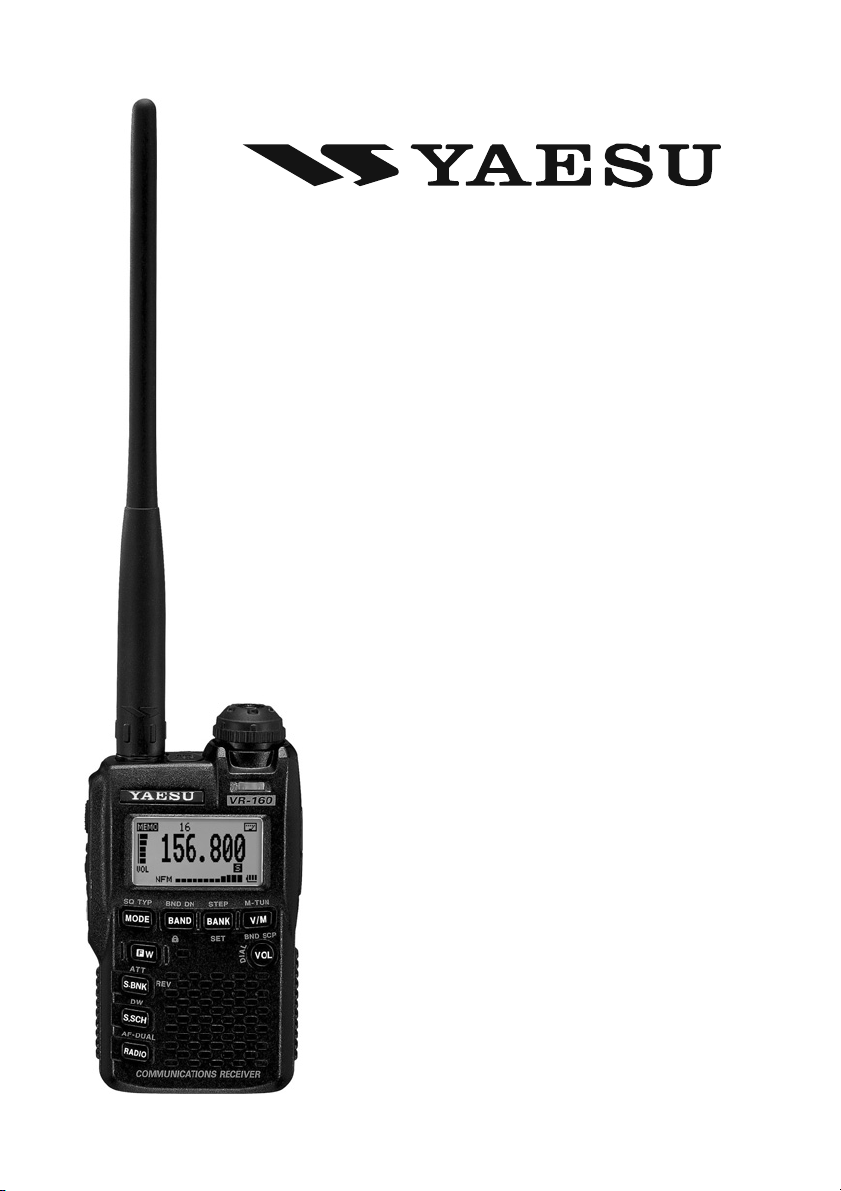
Yaesu VR-160 Manuale utente

AM/FM/WFM
COMMUNICATIONS RECEIVER
OPERATING MANUAL
VERTEX STANDARD CO., LTD.
4-8-8 Nakameguro, Meguro-Ku, Tokyo 153-8644, Japan
VERTEX STANDARD
US Headquarters
10900 Walker Street, Cypress, CA 90630, U.S.A.
YAESU UK LTD.
Unit 12, Sun Valley Business Park, Winnall Close
Winchester, Hampshire, SO23 0LB, U.K.
VERTEX STANDARD HK LTD.
Unit 5, 20/F., Seaview Centre, 139-141 Hoi Bun Road,
Kwun Tong, Kowloon, Hong Kong
VERTEX STANDARD (AUSTRALIA)PTY., LTD.
Normanby Business Park, Unit 14/45 Normanby Road
Notting Hill 3168, Victoria, Australia
VR-160

Contents
Scanning ............................................................................ 44
Setting the Scan-Resume Mode .................................... 44
VFO Scanning ............................................................... 44
How to Skip (Omit) a Frequency
during VFO Scan ...................................................... 47
Setting the Squelch Level
during active Scanning Operation ............................ 47
Memory Scanning ......................................................... 48
How to Skip (Omit) a Channel
during Memory Scan Operation ............................... 49
Preferential Memory Scan ........................................ 50
Memory Bank Scan .................................................. 51
Programmable (Band Limit) Memory Scan (PMS) ....... 52
Priority Channel Scanning (Dual Watch) ...................... 53
Automatic Lamp Illumination on Scan Stop .................. 54
Band Edge Beeper ........................................................ 54
Smart Search Operation ................................................. 56
Setting the Smart Search Mode ..................................... 56
Storing Smart Search Memories ................................... 57
Channel Counter Operation ............................................ 58
Setting the Channel Counter Sweep Width ................... 59
CW Learning Feature ..................................................... 60
CW Training Feature ...................................................... 62
Miscellaneous Setting ...................................................... 63
Password ....................................................................... 63
ATT (Front End Attenuator) ......................................... 64
Receive Battery Saver Setup ......................................... 64
Wakeup Feature ............................................................ 65
Disabling the BUSY Indicator ...................................... 66
Automatic Power-Off (APO) Feature ........................... 66
Automatic Power-On Feature ........................................ 67
My Bands Operation ..................................................... 68
Changing the Status of the [VOL]Key ......................... 69
S-meter Symbols ........................................................... 69
Cloning .............................................................................. 70
Set (Menu) Mode ............................................................. 71
Appendix ........................................................................... 88
External AM Radio Antenna Connections .................... 88
Line-In Audion Connections ......................................... 89
Computer Connections .................................................. 90
S-meter Connections ..................................................... 91
Specifications .................................................................... 92
Reset Procedures ............................................................. 94
General Description ........................................................... 1
Controls & Connections .................................................... 2
Keypad Functions ........................................................... 3
LCD Display ................................................................... 4
Accessories & Options ....................................................... 5
Inportant Notice ................................................................. 6
Installation of Accessories ................................................. 8
Antenna Installation ........................................................ 8
Installation of FNB-82LI Battery Pack ........................... 9
Battery Charging ........................................................... 10
Installation of FBA-37 Alkaline Battery Case ............... 11
Battery Life Information ................................................ 11
Operation .......................................................................... 12
Switching Power On and Off ........................................ 12
Adjusting the Volume Level .......................................... 12
Squelch Adjustment ...................................................... 13
Selecting the Operating Band ........................................ 14
Frequency Navigation ................................................... 15
AM and FM Broadcast Reception ................................ 16
AF-DUAL Operation ............................................... 17
Advanced Operation ........................................................ 18
Keyboard Locking ........................................................ 18
Adjusting the Keypad Beeper Volume Level ................ 18
Keypad/LCD Illumination ............................................. 19
Changing the Receiving Mode ...................................... 19
Changing the Channel Steps .......................................... 20
S-meter Squelch ............................................................ 21
Checking the Battery Voltage ....................................... 22
Checking the Temperature ............................................ 22
Band Scope Operation .................................................. 23
Tone Squelch/DCS Operation ......................................... 24
Tone Squelch Operation ................................................ 24
DCS Operation ............................................................. 26
DCS Code Inversion ................................................ 27
Tone Search Scanning ................................................... 28
Tone Squelch/DCS Bell Operation ............................... 29
Programming the User Beep .................................... 30
Memory Mode .................................................................. 32
Regular Memory Channel Operation ............................ 33
Memory Storage ....................................................... 33
Memory Recall ......................................................... 34
Labeling Memories .................................................. 34
Memory Offset Tuning ............................................. 36
Moving Memory Data to the VFO ........................... 36
Masking Memories .................................................. 37
Memory Bank Operation .......................................... 38
Assigning Memories to a Memory Bank ............. 38
Memory Bank Recall .......................................... 38
Removing Memories from a Memory Bank ........ 39
Changing a Memory Bank’s Name ..................... 39
Memory Only Mode ................................................. 40
Special Memory Channel Operation ............................. 41
Weather Broadcast Channels ................................... 41
VHF Marine Channels ............................................. 42
Short-wave Broadcast Station Memory Channels .... 43

VR-160 OPERATING MANUAL 1
GENERAL DESCRIPTION
The YAESU VR-160 is a high-performance micro-miniature communications receiver
covering frequencies from 100 kHz to 1299.995 MHz on the AM and FM (Wide and
Narrow bandwidths) modes. Coverage includes the AM and FM broadcast bands, HF Short-
wave Bands, VHF and UHF TV bands, the VHF AM aircraft band, and a wide range of
commercial and public safety frequencies!
The incredibly small size allows you to take it anywhere - hiking, skiing, or walking around
town. Its operating flexibility brings the user many avenues of listening enjoyment. The
tiny FNB-82LI Lithium-Ion Battery Pack provides more than 20 hours of receiver opera-
tion.
The VR-160 internal antenna bar provides good AM broadcast reception without the need
of an external antenna.
The large High-resolution Dot Matrix LCD display provides clear, easily read frequency
indication. The Band Scope function provides a high-resolution display of the relative
signal strengths of up to ±50 adjacent channels!
Additional features include the CTCSS and DCS squelch system, which help prevent false
activation of the receiver by radar or spurious signals from other transmitters. A security
Password may be set, which will allow you to turn on and operate your radio only after the
Password is entered.
The S-Meter Squelch may be adjusted to open at a programmed signal level, thus reducing
guesswork in setting the squelch threshold.
Additional equipment may be connected to the top panel ACC jack for expanded opera-
tion.
We appreciate your purchase of the VR-160, and encourage you to read this manual thor-
oughly, to learn about the many exciting features of your new YAESU communications
receiver!

VR-160 OPERATING MANUAL2
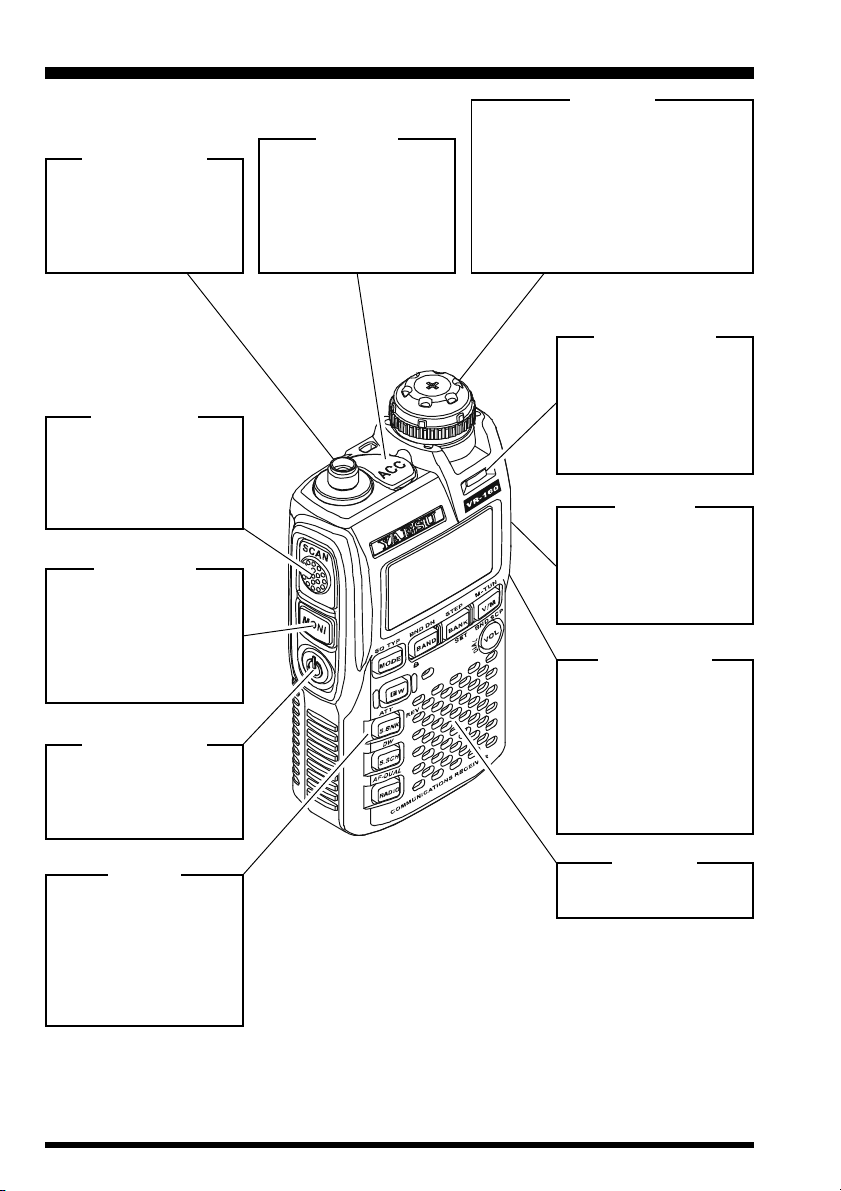
CONTROL & CONNECTIONS
ANTENNA Jack
Connect the supplied
flexible antenna (or an-
other antenna presenting
a 50-Ohm impedance)
here.
ACC Jack
This four-conductor min-
iature jack provides con-
nection points for an AM
antenna, Line audio input,
External computer, and
S-meter signal output.
DIAL Knob
The main tuning Dial is used for set-
ting the operating frequency. This
knob is also used for audio volume
level, menu selections, and other ad-
justments.
Pull the knob upward to release the
mechanical dial lock, and then rotate
the Dial knob.
MONI Switch
Pressing this key dis-
ables the noise squelch-
ing action, allowing you to
hear very weak signals
near the background
noise level.
POWER Switch
Press and hold this
switch in for one second
to toggle the receiver
power on and off.
KEYPAD
These nine keys select
many of most important
operating features on the
VR-160. The functions of
the keys are described in
detail on the pages to fol-
low.
SCAN Switch
Press this switch to acti-
vate the Scanner Upward
(toward a higher fre-
quency or a higher chan-
nel number.
BUSY Indicator
This indicator glows
green when the squelch
opens. It may also be set
to glow continuously
white for use as an emer-
gency flashlight at night.
EAR Jack
This 3-pin miniature jack
allows connection of after
market stereo earphones
to listen to the FM broad-
cast band in stereo.
EXT DC Jack
This coaxial DC jack al-
lows connection to an
external DC power
source (3.5 - 7.0V DC) for
battery charging. The
center pin of this jack is
the Positive (+) connec-
tion.
SPEAKER
The internal speaker is
located here.

VR-160 OPERATING MANUAL 3
CONTROL & CONNECTIONS
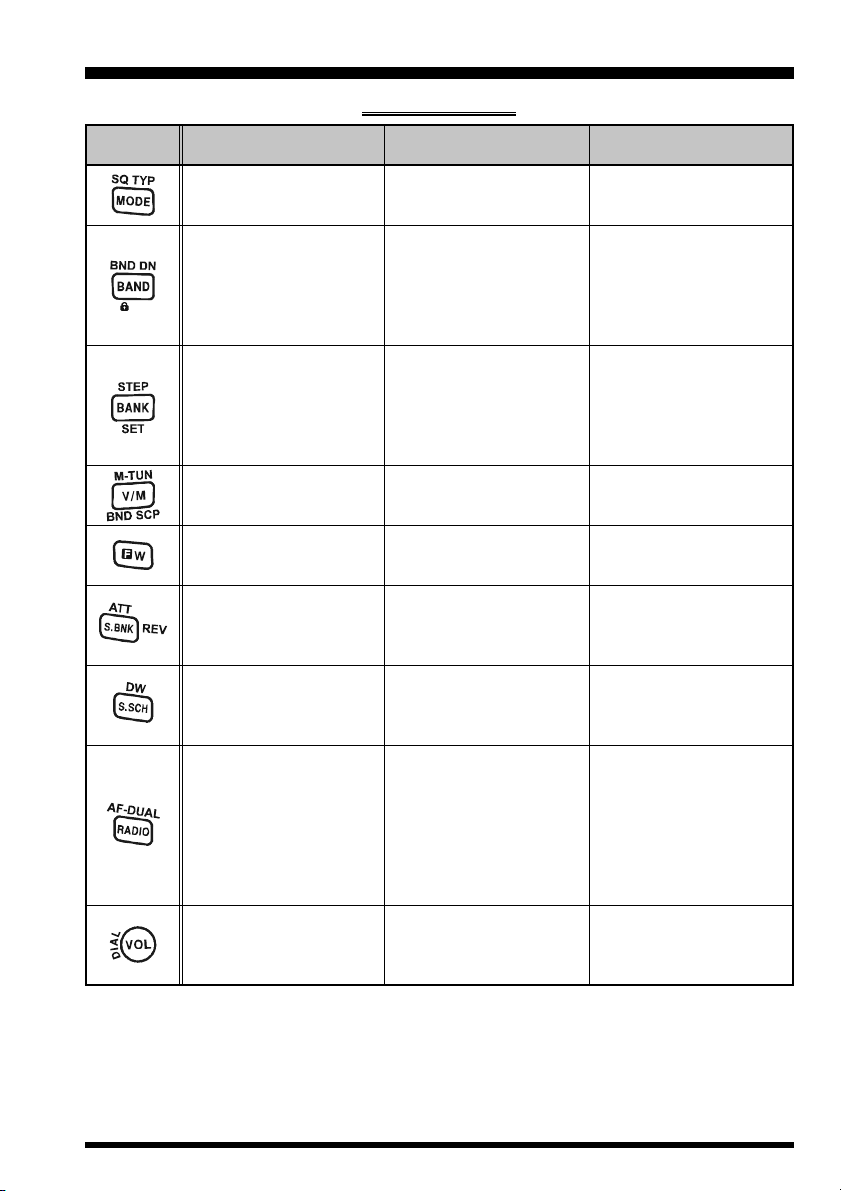
PRIMARY FUNCTION
(PRESS KEY)
Switches the operating
mode.
Moves operation to the
next-highest frequency
band.
Activates the “Memory
Bank” feature while in the
Memory Recall mode.
Activates the “Memory
Bank” feature.
Switches frequency con-
trol between the VFO and
Memory Systems.
Activates the “Alternate”
key function.
Engage the Special
Search mode.
Recalls the “Weather
Broadcast” channels and
Short-wave broadcast sta-
tion channels.
Enter the Broadcast Re-
ception mode.
While in the Broadcast Re-
ception mode, press the
[BAND]key to toggle the
receiving band between
“AM” broadcast band and
“FM” broadcast band.
No Action.
SECONDARY FUNCTION
(PRESS [F/W]+ KEY)
Activates Tone Squelch or
DCS operation.
Moves operation to the
next-lowest frequency
band.
Selects the synthesizer
steps to be used during
VFO operation.
Selects the Memory Bank
while in the Memory Bank
mode.
Activates the “Memory
Tune” function while in the
Memory Recall mode.
Disables the “Alternate”
key function.
Activates the receiver “At-
tenuator” to reduce the
receiving signal.
Activates the Dual Watch
feature.
Activates the AF-DUAL
Operation.
Toggle the DIAL knob
function between the “Fre-
quency Control” and “Re-
ceiver Audio Control”.
THIRD FUNCTION
(PRESS AND HOLD KEY)
No Action.
Activates the key lockout
feature.
Enters the Set (Menu)
Mode.
Activates the Band Scope
feature while in the VFO
mode.
Activates the “Memory
Write” mode (for memory
channel storage).
Monitor the opposite fre-
quency while recalling the
semi-duplex VHF Marine
channel.
No Action.
Enables the antenna se-
lection to be used.
Rotate the DIAL knob
while holding the [VOL]
key to adjust the audio vol-
ume level.
KEY
KEYPAD FUNCTIONS

VR-160 OPERATING MANUAL4
CONTROL & CONNECTIONS
LCD DISPLAY
FREQUENCY CONTROL
: VFO Mode
: Memory Mode
: Memory Tune Mode
: Memory Bank Mode
: Programmable Memory Scan Mode
OPERATING BAND NUMBER (while using VFO Mode)
MEMORY CHANNEL NUMBER (while using MR “Memory Recall” Mode)
OPERATING FREQUENCY (while using Alpha-Numeric “Tag” Operation)
VOLUME LEVEL
ACC JACK CONFIGURATION
: Clone Data Input/Output
:AM Antenna Input
:Line Audio Input
: External Computer Input/Output
: S-meter Output
OPERATING FREQUENCY
OPERATING MODE
NFM:FM
WFM: Wide FM
AM:AM
SQUELCH TYPE & RADIO MODE
DW: Dual Watch Active
TSQ: Tone Squelch Active
DCS: Digital Code Squelch Active
RTN: Reverse Tone Squelch Active
PR: User Programmed Reverse CTCSS Decoder Active
S&PO METER
ICON
P: Priority Channel
P(Blinking): Sub frequency is received
(while using AF-DUAL operation)
: Skip Memory Channel
(Blinking): Preference Memory Channel
ATT: Attenuator Active
: Secondary Keypad Active
: Semi-Duplex Channel
DW: Dual Watch Active
: Key Lock Active
: Bell function Active
: Battery Saver Active
: Automatic Power-Off Active
:Receiving an FM broadcast in Stereo
: Battery Indicator

VR-160 OPERATING MANUAL 5
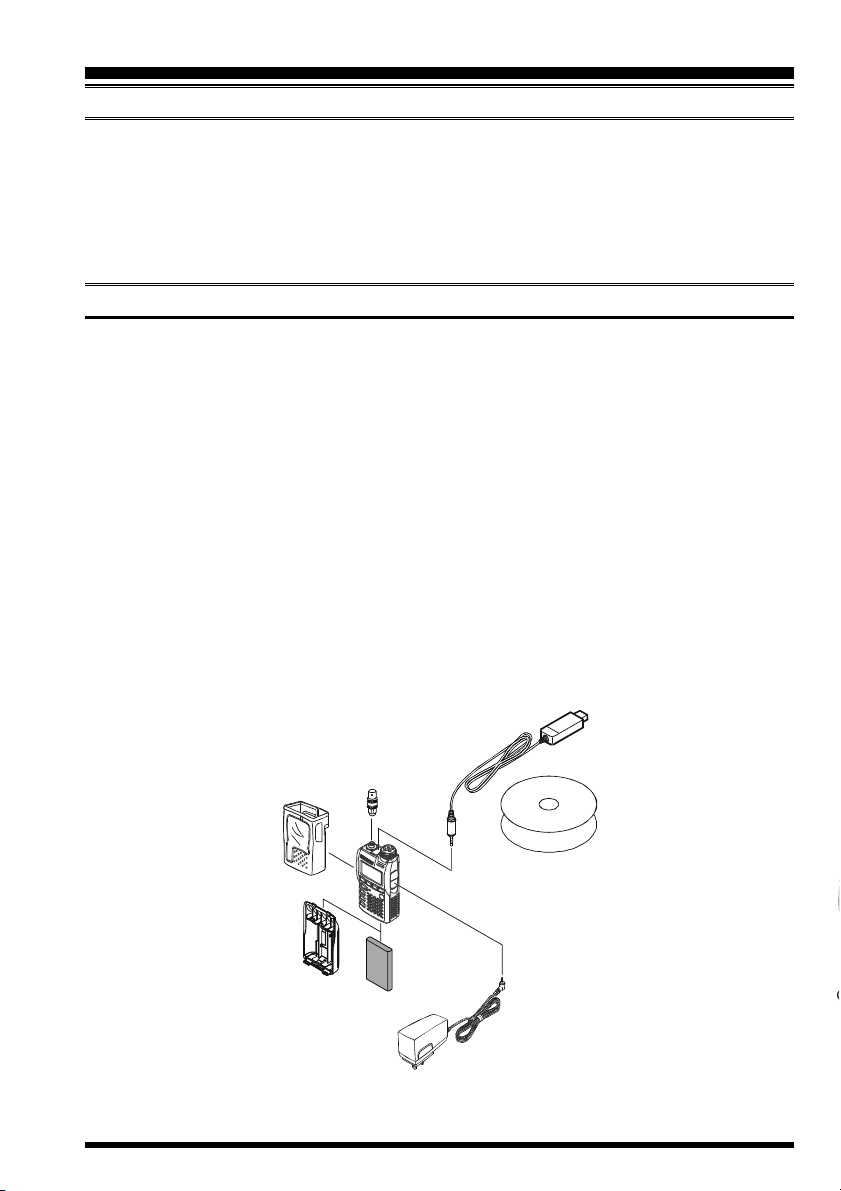
SUPPLIED ACCESSORIES
FNB-82LI 3.7 V, 1100 mAh Rechargeable Lithium Ion Battery Pack ....... 1
PA-46C or PA-46UAC Adapter ............................................................................... 1
YHA-66 Antenna ..................................................................................... 1
Operating Manual ............................................................................................................. 1
Warranty Card ...................................................................................................................1
AVAILABLE OPTIONS
CSC-92 Soft Case
FBA-37 Dry Cell Battery Case for 3 x “AA” Alkaline Cells
FNB-82LI 3.7 V, 1100 mAh Rechargeable Lithium Ion Battery Pack
PA-46C/UAC Adapter
CN-3 BNC-to-SMA Adapter
ADAMS-5 Advanced Data Management System
:“C” suffix is for use with 230 VAC (Type-C plug), and “U” suffix is for use with 230
VAC (Type-BF plug).
Availability of accessories may vary. Some accessories are supplied as standard per local
requirements, while others may be unavailable in some regions. Consult your Yaesu dealer
for details regarding these and any newly available options Connection of any non-Yaesu-
approved accessory, should it cause damage, may void the Limited Warranty on this ap-
paratus.
ACCESSORIES & OPTIONS

VR-160 OPERATING MANUAL6
IMPORTANT NOTICE
Please read this manual carefully before using the VR-160 radio.
Indicates Personal injury, fire hazard, or elec-
tric shock is Highly likely to occur.
Indicates Personal injury, fire hazard, or elec-
tric shock may occur.
Indicates Equipment damage may occur.
WARNING
CAUTION
NOTE
WARNING
Never use this equipment in a pro-
hibited area, such as airplane, hos-
pital etc.
Never operate this equipment
while driving a vehicle, or motor-
cycle.
Never touch the Battery Pack or
Battery Case with wet hands.
Never modify the Battery Pack.
This equipment is not waterproof.
When splashed with water, turn off
the power switch immediately,
then thoroughly dry the equipment
with a soft cloth.
Do not modify this equipment.
Do not use any improper operat-
ing voltage.
Never attach metal parts, such as
a paper clip, or a necklace etc. to
this receiver.
When using the FBA-37 Battery
Case, install the batteries accord-
ing to instructions. Check the po-
larity of the battery carefully.
In the event of abnormal opera-
tion, the smell of smoke etc., turn
off the power switch immediately,
and then remove the battery pack
from the radio. Disconnect the
battery charger from the AC out-
let.
CAUTION
This symbol indicates an action that must be performed to maintain safe operation.
This symbol indicates an action that must be avoided to maintain safe operation.

VR-160 OPERATING MANUAL 7
IMPORTANT NOTICE
CAUTION
Keep the Battery Pack terminals
clean.
Replace the battery pack if it is
damaged or deformed.
Use only the Vertex Standard
FNB-82LI Battery Pack.
NOTE
Use only the Vertex Standard PA-
46C/U AC Adapter.
Do not place this equipment in a
location exposed to dust and/or
high humidity.
Do not place this equipment near
a heater.
Properly recycle discarded battery
packs after affixing tape across the
terminals.
Perform the battery charging
where the ambient temperature
range is +5 °C to +35 °C.
Do not charge the battery in a
place where flammable gas is gen-
erated.
Do not wipe the case with thinner
and/or benzene.
Do not throw this equipment.
Do not hold or swing this equip-
ment around with the antenna.
Do not use this equipment at the
crowded place.
Do not expose this equipment to
direct sunlight.
Do not charge the battery with an
improper battery charger.
If charging is not completed even
if after ample charge time is
passed, disconnect the battery
charger from the AC outlet imme-
diately.

VR-160 OPERATING MANUAL8
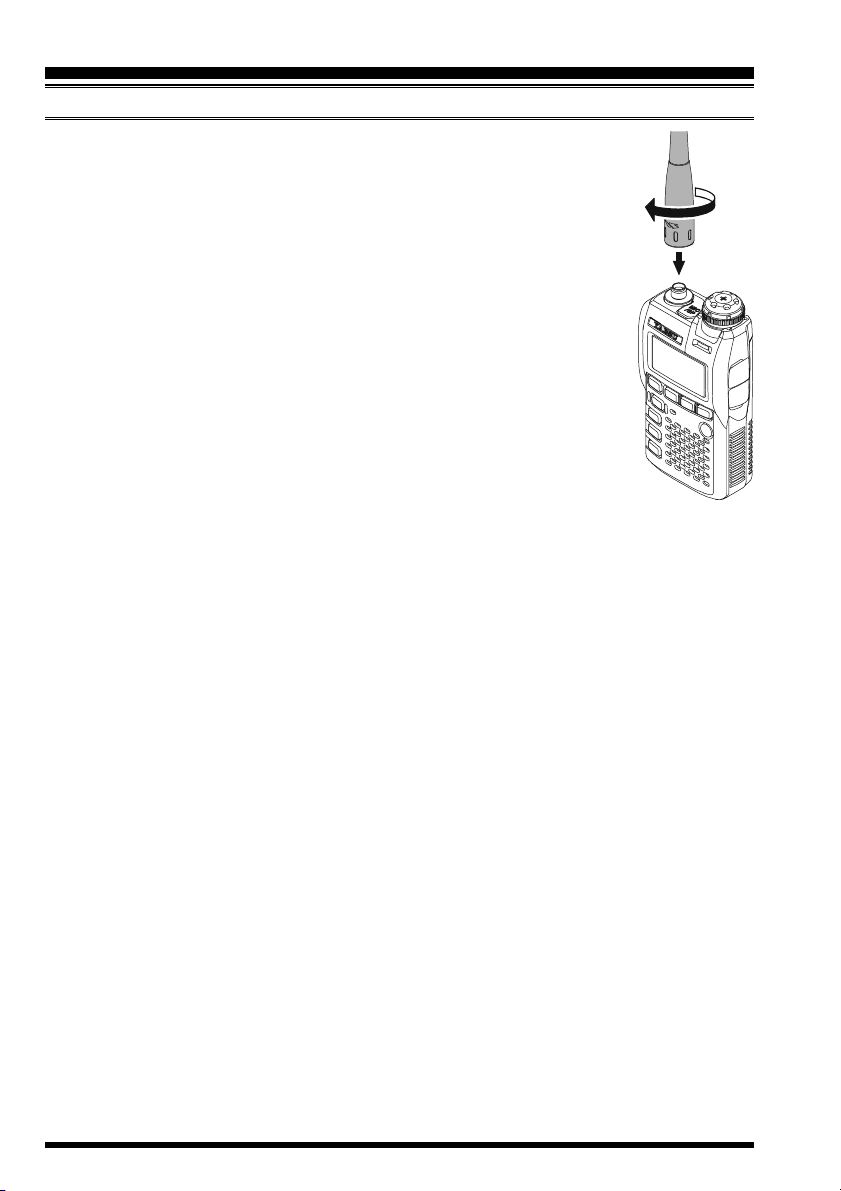
ANTENNA INSTALLATION
The supplied antenna provides good results over the entire frequency range
of the transceiver. However, for enhanced base station medium-wave and
shortwave reception, you may wish to connect an external (outside) an-
tenna, as the supplied antenna is very small and cannot be expected to
provide high performance at these frequencies.
To install the supplied antenna, hold the bottom end of the antenna and
screw it onto the mating connector on the transceiver until it is snug. Do
not over-tighten or use extreme force.
Notes:
When installing the supplied antenna, never hold the upper part of the
antenna while screwing it onto the mating connector on the transceiver.
INSTALLATION OF ACCESSORIES
Indice
Altri manuali Yaesu Ricevitore

Yaesu
Yaesu FRG-8800 Manuale utente

Yaesu
Yaesu FR-101 Manuale utente

Yaesu
Yaesu FT-900 Manuale utente

Yaesu
Yaesu FT-710 Manuale tecnico

Yaesu
Yaesu FRG-7700 Manuale utente

Yaesu
Yaesu VR-500 Manuale utente

Yaesu
Yaesu FRG-100 Manuale utente

Yaesu
Yaesu FR-100-b Manuale utente

Yaesu
Yaesu VR-120 Manuale utente

Yaesu
Yaesu VR-120D Manuale utente

Yaesu
Yaesu FT-901DM Manuale utente

Yaesu
Yaesu FRG-100 Manuale utente

Yaesu
Yaesu FRG-7700 Manuale utente

Yaesu
Yaesu VR-500 Manuale utente

Yaesu
Yaesu VR-120D Manuale utente

Yaesu
Yaesu FRG-8800 Manuale utente

Yaesu
Yaesu FRDX-400 Manuale utente

Yaesu
Yaesu FRG-8800 Manuale utente

Yaesu
Yaesu FRG-9600 Manuale utente

Yaesu
Yaesu VR-120D Manuale