
Zonet ZVC7611 Manuale utente

Copyright Statement
is the registered trademark of Zonet Technology Inc. All the products and
product names mentioned herein are the trademarks or registered trademarks of their
respective holders. Copyright of the whole product as integration, including its
accessories and software, belongs to Zonet Technology Inc. ithout the permission of
Zonet Technology Inc., any individual or party is not allowed to copy, plagiarize, imitate
or translate it into other languages.

Table of Contents
1. Introduction ................................................................................................1
2. Package Content..........................................................................................1
3. System Requirement....................................................................................2
4. Hardware Installation ...................................................................................2
4.1 LED and Focusing ................................................................................2
4.2 Know your ZVC7611/ZVC7611 ...........................................................3
4.3 Connecting ZVC7611/ZVC7611 to Your Network ...................................4
4.4 ZVC7611/ZVC7611 Application Example ..............................................5
5. Software Installation ....................................................................................6
6. Using the Administrator Utility..................................................................... 11
6.1 General Setting ................................................................................. 12
6.1.1 LAN Setting ............................................................................... 14
6.1.2 Security..................................................................................... 15
7. Using the Viewer Utility .............................................................................. 16
7.1 Configure IP Camera Viewer ............................................................... 18
7.1.1 Configure Cameras ..................................................................... 18
7.1.1.1 Camera ........................................................................ 19
7.1.1.2 Schedule Recording ....................................................... 21
7.1.1.3 Audio ........................................................................... 23
7.1.1.4 Motion Record ............................................................... 24
7.1.2 General Settings......................................................................... 25
7.1.2.1 General ........................................................................ 25
7.1.2.2 E-Mail Setting ............................................................... 26
7.1.2.3 Security ....................................................................... 27
7.1.2.4 About........................................................................... 28
7.3 Full-screen mode............................................................................... 32
7.4 Scan ................................................................................................ 33
7.5 Zoom-in / Zoom-out .......................................................................... 34
7.6 PTZ.................................................................................................. 35
7.7 Snapshot.......................................................................................... 36
7.8 Recording ......................................................................................... 37
7.9 Video Playback .................................................................................. 38
8. eb Connection and Setup ......................................................................... 39
8.1 Camera ............................................................................................ 40
8.2 LAN ................................................................................................. 41
8.3 LAN (For ZVC7611 ) ...................................................................... 43

8.4 E-Mail and FTP .................................................................................. 45
8.5 Motion Detection ............................................................................... 46
8.6 System............................................................................................. 47
8.7 Status .............................................................................................. 48
8.8 Users ............................................................................................... 48
8.9 Log .................................................................................................. 49
9. Specifications ............................................................................................ 50
10. Frequently Asked Questions ........................................................................ 51
Appendix A Viewing via UPnP in indows XP ....................................................... 52
Appendix B Configure indows 2003 Server ....................................................... 55

1
1. Introduction
Thank you for choosing Zonet ZVC7611/ZVC7611 . ZVC7611/ZVC7611 sends live
video through 10/100Mbps wired network to a web browser or camera viewer across
Internet anywhere in the world! This compact, self-contained unit lets you keep an eye
on your home, your kids, and your workplace—whatever’s important to you.
How does the Camera do all of this? Unlike standard “web cams” that require an attached
PC, ZVC7611/ZVC7611 can connect directly to a network. The MJPEG video
compression produces a high quality, high-frame rate, 640 x 480 video stream. The
included Camera Viewer utility lets you record the video to your local hard drive, “live” or
on a predetermined schedule.
Use the instructions in this User Manual to help you integrate ZVC7611/ZVC7611 into
your network. These instructions should be all you need to get the most out of
ZVC7611/ZVC7611 .
2. Package Content
One ZVC7611/ZVC7611
One Quick Installation Guide
One Installation CD w/Manual
One Power Adapter
One Camera Stand
One Ethernet Cable
One Antenna (ZVC7611 Only)
Contact your local authorized reseller or the store purchased from for any items
damaged and/or missing.

2
3. System Requirement
LAN: 10/100Mbps Fast Ethernet
LAN: IEEE 802.11b/g
OS System: indows 2000/XP/Server 2003/Vista/7
IE Version: 6.0.29 or above
CPU: Intel Pentium III 750MHz above or Intel Celeron 1GHz above
Memory Size: 128MB (256MB recommended)
DirectX 9.0 or above
VGA card with fully DirectX 9.0 supported.
VGA Card Resolution: 800 x 600 or above
4. Hardware Installation
4.1 LED and Focusing
The Camera head and its focus ring allow you to modify the aim and focus of
ZVC7611/ZVC7611 .
To adjust ZVC7611/ZVC7611 ’s focus, rotate the focus ring.
LED Indicator Status Description
ON Indicates LAN port is connected
LAN
Flashing Indicates LAN activity
(transferring or receiving data)
ON Indicates LAN is connected
LAN
(ZVC7611 only)
Flashing Indicates LAN activity
(transferring or receiving data)
PO ER ON Indicates camera is receiving power

3
4.2 Know your ZVC7611/ZVC7611
Front View
Bottom View
Reset Button
LAN Port
Power Jack
Focus Ring
LED Green:
LAN Activity
LED Orange:
LAN Activity
(ZVC7611 Only)
LED Blue:
Power On
ireless SMA Connector
(ZVC7611 Only)
4
Port & Button Description
Power Jack here you can connect the power adapter
LAN Port here you can connect the RJ-45 Ethernet cable
Antenna Connector
(ZVC7611 Only)
This is standard Reverse SMA connector where any
antenna with Reverse SMA connector can connect to
ZVC7611
Reset Button
1.
If problems occur with your ZVC7611/ZVC7611 ,
press the reset button with a pencil tip for less than 2
seconds and the camera will re-boot itself, keeping your
original configurations.
2.
If problems persist or you experience extreme
problems or you forgot your password, press the reset
button for longer than 5 seconds and the camera will
reset itself to the factory default settings
Note: your original configurations will be replaced with
the factory default settings.
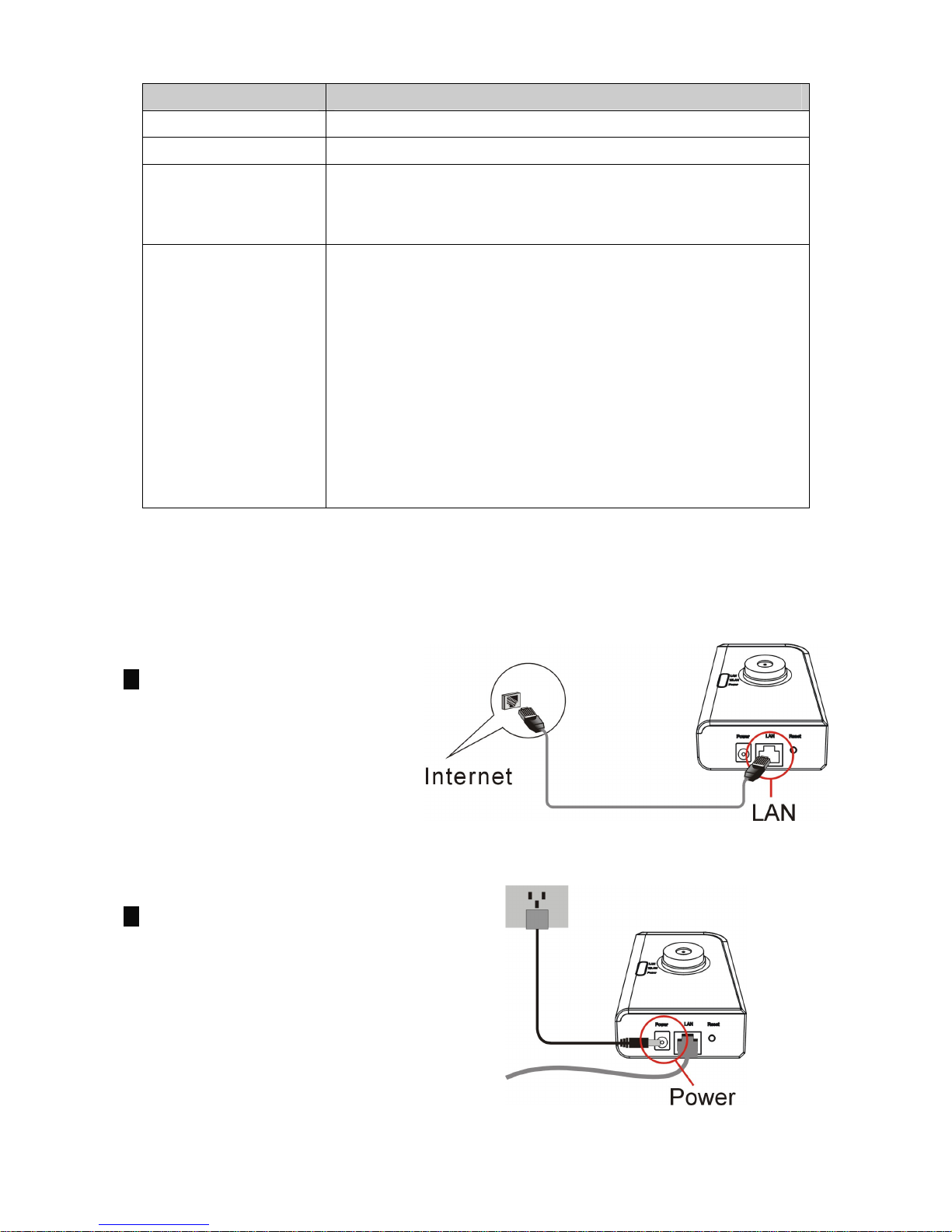
4.3 Connecting ZVC7611/ZVC7611 to Your Network
1. Connect ZVC7611/ZVC7611 to
your network by provided RJ-45
Ethernet cable from the
switch/router to the LAN port of
ZVC7611/ZVC7611 .
2. Connect the power adapter to
the ZVC7611/ZVC7611 and
plug the power adapter to power
socket. ZVC7611/ZVC7611 will
be powered on. hen the
ZVC7611/ZVC7611 is ready,
the PO ER LED will steady blue.
5
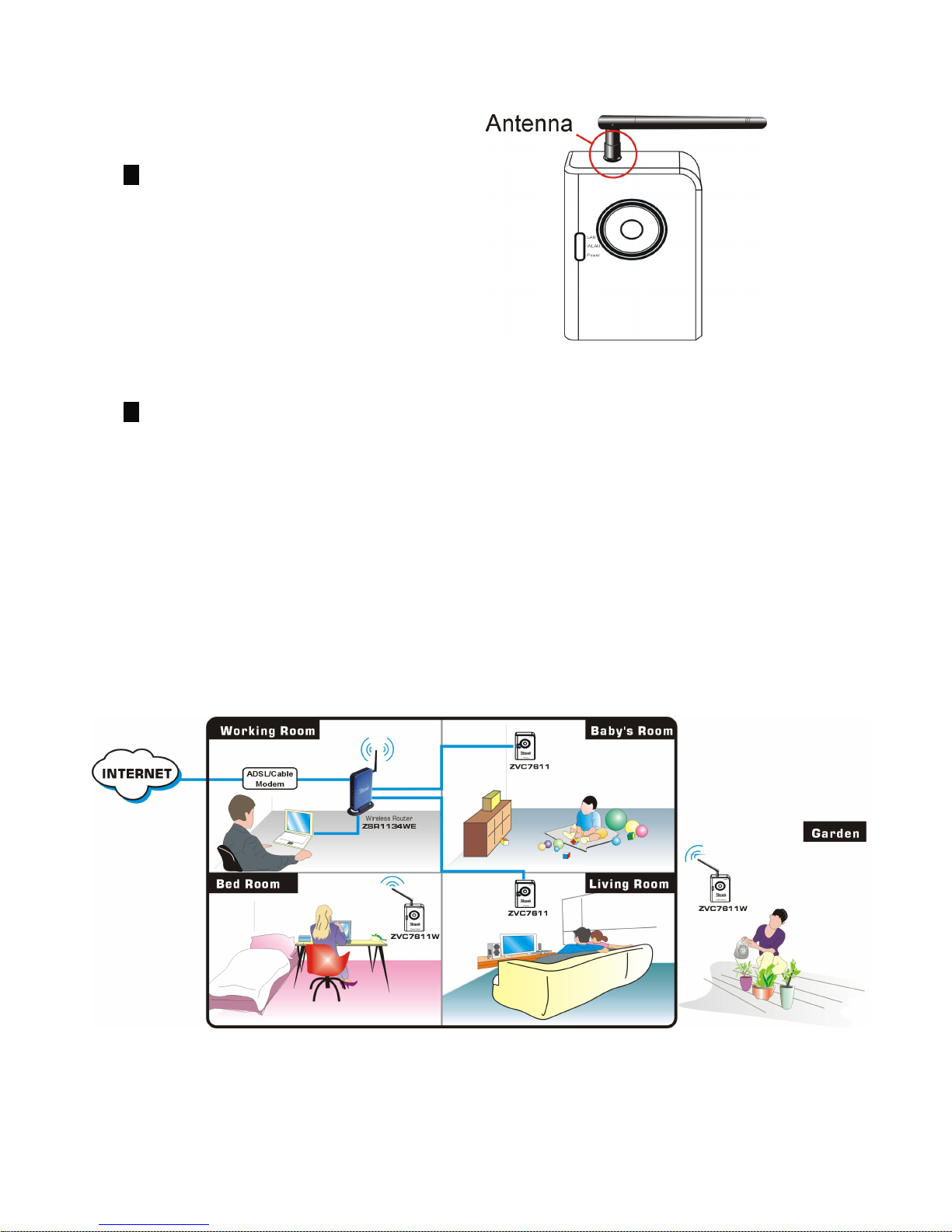
3. You have to connect the ireless
Antenna to ZVC7611 if you’d
like to use it in a wireless network
environment.
4. Make sure that you have
installed correct VGA driver and
DirectX 9.0 or above.
4.4 ZVC7611/ZVC7611 Application Example
The following diagram explains one of the most typical applications for the
ZVC7611/ZVC7611 .

6
5. Software Installation
NOTE:
Snap-shot screens of the following installation procedure are based on Windows
XP. Installation procedures will be similar for other windows operating systems.
1.
Insert Installation CD to
your CD-ROM drive
and the
elcome screen appears. If
you don’t see the elcome
screen, b
rowse CD and
double-click
Autorun.exe
.
2. The izard will show four
selections, select the
program you want to install
or click Exit to install later.
Altri manuali per ZVC7611
2
Questo manuale è adatto per i seguenti modelli
1
Indice
Altri manuali Zonet Telecamera IP

Zonet
Zonet ZVC7611W Manuale operativo

Zonet
Zonet ZVC7611 Manuale operativo

Zonet
Zonet ZVC7610 Manuale utente

Zonet
Zonet ZVC7610W Manuale utente

Zonet
Zonet ZVC7610 Manuale utente

Zonet
Zonet ZVC7630W Manuale utente

Zonet
Zonet ZVC7640 Manuale utente

Zonet
Zonet ZVC7630 Manuale utente

Zonet
Zonet ZVC7610 Manuale operativo

Zonet
Zonet ZVC7640W Manuale operativo


