
Zte Z291DL Manuale utente

Z291DL
User Manual
ZTE CORPORATION
NO. 55, Hi-tech Road South, ShenZhen, P.R.China
Postcode: 518057
Tel: +86-755-26779999
URL: www.ztedevice.com
E-mail: mobile@zte.com.cn

LEGAL INFORMATION
Copyright © 2016 ZTE CORPORATION.
All rights reserved.
No part of this publication may be excerpted, reproduced, translated or utilized in any form or by
any means, electronic or mechanical, including photocopying and microfilm, without the prior
written permission of ZTE Corporation.
The manual is published by ZTE Corporation. We reserve the right to make modifications on print
errors or update specifications without prior notice.
Trademarks
ZTE and the ZTE logos are trademarks of the ZTE Corporation.
Version No. : 1.0
Edition Time: December15, 2015

Getting Started .................................................................................................................. 1
Introduction ................................................................................................................... 1
Outline and Parts ........................................................................................................... 1
Indicators ....................................................................................................................... 2
Installing Your Device .................................................................................................. 3
Charging Your Device .................................................................................................. 4
Powering On/Off Your Device ..................................................................................... 4
Sleep Mode ................................................................................................................... 4
Resetting Your Device .................................................................................................. 5
Using the WPS (Optional) ............................................................................................ 5
Internet Access .................................................................................................................. 5
Configuring Your PC .................................................................................................... 5
Connecting to Your Device........................................................................................... 8
Accessing the Internet ................................................................................................... 9
Web UI Configuration ...................................................................................................... 9
Accessing the Configuration Page ................................................................................ 9
Login ........................................................................................................................... 10
Settings ............................................................................................................................ 10
Verifying the PIN Code .............................................................................................. 11
Quick Setups ............................................................................................................... 11
Wi-Fi Settings ............................................................................................................. 13
Device Settings ........................................................................................................... 16
Firewall ....................................................................................................................... 18
Router Settings ............................................................................................................ 20
Software update........................................................................................................... 20
Warning and Notice ........................................................................................................ 21
To the Owner .............................................................................................................. 21
Using Your Device...................................................................................................... 21
Using Battery .............................................................................................................. 21
Limited Warranty ........................................................................................................ 22
Limitation of Liability ................................................................................................. 22
Radio Frequency (RF) Energy (Only for America) .................................................... 22
FCC Compliance (Only for America) ......................................................................... 23
Disposal of Your Old Appliance ................................................................................. 24
Troubleshooting .............................................................................................................. 24


Confidential and Proprietary Information of ZTE CORPORATION 1
Getting Started
Introduction
ZTE Z291DL is a 4G LTE mobile hotspot device, working in LTE network. The client devices can
connect to it via Wi-Fi. The device supports data services, enabling you to communicate anytime and
anywhere.
Outline and Parts
The following figure shows the appearance of the device. It is only for your reference. The actual device
may be different.
Part Description
ON/OFF switch Slide it to turn on/off the Hotspot.
micro-SIM card slot Install the micro-SIM card.
WPS key When the Wi-Fi function is enabled, hold if for more than 3
seconds to active the WPS function.
To activate the WPS function when the Hotspot is in sleep
mode.
LED indicators It shows the signal strength, battery, Wi-Fi and message.
Charging/USB port Charge your device.
ON/OFF switch WPS key
LED indicators
Charging/USB port
micro-SIM card slot

ZTE Z291DL User Manual
2 Confidential and Proprietary Information of ZTE CORPORATION
Indicators
When the device is powered on, the following icons will light up, with the corresponding indicators
listed in the table below:
Indicator
Status Description
Network
Red solid Limited or no service, no SIM card, SIM card error or SIM card locked.
Red blinking Activation failed.
Green solid Registered to the LTE network.
Green blinking Registered to LTE network and connected to LTE network.
Blue blinking FOTA upgrading.
LED light off Power save or in sleep mode.
SMS
Blue solid You have unread messages.
Blue blinking You have new messages or your inbox is full.
LED light off No unread messages or no new messages.
Wi-Fi
Blue solid Wi-Fi is on.
Blue blinking WPS is active.
LED light off Wi-Fi is off.
Battery
Red solid The battery is low. (From 5% to dead) Please charge the battery.
Green blinking The battery is being charged. (From 6% to 94%)
Green solid The battery level is middle or high. (Charging from 95% to 100%, not
charging from 6% to 100%)
LED light off The battery is not inserted or not charged.

ZTE Z291DL User Manual
Confidential and Proprietary Information of ZTE CORPORATION 3
Installing Your Device
Inserting the SIM Card
1. Lift SIM card cover.
2. Insert the SIM card into the SIM card slot.
Inserting the battery
1. Remove the back cover.

ZTE Z291DL User Manual
4 Confidential and Proprietary Information of ZTE CORPORATION
2. Insert the battery as shown with the contacts located against the metal springs, and press the battery
down into the case.
3. Close the back cover.
Charging Your Device
You can charge your device by using the USB cable or adapter. Please charge your device for more than
two hours when you use it at the first time or when you haven’t used it for a long time.
Powering On/Off Your Device
Slide the Power key to ON/OFF position to switch on/off the device.
Sleep Mode
When you enable the Wi-Fi function and use the battery to supply power to the device, once no
user connects to the device within specified time, the device will enter the sleep mode. In the
sleep mode, the Wi-Fi function will be disabled. Press the WPS key to wake up the device and
Wi-Fi function.

ZTE Z291DL User Manual
Confidential and Proprietary Information of ZTE CORPORATION 5
Resetting Your Device
There are two ways to reset your device.
Reset your device on Web UI.
Please refer to the section Settings - Device Settings – Reset in this user manual.
Reset your device by pressing and holding the Reset key.
1. Remove the back cover.
2. Find a hole with a mark RESET on one side of the device bottom surface.
3. Press and hold the Reset key hidden in the hole with a pin for 3 seconds or longer.
4. Factory reset will take effect and then the device will restart.
Using the WPS (Optional)
If your client device supports WPS, you don’t have to input the password manually after WPS
has been available. Please do the following steps:
1. Log into the Web UI by visiting http://192.168.0.1 or http://mobile.hotspot.
2. Select Settings > Wi-Fi Settings > Basic Settings to enable the Broadcast Network
Name (SSID) and to set the Security Mode.
3. Set a Wi-Fi password in OPEN-WEP mode, WPA2 (AES)-PSK mode or
WPA-PSK/WPA2-PSK mode and then click Apply to confirm the settings.
4. Press and hold the WPS key to start Wi-Fi Protected Setup authentication process.
5. Enable the WPS function on your client to respond this authentication process.
6. Follow the system prompts on your client to finish the connection.
NOTE:
For the detailed operations about the client, please refer to the client’s instruction.
Internet Access
Configuring Your PC
The following procedure describes how to configure the Internet Protocol in the Windows 7 operating
system for Wi-Fi connection.
ZTE Z291DL User Manual
6 Confidential and Proprietary Information of ZTE CORPORATION
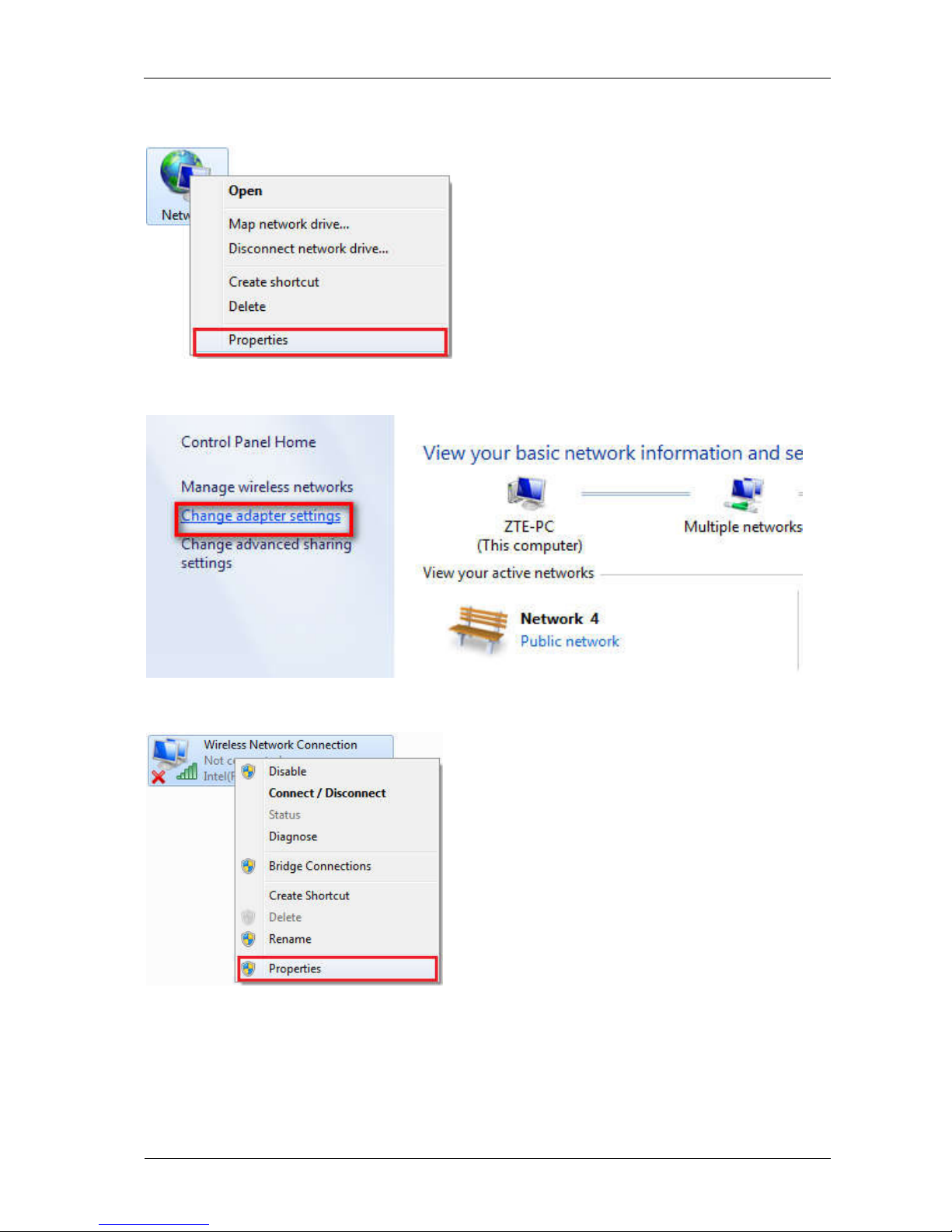
1. Right-click Network and select Properties.
2. Select Change adapter settings.
3. Right-click Wireless Network Connection and select Properties.
4. Select Internet Protocol Version 4 (TCP/IPv4) and click Properties.
Altri manuali per Z291DL
2
Indice
Altri manuali Zte Router wireless

Zte
Zte Z289L Manuale utente

Zte
Zte MF51 Manuale utente

Zte
Zte MF25A Manuale utente

Zte
Zte MF65 Manuale utente

Zte
Zte Z079584505806 Manuale utente

Zte
Zte MC7010 Manuale utente

Zte
Zte Z288L Manuale utente

Zte
Zte Z289L Manuale utente

Zte
Zte Telstra MF985T Manuale utente

Zte
Zte Pocket WiFi 5G A101ZT Manuale utente


