
Adel CC-04 Manuale utente

ADEL Instrumentation – 28 Rue de Stalingrad – 38300 BOURGOIN JALLIEU 1 – 04 74 93 06 37
CC-04
Calibrateur Volt/mA
Notice d’utilisation
ADEL Instrumentation – 28 Rue de Stalingrad – 38300 BOURGOIN JALLIEU 1 – 04 74 93 06 37
Calibrateur Volt/mA
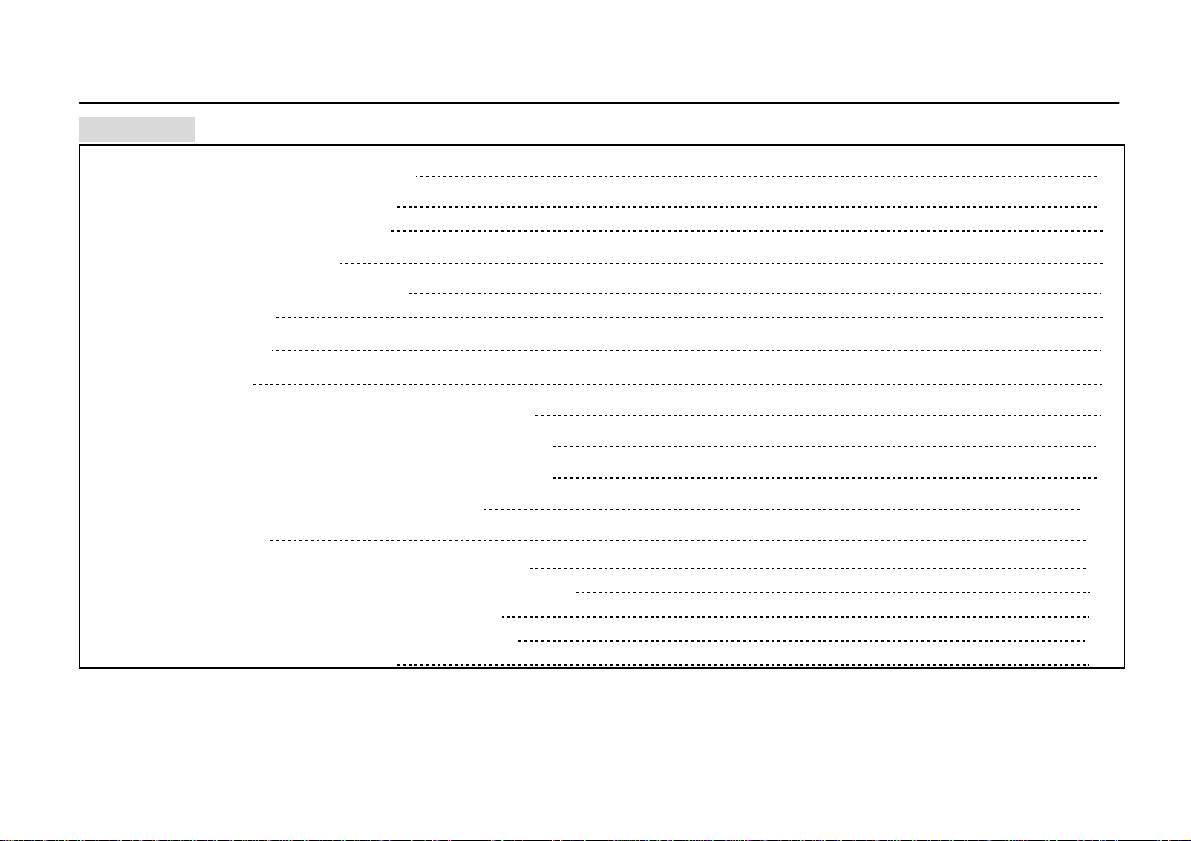
CONTENT
CONTENTS
1、Safety Information
1
1.1 Warnings and Notes 1
1.2 Symbols and Marks 2
2、Description
2
2.1 Pushbutton Functions 3
2.2 Display 5
3、Using
7
3.1 Input 7
3.1.1 Measure Voltage dc (MEASURE V) 7
3.1.2 Measure Millivolt dc (MEASURE mV) 8
3.1.3 Measure Current dc (MEASURE mA) 9
3.1.4 Measure mA with Loop Power 10
3.2 Output 11
3.2.1 SOURCE mAMode (Sourcing mA) 11
3.2.2 Simulate a Transmitter (SIMULATE mA) 13
3.2.3 Output Voltage dc (SOURCE V) 14
3.2.4 Output Millivolt dc (SOURCE mV) 15
3.2.5 Auto Ramp Function 16
Ⅰ

ADEL Instrumentation – 28 Rue de Stalingrad – 38300 BOURGOIN JALLIEU 1 – 04 74 93 06 37
Volt/mA Calibrator
CONTENT
CONTENTS
3.2.6 The “SpanCheck” Function (0%-100%) 17
3.3 Power 18
3.4 Charging Function 19
3.5 BL(Backlignt) 19
4、Technical Index
20
4.1 (MEASURE V dc) 20
4.2 (MEASURE mV dc) 20
4.3 (MEASURE mA dc) 20
4.4 (SOURCE / SIMULATE mA dc) 21
4.5 (SOURCE V dc ) 21
4.6 (SOURCE mV dc) 21
4.7 LOOP Power 21
4.8 General Specifications 22
5、Maintenance and Calibrati
23
5.1
Repair 23
5.2 Cleaning 23
5.3 Replace the Battery and Fuse 23
6、Accessories Included
25
Ⅱ

ADEL Instrumentation – 28 Rue de Stalingrad – 38300 BOURGOIN JALLIEU 1 – 04 74 93 06 37
Volt/mA Calibrator
Safe Information
一、Safe Information
This Calibrator complies with IEC 61010, CAT I 30 V and Pollution Degree II instrument.
1.1 Warnings and Notes
To avoid electric shock, injury or damage to the Calibrator.
Please use this Calibrator only as described in this instruction sheet or the protection
provided by this instrument may be impaired.
Do not use this Calibrator around explosive gas, vapor or dust.
Never apply more than 30 V between any two terminals or between any terminal and earth
ground.
Please select the appropriate port and scale span before using it.
Never use this Calibrator when the case cover open.
Once the symbol (low battery) appears, replace the battery to avoid false readings that
can lead to electric shock.
Remove test lead from the Calibrator before opening the case or battery cover.
If charge the Calibrator, must be use the power adapter that is provided from Calibrator.
Disconnect the power immediately and return it to detect and maintain if discover abnormal
situations or excessive local temperature on charging.
1

ADEL Instrumentation – 28 Rue de Stalingrad – 38300 BOURGOIN JALLIEU 1 – 04 74 93 06 37
Volt/mACalibrator
Safe Information and Description
1.2
Symbols and Marks
Symbol Meaning
Earth ground
Caution: Important information. Refer to instruction sheet
Double insulated
Low battery
Conforms to European Union requirements
二、Description
Volt/mA Calibrator (hereafter to be referred as “Calibrator”) is an accurate tool for current or
voltage supplying and measuring. The Calibrator can souring (output) 0-24mA or simulates a two-wire
transmitter output 0-24mA , it can measures 0-20mA or 4-20mA current loop as well as measure voltage
dc 0-100mV/0-10V. It is widely used to calibrate various loop current or voltage/current equipment.
2

ADEL Instrumentation – 28 Rue de Stalingrad – 38300 BOURGOIN JALLIEU 1 – 04 74 93 06 37
Volt/mA Calibrator
Description
2.1
Pushbutton Functions
Pushbutton Function
Power ON/OFF pushbutton.
Set up the auto power-off time : Set up the power-off time after power on,
refer to power section for details please.
Backlight ON / OFF pushbutton.
Press to step through modes:
• SOURCE mA mode ,display“SOURCE mA”
• SIMULATE mA mode,display“SIMULATE mA”
• Output voltage dc,display“SOURCE V”
• Output millivolt dc,display“SOURCE mV”
• MEASURE voltage dc,display“MEASURE V”
• MEASURE milivolt dc,display“MEASURE mV”
• MEASURE current dc,display“MEASURE mA”
• Measure current dc with Loop Power, display“MEASURE mA LOOP”
It would storage the current setting status before your turn off the
calibrator and keep it on when you using it again.
3

ADEL Instrumentation – 28 Rue de Stalingrad – 38300 BOURGOIN JALLIEU 1 – 04 74 93 06 37
Volt/mA Calibrator
Description
By pressing the knob
SOURCE mA mode: the current output could be adjusted to the
resolution of 1µA /10µA/100µA/1000µA (default value is 1µA);
SOURCE V mode:the voltage output could be adjusted to the resolution
of 1mV/10mV/100mV/1000mV. (default value is 1mV);
SOURCE mV mode:the voltage output could be adjusted to the resolution
of 0.01mV/0.1mV/1mV/0mV. (default value is 0.01mV);
By rotating the knob , the current or voltage signal output could be
increased or decreased in current setting resolution.
If turn the knob into auto ramp function or 25% stepping mode, the
direction and value could be changed for output signal.
Press
to increase the current or voltage with a stepping of 25% of full
scale.
When at full scale point, press key again
to decrease the current or
voltage with stepping of 25% of full scale (0-20mA/4-20mA)/(0-100mV)
/(0-10V).
4

ADEL Instrumentation – 28 Rue de Stalingrad – 38300 BOURGOIN JALLIEU 1 – 04 74 93 06 37
Volt/mA Calibrator
Description
2.2 Display
5
Press to enter into auto ramp current/voltage output function and
select a ramp output type. Press this pushbutton repeatedly could cycle
through select a ramp output type. stepped ramp display“”,slow ramp
display “”, fast ramp display “”.
Press to select “SpanCheck” function . “SpanCheck” is
displayed. From 0% and press it again to 100%. For example: The
0-20mA SpanChecks ,starting from 0% is 4mA and press it again to 100%
is 20mA.
+
Press and simultaneously to select the “SpanCheck” Span for
example:
• 4 mA-20 mA =0%-100% (default value)
• 0 mA-20 mA =0%-100% (optional)
The selection will be saved until next change.

ADEL Instrumentation – 28 Rue de Stalingrad – 38300 BOURGOIN JALLIEU 1 – 04 74 93 06 37
Volt/mA Calibrator
Description
6
Symbol Explanation
MEASURE Measure current or voltage
SIMULATE Simulate mA current
SOURCE Sourcing output current
SpanCheck Check of the full scale (0%-100%)
Loop Loop power
mAV The combination of unit symbol: mA/mV/V
Auto ramp type
Stepping direction indicate symbol
Low battery
ADEL Instrumentation – 28 Rue de Stalingrad – 38300 BOURGOIN JALLIEU 1 – 04 74 93 06 37
Volt/mA Calibrator
Using
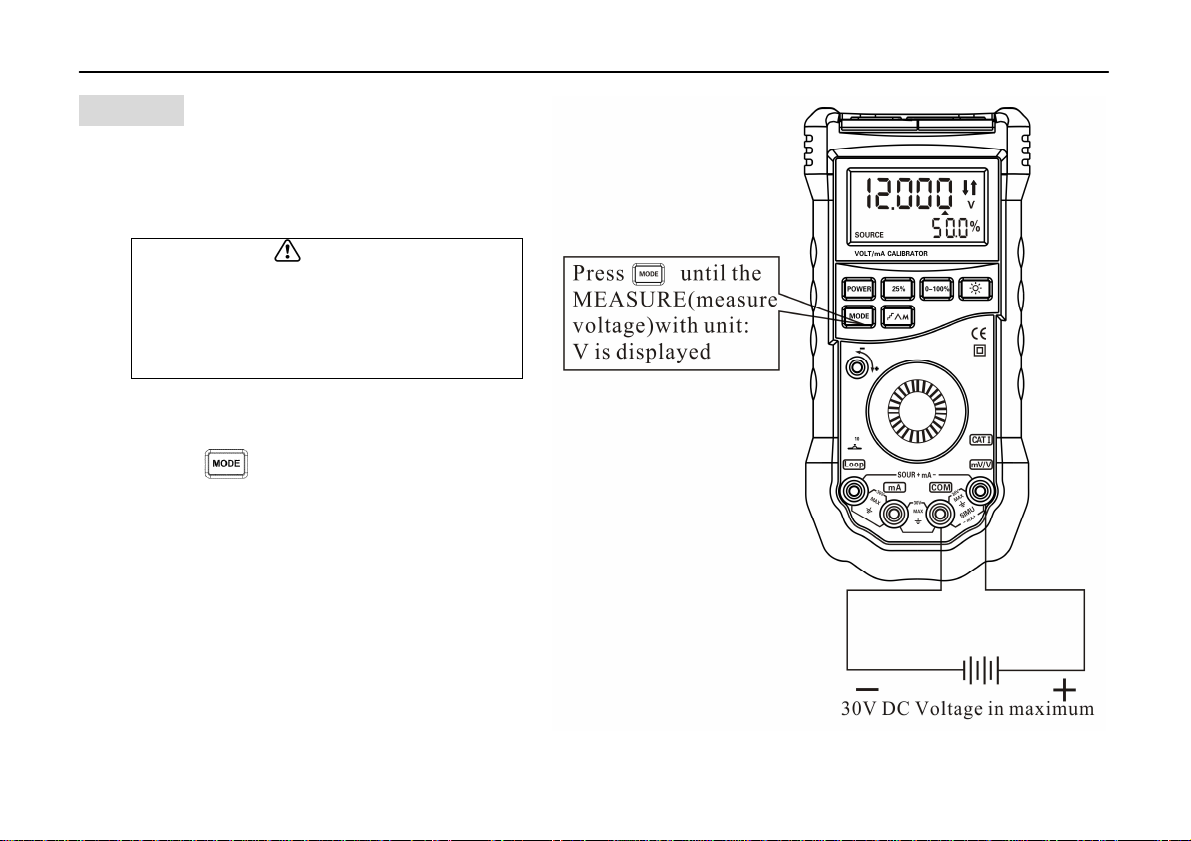
3、Using
3.1 Input
3.1.1 Measure Voltage dc
(MEASURE V)
To measure voltage dc
1) Press to step to MEASURE mode.
The display shows “MEASURE V”.
2) Touch test lead probes to the circuit
across the load or power source as
shown in right figure.
3) If the voltage over 10V the LCD will show
“-OL-”.
The lower display area ,shows the
voltage value percentage.
7
Caution
To prevent damage to the unit under
test, ensure that the Calibrator is in
the correct mode before connecting
the test leads.
Indice
Manuali Apparecchiature di prova popolari di altre marche

SMART
SMART KANAAD SBT XTREME 3G Series Manuale utente

Agilent Technologies
Agilent Technologies BERT Serial Manuale utente

Agilent Technologies
Agilent Technologies N3280A Manuale utente

Vernier
Vernier Go Direct Voltage Manuale utente

Lifeloc
Lifeloc R.A.D.A.R. Manuale utente

Fluke
Fluke T5-600 Istruzioni per l'uso e l'installazione


