AJAX Systems MotionCam Manuale utente

MotionCam Outdoor User Manual
Updated August 19, 2021
MotionCam Outdoor is a wireless outdoor motion detector with a camera for
alarm verification. Detects movement at a distance of 3 to 15 meters. Has anti-
masking protection, ignores animals when correctly configured and installed.
The detector only works with and . Connecting to other hubs, ReX
range extenders, and ocBridge Plus and uartBridge integration modules is not supported!
MotionCam Outdoor works as part of the Ajax security system by connecting to
the hub via and encrypted radio protocols. The communication
range without obstacles is up to 1,700 meters.
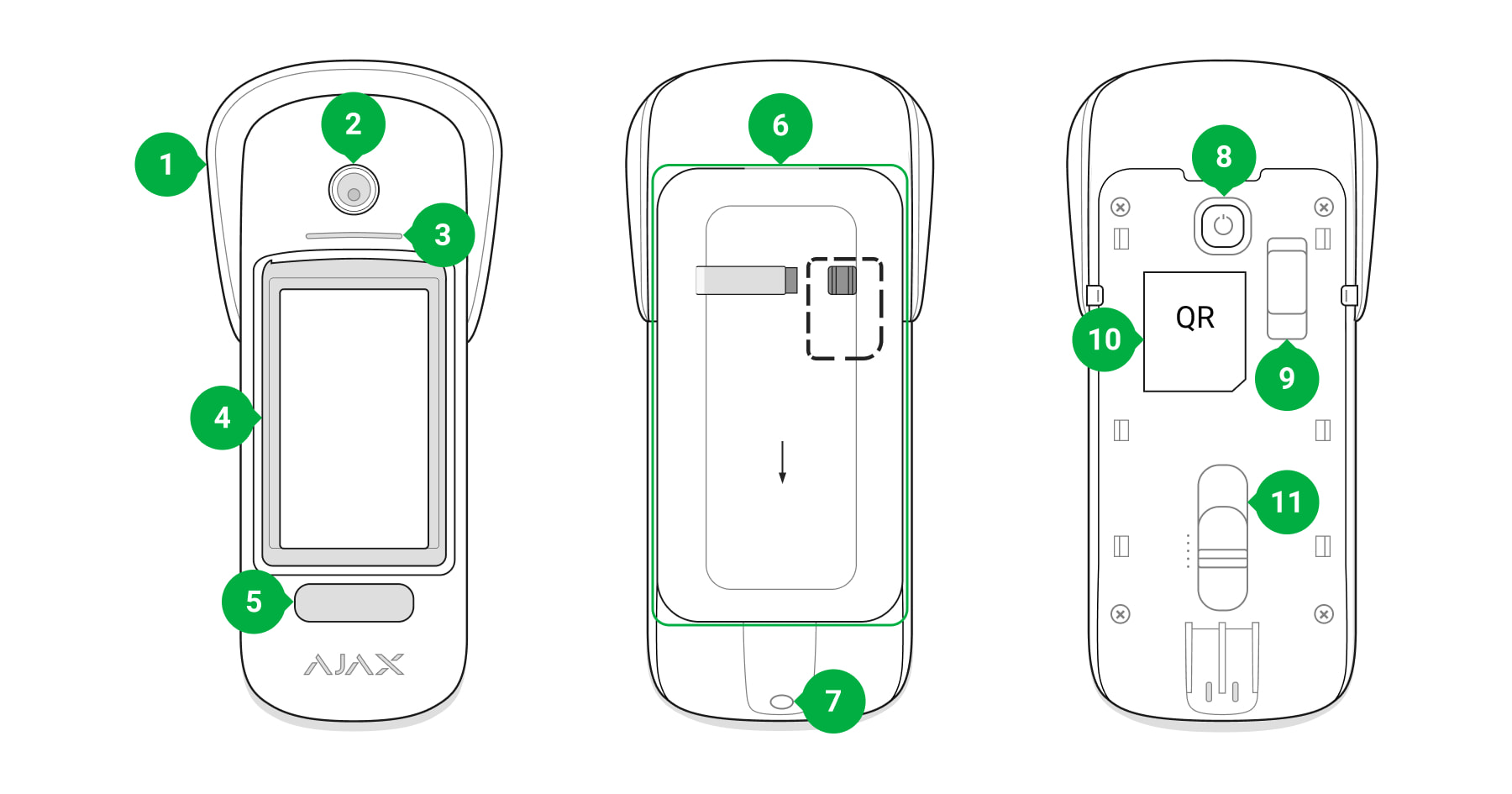
Functional elements
Hub 2 Hub 2 Plus
Jeweller Wings
Buy MotionCam Outdoor

1. Hood visor to protect camera and masking sensors from snow and rain
2. Camera
3. LED indicator
4. Motion detector lens
5. Infrared (IR) backlight for taking pictures in the dark
6. SmartBracket mounting plate. To remove the plate, slide it down
The perforated part is necessary to trigger a tamper in case of any attempt to
detach the detector from the surface. Do not detach it!
7. The hole for attaching SmartBracket mounting panel with a screw
8. Power button
9. . Triggers when an attempt is made to detach the detector
from the surface or remove the mount
Tamper button
10. Detector QR code. Is used to connect to the Ajax security system
11. Scrollbar for adjusting the detection range

Operating principle
MotionCam Outdoor is an outdoor motion detector with a camera. IR sensors of
the detector identify intrusions by detecting moving objects with temperatures
close to that of the human body. Visual verification helps you instantly assess
the situation, relieving users of unnecessary anxiety, and security companies —
from false calls of patrols.
In the armed mode, the detector constantly reads signals from infrared (IR)
sensors. When motion is detected, MotionCam Outdoor transmits an alarm to
the hub and signals it by flashing the LED indicator (if indication is enabled).
An alarm is detected if both IR sensors detect a movement. The detector takes
1 to 5 photos at a time (depending on the settings) and transmits them to the
hub. You can enable the Send Photo in Case of Alarm function in the
.
When triggered, the hub activates sirens, starts scenarios, and notifies users
and the security company. In case of an alarm, photos are transmitted to the
monitoring station of the security company and to all users of the system who
have access to the hub’s event feed. All alarms, photos, and events of
MotionCam Outdoor are recorded in the event feed of the Ajax app.
Learn more about Ajax motion detectors
detector
settings
00:00
00:08

The detector doesn’t go into the armed mode instantly. The time for switching to armed
mode depends on two factors: exit delays (specified in the detector settings) and the
hub – detector ping interval (Jeweller settings, the default value is 36 seconds). In the
first case, the delay is set by the user. In the second case, the delay is caused by the fact
that the hub notifies the detector about the transition to the armed mode not instantly,
but within one ping interval.
The range of motion detection is set manually — with a scrollbar on the detector
body — and is from 3 to 15 meters. This allows you to accurately set the
detection area and avoid false triggerings on bushes, trees, or other objects.
Users know exactly where motion is detected. The notifications contain the
name of the hub (name of the guarded object), the name of the device, and the
virtual room to which the detector is assigned.
Photo verication of alarms
When the detector is triggered, the built-in MotionCam Outdoor camera can take
1 to 5 images with a resolution of 320 × 176 and up to 3 images with a
resolution of 640 × 352 pixels. The detector has infrared illumination for
shooting in the dark, which is activated only when an alarm is raised.
A series of photos are played back in the app as animation, which allows you to
evaluate the incident in dynamics. Photos are available both in Ajax apps and in

the monitoring station software of the security company. MotionCam Outdoor
uses the radio protocol to transmit photos.
The delivery time of a photo to Ajax apps depends on the selected image
resolution, Jeweller and Wings signal strength, and the internet speed at the
hub. The alarm signal is transmitted in 0.15 seconds.
Photo resolution Delivery time of one photo
320 × 176 (default) Up to 9 seconds
640 × 352 Up to 20 seconds
The table shows the delivery time for one photo when the signal strength
between the hub and MotionCam Outdoor is 2–3 bars and the hub is
connected via Ethernet.
Temperature compensation
The detector perceives a person and other objects as heat spots. The device
monitors these heat spots and, if they move, signals an alarm. MotionCam
Outdoor reacts to the movement of heat spots with the temperature close to
that of the human body.
In the case where the ambient temperature is about the temperature of the
human body, the correct operation of the detector is not guaranteed unless
temperature compensation is applied. Owing to it, the detector identifies
movement over the entire operating temperature range.
Temperature compensation is used in all Ajax motion detectors. This way they
effectively detect movement over the entire operating temperature range of the
detector.
Pet immunity
Wings
Learn more

When set up and installed correctly, MotionCam Outdoor ignores animals up to
80 centimeters tall. The detector has two IR sensors and raises an alarm only
when movement is detected by both sensors.
If installed correctly, animals will only enter the detection zone of one of the
detector’s sensors. This way, MotionCam Outdoor eliminates false alarms. And
for additional protection against false alarms, the detector uses the LISA
software algorithm.
Anti-masking system
Masking is an attempt to block the view of the detector by painting over it,
covering it, placing an obstacle in front of the detector’s lens, or otherwise.
MotionCam Outdoor detects the following types of masking:
Masking type Time to alarm,
seconds
Time to restore,
seconds
Obstacle in front of the
detector’s lens (at a distance
7 20
Why motion detectors react to animals and how to avoid it
1. Obstacle in front of the detector’s lens at a distance of up to 10 centimeters
(the limit distance depends on the type of material).
2. Painting over the detector lens.
3. Sticking over the detector lens.

of up to 10 centimeters from
the lens)
Painting over the detector lens 100 20
Sticking over the lens or
detector’s side 100 20
The system informs the users and the monitoring station of the security
company about masking. For additional protection and notification, enable the
reaction of sirens to masking (you can do this in the detector ).
The maximum time of masking detection is 180 seconds (depends on the type
of obstacle and the distance to it).
Note that the anti-masking system is always active and works regardless of the detector
or system security mode.
For additional protection of the camera or the masking detection system from
false alarms on heavy rain or snow, a Hood visor is provided.
Protection against false triggering
Settings
Anti-masking and its implementation in Ajax outdoor detectors

MotionCam Outdoor features two independent IR sensors, the signals of which
are analyzed by a two-stage LISA algorithm. As soon as both IR sensors detect
movement, LISA performs correlation and spectral analysis of the signals, which
allows you to instantly distinguish between real threats and interference.
Correlation analysis
Each time a motion is detected, the LISA algorithm analyzes and compares the
waveforms of two signals in real-time. If the waveforms are similar, the detector
triggers an alarm.
Spectral analysis
When both sensors detect motion, but correlation analysis does not reveal
sufficient similarity of waveforms, LISA compares the frequency components of
the signals from the two sensors.
Sending events to the monitoring station
The Ajax security system can transmit alarms to the central monitoring station
(CMS) in such protocol formats as Sur-Gard (ContactID), SIA DC-09, and other
proprietary protocols. A complete list of supported protocols is .
The device ID and the loop (zone) number can be found in . Note that
photos are sent to the monitoring station of the security company only if the
CMS software supports the transmission of photo verifications. The list of
CMSs that support Ajax photo verification is .
Photo verifications are available in the without additional setup.
Adding to the system
The detector is incompatible with Hub and Hub Plus hubs, ReX radio signal range
extender, third-party security central units, as well as ocBridge Plus and uartBridge
available here
Which CMSs can the Ajax security system be connected to
its states
available here
Ajax PRO Desktop CMS

integration modules.
Before adding a device
Only a user or PRO with administrator rights can add a device to the hub.
How to add MotionCam Outdoor to the system
To make sure MotionCam Outdoor is connected to the hub, the detector must be located
at the same secured facility as the system (within the range of the hub’s radio network).
The detector connected to the hub will appear in the list of hub devices in the
Ajax app. Updating the statuses of devices in the list depends on the Jeweller
1. Install the . Create an . Add a hub to the app and create at
least one virtual room.
Ajax app account
2. Make sure that the hub is on and has access to the internet (via Ethernet
cable, Wi-Fi, and/or mobile network). You can do this in the Ajax app or by
checking the hub logo on the faceplate. The logo should light up white or
green if the hub is connected to the network.
3. Make sure the hub is disarmed and does not start updates by checking its
status in the Ajax app.
Types of accounts and their rights
1. Open the . If your account has access to multiple hubs, select the
one to which you want to add MotionCam Outdoor.
Ajax app
2. Go to the Devices tab and click Add Device.
3. Name the detector, scan or type in the QR code (placed on the detector body
and the packaging), select a room and a group (if is enabled).group mode
4. Click Add; the countdown will begin.
5. Switch on the device by holding the power button for 3 seconds.

settings; the default value is 36 seconds.
If the connection fails, try again in 5 seconds. Note that if the maximum number
of devices has already been added to the hub ( ),
you will be notified when you try to add a new one.
MotionCam Outdoor only works with one hub. When connected to a new hub,
the detector stops sending commands to the old hub. Once added to a new hub,
MotionCam Outdoor is not removed from the device list of the old hub. This
must be done through the Ajax app.
Icons
The icons represent some of MotionCam Outdoor statuses. You can see them in
the Devices tab in the Ajax app.
Icon Value
Jeweller signal strength — displays the signal strength between the hub and the
detector
MotionCam Outdoor battery level
Malfunction detected. A list and description are available in the detector states
The detector operates in Always Active mode
Entry and/or exit delay is enabled
MotionCam Outdoor will work when Night Mode is enabled
MotionCam Outdoor has detected motion
MotionCam Outdoor is temporarily disabled
depending on the hub model
Learn more
Learn more
Learn more
Learn more
Altri manuali per MotionCam
1
Questo manuale è adatto per i seguenti modelli
1
Indice
Altri manuali AJAX Systems Sensore di sicurezza

AJAX Systems
AJAX Systems MotionProtect Outdoor Manuale utente

AJAX Systems
AJAX Systems DoorProtect Plus Manuale utente

AJAX Systems
AJAX Systems DoorProtect Manuale utente

AJAX Systems
AJAX Systems GlassProtect Manuale utente

AJAX Systems
AJAX Systems StreetSiren Manuale utente

AJAX Systems
AJAX Systems DoorProtect Manuale utente

AJAX Systems
AJAX Systems Hub Plus Manuale utente

AJAX Systems
AJAX Systems MotionCam Manuale utente