
Alaxala AX6700S series Manuale utente

AX6700S/AX6600S/AX6300S/AX3800S/AX3600S/AX2400S
Troubleshooting Guide
AX36S-T001-B0X
Reading and storing this manual:
yBefore you use the equipment, carefully read the manual and make sure you understand all safety
precautions.
yAfter reading the guide, keep it in a convenient place for easy reference.

Relevant products
This manual applies to the models in the AX6700S, AX6600S, AX6300S, AX3800S, AX3600S, and AX2400S series
of switches.
Export restrictions
If you plan to export any of the models, complete the necessary procedures after checking the Foreign Exchange
and Foreign Trade Act and U.S. laws and regulations concerning such exports. If you require more information,
please contact an Alaxala sales representative.
Trademarks
- Cisco is a registered trademark of Cisco Systems, Inc. in the United States and other countries.
- Ethernet is a registered trademark of Xerox Corporation.
- Internet Explorer is either a registered trademark or trademark of Microsoft Corporation in the United States and
other countries.
- IPX is a trademark of Novell, Inc.
- Microsoft is either a registered trademark or trademark of Microsoft Corporation in the United States and other
countries.
- Octpower is a registered trademark of NEC Corporation.
- RSA and RSA SecurID are trademarks or registered trademarks of RSA Security Inc. in the United States and
other countries.
- sFlow is a registered trademark of InMon Corporation in the United States and other countries.
- UNIX is a registered trademark of The Open Group in the United States and other countries.
- VitalQIP and VitalQIP Registration Manager are trademarks of Lucent Technologies.
- VLANaccessClient is a trademark of NEC Soft, Ltd.
- VLANaccessController and VLANaccessAgent are trademarks of NEC Corporation.
- Windows is a registered trademark of Microsoft Corporation in the United States and other countries.
- Other company and product names in this manual are trademarks or registered trademarks of their respective
owners.
Reading and storing this manual
Before you use the equipment, carefully read the manual and make sure that you understand all safety precautions.
After reading the manual, keep it in a convenient place for easy reference.
Note
Information in this document is subject to change without notice.
Please note that the actual product might differ from how it is depicted in output examples and figures.
Edition history
August 2011 (Edition 12) AX36S-T001-B0X (SOFT-AM-0006_R12X)
Copyright
All Rights Reserved, Copyright (C) 2005, 2011, ALAXALA Networks, Corp.

History of Amendments
(Edition 12)
Summary of amendments
Location and title Changes
1.2.2 Failure analysis for the AX3800S,
AX3600S, and AX2400S series
zA description of AX3800S series switches has been
added.
3.8.7 Communication is not possible in IPv4
PIM-DM networks
zThis subsection was added.
3.8.8 Multicast data is forwarded twice in an IPv4
PIM-DM network
zThis subsection was added.
In addition to the above changes, minor editorial corrections were made.
(Edition 11)
Summary of amendments
Item Changes
Failure analysis for the AX3600S and AX2400S
series
zA description of AX3600 and AX2400S series switches
was added.
Failures occurring when the Ring Protocol
functionality is used
zA description of the multi-fault monitoring functionality
was added.
Communication is not possible or is
disconnected
zThe description was changed in accordance with the
addition of VRF support in AX3600S and AX2400
series switches.
Communication is not possible or is
disconnected
zThe description was changed in accordance with the
addition of VRF support in AX3600S and AX2400
series switches.
Creating loop connectors zThis subsection was added.
Detailed display contents of the "show
tech-support" command
zCommands were added to the detailed description.
(Edition 10)
Summary of amendments
Item Changes
IPv4 network communication failures zActions to be taken when using DHCP snooping were
added.
IPv6 DHCP relay communication problems zThis subsection was added.
IPv6 multicast communication problems in VRF zThis subsection was added.
IPv6 multicast communication problems in an
extranet
zThis subsection was added.

Item Changes
Problems due to the redundant configuration of
the NIF
zThis section was added.
Access list logging problems zThis section was added.
DHCP snooping problems zThis section was added.
Detailed display contents of the "show
tech-support" command
zCommands were added to the detailed description.
(Edition 9)
Summary of amendments
Item Changes
Login from a remote terminal is not possible zActions to be taken when a user cannot log in were
added.
Login authentication using RADIUS/TACACS+ is
not possible
zActions to be taken when a user cannot log in to the
Switch were added.
Command authentication using
RADIUS/TACACS+ and local is not possible
zItems to be checked were added.
zActions to be taken when all commands are restricted
were added.
Actions to be taken for
100BASE-FX/1000BASE-X problems
zActions to be taken for 100BASE-FX were added.
Problems that occur during IPv4 multicast
communication in the extranet
zThis subsection was added, and actions to be taken
when a problem occurs during IPv4 multicast
communication in the extranet were added.
Communication is not possible or is
disconnected
zItems to be checked for the optional license OP-NPAR
were added.
No IPv6 routing information exists in the VRF zThis subsection was added, and a description of the
failure analysis method for the option license
OP-NPAR was added.
Communication is not possible with uplink
redundancy
zThis subsection was added, and a description of the
failure analysis method with uplink redundancy was
added.
Detailed display contents of the "show
tech-support" command
zCommands were added to the detailed description.
(Edition 8)
Summary of amendments
Item Changes
Addition of series zA description relating to the addition of AX6600S series
switches was added.

Item Changes
Procedure for handling switch faults zItems for handling failures were added.
Memory card problems zThis section was added.
BSU/PSP communication failures zPSP was added. In addition, items for analyzing
failures were added or modified.
Actions to be taken for PoE problems zThis subsection was added.
Failures occurring when the Ring Protocol
functionality is used
zItems for analyzing failures were added.
GSRP communication failures zItems for analyzing failures were added.
Power saving-related problems zThis section was added.
(Edition 7)
Summary of amendments
Item Changes
Communication is not possible or is
disconnected
zItems to be checked for the optional license OP-NPAR
were added.
No RIP routing information exists zItems to be checked for the optional license OP-NPAR
were added.
No OSPF routing information exists zItems to be checked for the optional license OP-NPAR
were added.
No BGP4 routing information exists zItems to be checked for the optional license OP-NPAR
were added.
zThe actions to be taken were changed.
No routing information exists in the VRF zThis subsection was added.
Communication failures in the IPv4 multicast
routing functionality
zItems for analyzing failures were added.
zItems to be checked for the optional license OP-NPAR
were added.
No BGP4+ routing information exists zThe actions to be taken were changed.
Communication failures in the IPv6 multicast
routing functionality
zItems for analyzing failures were added.
Communication failures occurring when Web
authentication is used
zItems for analyzing failures were added.
zThe actions to be taken were changed.
Communication failures occurring when
MAC-based authentication is used
zThe actions to be taken were changed.
Communication is not possible with the VRRP
configuration of IPv4 networks
zItems for analyzing failures of the grouping
functionality were added.
Communication is not possible with the VRRP zItems for analyzing failures of the grouping

Item Changes
configuration of IPv6 networks functionality were added.
Packet congestion in CPU processing does not
recover
zThis section was added.
Detailed display contents of the "show
tech-support" command
zContent displayed by the added or changed
commands was added.
(Edition 6)
Summary of amendments
Item Changes
Information cannot be entered from the console
or does not appear correctly
zThe item "After line disconnection, reconnection is not
possible." for problems occurring during connection to
a modem was added.
Ethernet port cannot be connected zActions to be taken when L2 loop detection
functionality deactivates the port (makes it inactive)
were added to the port status check items.
Actions to be taken for
10BASE-T/100BASE-TX/1000BASE-T problems
zItems to be checked for pin-mapping depending on the
port settings were added.
Failures occurring when the spanning tree
functionality is used
zActions to be taken when the spanning tree
functionality is used with the Ring Protocol were
added.
Multicast forwarding by IGMP snooping is not
possible
zItems to be checked when using IPv4 multicast
concurrently were added.
Multicast forwarding by MLD snooping is not
possible
zItems to be checked when using IPv6 multicast
concurrently were added.
Communication is not possible on the IPv4
PIM-SM networks
zActions to be taken when checking by using the show
igmp-snooping command
Communication is not possible on the IPv4
PIM-SSM networks
zActions to be taken when checking by using the show
igmp-snooping command
Communication is not possible on the IPv6
PIM-SM networks
zActions to be taken when checking by using the show
mld-snooping command
Communication is not possible on the IPv6
PIM-SSM networks
zActions to be taken when checking by using the show
mld-snooping command
Communication failures occurring when Web
authentication is used
zActions to be taken when an operation log message is
output, and when authentication for a terminal subject
to authentication fails completely were added.
Transferring maintenance information files zThe procedure for transferring information when a
configuration file failure occurs was added.
Detailed display contents of the "show
tech-support" command
zContent displayed by the added commands was
added.

(Edition 5)
Summary of amendments
Item Changes
MAC-based authentication zThis item was added.
(Edition 4)
Summary of amendments
Item Changes
Ring Protocol zThis item was added.
(Edition 3)
Summary of amendments
Item Changes
Additional model zA description relating to the additional model was
added.
Web Authentication zThis item was added.
sFlow statistics zThis item was added.
IEEE 802.3ah/UDLD functionality zThis item was added.
(Edition 2)
Summary of amendments
Item Changes
Additional model zA description relating to the additional model was
added.
Authentication VLAN zThis item was added.
SNMPv3 zThis item was added.
Detailed display contents of the "show
tech-support" command
zThis item was added.


I
Preface
Relevant products
This manual applies to the models in the AX6700S, AX6600S, AX6300S, AX3800S,
AX3600S, and AX2400S series of switches.
Before you operate the equipment, carefully read the manual and make sure that you
understand all instructions and cautionary notes. After reading the manual, keep it in a
convenient place for easy reference.
Corrections to the manual
Corrections to this manual are contained in the Manual Corrections.
Intended readers
This manual is intended for system administrators who configure and operate a network
system that uses AX6700S, AX6600S, AX6300S, AX3800S, AX3600S, and AX2400S
series switches.
Readers must have an understanding of the following:
zThe basics of network system management
Manual URL
You can view this manual at the following Web site:
http://www.alaxala.com/en/index.html
Preface
II
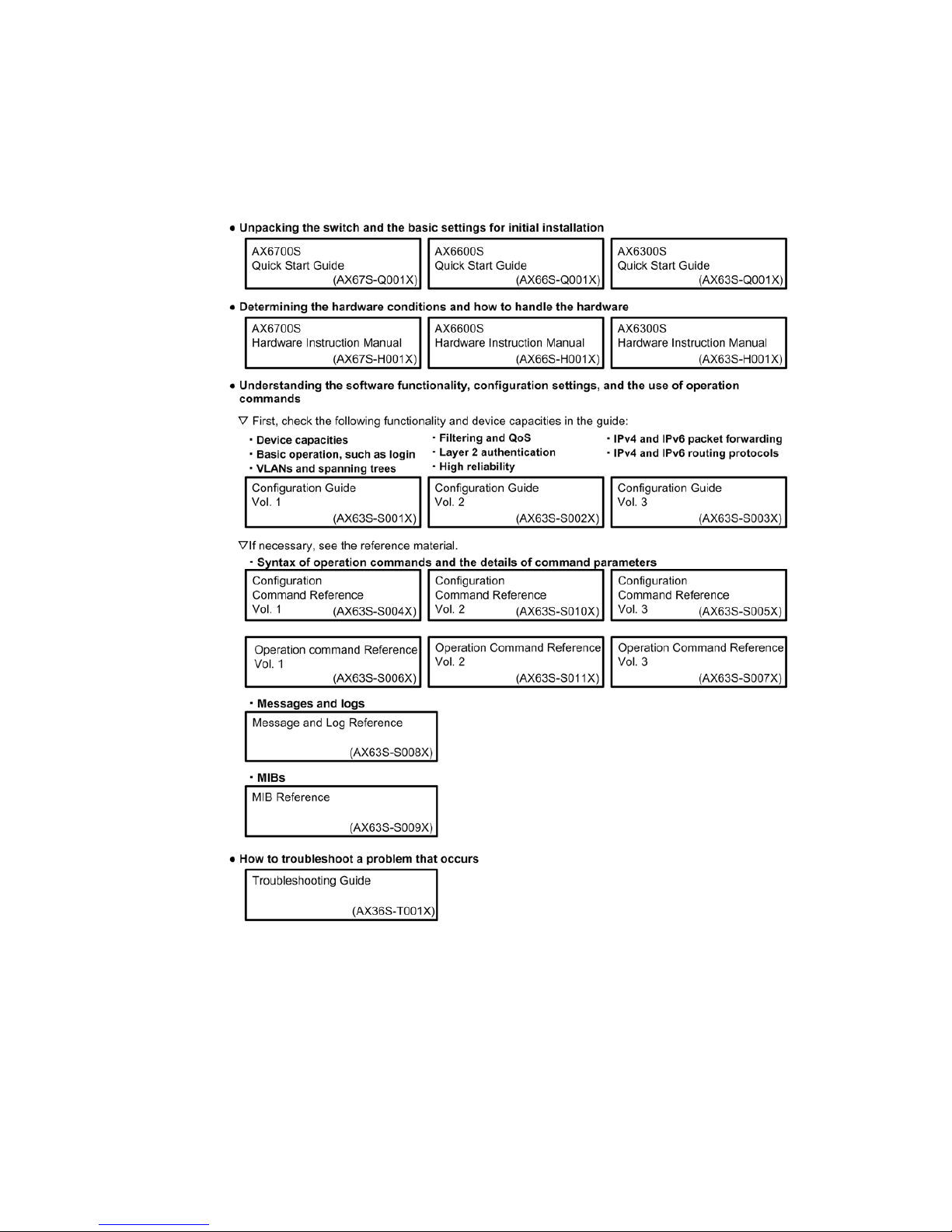
Reading sequence of the manuals
The following shows the manuals you need to consult according to your requirements
determined from the following workflow for installing, setting up, and starting regular
operation of a switch.
AX6700S, AX6600S, and AX6300S series switches
Altri manuali per AX6700S series
2
Questo manuale è adatto per i seguenti modelli
5
Indice
Altri manuali Alaxala Interruttore

Alaxala
Alaxala AX3640S Istruzioni per il montaggio

Alaxala
Alaxala AX6700S series Istruzioni per il montaggio

Alaxala
Alaxala AX2200S Series Manuale utente

Alaxala
Alaxala AX6700S series Manuale utente

Alaxala
Alaxala AX1250S Series Manuale utente

Alaxala
Alaxala AX1250S Series Istruzioni per il montaggio

Alaxala
Alaxala AX6300S series Manuale utente

Alaxala
Alaxala AX6300S series Manuale utente

Alaxala
Alaxala AX3800S series Istruzioni di montaggio


