
anago KST Series Manuale utente
OPERATING MANUAL
ANAGO Knife Sharpness Tester (KST) Series
KST200e Standard
KST300e Standard
Version 5.0
April 2021

1
©2003-2021 Anago Ltd
WARRANTY INFORMATION
Anago warrants that the products supplied are fit for purpose and free from defects for a period of
twelve (12) months from the date of delivery.
All other guarantees, warranties and representations in relation to the products or their supply implied
by law or otherwise are excluded except to the extent that Anago cannot lawfully exclude them.
Anago will not be liable, whether pursuant to this warranty or otherwise;
a. For any direct or indirect consequential loss (including loss of business or profits) incurred by
the customer, as a result of breach of the warranty or any defect in the product;
b. For fair wear and tear or wilful or accidental damage to the product;
c. For any damage cause by abnormal use or failure to properly maintain or service the product.
Anago’s liability to the customer, whether pursuant to this warranty or otherwise, is limited to the
value of the product and Anago may, at its option, either:
a. Repair any defective product; or
b. Replace any defective product; or
c. Pay to the customer the price the customer paid to Anago for the product.
Anago will not have any liability to the customer, whether pursuant to this warranty or otherwise, or
any defect in the product or other claim unless:
a. The customer notifies Anago of the defect or claim within 14 days of the customer becoming
aware of the defect or claim; and
b. The customer allows Anago to fully investigate the defect or claim.
DO NOT RETURN THIS PAGE TO ANAGO
Please fill in the fields below and retain with your purchase documentation for reference purposes.
Model No. _______________________
Serial No. _______________________
Date of Purchase _______________________
FOR ALL PRODUCT AND WARRANTY ENQUIRIES
EMAIL [email protected]

2
©2003-2021 Anago Ltd
CONTENTS
Frequently Asked Questions .................................................................................................................. 3
1. Introduction .................................................................................................................................... 5
Anago Limited ......................................................................................................................... 5
Safety ...................................................................................................................................... 6
2. Initial setup ..................................................................................................................................... 6
Software Installation ............................................................................................................... 6
Test Media .............................................................................................................................. 7
Connecting to a PC or Laptop ................................................................................................. 8
Operating Modes .................................................................................................................... 8
Calibration ............................................................................................................................... 9
Operation ...................................................................................................................................... 12
3.1. Basic Operations ................................................................................................................... 12
3.2. Keypad Functions .................................................................................................................. 13
3.3. Rapid Clamp .......................................................................................................................... 14
3.4. Running a Test ....................................................................................................................... 16
Test Results ................................................................................................................................... 18
4.1. PC Mode ................................................................................................................................ 18
4.2. Stand-Alone Mode ................................................................................................................ 21
Data management ........................................................................................................................ 22
5.1. Viewing Previous Results ...................................................................................................... 22
5.2. Editing Test Information ....................................................................................................... 24
5.3. Exporting Test Results ............................................................................................................. 0
5.4. Backing up, Restoring and Importing Data ........................................................................... 25
Troubleshooting and maintenance .............................................................................................. 26
6.1. Caring for Your Machine ....................................................................................................... 26
6.2. Spare Parts ............................................................................................................................ 27
6.3. Software Updates ................................................................................................................. 27
6.4. Machine Components ........................................................................................................... 28
6.5. Specifications ........................................................................................................................ 30

3
©2003-2021 Anago Ltd
FREQUENTLY ASKED QUESTIONS
How do I set up the Knife Sharpness Tester?
We supply a laminated A3 Quick Start Guide with pictures and simple-to-follow
instructions. Follow this guide for initial setup.
We recommend establishing an in-house Anago Champion. This person can be trained
at the commissioning session and becomes a key contact for our Service Technician.
How do I get the best results from our knife testing?
Each test will provide an immediate visual result on the sharpness of the knife.
Connect the KST to a PC with the included PC software, this will allow you to save the
test data for further analysis.
Most sites choose to use Anago Analytics that allows individuals/ shifts/ plants the
ability to develop a more in depth understanding of how knife sharpness is progressing
corresponding to productivity/safety intentions within the organization.
What is included with my Sharpness Tester?
Knife Sharpness Tester
Operating Manual
USB Cable
Power Cable
Quick Start Guide
Calibration Mass
USB flash drive (with included software and manuals)
Access to Service Support line.
1-year warranty against any manufacturing defects.
What are the ongoing operational costs?
Anago Test Media consumable is required to run tests. One box of Test Media (5 rolls)
will run approximately 625 tests, depending on knife length (approx. 125 tests per roll).
Anago’s optional online Analytics has a monthly subscription cost per site.
For US-based customers, we recommend an annual ½ day onsite visit from our Service
Technician (flat rate of USD$500, plus travel costs, plus any parts not covered by
warranty).
Anago genuine Test Media will ensure your machine runs efficiently and can be
purchased from [email protected].
Who do I talk to when I have a problem?
We have a dedicated support line directly to the engineers. This can be done through
email ([email protected]) or by skype/ phone 352-397 2858.
For US-based customers, we also have our service technician based in Missouri for site
visits. He can spend time with your Anago Champions, diagnosing issues, completing
service work and helping to train employees in sharpness management.
Check out our YouTube channel for frequently requested video tutorials

4
©2003-2021 Anago Ltd
Can I get a Technician to visit?
Please contact our support team at [email protected] to see if there is an available
technician in your area.

5
©2003-2021 Anago Ltd
1. INTRODUCTION
Thank you for buying an Anago Knife Sharpness Tester.
You now own the world’s best system for accurately, objectively and repeatedly testing and
auditing blade sharpness.
Sharp blades can be dangerous when handled without cut-resistant or cut-proof gloves.
With the Anago KST200e and KST300e series of sharpness analyzers you can now;
Test and record the sharpness of blades
Evaluate edge life
Analyze and compare blade sharpness between people, departments and facilities
Graph sharpness results in an easy-to-read format
Export sharpness test results
Control the quality of sharpness at your facility
Anago Limited
Anago Limited is a technology company based in Hamilton, New Zealand. Established in 2001, Anago
specializes in products that improve safety and production performance, primarily in the food
processing industry. Anago invented and commercialized the world’s leading knife sharpness testing
technology.
Anago Knife Sharpness Testers (KST’s) have been instrumental in the improvement of knife sharpness
levels and the optimization of sharpening methods throughout the United States, Australasia, and
Europe. Within food processing companies, these improvements have directly resulted in increases
in production yield and output as well as reduced musculoskeletal disorders amongst workers.
Anago also provides customised sharpness testing technology and consulting services to specialist
blade manufacturers (including the medical industry), processors and researchers.
Anago knife and blade sharpness testing technology is represented and serviced globally by Anago
direct and through a distributor and service agent network. Please contact Anago to find your nearest
representative.
6
©2003-2021 Anago Ltd
Safety
IMPORTANT
It is highly recommended that the operator wears appropriate cut-resistant or chain mail gloves
when loading and unloading blades into the Anago KST.
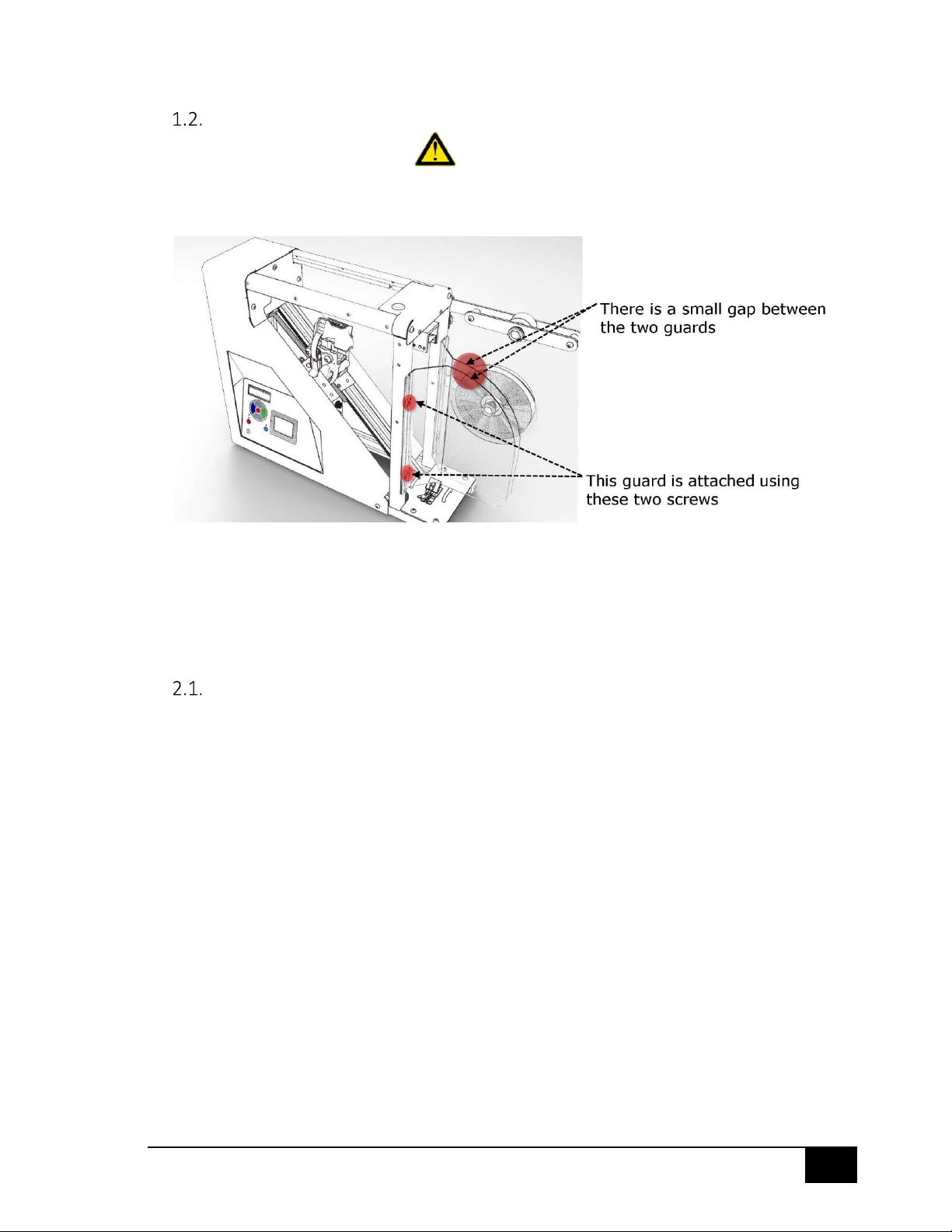
Keep the guard screen installed securely during use.
At all times, ensure care is taken
when handling blades.
2. INITIAL SETUP
Software Installation
Ensure you are logged on with a username that has administrator privileges. This must be
done before new programs can be installed
Plug the provided Anago USB flash drive into a USB port on the PC / Laptop
The setup program should run automatically. If it doesn’t, navigate to the Anago KST
Setup.exe file. Right-click and choose “Run as administrator”
Follow all prompts from the installation guide
After Installation, select the program from the Start Menu: AnagoSharp
You will be prompted to install a license – this is the license.xml file on the supplied USB. If
you already own a KST, fill out the information to receive a license
7
©2003-2021 Anago Ltd
Test Media
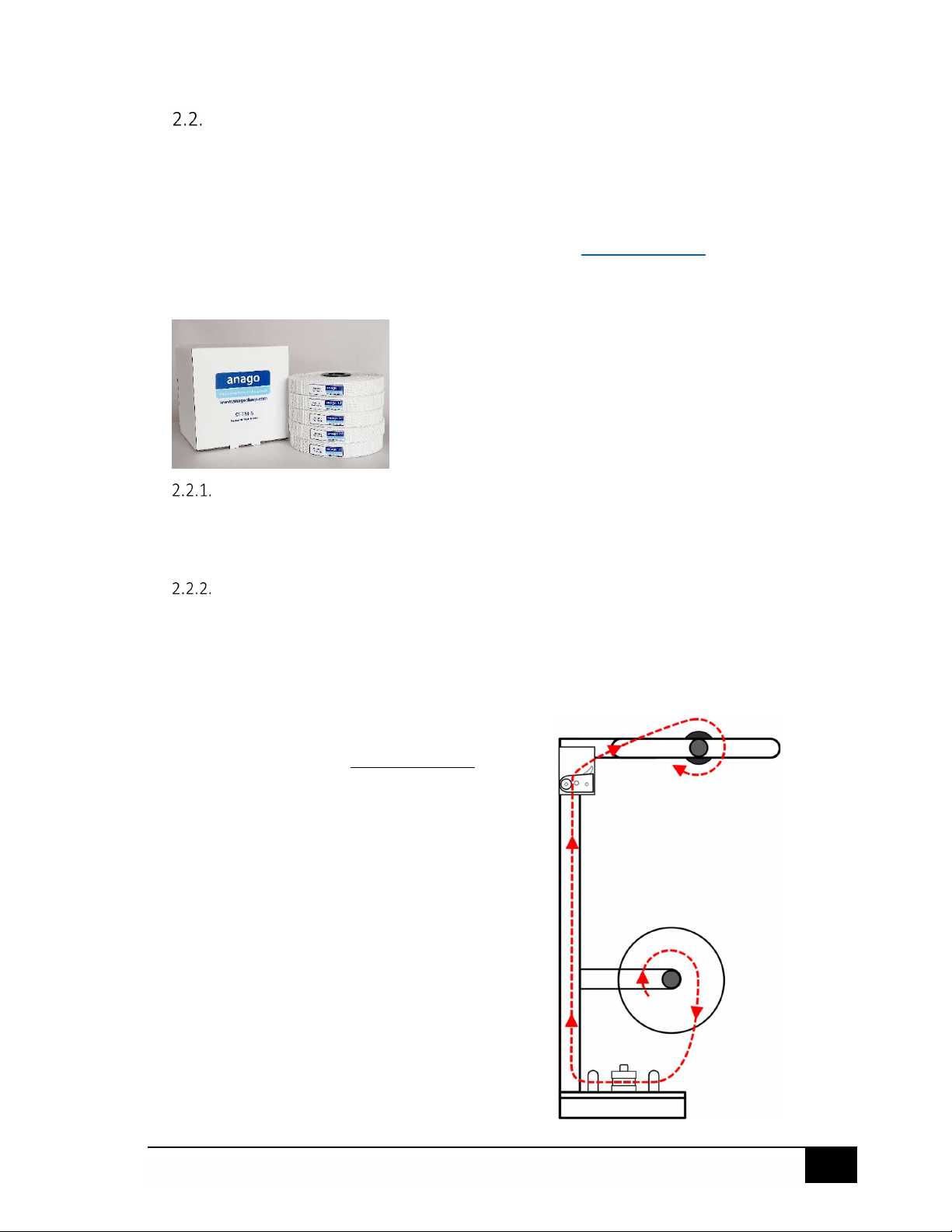
The Anago KST comes with ST-TM-5 Sharpness Test Media already loaded.
To ensure the best results, always operate your KST with genuine Anago test media. Other
counterfeit brands have been shown to cause inconsistencies and errors while tensioning, leading
to less accurate results. All purchase orders should go through [email protected].
Name: Anago Sharpness Test Media (box of 5 rolls)
Part Code: ST-TM-5
Removing the used roll of test media
Remove the top and bottom brackets
Release the top self-locking clamp, remove the used test media and the black media core
Remove the used fabric from the core. The core can now be reused
Loading the new roll of test media
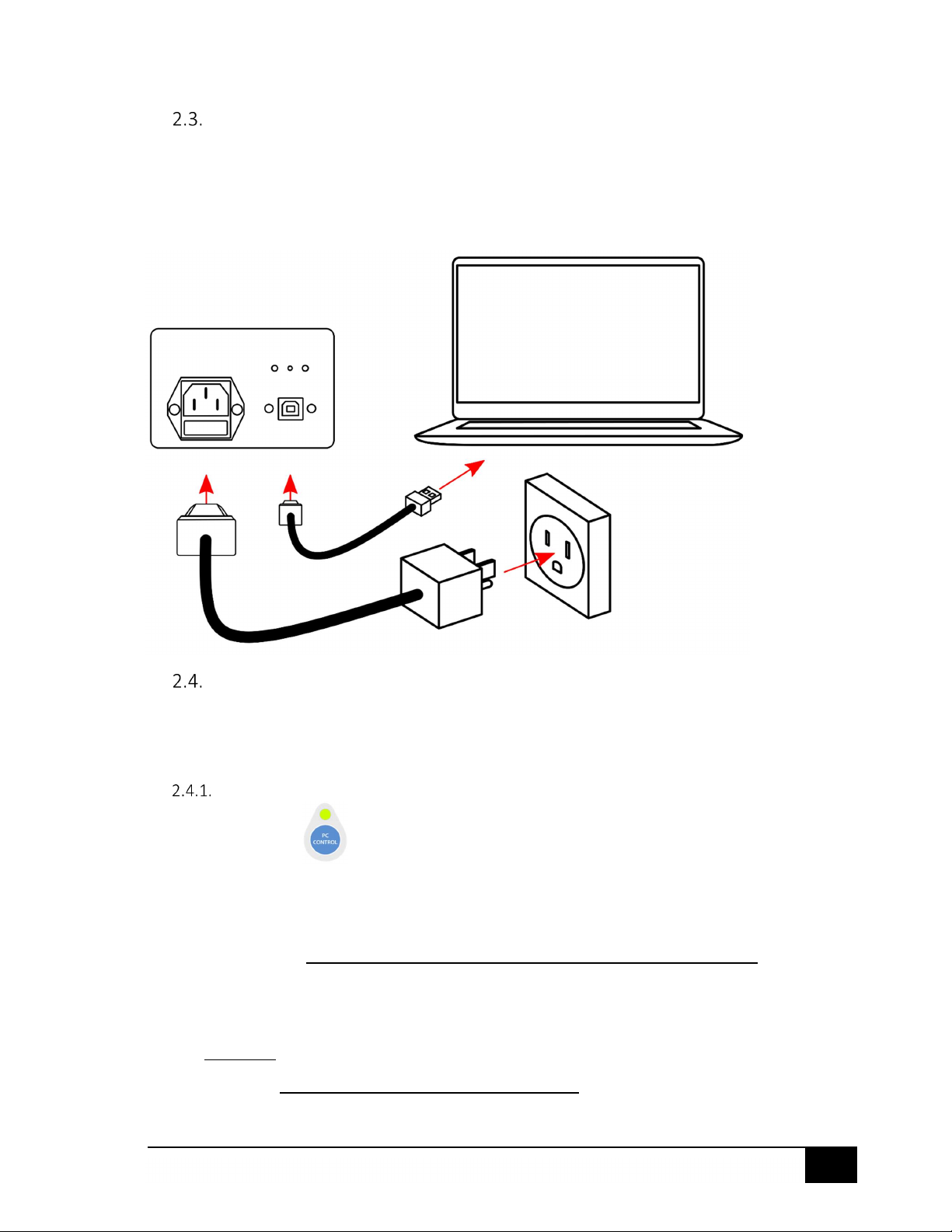
Take out the new test media roll and unwind about a meter of test media (sufficient that it
can be thread from bottom to top)
Thread the new media through as shown in red
At the top, insert the media into the perpendicular slot in the black media core
Re-attach the top and bottom brackets
Ensure the media is loaded in a clockwise direction on the top
roller.
8
©2003-2021 Anago Ltd
Connecting to a PC or Laptop
Connect the KST as follows:
USB (Type A) male into an available USB port on the laptop / PC
USB (Type B) male into the USB port on the side of the KST
Operating Modes
The Anago KST has two operating modes: PC-Control mode and Local mode. These modes have
different functions to fulfil different requirements.
Switching between PC-Control and Local Modes
Press the PC CONTROL button on the keypad to switch between operating modes.
The PC-Control indicator will light up when the KST is in PC Control Mode.
When in Local (Manual) Mode:
The KST will not respond to any motion commands from an attached PC / Laptop.
All motion control (including running a test) will need to be performed on the keypad
The KST will calculate the score locally and display the results on the LED display screen
The LCD display will show “Manual” at the bottom right hand corner
When in PC-Control Mode:
The KST can be controlled by an attached PC / Laptop, or by the keypad
The KST will not calculate or display the score locally
9
©2003-2021 Anago Ltd
Test results will be transferred to the connected PC
The LCD display will show “PC-Ctrl” at the bottom right hand corner
Calibration
Load Cell Calibration
The calibration process requires the use of the standard 2kg calibration mass shipped with the Anago
KST.
Calibration
Calibration is performed by Anago prior to shipment; however, we recommend recalibrating:
Before using the KST for the first time
Every 1 to 2 weeks during normal operations
Whenever the KST200e/300e may have suffered significant vibration (e.g. during transport or
from a knock)
After particularly blunt knives have been tested
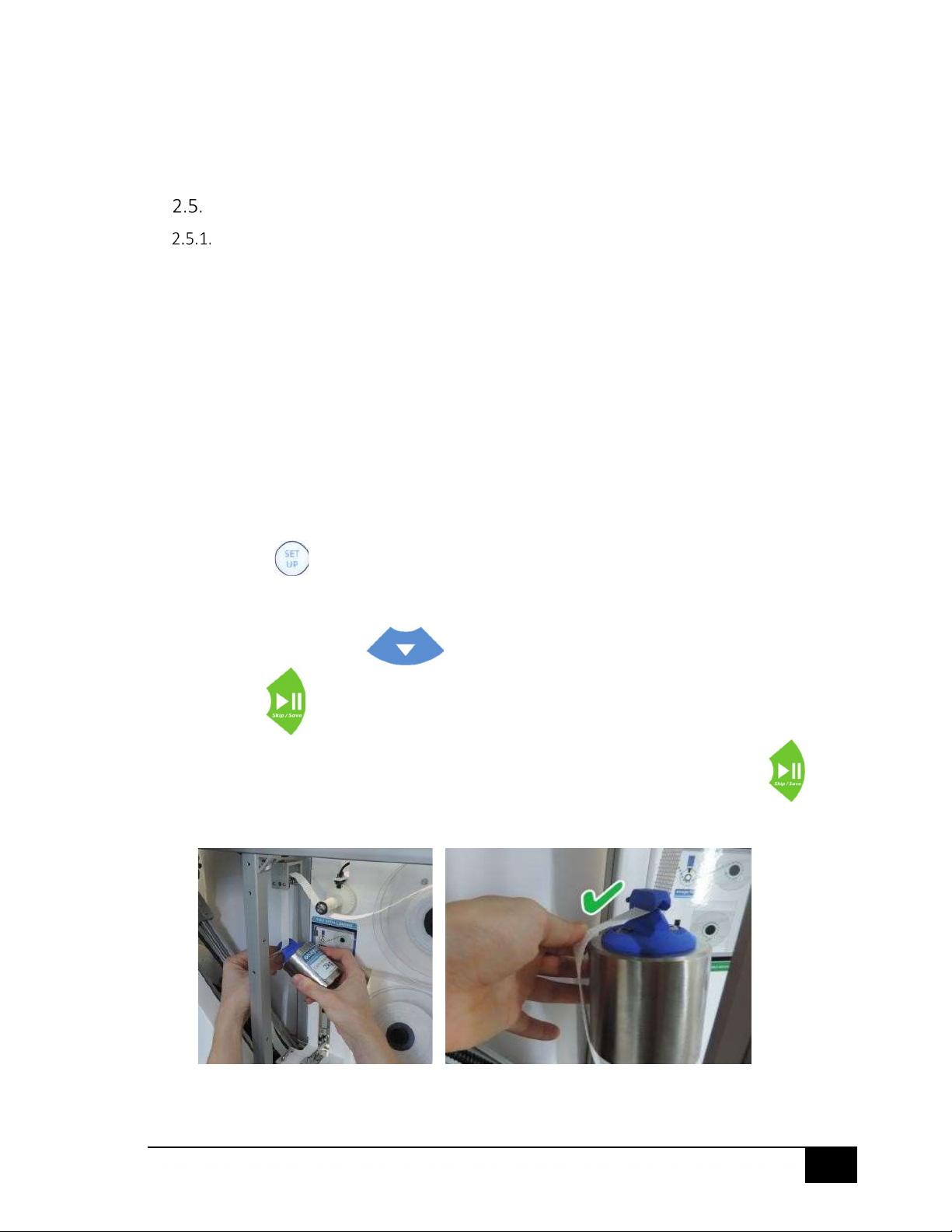
Setting Calibration
Turn the KST on using the Power button
Ensure the guards are closed
Press Setup on the keypad
Check that the LCD screen displays ‘Setup Menu’
Press Down until the screen displays ‘Calibration’
Press Run to select ‘OK’ and enter into the calibration sub-menu
Ensure the test media is loose and with the screen displaying ’Zero Load’ press the Run
button to save the new “Zero Load” calibration setting
With the screen displaying ‘2kg Load’, hang the calibration mass onto the test media
Questo manuale è adatto per i seguenti modelli
4
Indice
Altri manuali anago Apparecchiature di prova

Manuali Apparecchiature di prova popolari di altre marche

SMART
SMART KANAAD SBT XTREME 3G Series Manuale utente

Agilent Technologies
Agilent Technologies BERT Serial Manuale utente

Agilent Technologies
Agilent Technologies N3280A Manuale utente

Vernier
Vernier Go Direct Voltage Manuale utente

Lifeloc
Lifeloc R.A.D.A.R. Manuale utente

Fluke
Fluke T5-600 Istruzioni per l'uso e l'installazione


