
Antari AF-5 Manuale utente

1
AF-5 / AF-5R
Special Effects Fan User Manual
English Français Deutsch • • • 中文
©2014 Antari Lighting and Effects Ltd.

2

3
Antari AF-5 / AF-5R Special Effects Fan User Manual
Congratulations on the purchase of your new Antari AF-5 / AF-5R Special Effects Fan. Prior
to use, we suggest that you carefully read all of the instructions. By following the
suggestions found in this user manual, you can look forward to the reliable and satisfactory
performance of yourAntari AF-5 / AF-5R Special Effects Fan for years to come.
- Caution:
1. Operate only with adult supervision.
2. Keep hands off and do not insert anything into the fan.
3. This fan is not water-resistant. Avoid splash water.
4. Unplug the machine when it is not in use or unattended.
5. Prevent the vents from being blocked by anything.
- Wind Speed Control
The wind speed of the fan can be adjusted in three steps using the rotary switch, the
wireless remote control, or a DMX controller.
1. Manual Control:
Manual Control Panel
For manual control set DIP switch no. 10 to position OFF.
Then adjust the desired speed with the rotary control from off (position 0) →
low (position 1) → medium (position 2) → high (position 3).

4
2. Wireless Control:(AF-5R Only)
DMX / DIP Switch Section
For wireless control set DIP switch no. 10 to position ON.
At first, the wireless remote control must be registered with the machine.
When the fan is powered on, the LED indicator on the control panel will flash for about
15 seconds. Within this period, press button A on the remote control to register it with
the machine.
It is possible to register up to 5 remote controls with a machine at the same time. When
registered, a remote control can control an unlimited number of machines in parallel.
W-1 Wireless Remote Control
Button A on the remote control allows for incremental adjustment of the fan speed: first
actuation: low → second actuation: medium → third actuation: high.
Button B stops the fan.
Each time a button is actuated, the LED indicator on the control panel will flash once to
indicate proper signal transmission.

5
If your fan comes without a wireless remote, the LED indicator will not flash when the fan is
powered on. Also, turning DIP switch no. 10 to “ON” will not work either.
3. DMX Control:
DMX Connector Pin Assignment
The machine provide 3 or 5 pin XLR connector for DMX connection. Diagram below
indicate pin assignment information
Pin
Function
1
Ground
2
Data-
3
Data+
The machine uses one DMX channel for adjusting the fan speed.
DMX setting:
DMX value
Function
0~10
fan off
11~92
low speed
93~174
medium speed
175~255
high speed
DMX control will override both manual and wireless control functions.
DMX addressing by DIP switches:

6
DIP
1
2
3
4
5
6
7
8
9
10
Ch.
1
2
4
8
16
32
64
128
256
Wireless control
on/off
- Technical Specifications
Model
AF-5 / AF-5R
Power supply
AC 100~120V, 50/60HZ - 1700W
or
AC 220~240V, 50/60HZ - 1500W
Horsepower
1 HP
Dimensions (LxWxH)
530 x 470 x 490 mm
Vent dimensions
454 x 153 mm
Weight
17.5 kg
*Please read and save these instructions*

7
Antari AF-5 / AF-5R Special Effects Fan Mode d'emploi
Nous vous félicitons pour l'achat de votre nouvelle Antari AF-5 / AF-5R Special Effects Fan.
En vue d'utiliser correctement votre nouvel appareil, veuillez lire attentivement ce mode
d'emploi. Si vous respectez les instructions suivantes, vous profiterez d'une performance
solide et convaincante de votre Antari AF-5 Special Effects Fan pour de nombreuses
années.
- Attention :
1. L'usage de cet appareil n'est prévu que pour les adultes.
2. Eloigner les mains et ne jamais insérer des objets au ventilateur.
3. L’appareil a été conçu pour un emploi dans des locaux clos. Ne pas utiliser à l’extérieur.
Evitez les projections d'eau.
4. Mettre la machine hors de service quand vous n'utilisez pas la machine.
5. Ne jamais desservir les ouvertures de la machine.
- Ajuster la vitesse de vent
La vitesse du ventilateur est ajustable en trois pas grâce au commutateur rotatif, la
télécommande sans fil, ou un contrôleur DMX.
1. Opération manuelle
Commutateur rotatif pour l'opération manuelle
Pour choisir l'opération manuelle, mettez l‘interrupteur DIP 10 à OFF.
Ajustez la vitesse comme souhaité avec le commutateur rotatif avec les positions arrêt
(position 0) → lent (position 1) → moyen (position 2) → vite (position 3)

8
2. Opération sans fil (AF-5R)
Section DMX/Interrupteurs DIP
Pour choisir l'opération sans fil, mettez l‘interrupteur DIP 10 à ON.
Au début, la télécommande sans fil doit être enregistré avec la machine.
Quand le ventilateur est mis en service, l'indicateur LED clignote environ 15 secondes.
Pour l'enregistrement, appuyez sur la bouton A sur la télécommande pendant cette
période.
Il est possible d'enregistrer jusqu'à 5 télécommandes avec une machine. Quand
enregistrée, une télécommande peut contrôler des machines illimitée en même temps.
W-1 Télécommande sans fil
Appuyez sur la bouton Asur la télécommande pour ajuster la vitesse de vent : première
pression : lent → pression suivante : moyen → pression suivante : vite.
Pour désactiver le ventilateur, appuyez sur la bouton B.
Chaque fois vous pressez un bouton, l'indicateur LED clignote.

9
Quand le ventilateur est lviré sans télécommande, l'indicateur LED ne clignote pas quand
le ventilateur es mis en service.Autre fois, l'interrupteur DIP numéro 10 ne marche pas en
position "ON".
3. Opération DMX
Configuration de la connexion DMX
La machine possède fiches XLR 3 pôles et 5 pôles pour connecter un contrôleur DMX. Le
graphique ci-dessous montre la configuration des fiches.
Contact
Fonction
1
Masse
2
Signal-
3
Signal+
L'appareil a un canal de contrôle pour le réglage de la vitesse du ventilateur.
Réglages DMX :
Valeur DMX
Fonction
0~10
ventilateur arrêt
11~92
vitesse lent
93~174
vitesse moyen
175~255
vitesse vite
En mode contrôle par DMX, il n'est plus possible de contrôler la machine manuellement
ou sans fil avec la télécommande.
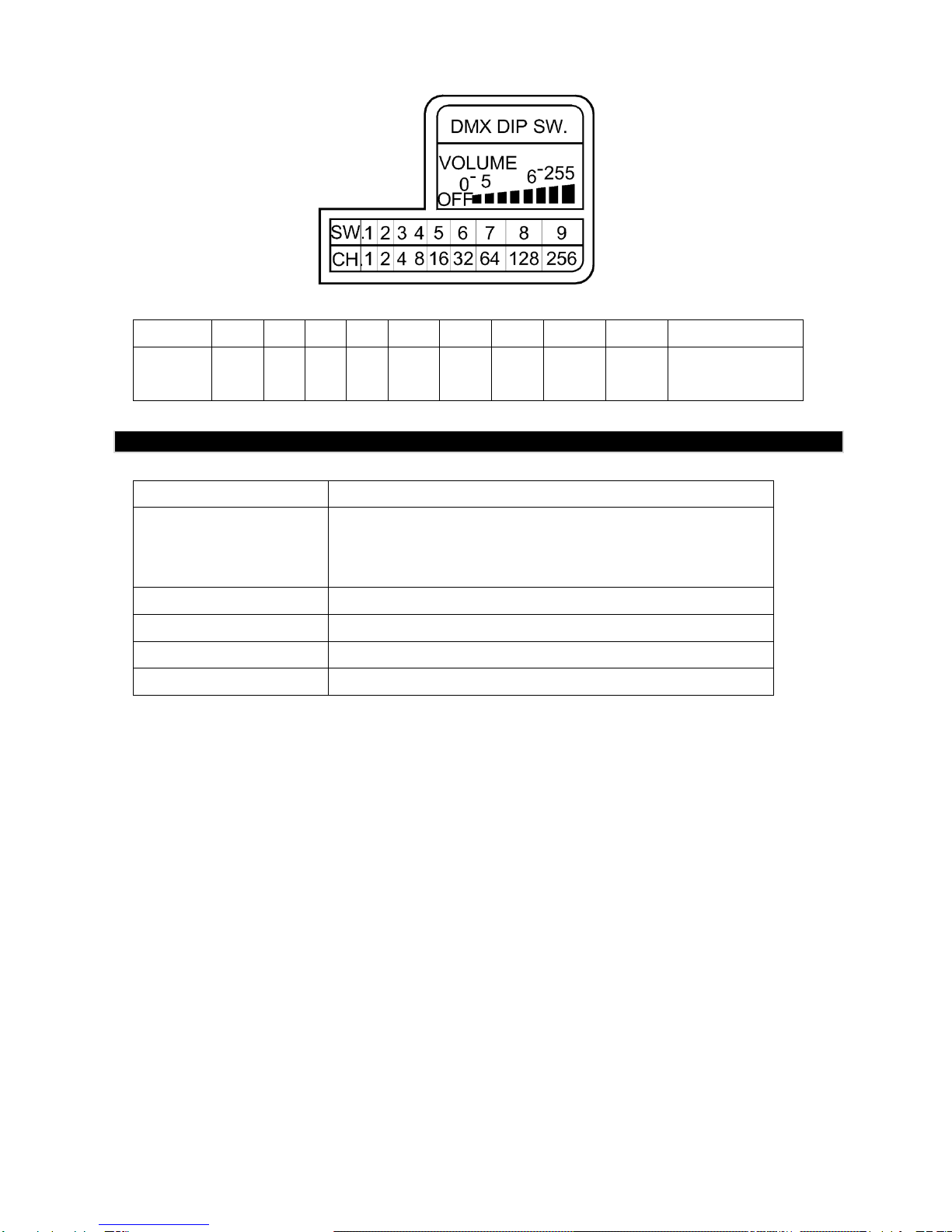
Ajustez l'adresse DMX par interrupteurs DIP :
10
DIP
1
2
3
4
5
6
7
8
9
10
Canal
1
2
4
8
16
32
64
128
256
Sans fil
marche/arrêt
- Caractéristiques Techniques
Modèle
AF-5 / AF-5R
Alimentation
AC 100~120V, 50/60HZ - 1700W
or
AC 220~240V, 50/60HZ - 1500W
Puissance
1 HP
Dimensions (LxlxH)
530 x 470 x 490 mm
Dimensions ventilateur
454 x 153 mm
Poids
17,5 kg
Lisez et gardez ces instructions.
Altri manuali per AF-5
2
Questo manuale è adatto per i seguenti modelli
1
Indice
Lingue:
Altri manuali Antari Fan


