Asus MyPal A600 Manuale utente

MyPal A600
User’s Manual

ii
Copyright © 2002 ASUSTeK COMPUTER INC. All Rights Reserved.
No part of this manual, including the products and software described in it, may be
reproduced, transmitted, transcribed, stored in a retrieval system, or translated into any
language in any form or by any means, except documentation kept by the purchaser for
backup purposes, without the express written permission of ASUSTeK COMPUTER INC.
(“ASUS”).
Product warranty or service will not be extended if: (1) the product is repaired, modified or
altered, unless such repair, modification of alteration is authorized in writing by ASUS; or (2)
the serial number of the product is defaced or missing.
ASUS PROVIDES THIS MANUAL “AS IS” WITHOUT WARRANTY OF ANY KIND, EITHER
EXPRESS OR IMPLIED, INCLUDING BUT NOT LIMITED TO THE IMPLIED WARRANTIES
OR CONDITIONS OF MERCHANTABILITY OR FITNESS FORA PARTICULAR PURPOSE.
IN NO EVENT SHALLASUS, ITS DIRECTORS, OFFICERS, EMPLOYEES OR AGENTS BE
LIABLE FOR ANY INDIRECT, SPECIAL, INCIDENTAL, OR CONSEQUENTIAL DAMAGES
(INCLUDING DAMAGES FOR LOSS OF PROFITS, LOSS OF BUSINESS, LOSS OF USE
OR DATA, INTERRUPTION OF BUSINESS AND THE LIKE), EVEN IF ASUS HAS BEEN
ADVISED OF THE POSSIBILITY OF SUCH DAMAGES ARISING FROM ANY DEFECT OR
ERROR IN THIS MANUAL OR PRODUCT.
SPECIFICATIONS AND INFORMATION CONTAINED IN THIS MANUALARE FURNISHED
FOR INFORMATIONAL USE ONLY, AND ARE SUBJECT TO CHANGE ATANY TIME
WITHOUT NOTICE,AND SHOULD NOT BE CONSTRUED AS ACOMMITMENT BYASUS.
ASUS ASSUMES NO RESPONSIBILITY OR LIABILITY FOR ANY ERRORS OR
INACCURACIES THAT MAYAPPEAR IN THIS MANUAL, INCLUDING THE PRODUCTS
AND SOFTWARE DESCRIBED IN IT.
Microsoft, Activesync, Outlook, Pocket Outlook, Windows, and the Windows logo are either
registered trademarks or trademarks of Microsoft Corporation in the United States and/or in
other countries. Microsoft products are licensed to OEMs by Microsoft Lincensing, Inc., a
wholly owned subsidiary of Microsoft Corporation.
E1054
First edition
July 2002

iii
Contents at a glance
This user’s manual contains the information you need to efficiently use
ASUS MyPal A600 Pocket PC.
•Chapter 1 - Get started!
This chapter introduces the ASUS MyPal A600 Pocket PC, how to set
and power it up, and basic screens that will help you get to know its
many features.
•Chapter 2 - Learn the basics
This chapter will teach you the basic functions in MyPal A600. You will
learn how to enter, find, and organize information, customize the
device, and use the bundled ASUS utilities.
•Chapter 3 - Microsoft
®
ActiveSync
®
This chapter tells you how to use the Microsoft ActiveSync to
synchronize your device with your desktop computer.
•Chapter 4 - Microsoft
®
Pocket Outlook
This chapter details the procedures for the Microsoft Pocket Outlook
Calendar, Contacts, Tasks, Notes, and Inbox.
•Chapter 5 - Companion programs
This chapter includes information on Pocket Word, Pocket Excel, MSN
Messenger, Windows Media Player for Pocket PC, and Microsoft
Reader.
•Chapter 6 - Pocket Internet Explorer
This chapter gives information and procedures on using Pocket
Internet Explorer, Mobile Favorites folder, and AvantGo interactive
service.
•Chapter 7 - Get connected
This chapter provides the procedures for connecting to the Internet and
for transferring data using infrared.
•Chapter 8 - Appendix
This part includes the safety notices and regulations.

iv
MyPal A600 specifications
MyPal A600 package
Your package includes several accessories for the Pocket PC. After
unpacking, check the items against the list below and make sure that they
are in good condition. If any item is missing or damaged, contact your
dealer or retailer immediately.
Deluxe Model Standard Model
• ASUS MyPal A600 • ASUS MyPal A600
• ASUS MyPal A600 USB cradle • Stylus (1 pc)
• ASUS MyPal A600 AC adapter • ASUS MyPal A600 AC adapter
(5V/3A with regional conversion plug) (5V/3A with regional conversion plug)
• Stylus (2 pcs) • USB sync cable (40-pin)
• Mini-USB sync cable (for the cradle) • Protective case
• USB sync cable (40-pin) • Microsoft Companion CD
• Protective case • ASUS MyPal A600 User’s Manual
• LCD cleaning cloth • Quick Start Guide
• Microsoft Companion CD • Warranty card
• Bonus CD (add’l Pocket PC software)
• ASUS MyPal A600 User’s Manual
• Quick Start Guide
• Warranty card
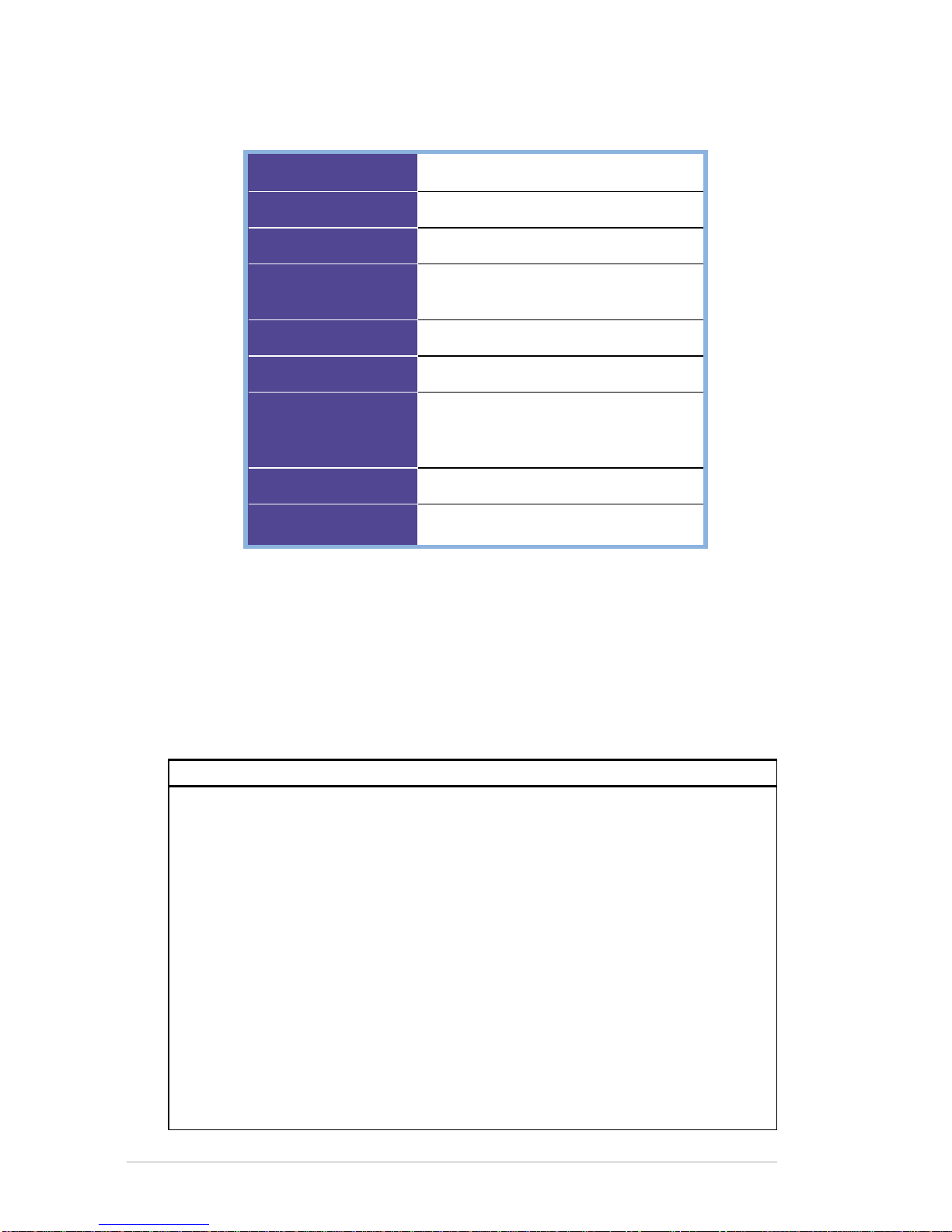
Processor
Software
Memory
Display
Card slots
Infrared
Audio
Size
Weight
Intel PXA250 400 MHz
Microsoft Pocket PC 2002
64MB SDRAM, 32MB Flash ROM
3.5-inch, 240 x 320 pixels
65,536 colors, TFT LCD
SD/MMC slot
FIR/SIR
Stereo headphone jack
Built-in microphone
Built-in speaker
75 mm x 125 mm x 12.8 mm
138g

Get started!
1-1
Chapter 1
Get started!
♦♦
♦♦
♦Introducing MyPal ................................................ 1-1
Front features........................................................................... 1-2
Side features............................................................................ 1-3
Top features ............................................................................. 1-4
Bottom features........................................................................ 1-4
Cradle features ........................................................................ 1-5
The stylus................................................................................. 1-5
♦♦
♦♦
♦Setting up MyPal................................................... 1-6
Placing on the cradle ............................................................... 1-6
Connecting the AC adapter...................................................... 1-6
Charging the battery ................................................................ 1-7
Activating MyPal ...................................................................... 1-7
♦♦
♦♦
♦Basic screens on MyPal....................................... 1-8
Today screen............................................................................ 1-8
Navigation Bar screen.............................................................. 1-9
Pop-up menus........................................................................ 1-10
Notifications ........................................................................... 1-10

1-2
Chapter 1
Introducing MyPal
The ASUS
®
MyPal A600 is truly a good companion wherever you go.
Powered by a 400MHz Intel
®
PXA250 processor, equipped with 64MB
SDRAM and 32MB Flash ROM, and bundled with the latest Microsoft
Pocket PC 2002 plus a host of useful utilities, you have everything you
need in your pocket!
Front features
•LCD touch screen - allows you to enter, read, send, receive, or edit data
by tapping on it. The screen lumination is increased or decreased by
changing the backlight settings.
•ASUS Settings, Calendar, Tasks, and Contacts buttons - allow you
quick access to commonly used programs.
•Navigation button - functions like the four arrow keys on a keyboard
when you press its corners. This button allows you to move from one
program icon to another.
•Speaker - allows you to hear alarms and other sound outputs from the
device.
LCD touch screen
Navigation button
Tasks button
Contacts button
ASUS Settings button
Calendar button
Speaker

Get started!
1-3
Side features
•Charging status LED - lights up orange when the battery is charging;
lights up green when the battery is fully charged.
•System indicator LED - indicates the system status.
•Power/Front light button - turns the device power on or off if you press
the button quickly. Pressing and holding the button for a few seconds
turns the front light on or off. Turning off the front light saves battery
power.
NOTE Press this button and the Tasks button simultaneously if you
wish to launch the Align Screen function.
•Scroll dial - allows you to scroll through a menu and open an
application.
•Record/Notes button - allows you to record sounds and save them as
files if you press and hold the button. Pressing this button quickly will
launch the Notes program.
•Software reset button - allows you to perform a soft reset in case of
device malfunctions, or when an application hangs.
Charging status LED
System indicator LED
Power/Front light button
Scroll dial
Record/Notes button
Software reset button

1-4
Chapter 1
Top features
Bottom features
DC IN
•Stylus - used for tapping or writing on the LCD touch screen. Slide out
the stylus from its compartment. Refer to the descirption of the stylus on
the next page.
•IR port - allows you to copy or send data to another device with an IR
port.
•SD/MMC slot - accommodates a Secure Digital (SD) card or a
Multimedia Memory Card (MMC card).
•Microphone - magnifies your sound recording.
•Headphone jack - connects a headphone.
Stylus IR port SD/MMC slot Microphone Headphone jack
Cradle connector /
Sync cable connector Power connector
•Cradle connector / Sync cable connector - connects to the 40-pin
female connector on the cradle. If you are not using the cradle, connect
the 40-pin USB sync cable directly to this connector to synchronize your
device with your computer.
•Power connector - connects the AC adapter cable. Use this connector if
you wish to use AC power without the cradle.

Get started!
1-5
Cradle features
Your standard package includes the cradle for MyPal. The cradle has
three connectors.
•Device connector - holds the device in place. This is a 40-pin connector
that matches the connector on the bottom of the device.
•Mini-USB connector - synchronizes the device with your PC using the
bundled USB PC cable. This connector is located at the back side of the
cradle.
•Power connector - connects the bundled AC adapter. This connector is
located at the back side of the cradle.
Device connector Mini-USB connector
Power connector
The stylus
The stylus functions on a Pocket PC the same way a mouse functions on
a standard PC. Use the stylus to tap or drag on the LCD touch screen to
open programs or execute commands.
•Tap. Touch the screen once with the stylus to open programs and select
options.
•Drag. Hold the stylus on the screen and drag across the screen to select
text and images. Drag in a list to select multiple items.
•Tap and hold. Tap and hold the stylus on an item to see a list of actions
available for that item. On the displayed pop-up menu, tap the action that
you want to perform.
Stylus

1-6
Chapter 1
Setting up MyPal
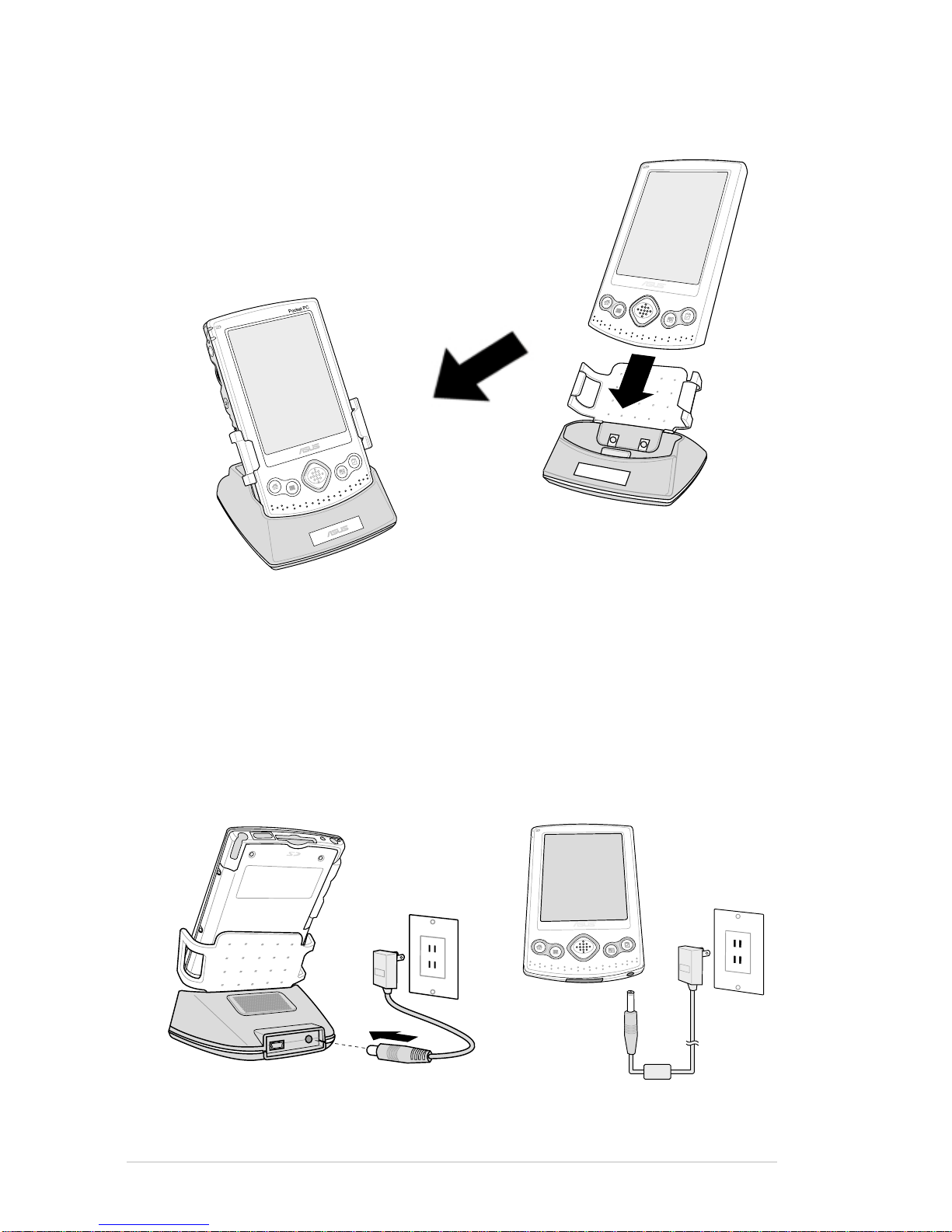
Placing on the cradle
Connecting the AC adapter
•Connect theAC adapter cable to the connector at the back of the cradle.
Connect the power plug to a grounded wall socket. See Figure 1.
•If you are not using the cradle, connect the AC adapter cable directly to
the power connector at the bottom of the device. Connect the power plug
to a grounded wall socket. See Figure 2.
Position the device on the cradle as shown
on the right. Match the connectors and
carefully insert the device until it fits in place.
The illustration on the left shows MyPal
properly installed on the cradle.
Figure 1 Figure 2

Indice
Altri manuali Asus Palmare

Asus
Asus MyPal A730 Manuale utente

Asus
Asus MyPal A716 Guida rapida

Asus
Asus MyPal A620 Manuale utente

Asus
Asus MyPal A730 Manuale utente

Asus
Asus MyPal A632 Manuale utente

Asus
Asus A626 - MyPal - Win Mobile 6.0 312 MHz Manuale utente

Asus
Asus MyPal A632 Manuale utente

Asus
Asus P505 Manuale di istruzioni

Asus
Asus MyPal A716 Manuale utente

Asus
Asus MyPal A632N Manuale utente