Avid Technology S4 Manuale utente

S4 Channel Strip Module
and EuControl 18.12

Legal Notices
© 2019 Avid Technology, Inc., (“Avid”), all rights reserved. This guide may not be duplicated in whole or in part without the written consent of Avid.
For a current and complete list of Avid trademarks visit: http://www.avid.com/legal/trademarks-and-other-notices
Bonjour, the Bonjour logo, and the Bonjour symbol are trademarks of Apple Computer, Inc.
Thunderbolt and the Thunderbolt logo are trademarks of Intel Corporation in the U.S. and/or other countries.
This product may be protected by one or more U.S. and non-U.S. patents. Details are available at www.avid.com/patents.
Product features, specifications, system requirements, and availability are subject to change without notice.
Guide Part Number 9329-66056-00 REV A 09/19

Safety Compliance
Safety Statement
This equipment has been tested to comply with USA and Canadian safety certifications in accordance with the specifications of UL Standards: UL60950-1:2007, 2nd Edition and
canadian CAN/CSA C22.2 60950-1-07, 2nd Edition. Avid Inc. has been authorized to apply the appropriate UL and CUL mark on its compliant equipment.
Warning
Important Safety Instructions
1) Read these instructions.
2) Keep these instructions.
3) Heed all warnings.
4) Follow all instructions.
5) Do not use this equipment near water.
6) Clean only with dry cloth.
7) Do not block any ventilation openings. Install in accordance with the manufacturer’s instructions.
8) Do not install near any heat sources such as radiators, heat registers, stoves, or other equipment (including amplifiers) that produce heat.
9) Do not defeat the safety purpose of the polarized or grounding-type plug. A polarized plug has two blades with one wider than the other. A grounding type plug has two blades and
a third grounding prong. The wide blade or the third prong are provided for your safety. If the provided plug does not fit into your outlet, consult an electrician for replacement of the
obsolete outlet.
10) Protect power cords from being walked on or pinched particularly at plugs, convenience receptacles, and the point where they exit from the equipment.
11) Only use attachments/accessories specified by the manufacturer.
12) For products that are not rack-mountable: Use only with a cart, stand, tripod, bracket, or table specified by the manufacturer, or sold with the equipment. When a cart is used, use
caution when moving the cart/equipment combination to avoid injury from tip-over.
13) Unplug this equipment during lightning storms or when unused for long periods of time.
14) Refer all servicing to qualified service personnel. Servicing is required when the equipment has been damaged in any way, such as power-supply cord or plug is damaged, liquid
has been spilled or objects have fallen into the equipment, the equipment has been exposed to rain or moisture, does not operate normally, or has been dropped.
15) For products that are a Mains powered device:
The equipment shall not be exposed to dripping or splashing and no objects filled with liquids (such as vases) shall be placed on the equipment.
Warning! To reduce the risk of fire or electric shock, do not expose this equipment to rain or moisture.
16) For products containing a lithium battery:
CAUTION! Danger of explosion if battery is incorrectly replaced. Replace only with the same or equivalent type.
17) For products with a power switch:
The main power switch is located on the back panel of S3. It should remain accessible after installation.
18) The equipment shall be used at a maximum ambient temperature of 40° C.

Contents iv
Chapter 1. Introduction . . . . . . . . . . . . . . . . . . . . . . . . . . . . . . . . . . . . . . . . . . . . . . . . . . . . . . . . . . . . . . . . . . . . . . . . . . . . . . 1
Module Capabilities and Features. . . . . . . . . . . . . . . . . . . . . . . . . . . . . . . . . . . . . . . . . . . . . . . . . . . . . . . . . . . . . . 1
System Requirements and Compatibility . . . . . . . . . . . . . . . . . . . . . . . . . . . . . . . . . . . . . . . . . . . . . . . . . . . . . . . . 1
Resources . . . . . . . . . . . . . . . . . . . . . . . . . . . . . . . . . . . . . . . . . . . . . . . . . . . . . . . . . . . . . . . . . . . . . . . . . . . . . . . . . 2
Chapter 2. S4 Channel Strip Module Connections . . . . . . . . . . . . . . . . . . . . . . . . . . . . . . . . . . . . . . . . . . . . . . . . . . . . . . . . 3
Installing a Single Module . . . . . . . . . . . . . . . . . . . . . . . . . . . . . . . . . . . . . . . . . . . . . . . . . . . . . . . . . . . . . . . . . . . . 3
Chapter 3. S4 Channel Strip Module Overview. . . . . . . . . . . . . . . . . . . . . . . . . . . . . . . . . . . . . . . . . . . . . . . . . . . . . . . . . . . 4
Fader Section . . . . . . . . . . . . . . . . . . . . . . . . . . . . . . . . . . . . . . . . . . . . . . . . . . . . . . . . . . . . . . . . . . . . . . . . . . . . . . 5
Function Select Section . . . . . . . . . . . . . . . . . . . . . . . . . . . . . . . . . . . . . . . . . . . . . . . . . . . . . . . . . . . . . . . . . . . . . . 7
Knob Section. . . . . . . . . . . . . . . . . . . . . . . . . . . . . . . . . . . . . . . . . . . . . . . . . . . . . . . . . . . . . . . . . . . . . . . . . . . . . . . 8
Appendix A. Dimensions . . . . . . . . . . . . . . . . . . . . . . . . . . . . . . . . . . . . . . . . . . . . . . . . . . . . . . . . . . . . . . . . . . . . . . . . . . . . 9
Appendix B. Compliance Information . . . . . . . . . . . . . . . . . . . . . . . . . . . . . . . . . . . . . . . . . . . . . . . . . . . . . . . . . . . . . . . . . 10
Environmental Compliance . . . . . . . . . . . . . . . . . . . . . . . . . . . . . . . . . . . . . . . . . . . . . . . . . . . . . . . . . . . . . . . . . . 10
EMC (Electromagnetic Compliance) . . . . . . . . . . . . . . . . . . . . . . . . . . . . . . . . . . . . . . . . . . . . . . . . . . . . . . . . . . . 10
Safety Compliance . . . . . . . . . . . . . . . . . . . . . . . . . . . . . . . . . . . . . . . . . . . . . . . . . . . . . . . . . . . . . . . . . . . . . . . . . 11
Contents

Channel Strip Module Guidev

Introduction 1
Introduction
The Avid® S4 Channel Strip Module features eight fader strips, each with a motorized, touch-sensitive fader, a fader display OLED,
and four rotary encoders with displays, as well as central function control section with multiple switches.
Module Capabilities and Features
• Eight fader strips, each with:
• One (1) motorized 100mm faders
• One (1) high resolution 128x64 OLED display
• Mute and Solo switches
• Attention key
• Automations Switches
• Channel Select and Focus switches
• Master, Slave, and Link indicators
• Menu switch, with switches
• Track Color / Modifier keys
• Four (4) touch-sensitive, continuous, dual function encoders
(rotate and press functionality) with red, green, and blue LED
knob top, 128 x 64 pixel OLED display, and Automation indi-
cators
• In and Select switches
• Left, Right, and Back switches
• Twenty (20) function select switches
• 2x 2-pin 12V Power connectors
• 2x 1000-BaseT (Gigabit) Ethernet RJ45 connectors
System Requirements and Compatibility
Avid can only assure compatibility and provide support for hardware and software it has tested and approved.
For complete system requirements and a list of qualified computers, operating systems, hard drives, and third-party devices, visit:
www.avid.com/compatibility
InputFuncExp Clear
XShift
Ins
In
Dyn
In
EQ
In
User
In
Sends Pan Edit Grp Bus Heat
Focus Focus Focus Focus Focus Focus Focus Focus
S4 Channel Strip Module

Introduction 2
Resources
The Avid website (www.avid.com) is your best online source for information to help you get the most out of your Avid system.
The following are just a few of the services and features available.
Account Activation, Product Registration, and License Activation
Activate your product to access downloads in your Avid account (or quickly create an account if you don’t have one). Register your
purchase online, download software, updates, documentation, and other resources. Activate your software license
https://www.avid.com/account
Support and Downloads
Contact Avid Customer Care (technical support); download software updates and the latest online manuals; browse the Compati-
bility documents for system requirements; search the online Knowledge Base or join the worldwide Avid user community on the
User Conference.
https://www.avid.com/learn-and-support
For S6 support, trouble-shooting, and downloads, visit:
http://avid.force.com/pkb/articles/faq/Avid-S6-Support
Training and Education
Study on your own using courses available online or find out how you can learn in a classroom setting at an Avid-certified training
center.
Videos on YouTube
Check out the new Avid Pro Tools | S6 Workflows and original Get Started Fast with S6 video tutorials, available on YouTube.
Products and Developers
Learn about Avid products; download demo software or learn about our Development Partners and their plug-ins, applications, and
hardware.
https://www.avid.com/Products/index.html
News and Events
Get the latest news from Avid or sign up for a demo.

S4 Channel Strip Module Connections 3
S4 Channel Strip Module Connections
Installing a Single Module
Connectors for power and Ethernet are located on the back of the module.
The Channel Strip Module is powered by 12 V DC. The power input connectors are 2-conductor Molex.
Cat 5e
Cat 5e
Ethernet
Power
Cat 5e
Cat 5e
+12V
0V

Chapter 3: S4 Channel Strip Module Overview 4
Chapter 3: S4 Channel Strip Module Overview
This chapter identifies the hardware features on the Channel Strip Module.
The lower fader section has eight motorized faders, eight displays, and multiple switches and indicator LEDs. The central control
section has 20 function select switches. The upper knob section has eight columns, each consisting of four knobs with associated
display and switches.
S4 Channel Strip Module
InputFuncExp Clear
XShift
Ins
In
Dyn
In
EQ
In
User
In
Sends Pan Edit Grp Bus Heat
Focus Focus Focus Focus Focus Focus Focus Focus

Chapter 3: S4 Channel Strip Module Overview 5
Fader Section
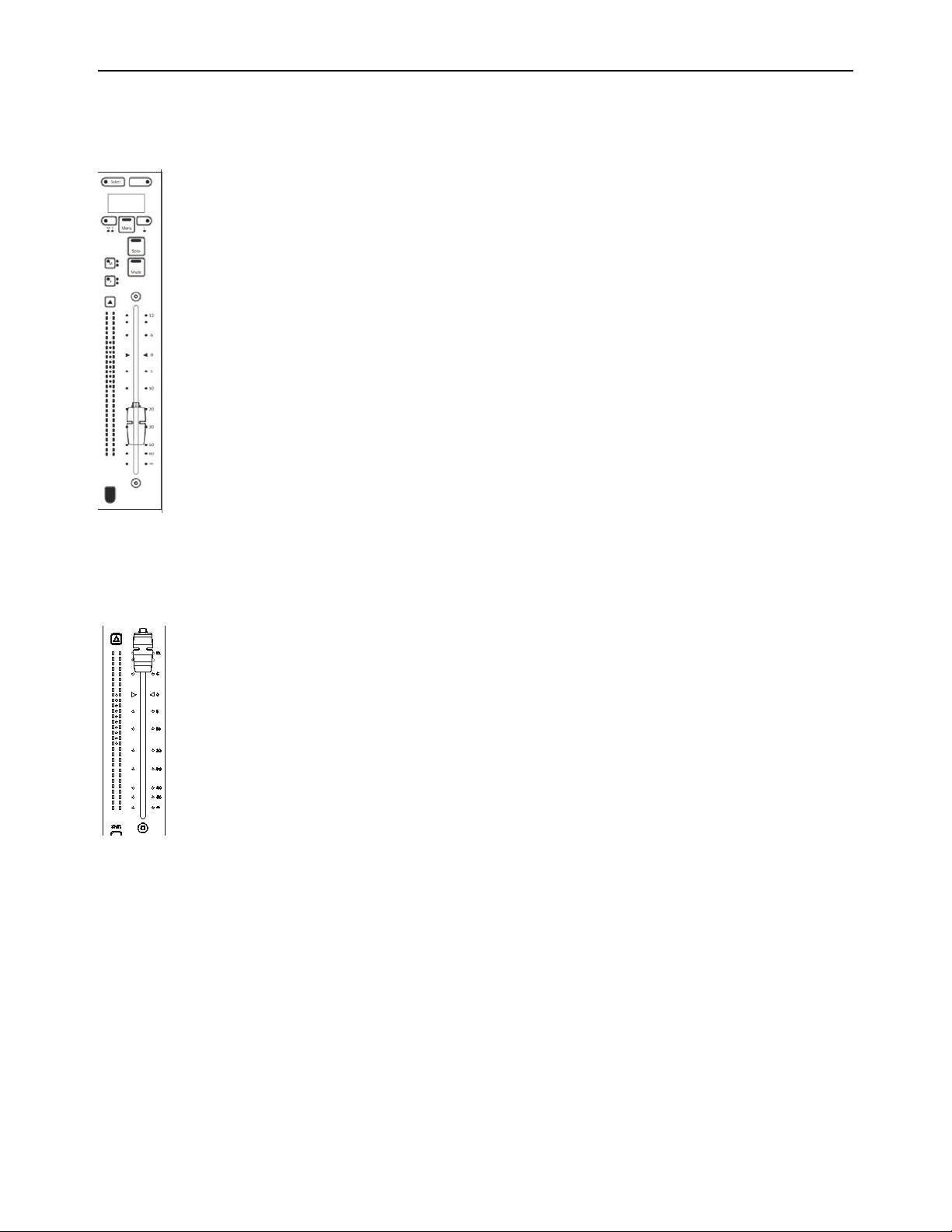
The lower section of the Channel Strip Module has eight fader strips. Each strip provides a fader with meters, Solo, Mute, and other
switches, and an OLED display.
Each strip provides the following controls and displays:
Fader and Meter
Fader
Each channel features a motorized, touch-sensitive 100mm fader. Raising the fader increases level (or other parameter); lowering
the fader decreases level.
Meter
Each channel features a dual 30-segment meter with green, yellow, and red LEDs. Meters display level, gain reduction and auto-
mation, as available on the currently focused DAW.
Fader strip
Fader and meter
Focus
Altri manuali per S4
1
Indice
Altri manuali Avid Technology Unità di controllo
Manuali Unità di controllo popolari di altre marche

Festo
Festo Compact Performance CP-FB6-E Manuale elenco delle parti

Elo TouchSystems
Elo TouchSystems DMS-SA19P-EXTME Manuale utente

JS Automation
JS Automation MPC3034A Manuale utente

JAUDT
JAUDT SW GII 6406 Series Guida rapida

Spektrum
Spektrum Air Module System Manuale utente

BOC Edwards
BOC Edwards Q Series Manuale utente