
Bat-caddy X4R Manuale utente

Bat-Caddy X4R™
Remote Controlled Electric Golf Caddy
User Manual
WARNING: PLEASE FOLLOWALLASSEMBLY INSTRUCTIONSAND READ
AND UNDERSTAND THE OPERATING INSTRUCTIONS BEFORE YOU
OPERATE THE CADDY, EITHER MANUALLY OR BY REMOTE CONTROL.
Page 1 of 16

TABLE OF CONTENTS
Page
1. PackingList&PartsGlossary 2
2. AssemblyInstructions 4
3. OperatingInstructions 6
4. General Maintenance & Other Instructions 10
5. TechnicalSpecifications 13
6. Frequently Asked Questions 15
1.Packing List
Standard Parts
1 x Caddy Frame
1 x Anti-Tip Wheel & Pin
2 x Rear Wheels
1 x Battery Pack (Battery, Bag, Leads)
1 x Charger
1 x Tool Kit
1 x Remote Control
1 x Scorecard Holder
1 x User Manual, Warranty, Terms & Conditions
Optional Accessories
Cup Holder
Umbrella Holder
Carrying Bag
Rain Cover
Sand Dispenser
Page 2 of 16

1. Manual Rheostat Speed Control 8. Dual Motors
2. Upper Bag Support 9. Lower Bag Support & Strap
3. Bag Support Strap 10. Front Wheel
4. Battery 11. UpperFrameLockingKnob
5. Rear Wheel 12. Handle IC Controller
6. Wheel Hubcap 13. Battery Plug
7. Rear Wheel Quick Release Catch 14. Front Wheel Tracking Adjustment
15. Scorecard Holder
16. Lower Frame Locking Knob
Page 3 of 16
2. Assembly Instructions
Unpack all items carefully and check parts
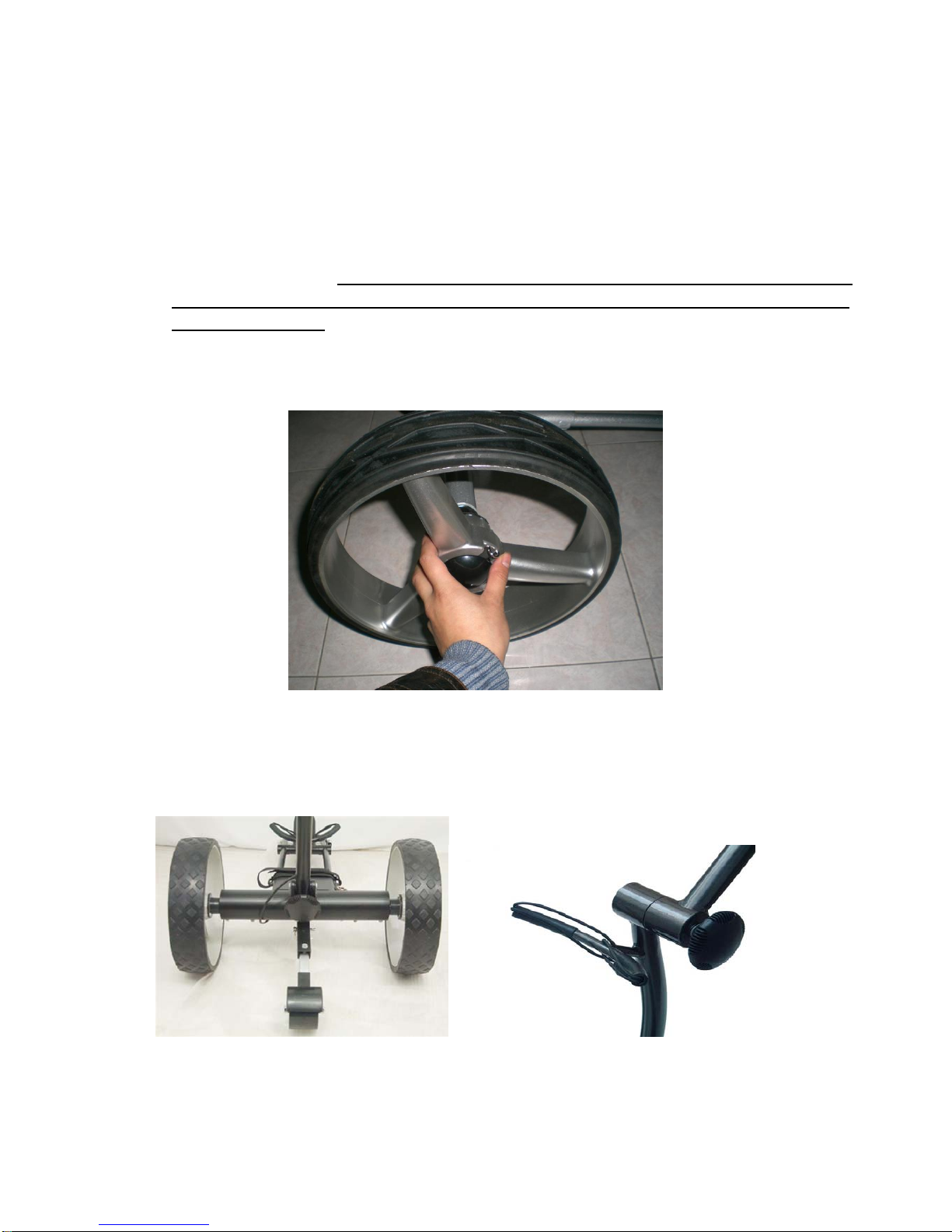
1. Place frame structure (one piece) on soft and clean ground to protect frame from being scratched. Attach
wheels to axles by pushing wheel locking button on the outside of the wheel and inserting the axle
extension into the wheel. Make sure to keep the locking button on the outside of the wheel pushed in
during this process, in order to enable the axle extensions, including the two pins, to be inserted all
the way into the wheel. If not locked in, the wheel will not be connected to the axle and will not be
propelled!!! Test the lock by trying to pull the wheel out. To disassemble the wheels proceed in reverse
order.
2. Erect Frame by unfolding and connecting the main frame tubes together at the two frame locks by
fastening the lower and upper frame locking knobs. Proceed in reverse for folding the caddy.
Page 4 of 16

3. Place battery pack on battery tray and fasten Velcro straps around battery tightly. Insert battery plug into
caddy outlet. Note: BEFORE CONNECTING make sure that caddy power is OFF, Rheostat Speed
Control on handle is in OFF position and the remote control is stored securely!!!
4. Insert anti tip wheel into holding bar on motor housing and secure with pin.
5. Install Scorecard Holder and other accessories, such as beverage or umbrella holder onto the frame or
handle in the foreseen places or receptors. (note: accessory design might vary during the model year)
Page 5 of 16

3. Operating Instructions
3.1. Handle Control Functions – Design A
1. The rheostat speed button on the right side of the handle lets you choose your preferred speed seamlessly. Dial
forward to increase speed. Dial backwards to reduce speed.
2. Press ON/OFF power button for about 2 seconds to turn caddy on or off
3. The Digital Cruise Control: Select the ideal speed to match your pace. In order to stop press the red cruise control
button on the top of the handle. The cart will remember its last speed setting when you stop. Once you are ready to
go press the button again, and the caddy will automatically travel at the same speed, except if you change the
speed knob position.
4. The caddy is equipped with a "Soft start" ability which ensures smooth acceleration up to selected speed by
pressing the stop/start button on the handlebar control panel.
5. The battery indicator LED with green or red color on the handle shows the battery charge at any time.
3.2. Handle Control Functions------Design B
Page 6 of 16

1,Timer: Press 'timer' one time ,the trolley will move 10m/y and stop
Press 'timer' two times, the trolley will move 20m/y and stop
Press 'timer' three times, the trolley will move 30m/y and stop
(Note: while the trolley moving, you can press the 'timer' button again and the preset distance will be
Increased by an additional 10m/y)
2 ON/OFF and GO/STOP Function:
A. ON/OFF Function: Press this button for 2 seconds to switch power on or off
B. GO/STOP Function (Cruise Control): Press this button and the trolley will stop, press it again and the
trolley will move at the previous speed
3.3. Remote Control Operation
3.3.1. Basic Remote Functions
A. Brake/Stop: The red button in the center of the directional arrows should be used for
braking/stopping the caddy.
B. Timed Advance Distance Control: 10, 20, 30 meters/yards (press once/twice, three times
consecutively; same as manual control timer function)
C. Forward Arrow: Pressing the forward arrow will set the caddy in forward motion. Increase
speed by pushing multiple times. Decrease reverse speed by pushing forward arrow.
D. Reverse Arrow: Pushing the reverse arrow will set the caddy in backward motion. Pushing
multiple times will increase the speed. Decrease forward speed by pushing reverse arrow.
E. Left Arrow: Initiates left turns. When the arrows are released the caddy stops turning and
continues straight with the original speed prior to turning.
F. Right Arrow: same as left arrow function
Page 7 of 16

3.3.2. Important Notes – PLEASE READ CAREFULLY
Change the remote control batteries once the indicator LED gets weak
The remote control uses two 1.5V AAA batteries available in any supermarket, drug store or
electronics store
It is recommended to keep a set of extra batteries ready as replacement
To change the batteries open up the battery compartment cover and place the batteries according
to the diagram in the battery compartment.
Do not pull out the antenna with force, as it might break
The remote control system is designed, so it does not interfere with other electric caddies.
The maximum range of the remote control varies between 80-120 yards, depending on the
battery charge, obstacles, atmospheric conditions, power lines and the topography of the course.
It is strongly recommended to operate the caddy at a maximum range not exceeding 30-50
yards in order to prevent the loss of control of the unit!
3.4. Additional Functions
3.4.1. Freewheeling Mode
The caddy can be easily operated without power. In order to activate the freewheeling mode, turn main
power Off. The caddy now can be pushed manually without resistance. The freewheeling mode on some
models can also be activated by pulling out both rear wheels by 1/2 inch (1cm) and relocking them back
into the second axle groove. Some models are equipped with both options.
3.4.2. Controller/Remote Frequency Synchronization
Sometimes it might be necessary to synchronize a new remote transmitter with the caddy: Turn the
caddy power On, press either forward or reverse button for about 10 seconds while aiming the remote at
the caddy. The caddy should start moving now. NOTE: It is recommended to remove the rear
wheels or jack up the caddy before the synchronization process to prevent it from getting away.
Page 8 of 16

3.4.3. Tracking Adjustment:
Tracking behavior of all electric caddies is strongly dependent on equal weight distribution and slope. Test
your caddy’s tracking by operating it on an even surface without the bag. If changes are necessary you can
adjust the tracking of your caddy by loosening the front wheel axle and the adjustment bar on the right
side of the front wheel and shifting the axle accordingly. After adjustment fasten screws in reverse order.
3.5. Electronic Systems
Remote Control Range: We recommend not to exceed 50 yards distance. The greater the distance
between you and caddy, the greater the chance of losing contact with it
Microcomputer: The remote caddy has 3 microcomputer controls: The first is in main controller box.
The second is in the remote control handset, and the third is in the handle.
Safety Protection: When the temperature of the controller box reaches its upper limit in case of an
overload it will automatically shut down to cool off.
Microprocessor Controlled Electronics System: When you connect the battery, the electronics
system will automatically run through a start-up routine. Then you can press the main OFF/ON switch
on the handle. The battery charge indicator lights will show you the charge level of the battery from
green (fully charged) to red (discharged).
Important: The electronics controller box contains no user serviceable parts. Therefore, it is sealed to
reduce the risk of moisture entering and impacting the electronic system. Breaking this seal increases
the risk of damaging the electronics and decreasing the reliability of your caddy. DO NOT attempt to
open the controller case. Doing so will void the warranty!
Battery Operation and Care: Follow battery charge and maintenance instructions. The battery comes
with leads and connector and a 30 or 40 Ah fuse.
Page 9 of 16

4. Maintenance and Additional Instructions
PLEASE OBEY THESE PRECAUTIONS FOR BATTERY USE & CHARGING
a) Please do not charge the battery in a sealed container or in upside down position. It is recommended to charge
the battery in a well ventilated area.
b) Please do not charge the battery near a heater, or where heat accumulation may occur or in direct sunshine.
c) In order to prolong the service life of the battery, please avoid complete discharge and charge the battery after
every use. Unplug the battery from the charger once the charge is complete. When the trolley is not in use for
an extended period of time, it is recommended to charge the battery once a month.
d) The battery’s poles red color stands for positive, and the black for negative. In case of battery replacement
please reconnect the poles of the battery correctly. Otherwise your caddy could suffer severe damage.
e) Please do not disassemble the battery or throw it into a fire. EXPLOSION!!!
f) NEVER TOUCH THE ELECTRIC POLES OF THE BATTERY!! SAFETY HAZARD!!
4.1. Battery Charging & Maintenance
Connect the battery cable plug with the charger and then plug the charger into an electrical outlet. During the charging
cycle the LED on the charger will show a blinking green light (some charger models also have a red steady light
during charging). Once the charging cycle is complete the blinking green light or the red light will turn into a steady
green light. It is now okay to unplug the charger and battery for reuse. The charging cycle can last up to 12 hours
depending on the level of discharge.
Normally the battery will hold its charge for several months, and it does not have a “memory effect”, and therefore can
be recharged at any discharge level. It is not recommended to fully discharge the batteries, as this will shorten
battery life drastically. The battery has a normal lifespan of 150-200 charges, depending on charging frequency,
storage conditions and time and discharge history. Before storing a battery for extended periods of time you must fully
charge it. DO NOT store an empty battery or else it might become unusable. Replacement batteries are available from
your authorized Bat-Caddy dealer or directly from Bat-Caddy.
Note: Life of sealed lead acid and any other batteries is dependent on a variety of factors, other than purely the number of charges,
including but not limited to frequency between charges, duration of charge, level of drainage, idle time, storage conditions and
duration and overall shelf time. We cover our batteries according to our warranty policy and any potential additional coverage is at
our discretion.
RECOMMENDATIONS FOR BATTERY CHARGING & MAINTENANCE
a. Fully charge the battery for ca. 12 hours before the first use
b. Do not leave the battery on the charger if it is not used for extended periods of time, but remove it from the
charger after charge is complete.
c. The battery will take approximately 2-3 rounds and charging cycles before it reaches its full operating potential.
During the first couple of rounds it might still be below its optimal power.
d. Always keep your battery fully charged before another game
e. Never keep your battery connected to the grid during prolonged power outages. It might be irreversibly damaged
f. Do not fully discharge the battery by “overplaying” it. It is recommended to recharge the battery after every 18
holes.
Page 10 of 16
Indice
Altri manuali Bat-caddy Carrello da golf

Bat-caddy
Bat-caddy X4 Manuale utente

Bat-caddy
Bat-caddy X8 Series Manuale utente

Bat-caddy
Bat-caddy X8 Series Manuale utente

Bat-caddy
Bat-caddy X3 Series Manuale utente

Bat-caddy
Bat-caddy X3 Series Manuale utente

Bat-caddy
Bat-caddy X4 Manuale utente

Bat-caddy
Bat-caddy X3 Series Manuale utente

Bat-caddy
Bat-caddy X4 Manuale utente


