BKI VGG Manuale utente

VGG
ROTISSERIE OVEN
OPERATOR’S MANUAL
BKI
www.bkideas.com
42 Allen Martin Drive, Essex Junction, Vermont 05452 USA Telephone: (802) 658-6600 Fax: (802)864-0183
PN SS-OM- 064-05 (10/21)
© 2021 - BKI

BKI LIMITED WARRANTY
42 Allen Martin Drive, Essex Junction, VT 05452 • USA
(802) 658-6600 • Fax: (802) 864-0183
WHAT IS COVERED This warranty covers defects in material and workmanship under normal use, and applies
only to the original purchaser providing that:
• The equipment has not been accidentally or intentionally damaged, altered or misused;
• The equipment is properly installed, adjusted, operated and maintained in accordance
with national and local codes, and in accordance with the installation and operating in-
structions provided with this product.
• The serial number rating plate axed to the equipment has not been defaced or removed.
WHO IS COVERED This warranty is extended to the original purchaser and applies only to equipment purchased
for use in the U.S.A.
COVERAGE PERIOD • Warranty claims must be received in writing by BKI within one (1) year from date of instal-
lation or within one (1) year and three (3) months from data of shipment from the factory,
whichever comes rst.
• Warranty period begins the date of dealer invoice to customer or ninety (90) days after
shipment date from BKI, whichever comes rst.
WARRANTY
COVERAGE
This warranty covers on-site labor, parts and reasonable travel time and travel expenses of
the authorized service representative up to (100) miles round trip and (2) hours travel time
and performed during regular, weekday business hours.
EXCEPTIONS Any exceptions must be pre-a roved in advance and in writing by BKI. The extended door
warranty on convection ovens years 3 through 5 is a parts only warranty and does not include
labor, travel, mileage or any other charges.
EXCLUSIONS • Negligence or acts of God,
• Thermostat calibrations after (30) days from equipment installation date,
• Air and gas adjustments,
• Light bulbs,
• Glass doors and door adjustments,
• Fuses,
• Adjustments to burner ames and cleaning of pilot burners,
• Tightening of screws or fasteners,
• Failures caused by erratic voltages or gas suppliers,
• Unauthorized repair by anyone other than a BKI Factory Authorized Service
• Center, Damage in shipment,
• Alteration, misuse or improper installation,
• Thermostats and safety valves with broken capillary tubes,
• Freight – other than normal UPS charges,
• Ordinary wear and tear,
• Failure to follow installation and/or operating instructions,
• Events beyond control of the company.
INSTALLATION Leveling, as well as proper installation and check out of all new equipment - per
appropriate installation and use materials – is the responsibility of the dealer or
installer, not the manufacturer.
REPLACEMENT
PARTS
BKI genuine Factory OEM parts receive a (90) day materials warranty eective from
the date of installation by a BKI Factory Authorized Service Center.
Warranty is in lieu of all other warranties, expressed or implied, and all other obligations or
liabilities on the manufacturer’s part. BKI shall in no event be liable for any special, indirect
or consequential damages, or in any event for damages in excess of the purchase price of
the unit. The repair or replacement of proven defective parts shall constitute a fulllment of all
obligations under the terms of this warranty.

INTRODUCTION
Safety Precautions...................................................2
Safety Signs and Messages ..............................2
Specic Precautions ..........................................3
Safe Work Practices ..........................................3
Safety Labels .....................................................5
Health & Sanitation Practices ..................................5
Food Handling....................................................5
Storage of Raw Meats .......................................5
Coding Cooked Foods .......................................5
Storage of Prepared Foods................................5
Operation
Controls & Indicators................................................6
Conguring the CTS Oven Controller ......................7
Conguration Access .........................................7
Recipe Editing....................................................7
Recipe Editing....................................................8
Changing Access Code......................................9
Importing Recipe & Firmware Update Files .......9
Exporting Recipe, Conguration
and History Files ..............................................10
Setting the Clock..............................................10
Viewing the Error and Event History File .........11
Cooking with the CTS Oven Controller ..................12
Using Quick Cook ............................................12
View a Recipe..................................................13
Cooking a Recipe.............................................14
Conguring the CTS Controller for
Use in the VGG Oven ............................................16
Controller Errors, Warnings and Events.................17
Errors ...............................................................17
Warnings and Alarms.......................................17
Events..............................................................18
Accessory Use .......................................................19
Trussing Chickens ...........................................19
V-Spits..............................................................20
Standard Meat Forks .......................................20
Baskets ............................................................20
Installation
Unpacking & Handling ...........................................21
Location and Clearance .........................................21
Extraction ...............................................................21
Wiring.....................................................................21
Specications.........................................................22
Guidelines for European Appliances......................23
Operating ...............................................................23
Maintenance
Scheduled Maintenance ........................................24
Daily Cleaning........................................................24
Troubleshooting .....................................................27
Accessories ..................................................................28
Wiring Diagram.............................................................29
TABLE OF CONTENTS

2
VGG Rotisserie Oven Introduction
2
Introduction
INTRODUCTION
Your BKI VGG is a computer controlled rotisserie oven. It utilizes a revolving mechanism and heating elements that
ensure even product cooking. A touchscreen control and switches are provided to allow for quick setup and operation.
Removable components allow for easy maintenance and cleaning.
The VGG rotisserie is intended to be used for commercial applications, for example in kitchens or restaurants, canteens,
hospitals and other commercial enterprises, not for continuous mass production of food.
The BKI name and trademark on this unit assures you of the nest in design and engineering -- that it has been built with
care and dedication -- using the best materials available. Attention to the operating instructions regarding proper instal-
lation, operation, and maintenance will result in long lasting dependability to ensure the highest protable return on your
investment.
PLEASE READ THIS ENTIRE MANUAL BEFORE OPERATING THE UNIT. If you have any
questions, please contact your BKI Distributor. If they are unable to answer your questions,
phone the applicable BKI Technical Services Department:
BKI
Technical Services Department
42 Allen Martin Drive
Essex Junction, VT 05452
(802) 658-6600
USB connection is for service only.
SAFETY PRECAUTIONS
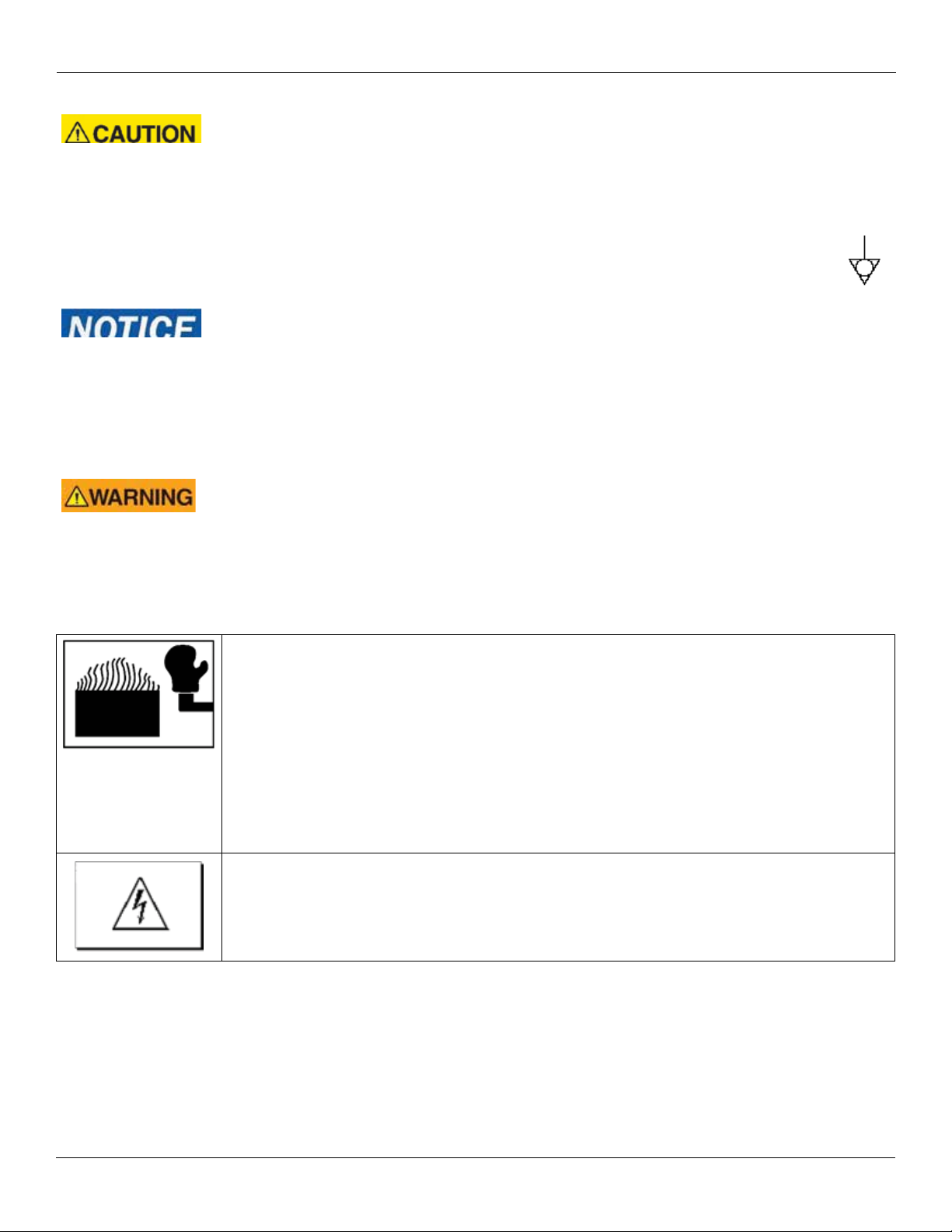
Always follow recommended safety precautions listed in this manual. Below is the safety alert symbol. When you
see this symbol on your equipment, be alert to the potential for personal injury or property damage.
Safety Signs and Messages
The following Safety signs and messages are placed in this manual to provide instructions and identify specic areas
where potential hazards exist and special precautions should be taken. Know and understand the meaning of these
instructions, signs, and messages. Damage to the equipment, death or serious injury to you or other persons may result if
these messages are not followed.
This message indicates an imminently hazardous situation which, if not avoided, will result in
death or serious injury.
This message indicates a potentially hazardous situation, which, if not avoided, could result in
death or serious injury.
This message indicates a potentially hazardous situation, which, if not avoided, may result in
minor or moderate injury. It may also be used to alert against unsafe practices.
This message is used when special information, instructions or identication are required relat-
ing to procedures, equipment, tools, capacities and other special data.

3
VGG Rotisserie Oven Introduction
3
Introduction
Specic Precautions
Equipotential Ground Plane
When a high current ows through a conductor, dierences in potential appear between the
conductor and nearby metallic surfaces near the appliance. As a result, sparks may be produced
between the appliance and surrounding metal surfaces. These sparks could cause serious
injury, damage, or re.
BKI provides an Equipotential ground terminal for the connection of a bonding conduc-
tor after the installation of the appliance per lEC60417-1. This terminal is located on the
drive side of the oven base and is marked with this symbol.
Full Disconnection for IEC / CE Regulations
In accordance with Local and/or National wiring codes, the installer must provide a means of full
disconnection for overvoltage Category III conditions. An IEC approved cord and plug combina-
tion will meet this requirement. If the supply cord is damaged, it must be replaced by manufac-
turer or authorized service agent.
Units not provided with a cord and plug do not meet this requirement. In accordance with Local
and/or National wiring codes, the installer must provide the means of full disconnection.
California Residents Only.
This product can expose you to chemicals including chromium, and lead which are known to
the State of California to cause cancer and birth defects or other reproductive harm. For more
information go to www.P65Warnings.ca.gov.
Safe Work Practices
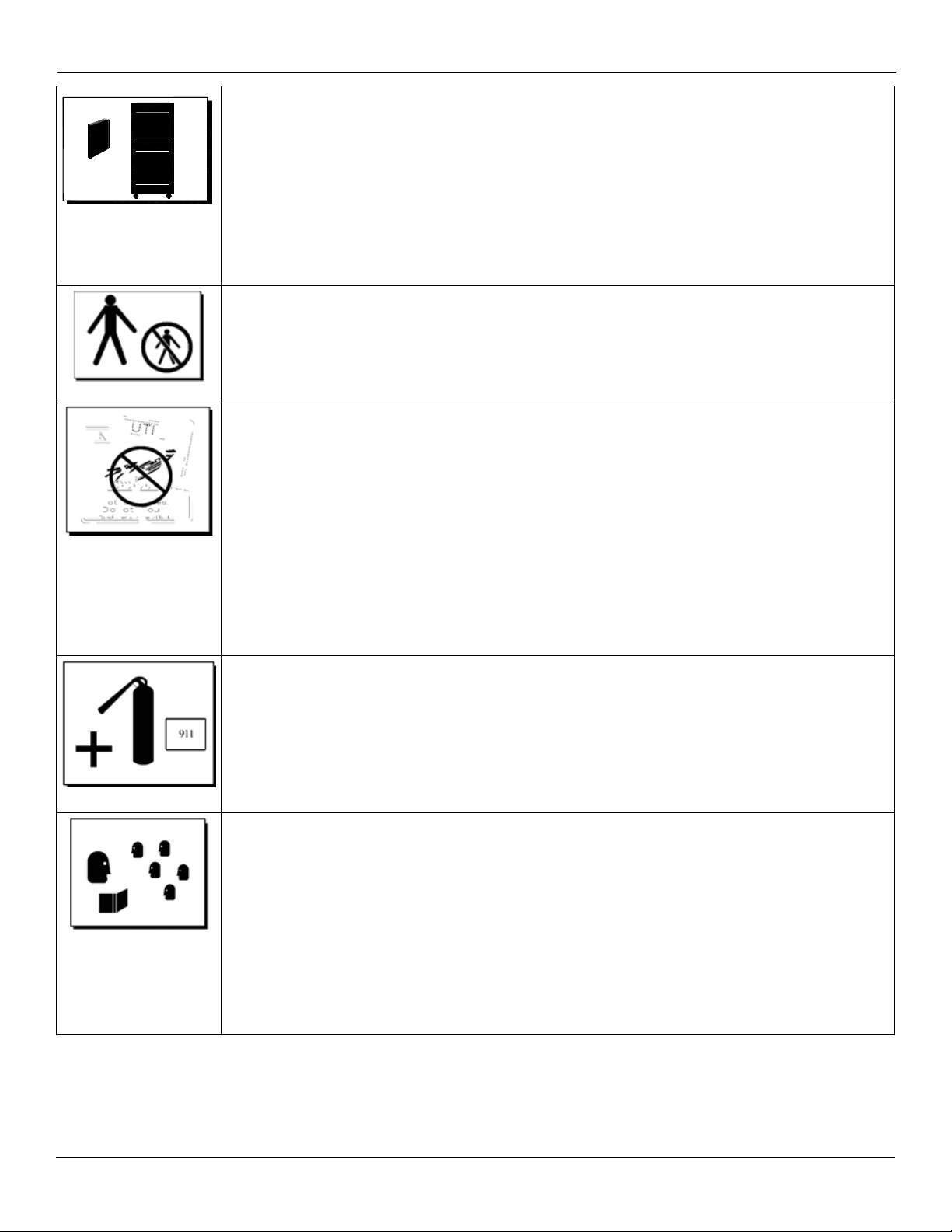
Wear Safe Clothing Appropriate To Your Job
Always wear your insulated mitts when handling hot oven parts or touch any hot metal surface.
If you lose or damage your mitts, you can buy new ones at your local restaurant equipment sup-
ply store or from your local BKI Distributor.
Always wear non-skid shoes when working around the oven or any other equipment.
Never wear loose clothing such as neckties or scarves while operating this equipment. Keep
loose hair tied back or in a hair net while operating this equipment.
Always wear appropriate personal protection equipment during the cleaning process to guard
against possible injury.
WARNING – DANGEROUS VOLTAGE
This equipment uses high voltage. Serious injury can occur if you or any untrained or unauthor-
ized person installs, services, or repairs this equipment. Always Use an Authorized Service
agent to Service Your Equipment.

4
VGG Rotisserie Oven Introduction
4
Introduction
Keep this manual with the Equipment
This manual is an important part of your equipment. Always keep it near for easy access. If you
need to replace this manual, phone the applicable BKI Technical Services Department:
BKI
Technical Services Department
42 Allen Martin Drive
Essex Junction, VT 05452
(802) 658-6600, press option 4
Protect Children
Keep children away from this equipment. Children may not understand that this equipment is
dangerous for them and others.
NEVER allow children to play near or operate your equipment.
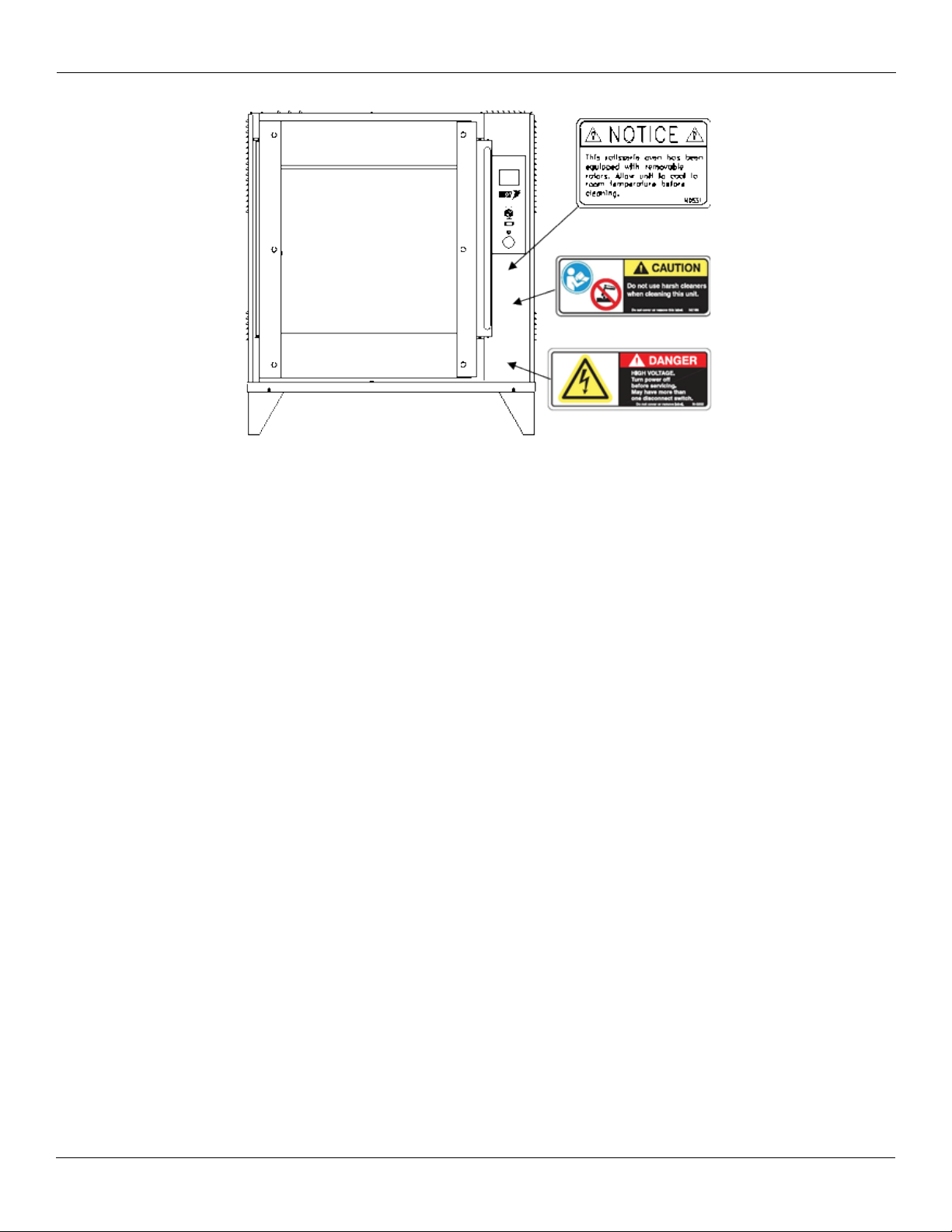
Keep Safety Labels Clean and in Good Condition
Do not remove or cover any safety labels on your equipment. Keep all safety labels clean and
in good condition. Replace any damaged or missing safety labels. Refer to the Safety Labels
section for illustration and location of safety labels on this unit. If you need a new safety label,
obtain the number of the specic label illustrated on page 5, then phone the applicable BKI
Technical Services Department:
BKI
Technical Services Department
42 Allen Martin Drive
Essex Junction, VT 05452
(802) 658-6600, press option 4
Be Prepared for Emergencies
Be prepared for res, injuries, or other emergencies.
Keep a rst aid kit and a re extinguisher near the equipment. You must use a 40-pound Type
BC re extinguisher and keep it within 25 feet of your equipment.
Keep emergency numbers for doctors, ambulance services, hospitals, and the re department
near your telephone.
Know your responsibilities as an Employer
• Make certain your employees know how to operate the equipment.
• Make certain your employees are aware of the safety precautions on the equipment and in
this manual.
• Make certain that you have thoroughly trained your employees about operating the equip-
ment safely.
• Make certain the equipment is in proper working condition. If you make unauthorized modi-
cations to the equipment, you will reduce the function and safety of the equipment.

5
VGG Rotisserie Oven Introduction
5
Introduction
Safety Labels
HEALTH & SANITATION PRACTICES
BKI Rotisserie Ovens are manufactured to comply with health regulations and are tested and certied to NSF standards.
You must operate the equipment properly, using only quality products and use meat thermometers to insure meats are
thoroughly cooked.
Food Handling
• Wash hands thoroughly in warm, soapy water after handling raw poultry or meats.
• Clean and sanitize all utensils and surfaces that have been in contact with raw products. Clean and sanitize the meat
forks or baskets between cooking.
• Never place cooked meats on the same surfaces used to prepare raw meats, unless the area has been thoroughly
cleaned and sanitized.
Storage of Raw Meats
• Designate an area or shelf strictly for the storage of all raw meats to be used in the rotisserie.
• Raw product must always be stored at temperatures below 38° F. (3° C.).
• Never store or mix raw foods above cooked foods, as this is a health hazard. The drippings from raw foods contami-
nate cooked or processed foods.
• All chicken and chicken parts to be stored overnight must be thoroughly iced down and refrigerated.
• Never put raw foods into the oven with cooked or partially cooked foods, as this is a health hazard. The drippings from
raw foods contaminate cooked foods.
Coding Cooked Foods
• All products cooked during the day should be sold the same day.
NOTE: It is not the intent of the rotisserie program to have unsold merchandise at the end of the cooking day. Follow your
company’s procedures for the handling of any leftover product.
Storage of Prepared Foods
• Cold foods should be kept at or below 38° F. (3° C).
• Hot foods must be maintained to meet local health codes, usually a minimum 145° F. (63° C.).

6
VGG Rotisserie Oven
6
Operation
OPERATION
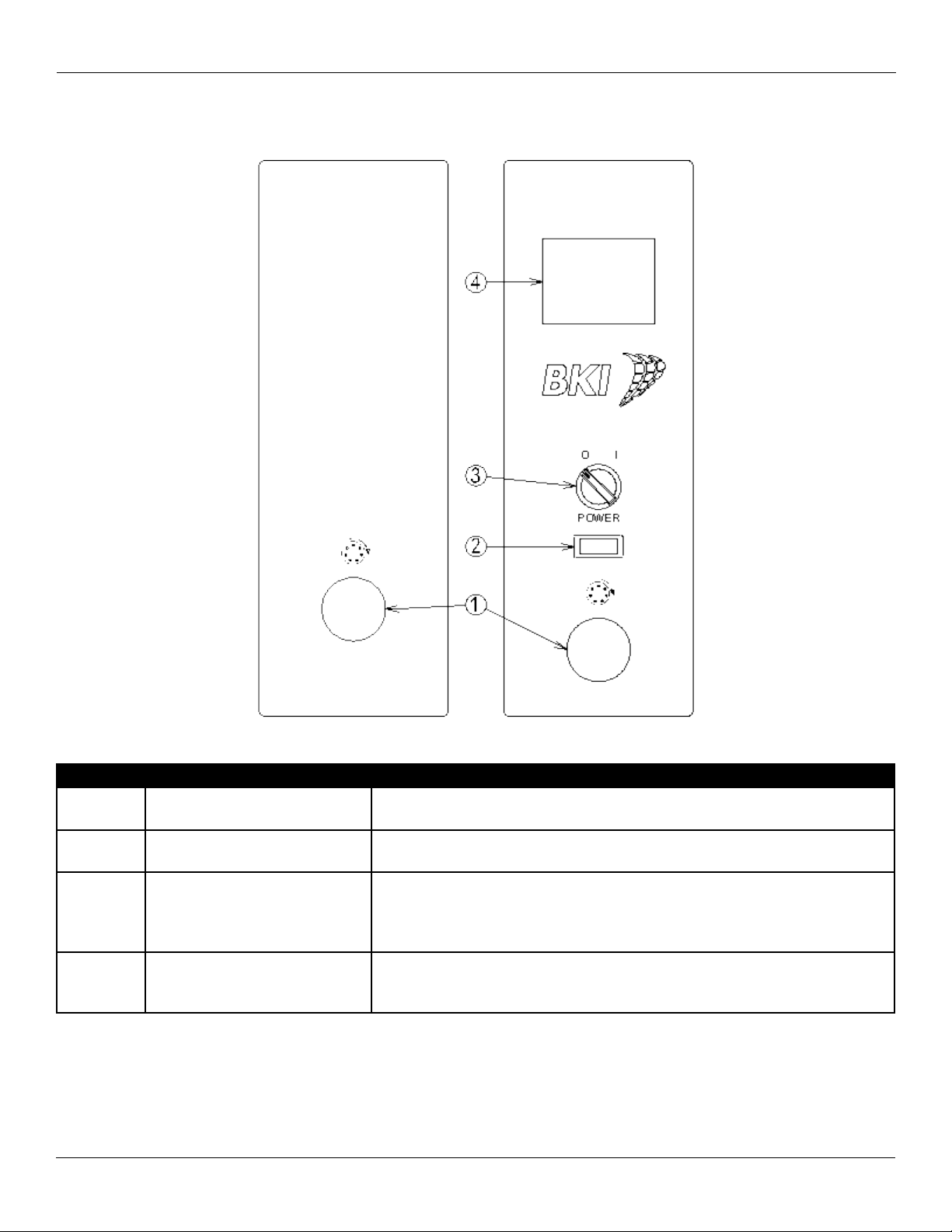
CONTROLS & INDICATORS
Item # Description Function
1 Rotor Switch Depressing the switch allows the operator to “jog” the rotor position when
the door is open. Releasing the switch stops the rotor.
2 Main Power Isolator Light This light illuminates to indicate that power is being applied to the oven
from the Main Power Isolator (Circuit Breaker).
3 Main Power Switch Turns power to the entire unit on or o. When placed in the on position,
the Touchscreen controller is powered, lights illuminate and the rotor mo-
tor engages (if both doors are closed). When placed in the o position,
power is removed from the entire unit.
4Color Touchscreen Controller Used for operation and programming of the oven. A built-in beeper is
used to indicate touchscreen presses and other oven functions. It has 16
programmable cooking recipes.

7
VGG Rotisserie Oven
7
Operation
CONFIGURING THE CTS OVEN CONTROLLER
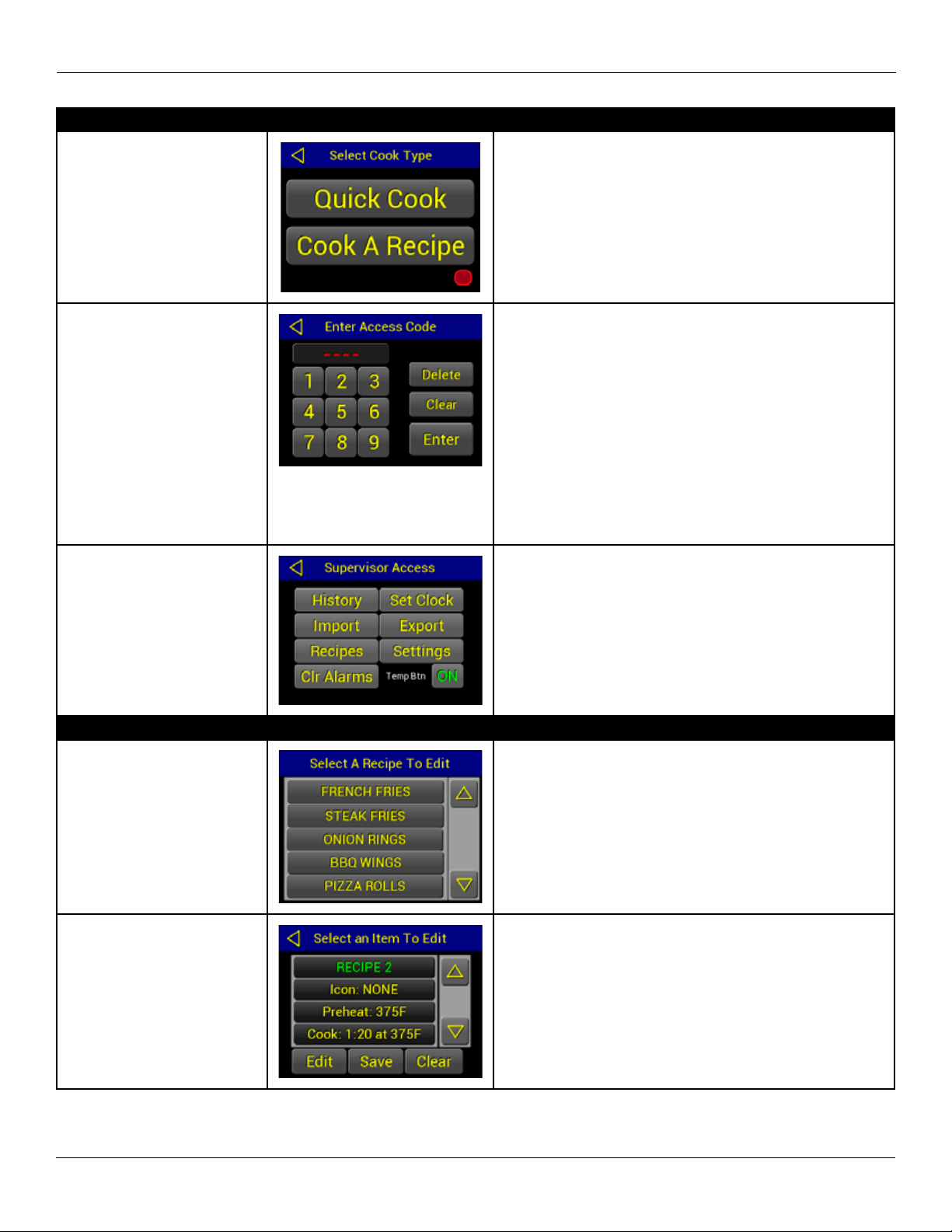
Conguration Access
Touch and hold the lower
right portion of the screen
until the control chirps twice.
The area on the control screen is black. The red graph-
ic in this diagrams indicates the area to touch and hold.
Enter your access code.
Touch [◄] to exit and return
to Main Recipe screen.
[Delete] clears the last
character.
[Clear] clears all characters.
The default Supervisor access code is 1234. Use the
default code the rst time the Conguration is accessed.
The access code can be changed after initial access to
conguration (recommended). Write the new access
code below and keep this manual where only supervi-
sors have access to it.
Access Code ___________________
Use the screen keypad to enter the access code then
touch [ENTER].
Supervisor level congura-
tion screen is displayed.
Touch [◄] to exit and return
to Main Recipe screen.
The supervisor has access to change Recipes, change
the Access Code, Set the Clock, Import or Export reci-
pes and congurations or view the control History.
Touch the desired function button and follow the con-
guration instructions below.
Recipe Editing
Touch and highlight the
desired recipe.
Touch [EDIT].
Touch [◄] to exit and re-
turn to Supervisor Access
screen.
There are 16 programmable recipes in the control.
Touch [▲] or [▼] to scroll through the list.
Touch and highlight the recipe name in the selection
window. Touch [EDIT].
Touch and highlight the
desired Recipe Item.
Touch [EDIT].
Touch [◄] to exit and return
to Select Recipe screen.
Touch and highlight the Recipe Item to be edited in the
selection window. Touch [EDIT].
Once all changes have been made you must touch
[SAVE] to store the recipe revisions.

8
VGG Rotisserie Oven
8
Operation
Recipe Editing
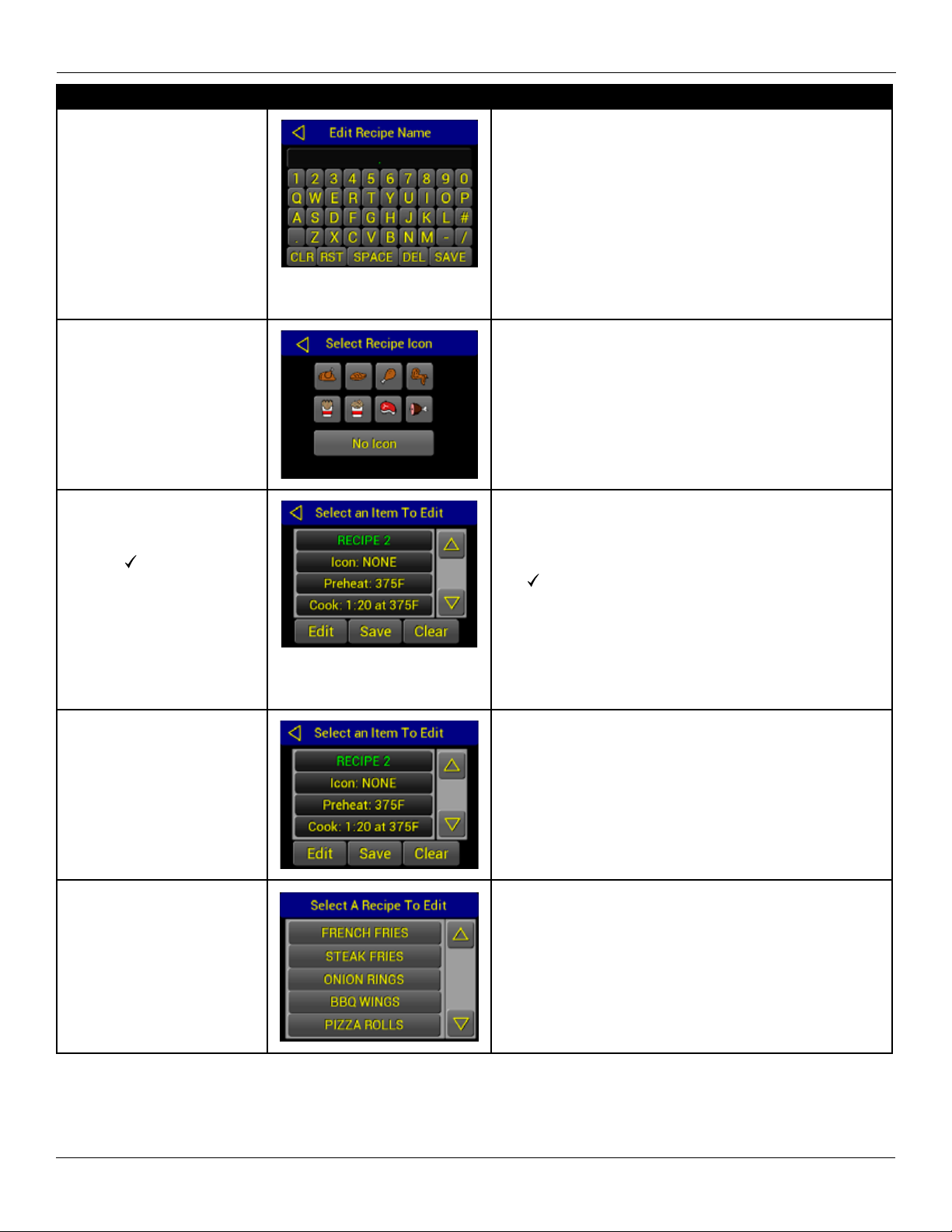
Edit Recipe Name.
Touch [SAVE].
Touch [◄] to exit and return
to Select Item screen.
Edit the Recipe Name using the alpha-numeric key-
board. Recipe Names are limited to a maximum of 15
characters.
Touch [SAVE] to save the new Recipe Name and return
to the Select Item screen.
[Clr] – Clears the editing box of all characters.
[Rst] – Restores the original recipe name.
[Space] – Adds a space character at the end.
[Del] – Deletes the last character.
Edit Recipe Icon. Select one
of the available icons or [No
icon]
Icons may be assigned to the recipe to be displayed on
the main recipe selection menu, in addition to the name.
Edit recipe items. Touch a
eld to highlight and touch
edit to change the value.
Use the [ ] to save or [◄]
Selecting Preheat, Cook and/or Hold, and touch edit will
bring up a Cycle Stage screen. Touch [Prev] and [Next]
to move between the Recipe Items. Touch the value
eld (time, temp) to edit. Input a new value and touch
the [ ] to save or touch the [◄] to return to the previous
menu without editing the value. The Preheat and Hold
items only have a temperature value. The time eld for
these items is greyed out and not selectable. To turn the
Preheat, Cook Cycle 2, Cook Cycle 3 or Hold segments
O, use the [On/O] toggle key to the right of the time
and temperature.
Return to the Select Item
screen.
Touch [SAVE] to save
Recipe.
Touch [◄] to exit and return
to Select Recipe screen.
After Recipe editing is complete, touch [X] on the Recipe
Item screen above to return to the Select Item screen.
You must touch [SAVE] to store the recipe revisions.
Touch another recipe to
edit, or touch [◄] to exit and
return to the Supervisor Ac-
cess screen.
Touch another Recipe name in the selection window to
edit, or touch the [◄] key to return to the Supervisor Ac-
cess scree if you are done editing Recipes.
Questo manuale è adatto per i seguenti modelli
2
Indice
Altri manuali BKI Forno

BKI
BKI GO-36 Manuale utente

BKI
BKI 16/C Manuale utente

BKI
BKI Rotary Oven NMK Manuale utente

BKI
BKI EHG101R Manuale utente

BKI
BKI VG Manuale utente

BKI
BKI VG16 Manuale utente

BKI
BKI Combi-King ETE Series Manuale utente

BKI
BKI DR-34 Manuale utente

BKI
BKI CB-MVPWDS Manuale utente

BKI
BKI Hoodini CLBKI-6E-H Manuale del proprietario