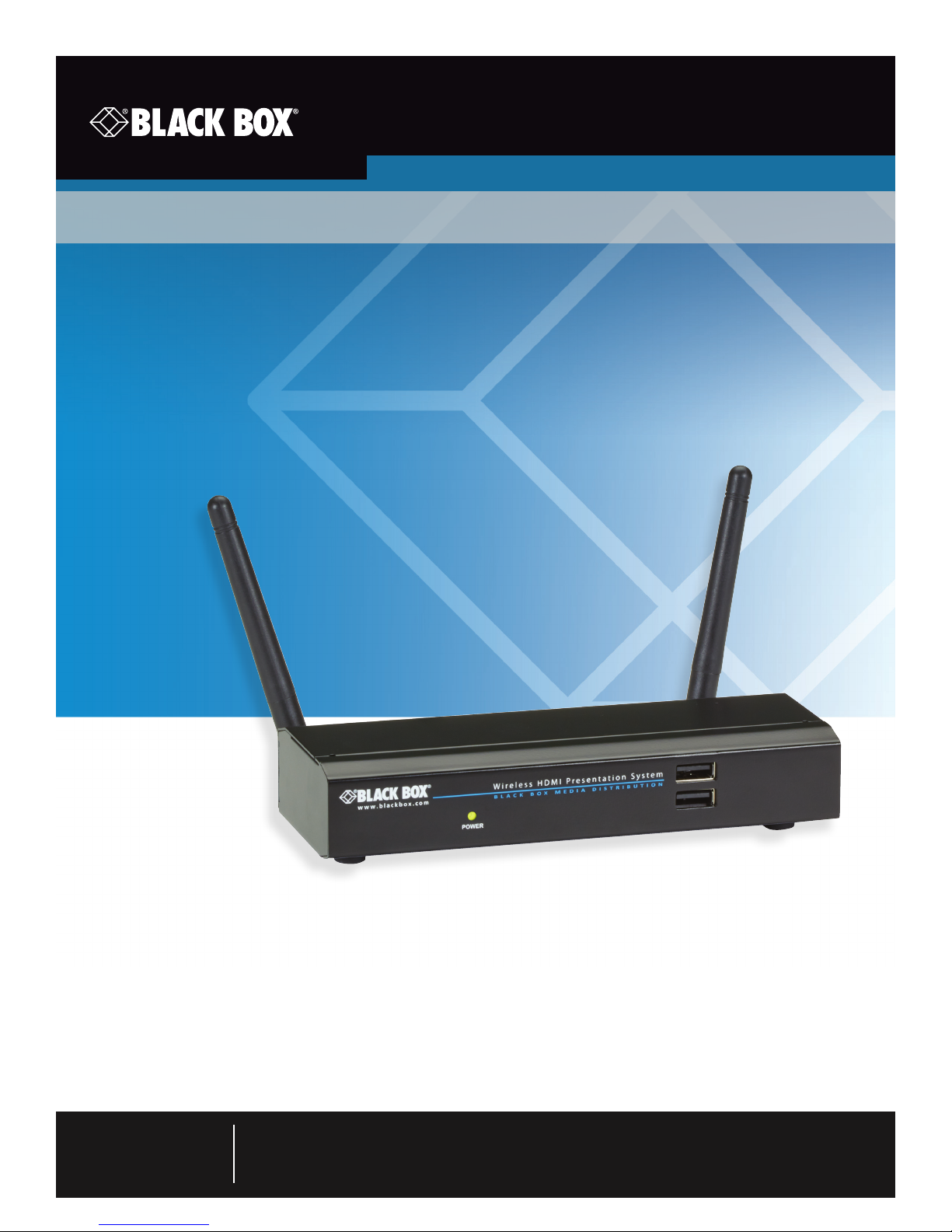
Black Box Wireless HDMI Presentation System (WHPS) Manuale utente

AVX-HDMI-WI
Transform your wired projector into
a wireless projector with audio.
Includes plug-and-show, 4-to-1 split screen, and PDA wireless projection
features.
Wireless HDMI Presentation System (WHPS)
AVX-HDMI-WI
Order toll-free in the U.S.: Call 877-877-BBOX (outside U.S. call 724-746-5500)
FREE technical support 24 hours a day, 7 days a week: Call 724-746-5500 or fax 724-746-0746
www.blackbox.com • info@blackbox.com
Customer
Support
Information

724-746-5500 | blackbox.com
Page 2 AVX-HDMI-WI
Trademarks Used in this Manual
We‘re here to help! If you have any questions about your application
or our products, contact Black Box Tech Support at 724-746-5500
or go to blackbox.com and click on “Talk to Black Box.”
You’ll be live with one of our technical experts in less than 60 seconds.
Trademarks Used in this Manual
Black Box and the Double Diamond logo are registered trademarks of BB Technologies, Inc.
Mac and Macintosh are registered trademarks of Apple Computer, Inc.
Internet Explorer, PowerPoint, Windows, and Windows Vista are registered trademarks of Microsoft Corporation.
Any other trademarks mentioned in this manual are acknowledged to be the property of the trademark owners.

724-746-5500 | blackbox.com Page 3
AVX-HDMI-WI
FCC and IC RFI Statements
Federal Communications Commission and Industry Canada Radio Frequency Interference
Statements
This equipment generates, uses, and can radiate radio-frequency energy, and if not installed and used properly, that is, in strict
accordance with the manufacturer’s instructions, may cause interference to radio communication. It has been tested and found to
comply with the limits for a Class A computing device in accordance with the specifications in Subpart B of Part 15 of FCC rules,
which are designed to provide reasonable protection against such interference when the equipment is operated in a commercial
environment. Operation of this equipment in a residential area is likely to cause interference, in which case the user at his own
expense will be required to take whatever measures may be necessary to correct the interference.
Changes or modifications not expressly approved by the party responsible for compliance could void the user’s authority to
operate the equipment.
This digital apparatus does not exceed the Class A limits for radio noise emission from digital apparatus set out in the Radio
Interference Regulation of Industry Canada.
Le présent appareil numérique n’émet pas de bruits radioélectriques dépassant les limites applicables aux appareils numériques
de la classe A prescrites dans le Règlement sur le brouillage radioélectrique publié par Industrie Canada.

724-746-5500 | blackbox.com
Page 4 AVX-HDMI-WI
NOM Statement
Instrucciones de Seguridad
(Normas Oficiales Mexicanas Electrical Safety Statement)
1. Todas las instrucciones de seguridad y operación deberán ser leídas antes de que el aparato eléctrico sea operado.
2. Las instrucciones de seguridad y operación deberán ser guardadas para referencia futura.
3. Todas las advertencias en el aparato eléctrico y en sus instrucciones de operación deben ser respetadas.
4. Todas las instrucciones de operación y uso deben ser seguidas.
5. El aparato eléctrico no deberá ser usado cerca del agua—por ejemplo, cerca de la tina de baño, lavabo, sótano mojado o cerca
de una alberca, etc.
6. El aparato eléctrico debe ser usado únicamente con carritos o pedestales que sean recomendados por el fabricante.
7. El aparato eléctrico debe ser montado a la pared o al techo sólo como sea recomendado por el fabricante.
8. Servicio—El usuario no debe intentar dar servicio al equipo eléctrico más allá a lo descrito en las instrucciones de operación.
Todo otro servicio deberá ser referido a personal de servicio calificado.
9. El aparato eléctrico debe ser situado de tal manera que su posición no interfiera su uso. La colocación del aparato eléctrico
sobre una cama, sofá, alfombra o superficie similar puede bloquea la ventilación, no se debe colocar en libreros o gabinetes
que impidan el flujo de aire por los orificios de ventilación.
10. El equipo eléctrico deber ser situado fuera del alcance de fuentes de calor como radiadores, registros de calor, estufas u otros
aparatos (incluyendo amplificadores) que producen calor.
11. El aparato eléctrico deberá ser connectado a una fuente de poder sólo del tipo descrito en el instructivo de operación, o como
se indique en el aparato.
12. Precaución debe ser tomada de tal manera que la tierra fisica y la polarización del equipo no sea eliminada.
13. Los cables de la fuente de poder deben ser guiados de tal manera que no sean pisados ni pellizcados por objetos colocados
sobre o contra ellos, poniendo particular atención a los contactos y receptáculos donde salen del aparato.
14. El equipo eléctrico debe ser limpiado únicamente de acuerdo a las recomendaciones del fabricante.
15. En caso de existir, una antena externa deberá ser localizada lejos de las lineas de energia.
16. El cable de corriente deberá ser desconectado del cuando el equipo no sea usado por un largo periodo de tiempo.
17. Cuidado debe ser tomado de tal manera que objectos liquidos no sean derramados sobre la cubierta u orificios de ventilación.
18. Servicio por personal calificado deberá ser provisto cuando:
A: El cable de poder o el contacto ha sido dañado; u
B: Objectos han caído o líquido ha sido derramado dentro del aparato; o
C: El aparato ha sido expuesto a la lluvia; o
D: El aparato parece no operar normalmente o muestra un cambio en su desempeño; o
E: El aparato ha sido tirado o su cubierta ha sido dañada.

724-746-5500 | blackbox.com Page 5
AVX-HDMI-WI
Table of Contents
Table of Contents
Quick Start Guide .........................................................................................................................................................7
1. Specifications ....................................................................................................................................................... 11
2. Overview ....................................................................................................................................................... 12
2.1 Introduction................................................................................................................................................. 12
2.2 Features....................................................................................................................................................... 12
2.3 What’s Included .......................................................................................................................................... 13
2.4 Hardware Description.................................................................................................................................. 13
3. Windows Client Utility ............................................................................................................................................... 15
3.1 Starting the Program................................................................................................................................... 15
3.2 Login ....................................................................................................................................................... 16
3.3 Main User Interface..................................................................................................................................... 16
3.4 Screen Projection......................................................................................................................................... 16
3.5 Audio Projection.......................................................................................................................................... 18
3.6 Quick Connect ............................................................................................................................................ 18
3.7 Menu Description........................................................................................................................................ 18
3.7.1 Show Receiver Information............................................................................................................. 19
3.7.2 Web Admin.................................................................................................................................... 19
3.7.3 Search Receiver Device ................................................................................................................... 20
3.7.4 Select Projection Desktop (Win XP/Vista/7) ................................................................................... 20
3.7.5 Projection Quality ........................................................................................................................... 20
3.7.6 Projection Mode............................................................................................................................. 20
3.7.7 Projection Aspect Ratio .................................................................................................................. 20
3.7.8 Advanced Screen Capture .............................................................................................................. 20
3.7.9 Send Audio to Display .................................................................................................................... 21
3.7.10 Auto Power Manager ..................................................................................................................... 21
3.7.11 Auto Wi-Fi Connect ....................................................................................................................... 21
3.7.12 Make Plug-and-Show Token...........................................................................................................22
3.7.13 Copy Application to Desktop..........................................................................................................23
3.7.14 About............................................................................................................................................. 23
3.7.15 E x it .................................................................................................................................................23
4. Mac Client Utility ....................................................................................................................................................... 24
4.1 Launch Application...................................................................................................................................... 24
4.2 Main User Interface..................................................................................................................................... 24
4.3 Screen Projection......................................................................................................................................... 25
4.4 Mac Audio Projection.................................................................................................................................. 26
5. Web Management..................................................................................................................................................... 27
5.1 Home Page.................................................................................................................................................. 27
5.2 Download Software .................................................................................................................................... 27
5.3 Conference Control ..................................................................................................................................... 28
5.4 Login Web Admin .......................................................................................................................................30
5.4.1 System Status......................................................................................................................... 30
5.4.2 Device Setup ...........................................................................................................................31
5.4.3 Network Setup........................................................................................................................32
5.4.4 OSD Setup ............................................................................................................................. 34
5.4.5 Change Passwords ......................................................................................................................... 35
5.4.6 Reset to Default..............................................................................................................................36

724-746-5500 | blackbox.com
Page 6 AVX-HDMI-WI
Table of Contents
5.4.7 Firmware Upgrade....................................................................................................................................... 36

5.4.8 Reboot System ............................................................................................................................................38
5.4.9 Logout .......................................................................................................................................................38

724-746-5500 | blackbox.com Page 7
AVX-HDMI-WI
Quick Start Guide
Quick Start Guide
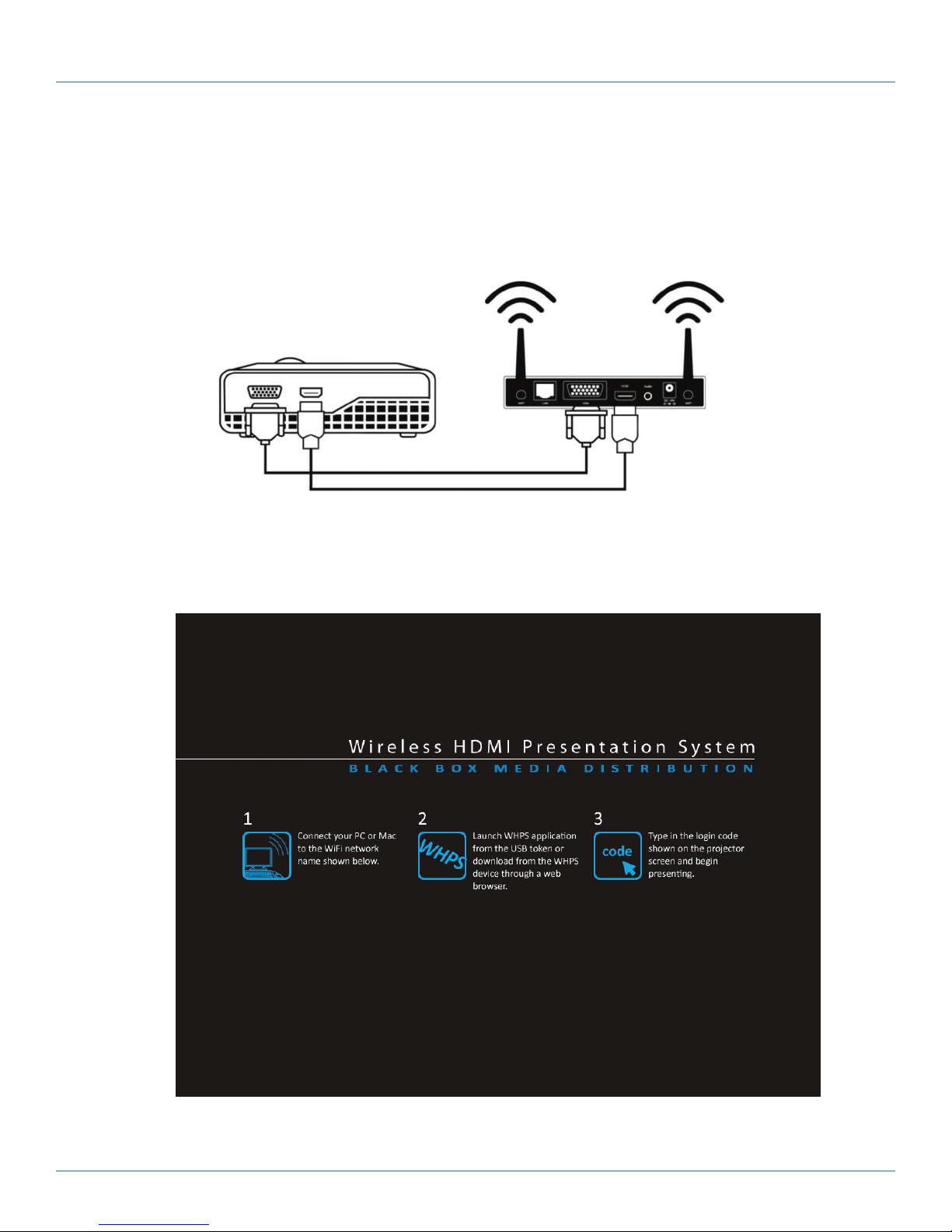
Step 1: Connect the projector VGA/HDMI cable to the Wireless HDMI Presentation System (WHPS) box VGA/HDMI connector
and turn on the projector’s power.
Figure QS-1.
Step 2: Turn on the WHPS box. When the projector shows the default menu on the screen as shown below. The WHPS box is
ready.
Figure QS-2. Default menu.
LOGIN CODE: 4316
Server IP: 192.168.100.10 SSID: WHPS
Resolution: 1280x720 Channel: 9
Version: 1.0.0.0 Security: OFF

724-746-5500 | blackbox.com
Page 8 AVX-HDMI-WI
Quick Start Guide
Step 3: Make sure your PC WLAN is already enabled, and connect your PC to the WHPS box.
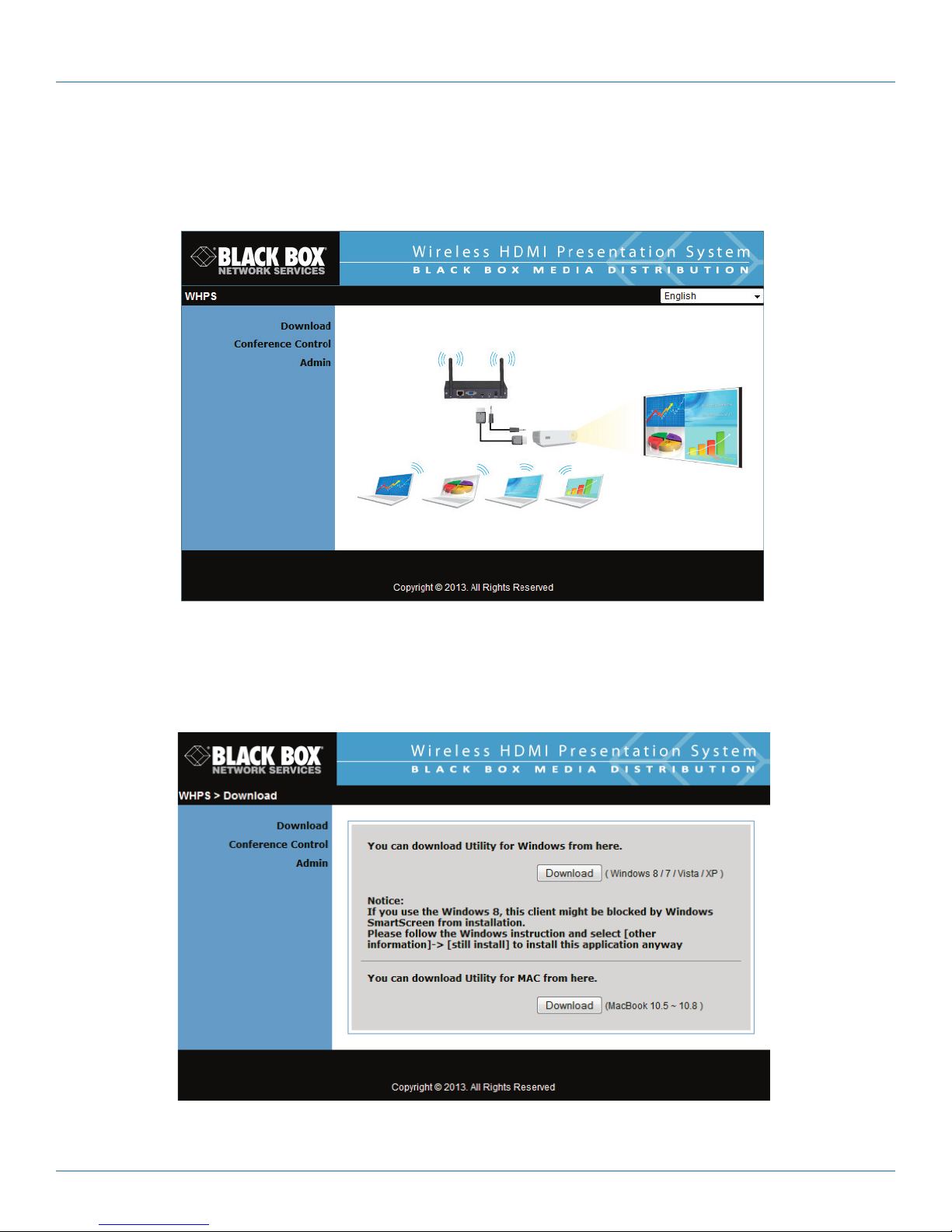
Step 4: Open your browser and enter the IP address to access the WHPS Web home page.
The default IP address of the WHPS is 192.168.100.10. It is the IP address shown on the left corner of the projector screen.
Figure QS-3. Main menu.
Step 5: Download the client software. Select either “Win8/7/Windows Vista/XP” or “MacBook 10.5–10.8” and execute the
installation program. After installing the program, you will see the WHPS shortcut on the PC screen.
Figure QS-4. Download screen.

724-746-5500 | blackbox.com Page 9
AVX-HDMI-WI
Quick Start Guide
WHPS-Interactive
WHPS.exe
Figure QS-5. WHPS shortcut.
Step 6: Make sure your personal firewall allows WHPS software to pass through.
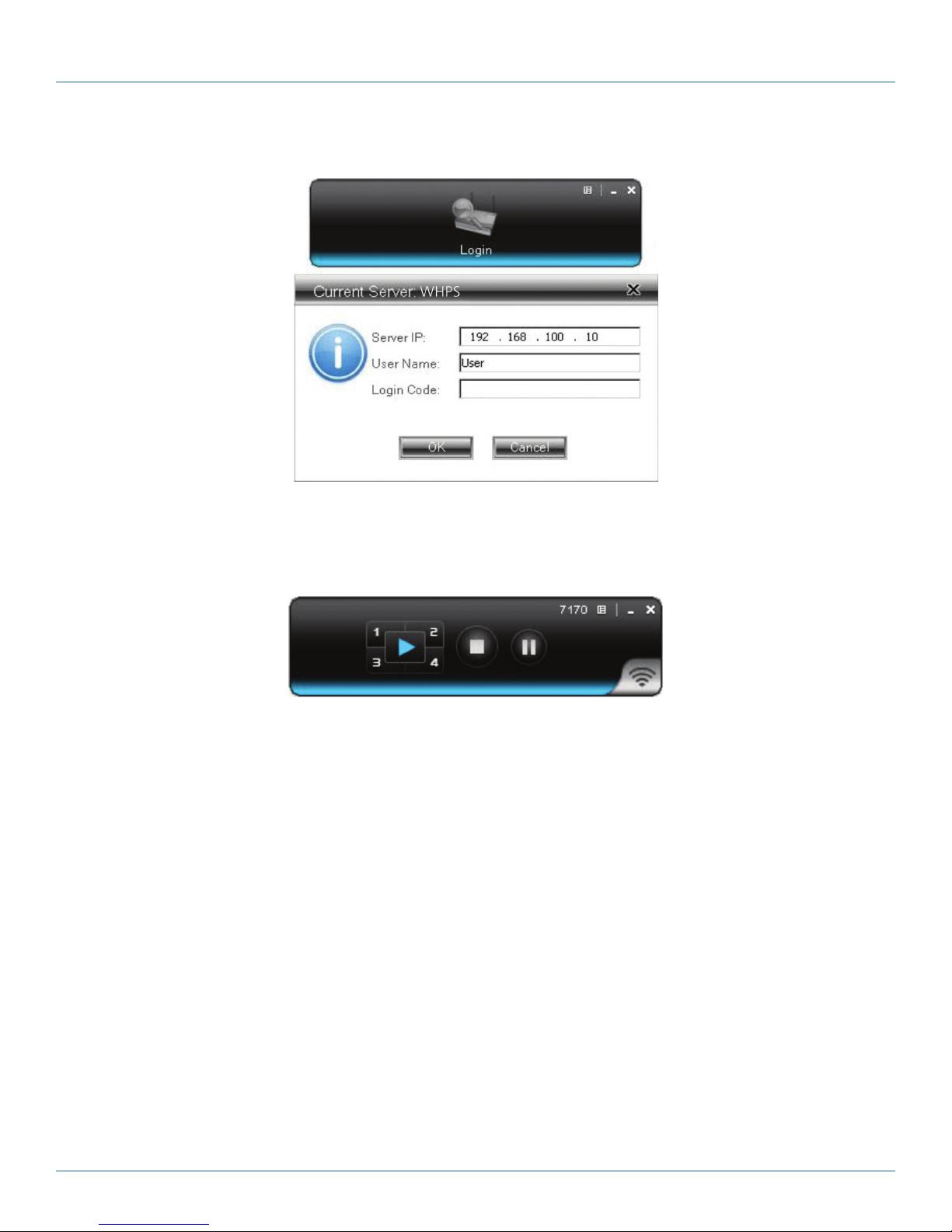
Step 7: Select the device that you want to project.
Figure QS-6. Available server list.

724-746-5500 | blackbox.com
Page 10 AVX-HDMI-WI
Quick Start Guide
Step 8: Enter the LOGIN CODE and it will appear on the projector screen.
Figure QS-7. Enter Login code.
Step 9: Click the “Play” button to start projection.
Figure QS-8. Start projection.
Questo manuale è adatto per i seguenti modelli
1
Indice
Altri manuali Black Box Accessori per proiettori

Black Box
Black Box Coalesce WC-COA Guida di riferimento rapido

Black Box
Black Box AVX-HDMI-WI-HD Manuale utente

Black Box
Black Box WC-COA-MPE Manuale utente

Black Box
Black Box Coalesce WC-COA-I Manuale utente

Black Box
Black Box Wireless Video Presentation System III... Manuale utente

Black Box
Black Box AC1131A Manuale utente

Black Box
Black Box WC-COA-MPE Manuale utente

Black Box
Black Box AVSC-0802H Manuale utente

Black Box
Black Box Coalesce WC-COA Manuale utente

Black Box
Black Box AC1130A Manuale utente