
Blackview AirBuds 10 Manuale utente

AirBuds 10
USER GUIDE
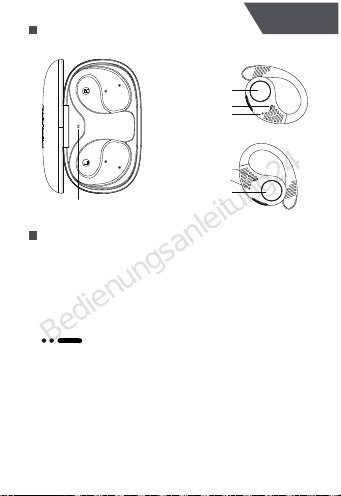
Product Introduction
Equipment operation
1. Power on: Open the charging case, and the
headphones will automatically power on.
2. Shut down: Put the headphones into the charging
case and close the charging case to shut down.
3. Restore factory settings:
Double touch + long press 5S; when the white
light flashes for 3 times, the headphones will enter the
factory reset mode, put the headphones into the
charging case, the headphones status will be restored
to the factory settings. You can open the cover to
re-pair.
1
English
Indicator Light
Indicator Light
Multifunctional Area
Multifunctional Area
Microphone
Indicator Light
Microphone
L
R
Bedienungsanleitung24
Bluetooth pairing
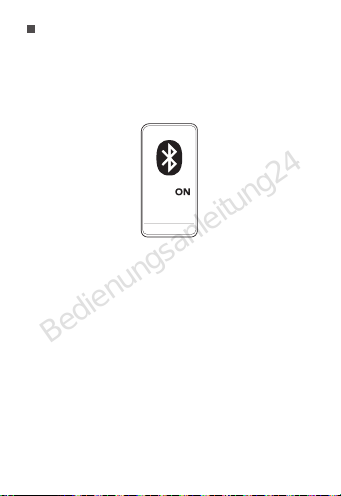
Method 1: When connecting for the first time, open the
charging case, the two headphones are in the charging
case, the indicator light of the charging case is red; the
headphones enter the pairing state and flash red and
white lights; turn on the Bluetooth of the device, and
select “AirBuds 10” for connection.
Method 2: When the device is connected to the
headphones, put the headphones into the charging
case. Press for 3s, the headphones will enter the
pairing state and flash red and white lights. Turn on
Bluetooth for your new device and select "AirBuds 10"
for connection.
Note: For some smartphones, after you select “AirBuds
10” for Bluetooth pairing, you may be asked to
reconfirm the pairing in a pop-up window.
Turn off the Bluetooth switch of the phone to disconnect
the headphones.
2
AirBuds 10
Bedienungsanleitung24
Operation control
3
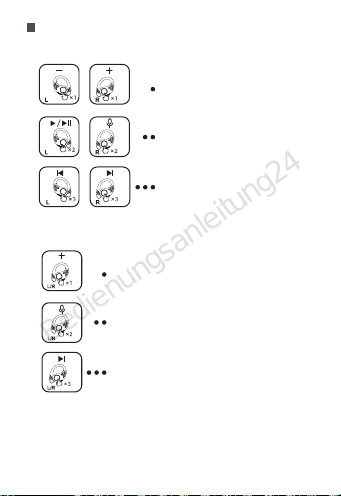
Monaural mode
Single touch, L/R volume +
Double touch, L/R voice assistant
Three touch, L/R next
Single touch, L volume -, R volume +
Double touch, L play/pause,
R voice assistant
Three touch, L previous, R next
Music mode
Bedienungsanleitung24
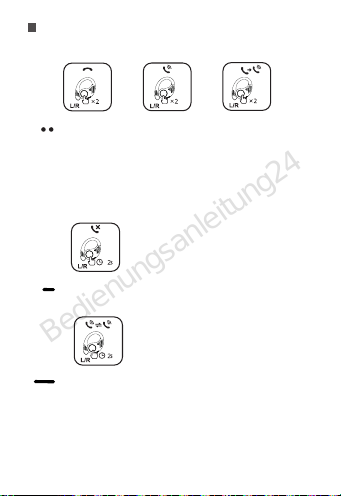
Incoming call ----- double touch to answer
Calling/outgoing call-----Double touch, hang up/cancel
outgoing call
During a call, the second call comes in -----Double touch,
answer the second call, put the first call on hold
Incoming call ----- long press 2S, reject the call
Three-party call ----- long press 2S, switch between two
calls freely
Talk mode
4
Bedienungsanleitung24
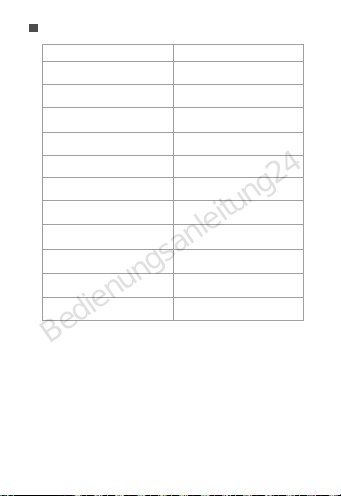
Light indication
White light on
White light flashing
The red indicator light is on
for 2 seconds
Red light flashing
Alternately flashing red and
white lights
The red indicator light is on
for 2 seconds
Red light on
Light off
Light off
Power on
Power off
Pairing status
Play music/call status
Headphone low power status
Headphone charging
The headphones fully charged
Charging case battery is low The red light flashes and
turns off after 4s
The charging case is charging
The charging case is fully charged
Factory reset The white light flashes 3 times
and then goes off
Headphone mode Status
5
Bedienungsanleitung24
Wearing
Put the headphones on and adjust them to a comfortable
position.
Charging
1. When the battery of the headphones is low, the red
light will flash. You can put the headphones into the
charging case and close the charging case.
2. When the power of the charging case is low, the red
light will flash when the charging case is opened,
prompting to charge the charging case;
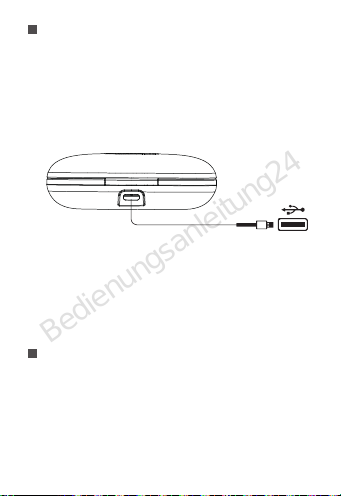
Note: Before charging, please dry the USB charging
port completely, and use the attached or certified
USB-C charging cable to connect the charging case to
the power supply for charging; the white light of the
charging case flashes during charging, and the white
light is always on when fully charged.
6
Bedienungsanleitung24

Specifications
Model: AirBuds 10
Bluetooth version : 5.3
Call encoding format: SBC/AAC
Noise Cancellation: ENC
Microphone: X1
Headphone status indicator LED: white, red
Battery capacity: 45mAh
Speaker: 10mW
Music battery life: ≥5.5H
Call life: 4H
Charging voltage: 5V±0.2V
Bluetooth frequency : 2.401-2.480
Bluetooth effective distance: >10M
Dynamic frequency response: 20-20KHz
Standby time: ≤50H
Charging time: <1.5H
Charging case
Battery capacity: 550mAh
Charging time: 1.5H
Charging interface: Type-C
Operating temperature: 0-45°C
7
Bedienungsanleitung24

Answers for Common Questions
(1) The bluetooth headset cannot be switched on.
Reason: The battery in the charging compartment is
low or the power of the bluetooth headset is low.
Solution: Put the headset into the charging box, close
the cover, and charge the charging box for more than 1
hour before use.
(2) The phone cannot search for bluetooth headset.
Reason: 1. The Bluetooth headset is not in the pairing
state;
Solution: Put both headphones into the charging case,
press and hold L/R for 3 seconds to enter the pairing
state, and the red and white lights will flash.
Reason:2. There are mobile phone bluetooth program
errors;
Solution: After the bluetooth of the mobile phone is
restarted, clear all pairing data stored in the the mobile
phone; Search for bluetooth again.
(3) There is no sound from the headset speaker
Reason: 1. Turn the volume of the mobile phone and
headset to the maximum and confirm whether it is
caused by volume adjustment.
Solution: When the headset is connected, adjust the
volume of the mobile phone;
Reason: 2. The Bluetooth headset is not properly
connected with the mobile phone.
Solution: Reconnect bluetooth and mobile phone
through pairing.
8
Bedienungsanleitung24

Reason: 3. The Bluetooth headset is not within the
valid working range.
Solution: Keep the headset within 10 meters of the
mobile phone, and there are no large objects, walls and
other obstacles between the headset and the device.
(4) The headset doesn't send messages or the voice
is low.
Reason: 1. The Bluetooth headset is too far from the
mouth;
Solution: The bluetooth headset should be worn on the
ear for normal use;
Reason: 2. The microphone hole of Bluetooth is
blocked or water has entered;
Solution: Remove the blockage of the microphone hole
or prevent water from entering the microphone hole.
(5) The headphone get stuck or disconnected when
talking or listening to music.
Reason: 1. The Bluetooth headset is too far away from
the mobile phone or there are obstacles.
Solution: 1. Keep the headset within 10 meters of the
mobile phone, and there are no large objects and walls
between the headset and the device. Be careful not to
cover the bluetooth headset with your hand. In order to
maintain the continuous stability of the signal, please try
to keep the bluetooth and the mobile phone in the same
direction.
Reason: 2. There is a problem with the bluetooth
signal of the mobile phone or there is strong signal
interference nearby.
Solution: It is best not to make the mobile phone close
to metal objects. You can also change another mobile
9
Bedienungsanleitung24
Indice
Lingue:
Altri manuali Blackview Cuffie


